


ESP32-S3 + WIZnet W5500 — MicroPython Ethernet (MACRAW) Guide
This guide walks through flashing MicroPython onto an ESP32-W5500-Dev-V1 board and verifying Ethernet functionality end to end, starting from a blank board.
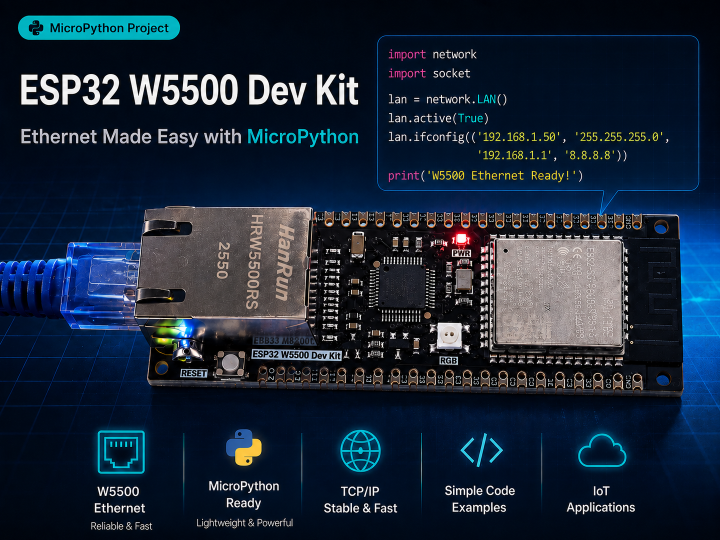

WIZnet - W5500
x 1

The W5500 acts as a dumb SPI Ethernet MAC/PHY; TCP/IP is handled by MicroPython's own lwIP stack via the built-in network.LAN driver.
Every step below was flashed, run, and verified on real hardware — follow it in order and you should get the same result.
Board specs
| Item | Value |
|---|---|
| MCU | ESP32-S3-WROOM-1 |
| SPIRAM | Octal SPIRAM |
| Ethernet chip | WIZnet W5500 (SPI interface) — used in MACRAW mode in this guide |
| Ethernet SPI pins | see section 1 |
00 Environment setup
On your PC:
Install the Python tools
pip install esptool mpremoteesptool flashes firmware onto the board; mpremote connects to the board's REPL, copies files, and runs scripts.
Download the MicroPython firmware
Matching the Octal SPIRAM in the specs above, this guide picks board type ESP32_GENERIC_S3 and variant SPIRAM_OCT on micropython.org/download (grabbing the plain variant or FLASH_4M would still boot, but PSRAM wouldn't be usable). If you're using a different board, check its module name and SPIRAM type (Octal vs. Quad, or none) first and pick the matching variant.
This guide is based on MicroPython v1.28.0 — to grab that exact build directly, use ESP32_GENERIC_S3-SPIRAM_OCT-20260406-v1.28.0.bin.
Connect the board and find its port
Plug the board in over USB. On Windows, check Device Manager → "Ports (COM & LPT)" for the assigned COM number (e.g. COM5). Replace COMx below with whatever you find.
Flash the firmware
esptool.py --port COMx erase_flash
esptool.py --port COMx --baud 460800 write_flash 0x0 ESP32_GENERIC_S3-SPIRAM_OCT-v1.28.0.bin
If your board has a BOOT button and isn't detected, hold BOOT while plugging in USB, or press it right before running erase_flash.
Verify the connection
mpremote connect COMxYou should see the MicroPython banner and a >>> prompt. Exit the REPL with Ctrl+] or Ctrl+X.
Get the example files onto the board
This guide's examples live in a repository: github.com/simryang/esp32-w5500-devkit-examples
git clone https://github.com/simryang/esp32-w5500-devkit-examples.git
cd esp32-w5500-devkit-examples
Copy the shared module over first:
mpremote connect COMx fs cp net_init.py :net_init.pyThe remaining examples are run in place, one at a time, starting in section 3.
Official examples/tests referenced
This guide's examples were written against the following paths in the official MicroPython repository.
examples/network/ — generic network examples, not tied to any specific interface (the official repo has no W5500-specific example):
| File | What it does |
|---|---|
| http_client.py | Minimal HTTP GET client — basis for example 08 |
| http_server.py | Basic HTTP server |
| http_server_simplistic.py | Minimal HTTP server (no comments) |
| http_server_simplistic_commented.py | Same as above with line-by-line comments — basis for example 09 |
| https_client.py | HTTP client with TLS |
| https_client_nonblocking.py | HTTPS client using non-blocking sockets |
| https_server.py | HTTP server with TLS |
tests/ — used to confirm the exact shape of the plain socket API (error handling, timeouts, etc.), reflected in examples 03–07. Repository: github.com/micropython/micropython/tree/v1.28.0/tests
01 Hardware wiring
Confirmed from the board schematic (ESP32-W5500-Dev-V1_SCH.pdf) — do not guess these pins on a different board, re-check the schematic:
| Signal | GPIO |
|---|---|
| SCK | 12 |
| MOSI | 11 |
| MISO | 13 |
| CS | 10 |
| INT | 14 |
| RESET | 9 |
02 Shared init module
Every example imports init_lan() from this module. It brings the SPI bus and network.LAN interface up and blocks (up to dhcp_timeout_s) until DHCP assigns an address. On the ESP32 port, W5500 support ships through the generic network.LAN class, not network.WIZNET5K.[1]
# net_init.py
import time
import network
from machine import Pin, SPI

PIN_SCK = 12
PIN_MOSI = 11
PIN_MISO = 13
PIN_CS = 10
PIN_INT = 14
PIN_RESET = 9


def init_lan(dhcp_timeout_s=15):
    spi = SPI(1, sck=Pin(PIN_SCK), mosi=Pin(PIN_MOSI), miso=Pin(PIN_MISO))

    lan = network.LAN(
        spi=spi,
        phy_type=network.PHY_W5500,
        phy_addr=0,
        cs=Pin(PIN_CS),
        int=Pin(PIN_INT),
        reset=Pin(PIN_RESET),
    )
    lan.active(True)

    for _ in range(dhcp_timeout_s):
        if lan.isconnected():
            return lan
        time.sleep(1)

    raise RuntimeError("W5500: no link/DHCP within %ds (ifconfig=%s)" % (dhcp_timeout_s, lan.ifconfig()))
If you already copied net_init.py to the board in section 0, each example below now runs on its own:
mpremote connect COMx run 01_link.py03 Verify functionality with the examples — all 10 verified PASS on hardware
Run each example with mpremote connect COMx run <filename>. The Ethernet cable must be plugged in and your router must be able to hand out a DHCP lease.
| # | File | What it verifies | Basis |
|---|---|---|---|
| 01 | 01_link.py | Bring up the link, print active/isconnected | quickref[1] |
| 02 | 02_dhcp.py | Print ifconfig() (ip/subnet/gateway/dns) after DHCP | quickref[1] |
| 03 | 03_dns.py | Resolve a domain via socket.getaddrinfo | stdlib socket, per tests/ (section 0) |
| 04 | 04_tcp_client.py | TCP client — connect, send, recv, close | stdlib socket |
| 05 | 05_tcp_server.py | TCP echo server (accept loop) | stdlib socket |
| 06 | 06_udp_client.py | UDP client — sendto/recvfrom with timeout | stdlib socket |
| 07 | 07_udp_server.py | UDP echo server | stdlib socket |
| 08 | 08_http_get.py | Minimal HTTP GET | adapted from http_client.py (section 0) |
| 09 | 09_http_server.py | Minimal HTTP server, port 80 | adapted from http_server_simplistic_commented.py (section 0) |
| 10 | 10_reconnect_stress.py | 5× active(False)/active(True) cycles + 120s passive link/heap poll | original |
04–07 need a peer running on your PC before you run them — e.g. for 04_tcp_client.py, start a listener on the same network first with something like ncat -l 5000 -k -e /bin/cat.
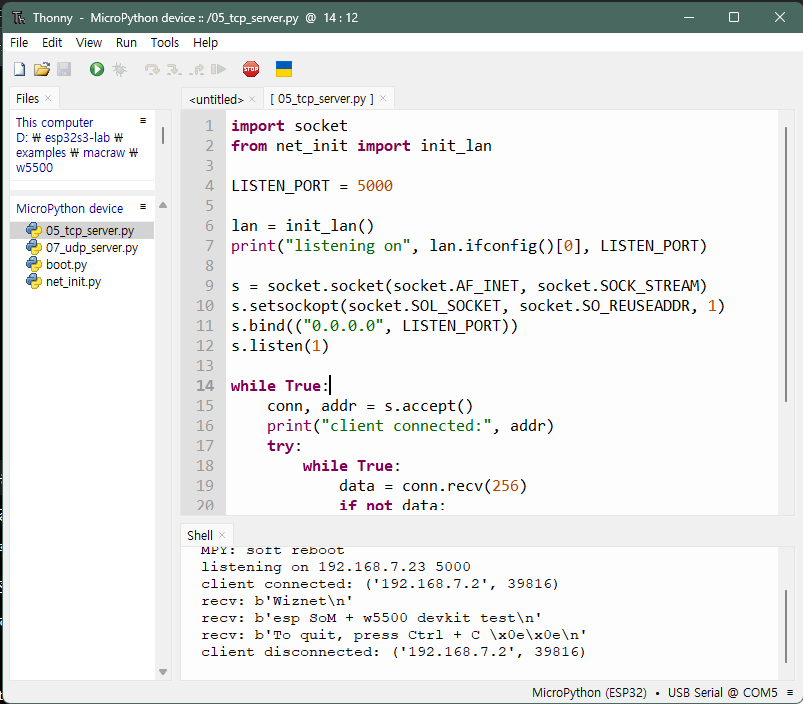
Sample 05 (TCP echo server, accept loop):
import socket
from net_init import init_lan

LISTEN_PORT = 5000

lan = init_lan()
print("listening on", lan.ifconfig()[0], LISTEN_PORT)

s = socket.socket(socket.AF_INET, socket.SOCK_STREAM)
s.setsockopt(socket.SOL_SOCKET, socket.SO_REUSEADDR, 1)
s.bind(("0.0.0.0", LISTEN_PORT))
s.listen(1)

while True:
    conn, addr = s.accept()
    print("client connected:", addr)
    try:
        while True:
            data = conn.recv(256)
            if not data:
                break
            print("recv:", data)
            conn.send(data)  # echo
    finally:
        conn.close()
print("client disconnected:", addr)Run logs
Real output from re-verifying all 10 examples on real hardware (board IP 192.168.7.23, PC IP 192.168.7.2):
mpremote connect COMx run <filename>01_link.py
link up, active = True connected = True02_dhcp.py
ip: 192.168.7.23
subnet: 255.255.255.0
gateway: 192.168.7.1
dns: 8.8.8.8
03_dns.py
www.wiznet.io -> 183.111.138.24904_tcp_client.py — with a TCP listener already running on the PC
connected to 192.168.7.2 5000
received: b'hello from PC listener\n'
05_tcp_server.py — PC connected as a client
listening on 192.168.7.23 5000
client connected: ('192.168.7.2', 39816)
recv: b'Wiznet\n'
recv: b'esp SoM + w5500 devkit test\n'
recv: b'To quit, press Ctrl + C \x0e\x0e\n'
client disconnected: ('192.168.7.2', 39816)
06_udp_client.py
sent to 192.168.7.2 5000
received from ('192.168.7.2', 5000) : b'hello from PC listener\n'
07_udp_server.py
UDP echo listening on 192.168.7.23 5000
recv from ('192.168.7.2', 56907) : b'hello from PC UDP client'
08_http_get.py
b'HTTP/1.1 200 OK\r\nDate: Tue, 25 Aug 2026 05:15:23 GMT\r\nServer: Apache\r\n...
Content-Type: text/html\r\n\r\n<html>...<h1>http://info.cern.ch - home of the first website</h1>...</html>\n'
09_http_server.py — PC ran curl http://192.168.7.23/
device: http://192.168.7.23/
device: client: ('192.168.7.2', 14633)
PC:     HTTP/1.0 200 OK
PC:     Hello #0 from ESP32-S3 + W5500!
10_reconnect_stress.py — full log, 5 cycles + 120 s passive poll
initial link OK: ('192.168.7.23', '255.255.255.0', '192.168.7.1', '8.8.8.8')
cycle 0 recovered in 2214 ms, free heap: 8317744
cycle 1 recovered in 2207 ms, free heap: 8317744
cycle 2 recovered in 2207 ms, free heap: 8317744
cycle 3 recovered in 2207 ms, free heap: 8317728
cycle 4 recovered in 2207 ms, free heap: 8317728

passive poll for 120 s
t=0s   connected=True free_heap=8317728
t=5s   connected=True free_heap=8317824
...
t=115s connected=True free_heap=8317824
04 Known gotcha — OSError: -202 on DNS/external hosts
If 03_dns.py or any external connection fails, link up + DHCP OK
- Isolate the failure — try a raw
socket.connect()to the gateway on port 80 (should succeed) vs.8.8.8.8:53(times out if this is the cause). - If the gateway connects but nothing external does, the router is very likely MAC-filtering. Register the board's MAC (printed via
network.LAN().config('mac')or visible in DHCP client logs on the router) in the router's allow-list. - This is not a DNS-server problem — switching the resolver (e.g. 1.1.1.1 → 8.8.8.8) will not fix it if the real cause is routing/MAC filtering.
References
[1] ESP32 port quickref — documents the exact network.LAN(spi=, phy_type=, phy_addr=, cs=, int=, reset=) constructor signature used in this guide. Note that network.WIZNET5K only exists on the STM32/RP2040 ports and targets the chip's hardware TOE mode, so it doesn't apply here.
MicroPython
- Official homepage: micropython.org
- ESP32-S3 firmware download page: micropython.org/download/ESP32_GENERIC_S3
- ESP32 port general info: docs.micropython.org/en/latest/esp32/general.html
- ESP32 port README (repository): github.com/micropython/micropython/blob/master/ports/esp32/README.md
Espressif (ESP32 vendor)
- Official ESP32-S3 product page: espressif.com/en/products/socs/esp32-s3 (no MicroPython mention — only ESP-IDF/Arduino/Zephyr)
- Developer Portal MicroPython workshop — Espressif's own domain pointing to MicroPython's official docs: developer.espressif.com/workshops/micropython-jupyter-notebooks-in-browser
Community (corroborating, not load-bearing)
- Community GitHub projects referencing W5500 +
network.LANon ESP32 exist, but the constructor signature and behavior in this guide were verified directly against the official sources above and real hardware.
-
esp32-w5500-devkit-examples


