


How to Build a Reliable MQTT I/O Controller with W5500 and Arduino Nano for Home Assistant
An Arduino Nano and W5500 create an MQTT-based 8-channel opto-isolated I/O controller with over 280 days of reported uptime.
Arduino - Arduino Nano R3
x 1


WIZnet - W5500
x 1
Step 1: Understanding the Hardware
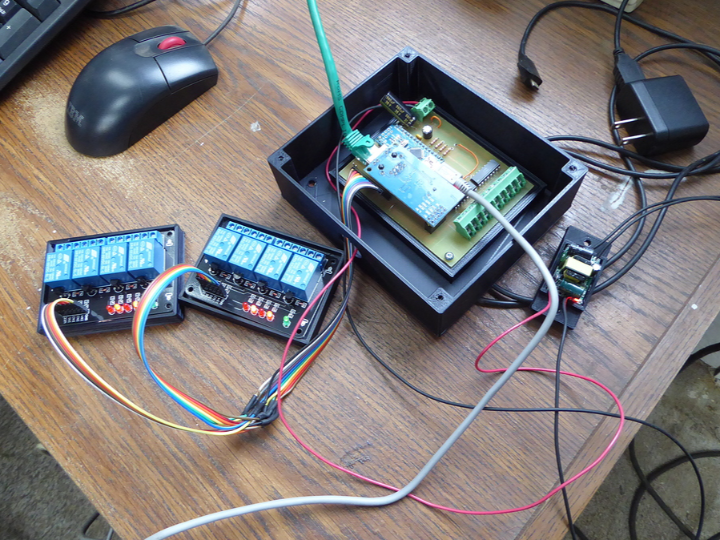
This project demonstrates a practical Ethernet-based home automation controller built around an Arduino Nano and the WIZnet W5500 Ethernet controller.
The board provides:
- Arduino Nano MCU
- W5500 Ethernet module
- 8 opto-isolated digital inputs
- 8 digital outputs
- MQTT communication
- Home Assistant integration
- Serial debugging interface
- Expansion capability for RFID readers and other peripherals
The W5500 provides:
- Hardwired TCP/IP stack
- Integrated MAC + PHY
- SPI interface
- 8 hardware sockets
- 32KB internal TX/RX buffer
- 10/100 Ethernet connectivity
Unlike Wi-Fi-based nodes, the system uses wired Ethernet for dependable communication and reduced maintenance requirements.
Step 2: Why Opto-Isolated Inputs Matter
One of the most interesting aspects of this design is the use of eight active-high opto-isolated inputs.
These inputs can connect directly to:
- Wall switches
- Push buttons
- Door contacts
- Motion detectors
- Relay contacts
- Alarm signals
The designer notes that the inputs provide approximately 1000V isolation and are highly resistant to electrical noise and false triggering. This makes the design particularly attractive for whole-home wiring and control cabinet installations.
The firmware continuously scans all inputs every 50ms and publishes MQTT updates whenever a state change occurs. It also tracks press duration, enabling:
- Short press actions
- Long press actions
- Multi-function button control
- Scene activation
without requiring additional automation hardware.
Step 3: MQTT-Based Home Assistant Architecture
The communication architecture is intentionally simple:
Switch / Sensor
        │
        ▼
Opto-Isolated Input
        │
        ▼
Arduino Nano
        │
        ▼
W5500 Ethernet
        │
        ▼
MQTT Broker
        │
        ▼
Home Assistant
This approach offers several advantages:
- No Wi-Fi congestion
- Low latency communication
- Centralized automation logic
- Easy integration with Home Assistant
- Reliable long-term operation
According to the author, multiple boards are deployed throughout the house and telemetry reports showed uptime exceeding 280 days without requiring rebooting.
Step 4: Software Implementation
The W5500 handles all Ethernet networking while the Arduino Nano focuses on I/O monitoring and MQTT messaging.
// Conceptual example based on WIZnet Ethernet Library
// Not project-specific source code

#include <Ethernet.h>
#include <PubSubClient.h>

EthernetClient ethClient;
PubSubClient mqtt(ethClient);

void setup()
{
    Ethernet.begin(mac, ip);
    mqtt.setServer(broker_ip, 1883);
}

void loop()
{
    mqtt.loop();

    if(inputChanged())
    {
        mqtt.publish(
            "home/io/input1",
            "ON"
        );
    }
}
Because the W5500 offloads TCP/IP processing in hardware, the Nano's limited RAM and processing resources remain available for application logic and sensor handling.
Step 5: Why W5500 Works Well for Home Automation
Most home automation installations eventually boil down to two tasks:
- Reading physical inputs
- Controlling outputs
This project demonstrates how a simple W5500-based Ethernet controller can serve as a highly reliable distributed I/O node.
Key advantages include:
- Wired Ethernet reliability
- Hardware TCP/IP offload
- MQTT compatibility
- Long-term uptime
- Noise-resistant opto-isolated inputs
- Scalable room-by-room deployment
Rather than deploying a full SBC or Wi-Fi MCU in every location, the design provides a lightweight and cost-effective Ethernet endpoint for Home Assistant ecosystems.
FAQ
Q1: Why are opto-isolated inputs important?
A: Opto-isolation protects the controller from electrical noise, voltage spikes, and ground-loop issues. This improves reliability when interfacing with long cable runs, relays, switches, and industrial-style control wiring.
Q2: How does MQTT integrate with Home Assistant?
A: MQTT acts as the communication layer between the W5500-based controller and Home Assistant. Input changes are published as MQTT messages, while Home Assistant can issue commands to control outputs through MQTT topics.
Q3: What applications can use this architecture?
A: Typical applications include smart lighting, security systems, relay control, door monitoring, occupancy detection, HVAC control, and distributed I/O systems for Home Assistant or industrial automation platforms.