



zephyr_echo_test_suite
zephyr + W5500
How to Benchmark W5500 Socket Offload with Zephyr RTOS on Raspberry Pi Pico?
Summary
This project benchmarks socket performance on Zephyr RTOS using a Raspberry Pi Pico paired with the WIZnet W5500 Ethernet controller. It compares Zephyr's native networking path with the W5500 hardware TCP/IP socket offload implementation through TCP and UDP echo tests, making it an excellent reference for understanding how Ethernet drivers influence networking performance in embedded RTOS environments.
What the Project Does
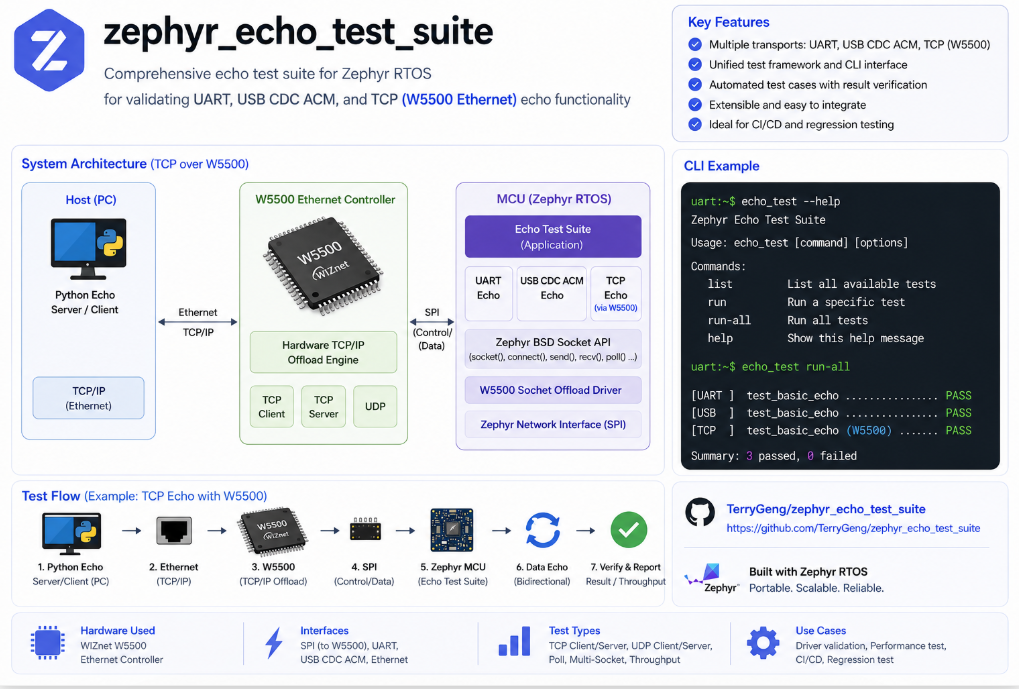
zephyr_echo_test_suite is a networking benchmark designed to evaluate the throughput and behavior of Zephyr's socket layer. The firmware runs on a Raspberry Pi Pico connected to a W5500 Ethernet controller, while a Python application on a host PC serves as the TCP or UDP echo server.
The project implements several networking scenarios including:
TCP Client
TCP Server
Poll-based TCP Server
UDP Client
UDP Server
Each test repeatedly exchanges echo packets and measures throughput, allowing developers to compare different networking implementations under identical conditions.
One particularly interesting aspect is that the application code remains identical regardless of the networking backend. The same BSD socket API (socket(), connect(), send(), recv()) is used whether packets travel through Zephyr's native network stack or through the W5500 socket offload implementation.
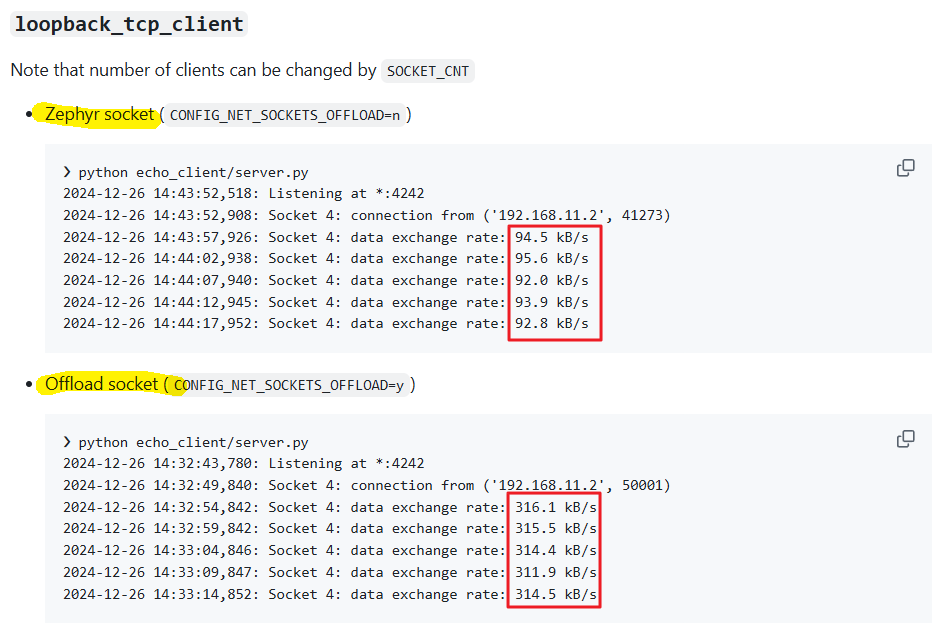
According to the project's benchmark results, the W5500 socket offload implementation achieves approximately three times higher throughput than Zephyr's native networking path in the TCP client benchmark, demonstrating the effectiveness of hardware TCP/IP offloading.
Where WIZnet Fits
This project uses the WIZnet W5500 Ethernet controller as the hardware networking interface.
Unlike a simple Ethernet PHY, the W5500 integrates a hardware TCP/IP Offload Engine (TOE) capable of handling socket-level networking operations internally. In Zephyr, the device is enabled through the Devicetree using the compatible = "wiznet,w5500" node together with the CONFIG_ETH_W5500 Kconfig option.
The networking architecture is illustrated below.
Application
      │
 BSD Socket API
      │
Socket Backend
      │
 ├── Zephyr Native Stack
 │
 └── W5500 Socket Offload
      │
 Ethernet Driver
      │
      SPI
      │
     W5500
This architecture allows developers to evaluate how different socket backends affect application performance without modifying application logic.
For resource-constrained MCUs, the W5500 reduces CPU utilization by moving TCP/IP processing into dedicated hardware while keeping the software interface unchanged.
Implementation Notes
W5500 DeviceTree Configuration
The project configures the W5500 through Zephyr's Devicetree.
&spi1 {
    status = "okay";
    cs-gpios = <&gpio0 9 GPIO_ACTIVE_LOW>;

    test_spi_w5500@0 {
        compatible = "wiznet,w5500";
        reg = <0>;
        spi-max-frequency = <60000000>;
        int-gpios = <&gpio0 21 GPIO_ACTIVE_LOW>;
        reset-gpios = <&gpio0 20 GPIO_ACTIVE_LOW>;
        local-mac-address = [00 08 dc 12 34 56];
    };
}
File
boards/rpi_pico.overlay
This configuration registers the W5500 as a Zephyr Ethernet device, assigning the SPI bus, chip select, interrupt pin, reset pin, and MAC address.
Enabling the Driver
The networking driver is enabled through Kconfig.
CONFIG_GPIO=y
CONFIG_SPI=y
CONFIG_NET_L2_ETHERNET=y
CONFIG_NET_SOCKETS_OFFLOAD=y
CONFIG_ETH_W5500=y
CONFIG_ETH_W5500_TIMEOUT=1000
CONFIG_ETH_W5500_SOCKET_TIMEOUT=0
File
boards/rpi_pico.conf
Instead of modifying application code, Zephyr selects the networking implementation through configuration options. This demonstrates one of the strengths of Zephyr's driver architecture—drivers are integrated through Devicetree and Kconfig rather than application-specific APIs.
Standard BSD Socket API
The application itself uses standard BSD sockets.
ctx->sock = socket(AF_INET, SOCK_STREAM, IPPROTO_TCP);

connect(ctx->sock,
        (const struct sockaddr *)&addr4,
        sizeof(struct sockaddr_in));

send(ctx->sock,
     lorem_ipsum + sentsize,
     ipsum_len - sentsize,
     0);

recv(ctx->sock,
     recvbuf,
     sizeof(recvbuf),
     MSG_DONTWAIT);
File
src/main.c
Notice that the application never calls a W5500-specific API.
The networking backend is selected entirely by Zephyr, allowing identical application code to be benchmarked across different driver implementations.
Comparison with Similar WIZnet Maker Projects
1. Zephyr W5500-EVB-Pico2
Similarity
Uses Zephyr RTOS
Uses W5500 Ethernet
Uses Zephyr networking framework
Demonstrates Devicetree and Kconfig integration
Difference
The W5500-EVB-Pico2 project focuses on running Zephyr networking applications such as DHCP, MQTT, and Echo Server on actual hardware.
This project instead focuses on benchmarking and validating the networking backend itself.
In other words,
W5500-EVB-Pico2 shows how to use the driver
zephyr_echo_test_suite measures how well the driver performs
2. ESP32 + W5500 on Zephyr
Another related Maker project demonstrates adding a W5500 Ethernet controller to an ESP32-S3 running Zephyr.
Similarity
SPI-connected W5500
Devicetree configuration
Zephyr Ethernet driver
Standard BSD socket API
Difference
The ESP32 project is primarily a system integration tutorial, explaining how to add Ethernet connectivity to an existing platform.
The Echo Test Suite is a performance evaluation tool intended to compare networking implementations under controlled conditions.
3. Implementing Socket Offload for W5500 in Zephyr
This is perhaps the closest companion project.
The Maker article explains the motivation behind implementing socket offload support inside Zephyr.
It discusses how earlier W5500 support relied primarily on MACRAW mode, while the newer implementation exposes W5500's hardware TCP/IP engine through Zephyr's socket API.
The Echo Test Suite complements this work by providing measurable benchmark results demonstrating the performance improvement achieved through socket offloading.
4. Ethernet Socket Dispatcher (nRF9151 + W5500)
Another advanced Maker project combines cellular networking with Ethernet.
Unlike the Echo Test Suite, which evaluates a single Ethernet interface, the Socket Dispatcher example demonstrates how Zephyr routes socket traffic across multiple networking backends using SO_BINDTODEVICE.
This illustrates the scalability of Zephyr's networking architecture beyond a single Ethernet controller.
Practical Tips
Ensure the SPI clock frequency matches the hardware capability of both the MCU and the W5500.
Verify the interrupt and reset GPIO assignments in the Devicetree.
Enable CONFIG_NET_SOCKETS_OFFLOAD only when benchmarking hardware socket offloading.
Use identical echo packet sizes when comparing native networking and offload performance.
Static IP addressing often produces more repeatable benchmark results than DHCP.
Remember that overall throughput depends not only on the W5500 but also on SPI bandwidth, driver implementation, and application buffer sizes.
FAQ
Why use the W5500 for this project?
The W5500 includes a hardware TCP/IP Offload Engine that processes socket communication internally, reducing CPU overhead while maintaining compatibility with Zephyr's BSD socket interface.
How is the W5500 connected to the Raspberry Pi Pico?
The controller communicates over SPI. The Devicetree specifies the SPI bus, chip select, interrupt, reset GPIOs, and MAC address, allowing Zephyr to initialize the device automatically.
What role does the W5500 play in this benchmark?
The W5500 provides the hardware networking backend for Zephyr's socket offload implementation. The benchmark compares this backend against Zephyr's native networking stack using identical application code.
Can beginners follow this project?
Yes. Developers familiar with basic Zephyr concepts such as Devicetree, Kconfig, and BSD sockets should be able to reproduce the benchmark. It also serves as an excellent introduction to Zephyr's driver architecture.
How does W5500 socket offload compare with Zephyr's native networking?
Zephyr's native networking processes TCP/IP entirely in software on the MCU. The W5500 socket offload implementation delegates socket processing to dedicated hardware, reducing CPU load and improving throughput while preserving the same application programming interface.
Source
Original Project
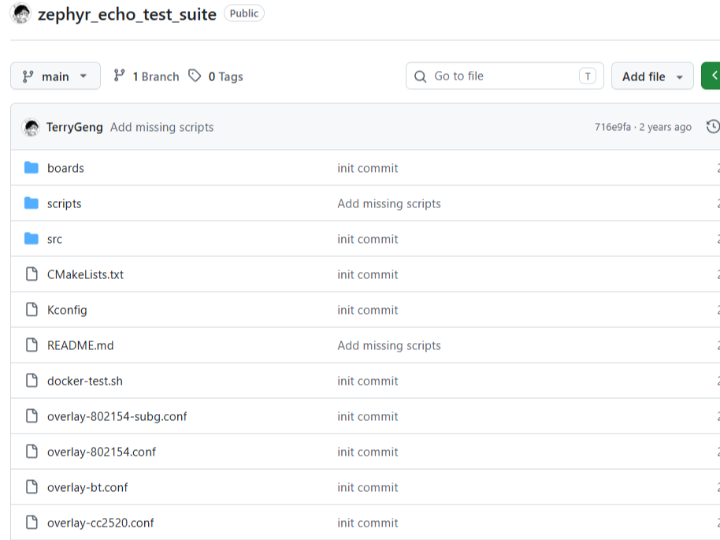
https://github.com/TerryGeng/zephyr_echo_test_suite
Related WIZnet Maker Projects
Zephyr W5500-EVB-Pico2
How to Add W5500 Ethernet to ESP32 on Zephyr
Implementing Socket Offload for W5500 in Zephyr
Ethernet Socket Dispatcher (nRF9151 + W5500)
License
Please refer to the original GitHub repository for the project's license information.
Tags
#W5500 #ZephyrRTOS #Ethernet #SocketOffload #EmbeddedNetworking #RaspberryPiPico #DeviceTree #Kconfig #TCP #UDP #WIZnet