



Wired networking, PoE, and a self-powered web camera
ESP web cam
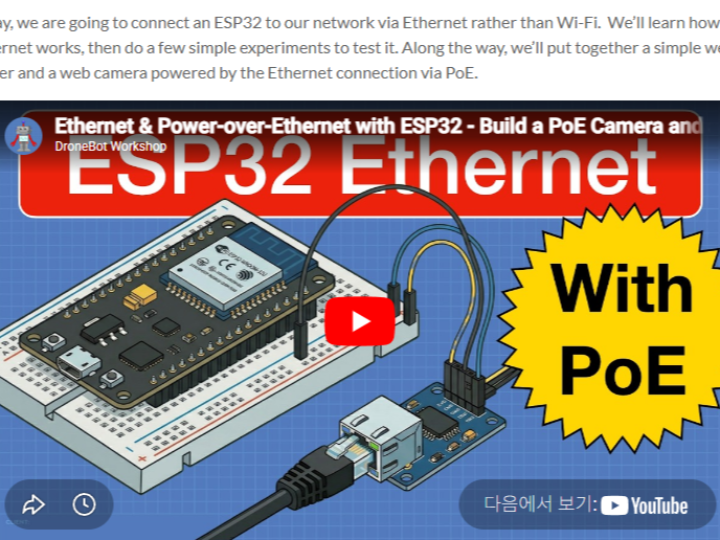
About the Source: DroneBot Workshop
DroneBot Workshop (https://dronebotworkshop.com/) is an independent educational engineering website focused on practical electronics, embedded systems, and IoT development.
It is not a vendor site or a WIZnet-specific platform. Instead, it is run by an individual creator (Bill, known for his YouTube channel and tutorials) who publishes hands-on guides covering:
- Microcontrollers (ESP32, Arduino, Raspberry Pi)
- Communication interfaces (Wi-Fi, Ethernet, MQTT, Serial)
- Sensors, robotics, and automation
- Real-world build projects (web servers, cameras, control systems)
The key characteristic of this site is hardware-focused, step-by-step experimentation, not product promotion.
Why W5500 Appears in This ESP32 Project
The ESP32 is widely known for its built-in Wi-Fi, so Ethernet is not the default path. The reason this tutorial introduces the WIZnet W5500 is tied to a practical engineering need:
1. Expanding ESP32 Beyond Wi-Fi
DroneBot Workshop often explores alternative interfaces beyond what’s built into a board.
In this case:
- ESP32 → originally Wi-Fi-based
- W5500 → adds wired Ethernet via SPI
This allows the tutorial to demonstrate:
- Deterministic networking (vs wireless variability)
- Integration with wired infrastructure (routers, switches, PoE)
2. Teaching Network Stack Architecture
This tutorial is not just “how to connect Ethernet.”
It explicitly shows that:
- The ESP32 uses the
ETH.hdriver - The W5500 handles TCP/IP in hardware
- The application still uses familiar APIs (
WiFiClient,WiFiServer)
This is important educationally because it demonstrates a layered model:
[ Application Layer ] → HTTP Server (ESP32)
[ Socket API Layer ] → WiFiClient / WiFiServer
[ Transport/IP Layer ] → W5500 (hardware offload)
[ Physical Layer ] → Ethernet cable
This kind of explanation is typical of DroneBot Workshop content—it teaches how systems are structured, not just how to run code.
3. Real-World Use Case: PoE Camera
The inclusion of the PoE ESP32-S3 camera is a strong indicator of the site’s philosophy.
This is not a toy example. It reflects a real deployment scenario:
- Fixed-position device (camera)
- Requires continuous power
- Needs reliable network connection
- Installed in locations where Wi-Fi is unstable or unavailable
Wi-Fi alone cannot solve this cleanly.
But with W5500 + PoE:
- One cable = Power + Data
- No USB power supply required
- No wireless interference issues
This aligns with practical IoT/edge deployments (surveillance, monitoring, industrial nodes).
4. Component-Agnostic Approach
DroneBot Workshop does not prefer WIZnet specifically—it simply selects components that:
- Are widely available (W5500 modules are common)
- Have stable libraries (Arduino + ESP32 Ethernet support)
- Demonstrate clear engineering concepts (hardware TCP/IP offload)
That’s why you’ll also find tutorials on:
- Wi-Fi (ESP32 native)
- Serial communication
- I2C/SPI peripherals
- MQTT brokers
The W5500 appears here because it is the most accessible way to add Ethernet to ESP32 via SPI.
Why This Matters from a WIZnet Perspective
Even though the site is not WIZnet-owned, this kind of content is valuable because it naturally highlights:
- The practicality of hardware TCP/IP offload (W5500)
- The simplicity of SPI-based Ethernet expansion
- The advantage of wired networking in real deployments
- The compatibility with existing Arduino-style APIs
In other words, W5500 is not introduced as a product—it emerges as a solution to a real engineering constraint.
Bottom Line
DroneBot Workshop is an educational engineering platform that publishes hands-on embedded system tutorials.
The reason it includes a W5500-based ESP32 Ethernet project is simple:
- It solves a real limitation of ESP32 (lack of native Ethernet)
- It demonstrates system-level networking concepts
- It enables practical builds like PoE-powered devices
That combination makes it an ideal example of when and why WIZnet hardware becomes relevant in modern IoT design.
Source 설명: DroneBot Workshop
DroneBot Workshop (https://dronebotworkshop.com/)는 전자공학, 임베디드 시스템, IoT 개발을 다루는 실습 중심의 교육용 웹사이트입니다.
이 사이트는 특정 제조사(WIZnet 포함)에 종속된 플랫폼이 아니라, 개인 제작자(Bill)가 운영하는 기술 블로그이자 튜토리얼 허브로, 다음과 같은 내용을 다룹니다:
- ESP32, Arduino, Raspberry Pi 같은 마이크로컨트롤러
- Wi-Fi, Ethernet, MQTT 등 통신 기술
- 센서, 로봇, 자동화 시스템
- 웹서버, 카메라, 제어 시스템 등 실제 프로젝트
핵심 특징은 이론 설명이 아니라 실제 하드웨어를 기반으로 한 실습형 콘텐츠라는 점입니다.
왜 ESP32 + W5500 프로젝트가 여기 올라와 있을까?
ESP32는 기본적으로 Wi-Fi가 내장된 MCU입니다.
그럼에도 불구하고 이 튜토리얼에서 W5500을 사용하는 이유는 단순한 기능 추가가 아니라, 명확한 기술적 목적이 있습니다.
1. ESP32의 한계를 확장하기 위해
DroneBot Workshop은 항상 “기본 기능을 넘어서 확장하는 방법”을 다룹니다.
이 프로젝트에서는:
- ESP32 → 기본은 Wi-Fi
- W5500 → SPI로 연결되는 유선 Ethernet 추가
이를 통해 다음을 실험할 수 있습니다:
- 무선이 아닌 유선 네트워크
- 더 안정적인 연결
- 라우터/스위치 기반 인프라 통합
2. 네트워크 구조를 교육하기 위해
이 튜토리얼의 핵심은 단순 연결이 아니라 네트워크 아키텍처 이해입니다.
구조를 보면:
- ESP32는
ETH.h드라이버 사용 - W5500은 TCP/IP를 하드웨어로 처리
- 사용자 코드는
WiFiClient,WiFiServer그대로 사용
즉, 내부적으로는 이렇게 동작합니다:
[ Application ] → HTTP Server (ESP32)
[ Socket API ] → WiFiClient / WiFiServer
[ TCP/IP ]     → W5500 (하드웨어 오프로딩)
[ PHY ]        → Ethernet Cable
이 구조를 통해 학습자는 다음을 이해하게 됩니다:
- TCP/IP 스택이 어디서 처리되는지
- MCU와 네트워크 칩의 역할 분리
- 소프트웨어 스택(LwIP) vs 하드웨어 스택(W5500)
3. 실제 활용 사례: PoE 카메라
이 프로젝트에서 가장 중요한 부분 중 하나가 PoE ESP32 카메라 확장입니다.
이건 단순 데모가 아니라 실제 사용 시나리오입니다:
- 고정형 장치 (카메라)
- 항상 전원 필요
- 안정적인 네트워크 필요
- Wi-Fi 환경이 불안정하거나 없음
Wi-Fi만으로는 해결이 어렵지만,
W5500 + PoE를 사용하면:
- Ethernet 케이블 하나로 전원 + 데이터 동시 공급
- 별도 전원 어댑터 불필요
- 무선 간섭 문제 없음
이건 산업용 IoT, 감시 시스템, 엣지 디바이스에서 매우 현실적인 구조입니다.
4. 특정 브랜드가 아닌 “문제 해결 중심” 접근
DroneBot Workshop은 특정 제품을 홍보하지 않습니다.
대신 다음 기준으로 부품을 선택합니다:
- 쉽게 구할 수 있는가
- 라이브러리가 안정적인가
- 구조 설명에 적합한가
W5500은:
- SPI 기반이라 ESP32에 쉽게 연결 가능
- Arduino/ESP32 라이브러리 지원
- TCP/IP 오프로딩이라는 명확한 개념 제공
그래서 이 프로젝트에 자연스럽게 선택된 것입니다.
WIZnet 관점에서의 의미
이 사이트는 WIZnet 공식 채널이 아니지만, 오히려 더 중요한 의미가 있습니다.
왜냐하면:
- 실제 개발자가 필요해서 W5500을 선택함
- Wi-Fi 대신 Ethernet이 필요한 상황을 보여줌
- 하드웨어 TCP/IP 오프로딩의 가치를 자연스럽게 드러냄
즉, W5500은 “제품”이 아니라
문제를 해결하는 도구로 등장합니다.
정리
DroneBot Workshop은 실제 하드웨어 기반의 임베디드 교육 플랫폼입니다.
이 사이트에 ESP32 + W5500 프로젝트가 올라온 이유는:
- ESP32의 Wi-Fi 한계를 보완하기 위해
- 네트워크 구조를 교육하기 위해
- PoE 같은 실제 IoT 시나리오를 구현하기 위해
결과적으로 이 프로젝트는
“언제 WIZnet Ethernet이 필요한가”를 잘 보여주는 사례입니다.