



Smart home with Arduino Mega
Smart home
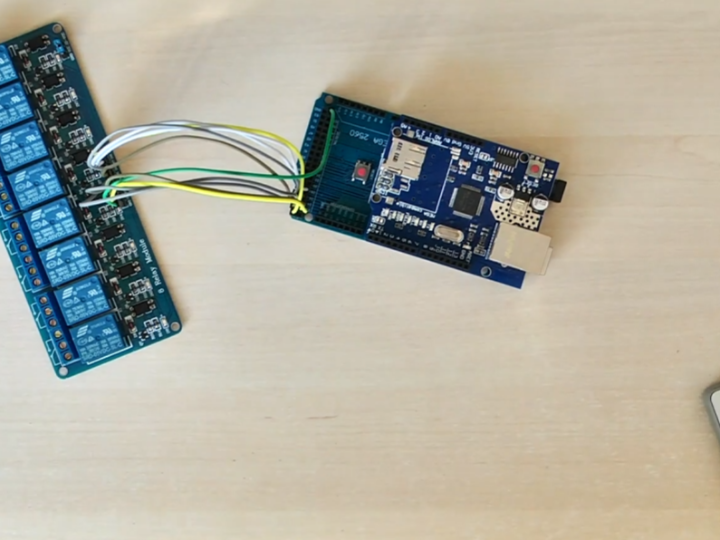
프로젝트 개요
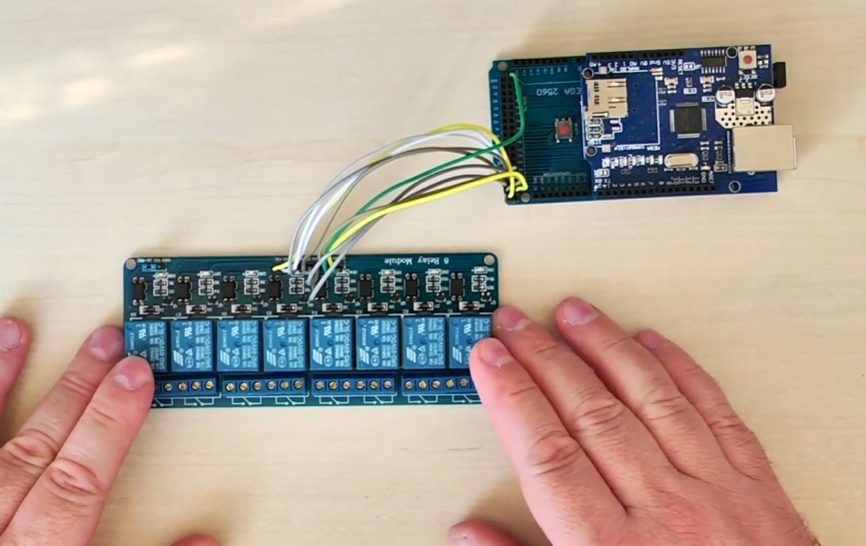
이 프로젝트는 Arduino Mega와 WIZnet W5100 Ethernet Shield를 사용해 내장 웹서버를 통해 릴레이를 제어하는 시스템이다. 핵심 기능 자체는 단순하지만, AI 기반 UI 제작 도구를 활용함으로써 하드웨어 구조를 변경하지 않고도 웹 인터페이스의 시각적 완성도와 사용자 경험을 크게 향상시켰다.
1. 이 프로젝트는 실제로 무엇을 하는가 (그리고 왜 익숙한가)
이 프로젝트의 핵심 구조는 매우 단순하다.
Arduino Mega 2560
WIZnet W5100 Ethernet Shield
포트 80에서 동작하는 HTTP 서버
웹 요청을 통한 8채널 릴레이 제어
기능만 놓고 보면, 이러한 프로젝트는 이미 10년 이상 존재해 왔다.
브라우저에서 릴레이를 ON/OFF 하는 구조 자체는 새롭지도, 복잡하지도 않다.
그럼에도 불구하고 이 프로젝트가 의미 있는 이유는 바로 여기에 있다.
이 프로젝트의 가치는 무엇을 하느냐가 아니라, 지금 시대에 어떻게 보이느냐에 있다.
2. MCU 웹서버가 오랫동안 안고 있던 문제
AI 도구가 보편화되기 이전, 대부분의 MCU 기반 웹서버 프로젝트는 공통적인 한계를 가지고 있었다.
HTML을 문자열로 직접 작성
CSS 사용이 거의 없거나 매우 제한적
텍스트와 버튼 위주의 단조로운 화면
애니메이션이나 레이아웃 개념 부재
하드웨어와 기능은 정상 동작했지만, 결과물은 늘 “미완성”처럼 보였다.
이러한 UI는 종종 다음과 같이 인식되었다.
간단한 데모
취미용 실험
초기 단계의 프로토타입
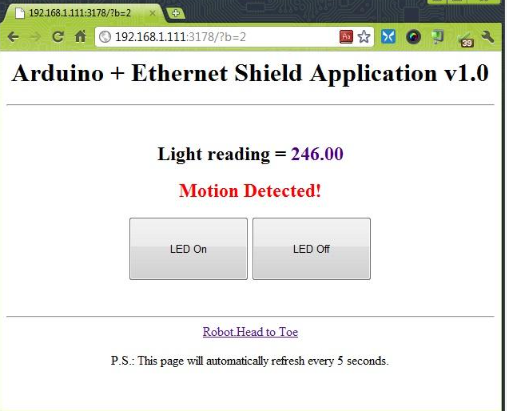
예시 이미지는 이러한 과거 MCU 웹 UI의 전형적인 모습을 잘 보여준다.
3. 무엇이 달라졌는가: AI가 UI의 진입 장벽을 낮추다
이 프로젝트의 차별점은 새로운 하드웨어가 아니다.
핵심은 개발 환경과 도구의 변화, 그중에서도 AI 도구의 등장이다.
오늘날 AI 도구를 활용하면 개발자는 다음과 같은 작업을 빠르게 수행할 수 있다.
SVG 기반 아이콘과 애니메이션 생성
정돈된 CSS 레이아웃(grid, card UI 등) 구성
시각적 피드백 요소 추가
UI 반복 수정과 개선
그 결과, 동일한 임베디드 로직을 사용하더라도
프로젝트는 훨씬 직관적이고 현대적인 모습으로 표현될 수 있다.
이 프로젝트는 AI가 MCU의 기능을 바꾼 것이 아니라, 결과물의 ‘인식’을 바꿨다는 점을 잘 보여준다.
4. UI는 어떻게 구현되었는가 (마법은 없다)
UI의 외형은 크게 달라졌지만, 기술적 구조는 여전히 단순하고 보수적이다.
사용된 UI 구성 요소
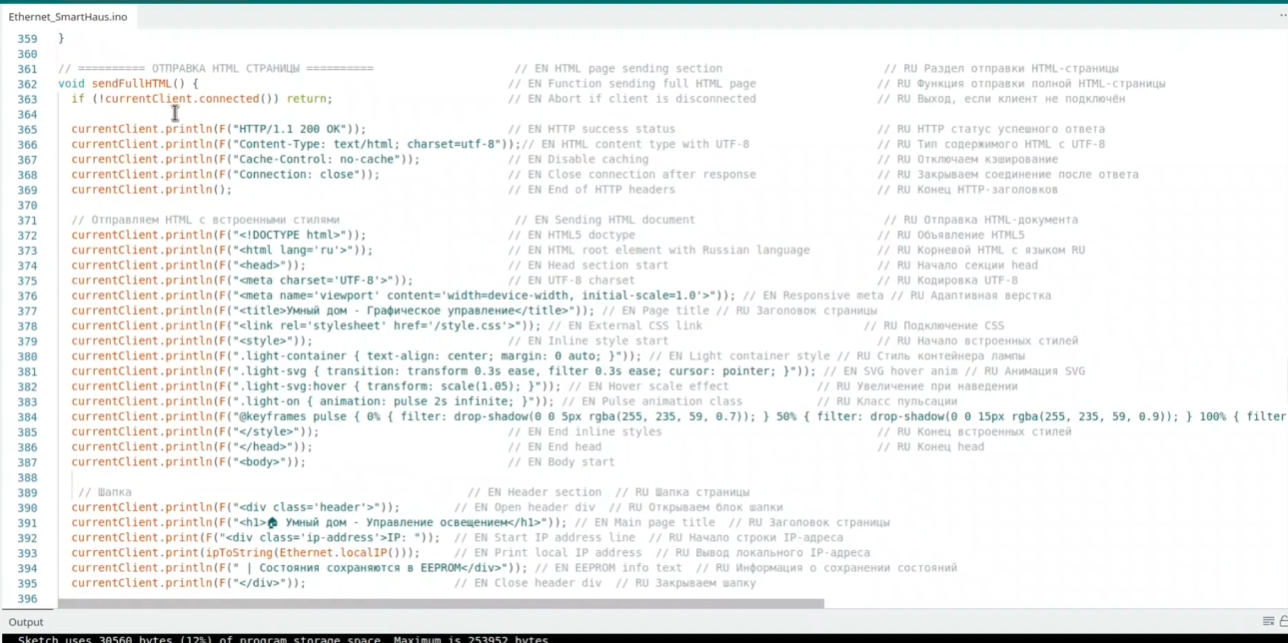
Arduino 펌웨어에서 직접 생성한 HTML
동일한 웹서버에서 제공되는 CSS
릴레이 상태에 따라 동적으로 생성되는 SVG 그래픽
AJAX 기반의 주기적 상태 업데이트용 JavaScript
외부 프레임워크는 없다.
파일 시스템도 없다.
클라우드 의존성도 없다.
Arduino는 HTML이나 SVG를 “이해”하지 않는다.
단지 문자열을 전송할 뿐이며, 실제 렌더링은 브라우저가 담당한다.
5. 왜 이 구조는 WIZnet Ethernet과 특히 잘 맞는가
여기서 **Why WIZnet?**가 기술적으로 중요해진다.
W5100은 다음을 제공한다.
하드웨어 기반 TCP/IP 스택
결정론적인 Ethernet 통신
MCU의 CPU 및 RAM 사용량 최소화
반복적인 HTTP 및 AJAX 요청에 대한 안정적인 처리
이 덕분에 Arduino Mega는 다음 작업에만 집중할 수 있다.
UI 문자열 생성
릴레이 제어 로직
EEPROM 상태 저장
만약 이 프로젝트가 소프트웨어 TCP/IP 스택이나 불안정한 무선 통신에 의존했다면,
UI의 개선은 곧바로 사용자 경험 개선으로 이어지지 못했을 것이다.
안정적인 네트워크가 있어야 시각적 완성도도 의미를 가진다.
6. 기술적 단순함은 약점이 아니라 강점이다
이 프로젝트의 또 다른 장점은 의외로 그 단순함에 있다.
RTOS 없음
비동기 프레임워크 없음
복잡한 미들웨어 없음
이 구조는 시스템을 다음과 같이 만든다.
동작이 예측 가능하고
디버깅이 쉽고
확장이 용이하다
코드 구조가 단순하기 때문에,
UI를 현대화하더라도 시스템의 안정성은 크게 흔들리지 않는다.
즉,
겉보기에는 현대적이지만, 동작 방식은 매우 보수적이다.
이는 산업용 시스템이나 스마트 홈 환경에서 특히 선호되는 특성이다.
7. 이 프로젝트가 2026년에 가지는 의미
이 프로젝트는 더 똑똑한 릴레이 컨트롤러를 만드는 것이 목적이 아니다.
이 프로젝트가 보여주는 것은 다음과 같다.
기능 자체는 이미 충분히 성숙 단계에 도달했다
이제 차별점은 사용성 및 인식 품질에 있다
AI 도구는 소형 MCU 프로젝트도 “데모”에서 “제품” 수준으로 끌어올릴 수 있다
10년 전이라면 이 프로젝트는 미완성처럼 보였을 것이다.
하지만 오늘날, 동일한 하드웨어로도 충분히 배포 가능한 시스템처럼 보인다.
FAQ
Q1. Wi-Fi 대신 WIZnet W5100을 사용하는 이유는 무엇인가요?
A: W5100은 TCP/IP 스택을 하드웨어에서 처리하여 안정적이고 결정론적인 Ethernet 통신을 제공합니다. 이를 통해 반복적인 HTTP 요청과 동적 웹 UI를 리소스가 제한된 MCU에서도 안정적으로 처리할 수 있습니다.
Q2. 이 프로젝트에서 W5100의 역할은 무엇인가요?
A: W5100은 네트워크 전용 프로세서 역할을 합니다. 소켓 관리와 TCP/IP 처리를 전담하여, Arduino Mega가 릴레이 제어, EEPROM 관리, UI 문자열 생성에 집중할 수 있도록 합니다.
Q3. 소프트웨어 TCP/IP 스택으로도 구현할 수 있지 않나요?
A: 기술적으로는 가능하지만, CPU 부하와 메모리 사용량이 크게 증가합니다. 복잡한 HTML, SVG, AJAX 요청을 동시에 처리할 경우 시스템 안정성이 저하될 가능성이 큽니다.
Q4. 초보자에게도 적합한 프로젝트인가요?
A: 네. 하드웨어 구성과 펌웨어 구조는 비교적 단순합니다. 동시에 AI 도구를 활용해 임베디드 프로젝트의 완성도를 높이는 방법을 배울 수 있어 교육용 예제로도 적합합니다.
Q5. 하드웨어를 바꾸지 않고 AI가 어떻게 프로젝트를 개선했나요?
A: AI 도구는 HTML, CSS, SVG 기반 UI를 빠르게 설계할 수 있게 해줍니다. 이를 통해 임베디드 로직은 그대로 유지하면서도, 사용자에게는 훨씬 완성도 높은 결과물을 제공할 수 있습니다.
원문 출처
원본 프로젝트 영상: YouTube – Check It (@check_it_and_dont_touch)
하드웨어 구성: Arduino Mega 2560 + WIZnet W5100 Ethernet Shield
라이선스: 교육 / 메이커 목적
Project Overview
This project uses an Arduino Mega and a WIZnet W5100 Ethernet Shield to control relays through a built-in web server. While the core functionality is simple, modern AI-assisted UI generation enables a clean and intuitive web interface, significantly improving visual quality and user experience without changing the underlying hardware architecture.
1. What This Project Actually Does (And Why It Looks Familiar)
At its core, this is a very straightforward embedded project:
Arduino Mega 2560
WIZnet W5100 Ethernet Shield
HTTP server on port 80
Eight relays controlled via web requests
From a functional standpoint, this type of project has existed for more than a decade.
Turning relays ON and OFF through a browser is not new, innovative, or complex.
And that is precisely why this project is interesting.
The value of this project is not in what it does, but in how it is perceived today.
2. The Historical Problem with MCU Web Servers
Before AI-assisted tools became common, most MCU-based web servers shared the same limitations:
HTML generated manually as raw strings
Minimal or no CSS
Text-heavy pages with plain buttons
No animation, no layout structure, no visual hierarchy
Even when the hardware worked perfectly, the project looked unfinished.
A working relay controller with a low-quality UI was often perceived as:
a quick demo,
a hobby experiment,
or an early prototype.
The attached reference image is a perfect example of this era.
3. What Changed: AI Lowered the UI Barrier
The key difference in this project is not new hardware, but new tooling.
With modern AI tools, developers can now:
Generate SVG-based icons and animations
Create clean CSS layouts (grid, cards, glassmorphism)
Add subtle UI feedback without deep frontend expertise
Iterate on visual design in minutes instead of days
As a result, the same embedded logic can now be presented as:
intuitive,
modern,
and product-like.
This project demonstrates that AI does not change what the MCU can do,
but it dramatically changes how the result is perceived.
4. How the UI Is Technically Implemented (No Magic)
Despite the improved appearance, the technical structure remains simple and robust.
UI Stack Used
HTML generated directly by Arduino firmware
CSS embedded or served from the same HTTP server
SVG graphics generated dynamically for relay states
Lightweight JavaScript for periodic AJAX updates
No external frameworks.
No file system.
No cloud dependency.
The Arduino does not “understand” HTML or SVG.
It simply sends strings.
The browser does the heavy lifting.
5. Why This Works Especially Well with WIZnet Ethernet
This is where Why WIZnet? becomes technically important.
The W5100 provides:
A hardware TCP/IP stack
Deterministic Ethernet communication
Minimal CPU and RAM usage on the MCU
Stable handling of repeated HTTP and AJAX requests
Because networking is offloaded to the W5100, the Arduino Mega can focus on:
generating UI strings,
handling relay logic,
managing EEPROM state storage.
If this project relied on a software TCP/IP stack or unstable wireless links,
the UI improvements would not translate into a better user experience.
Stable networking is what makes visual polish meaningful.
6. Technical Simplicity as a Strength
Another overlooked strength of this project is its simplicity.
No RTOS
No asynchronous framework
No complex middleware
This makes the system:
predictable,
easy to debug,
easy to extend.
Because the codebase is simple, adding modern UI elements does not introduce fragility.
In other words:
The project looks modern, but behaves conservatively.
This balance is exactly what many industrial and smart-home systems aim for.
7. What This Project Represents in 2026
This project is not about building a smarter relay controller.
It represents a shift in embedded development:
Functionality has plateaued
Perception and usability are now the differentiators
AI tools allow small MCU projects to cross the “demo → product” gap
A decade ago, this project would have looked unfinished.
Today, with the same hardware, it looks deployable.
FAQ
Q1: Why use the WIZnet W5100 instead of Wi-Fi?
A: The W5100 offloads the entire TCP/IP stack to hardware, providing stable and deterministic Ethernet communication. This ensures reliable HTTP handling and consistent UI responsiveness, which is especially important when serving dynamic web interfaces from resource-limited microcontrollers.
Q2: What role does W5100 play in this project?
A: The W5100 acts as the dedicated network processor. It handles socket management, TCP/IP processing, and Ethernet communication, allowing the Arduino Mega to focus on relay control logic, EEPROM state management, and UI string generation.
Q3: Could this project work with a software TCP/IP stack?
A: Technically yes, but with significant trade-offs. Software stacks increase CPU load and memory usage, which can lead to unstable behavior when serving complex HTML, SVG, and repeated AJAX requests on small MCUs.
Q4: Is this project suitable for beginners?
A: Yes. The hardware setup and firmware logic are simple and easy to understand. At the same time, the project shows beginners how modern UI techniques and AI tools can dramatically improve perceived quality without increasing embedded system complexity.
Q5: How does AI improve this project without changing the hardware?
A: AI tools reduce the effort required to design clean HTML, CSS, and SVG-based interfaces. This allows developers to focus on embedded logic while still delivering a polished, user-friendly web interface that feels like a finished product.
Original Source
Original Project Video: YouTube – Check It (@check_it_and_dont_touch)
Hardware: Arduino Mega 2560 + WIZnet W5100 Ethernet Shield
License: Educational / Maker use