



seeed studio xiao w5500 Ethernet Bluetooth 사용기
seeed studio xiao w5500 Ethernet Bluetooth 사용기
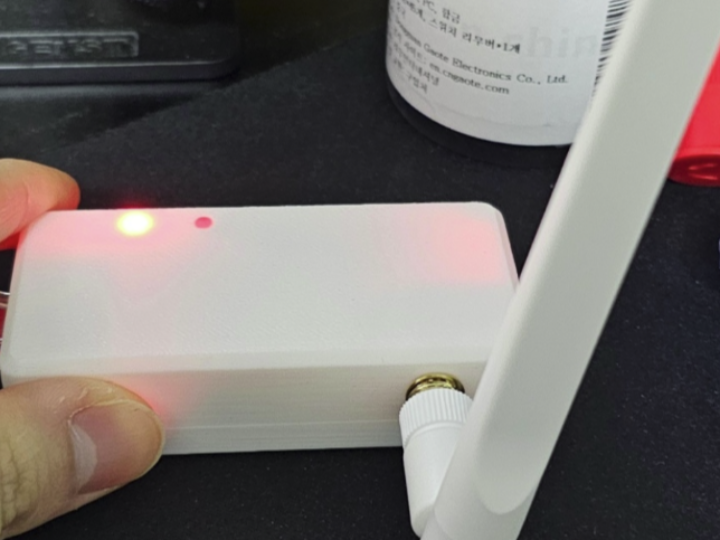
How to Build a PoE-Based Bluetooth Proxy with W5500 on XIAO ESP32-S3 for Home Assistant?
Summary
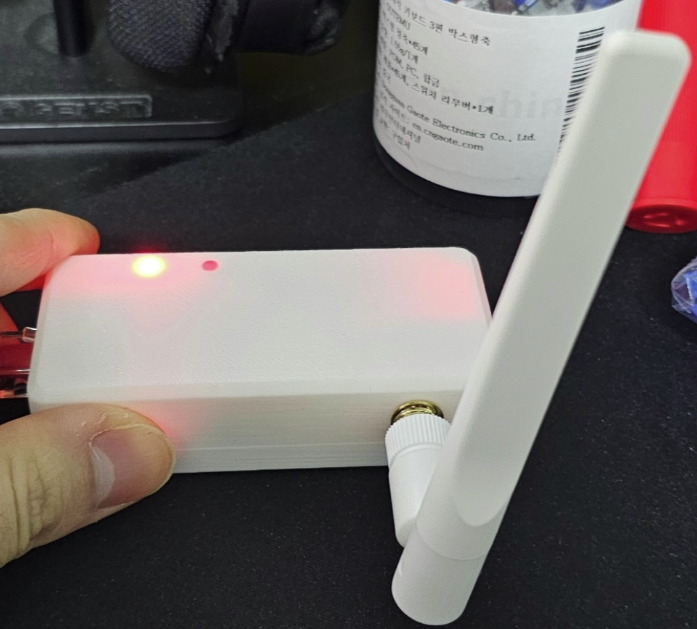
This project configures a Seeed Studio XIAO ESP32-S3 with a WIZnet W5500 Ethernet adapter to act as a Bluetooth proxy for Home Assistant using ESPHome. The W5500 provides stable wired Ethernet transport, allowing BLE data collected by the ESP32-S3 to be forwarded reliably over the network, especially in PoE-powered smart home environments.
What the Project Does
This setup turns a compact embedded device into a Bluetooth-to-Ethernet gateway for Home Assistant.
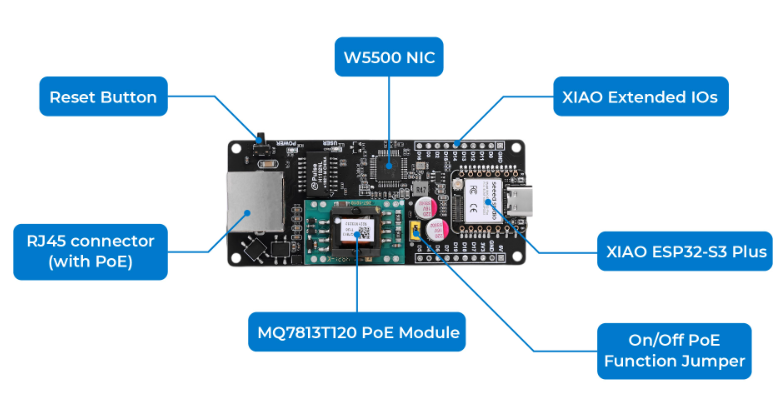
- The ESP32-S3 scans nearby Bluetooth Low Energy (BLE) devices.
- ESPHome firmware processes BLE advertisements and sensor data.
- Instead of Wi-Fi, the device sends data via wired Ethernet.
- Home Assistant receives this data through its ESPHome integration.
The overall data flow is straightforward: BLE signals are captured locally, processed on the MCU, and then transmitted over Ethernet to the home automation server.
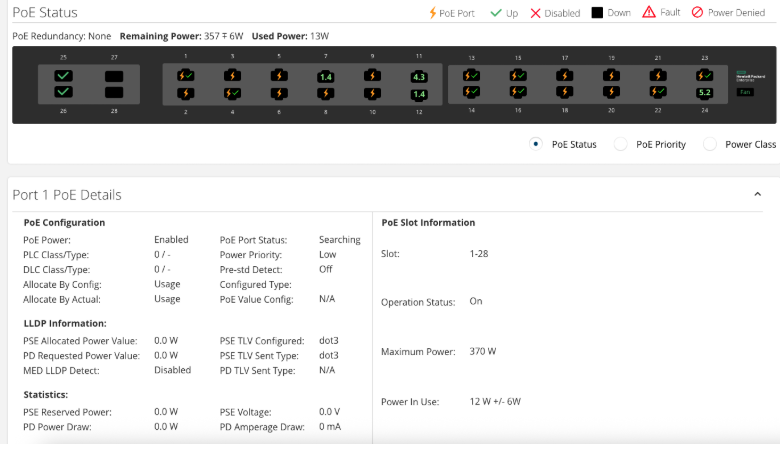
In the user’s deployment, the device is powered via PoE, eliminating separate power cables and simplifying installation across network switches. Power consumption was observed at around 1.4W, which is consistent with low-power always-on IoT nodes.
Where WIZnet Fits
The system uses the WIZnet W5500 Ethernet controller as the core network interface.
- It provides hardware TCP/IP offload, so the ESP32-S3 does not need to run a full software networking stack.
- Communication with the MCU is handled over SPI, minimizing pin usage and integration complexity.
- It enables stable wired communication, which is critical for continuous BLE data streaming.
In this project, W5500 acts as the transport layer bridge between BLE and Home Assistant:
- BLE → processed by ESP32-S3
- Ethernet → handled by W5500
- Data delivered reliably to Home Assistant
This is especially effective in environments with:
- Multiple access points (e.g., UniFi setups)
- Zigbee coordinators and dense RF traffic
- Wi-Fi congestion or interference
By offloading networking and using wired Ethernet, the system avoids packet loss and latency spikes typical of wireless setups.
Implementation Notes
The original post does not include source code, but the configuration follows the standard ESPHome workflow for W5500-based Ethernet devices.
From the observed behavior:
- The device is flashed via ESPHome build system
- Ethernet is used instead of Wi-Fi, which can cause:
- ESPHome showing the device as “offline” (no native API over Wi-Fi)
- Logs not being available unless explicitly configured over Ethernet
- In Home Assistant:
- The device is manually added via integration
- It appears as a Bluetooth proxy node
Additionally, the user observed multiple devices in network topology views. This is likely due to how Ethernet interfaces and BLE proxy services are represented, rather than indicating multiple MCUs. There is no verified evidence that two ESP32-S3 chips are used in this hardware configuration.
Practical Tips / Pitfalls
- Verify SPI pin mapping carefully; incorrect wiring prevents Ethernet initialization.
- If ESPHome shows offline status, check:
- Whether API access is enabled over Ethernet
- Router/firewall rules blocking local traffic
- PoE requires either:
- A compatible splitter, or
- Native PoE hardware support
- Always confirm Ethernet link status (PHY LEDs) before debugging firmware.
- BLE coverage depends heavily on antenna placement, not Ethernet quality.
- In dense RF environments, Ethernet significantly improves data reliability.
- Be aware that ESPHome logging over Ethernet may require additional configuration.
FAQ
Q: How is W5500 connected to the XIAO ESP32-S3?
A: It connects via SPI using MISO, MOSI, SCK, and CS pins, with optional interrupt/reset pins. This keeps wiring simple while enabling full Ethernet functionality.
Q: What role does W5500 play in this project?
A: It serves as the network transport layer, delivering BLE data collected by the ESP32-S3 to Home Assistant over a stable wired connection.
Q: Can beginners follow this setup?
A: Yes, if they are familiar with ESPHome and basic GPIO/SPI configuration.
Source
- Original community post (Naver Cafe): user deployment experience
- Seeed Studio Wiki: https://wiki.seeedstudio.com/esphome_xiao_w5500_ethernet_adapter/
- License: Not explicitly specified
Tags
#W5500 #ESP32S3 #ESPHome #HomeAssistant #BluetoothProxy #Ethernet #PoE #SmartHome #IoT #WIZnet
How to Build a PoE-Based Bluetooth Proxy with W5500 on XIAO ESP32-S3 for Home Assistant?
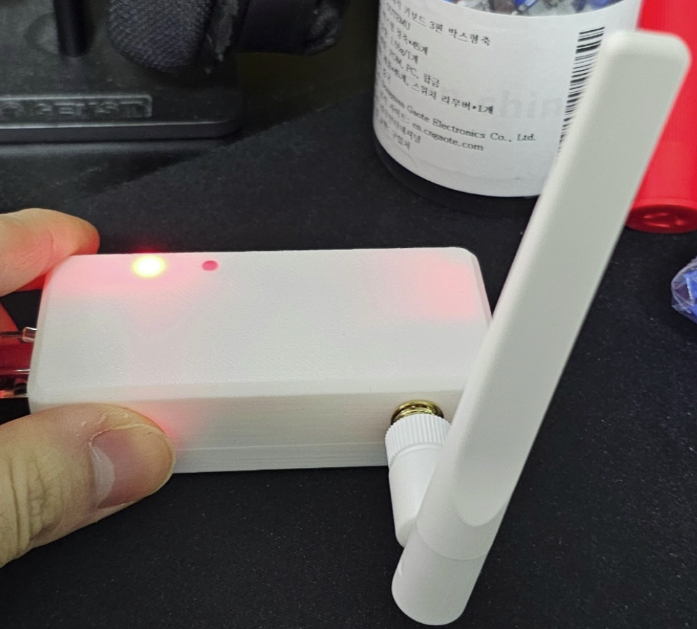
Summary
이 프로젝트는 Seeed Studio XIAO ESP32-S3와 WIZnet W5500 이더넷 어댑터를 결합하여 ESPHome 기반 Bluetooth Proxy를 Home Assistant에 연동하는 구성입니다. W5500은 유선 Ethernet 전송을 담당하며, ESP32-S3가 수집한 BLE 데이터를 안정적으로 전달하여 PoE 기반 스마트홈 환경에서 신뢰성 높은 통신을 제공합니다.
What the Project Does
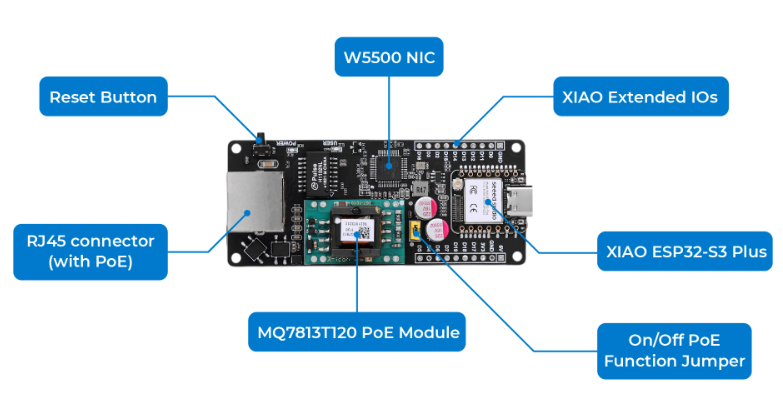
이 구성은 소형 임베디드 장치를 Bluetooth → Ethernet 게이트웨이로 사용하는 방식입니다.
- ESP32-S3가 주변 BLE 디바이스를 스캔
- ESPHome이 BLE 데이터를 처리
- Wi-Fi 대신 유선 Ethernet으로 전송
- Home Assistant가 이를 수신하여 통합
데이터 흐름은 다음과 같습니다:
BLE 센서 → ESP32-S3 (스캔/처리) → W5500 (이더넷 전송) → 네트워크 스위치(PoE) → Home Assistant
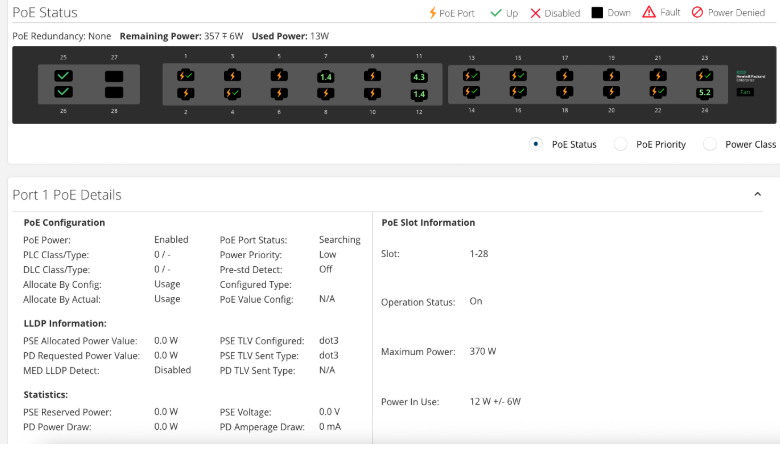
사용 사례에서는 PoE 환경에서 동작하며,
약 1.4W 수준의 전력 소비로 항상 켜두는 IoT 노드로 적합합니다.
또한 별도의 전원 케이블 없이 LAN 케이블만으로 동작하기 때문에 설치가 간결해집니다.
Where WIZnet Fits
이 시스템에서 핵심 네트워크 역할은 WIZnet W5500이 담당합니다.
- 하드웨어 TCP/IP 오프로드 제공
- ESP32-S3와 SPI 인터페이스로 연결
- Wi-Fi 없이도 안정적인 네트워크 통신 가능
구조적으로 보면:
- BLE 수집 → ESP32-S3
- 네트워크 전송 → W5500
즉, W5500은 BLE 데이터를 외부 시스템(Home Assistant)으로 전달하는 전송 계층입니다.
이 선택이 중요한 이유:
- Wi-Fi 간섭이 많은 환경에서도 안정적
- 지연시간 및 패킷 손실 최소화
- ESP32는 BLE 처리에 집중 가능
특히 다음과 같은 환경에서 효과적입니다:
- UniFi AP 등 다수의 무선 장비 존재
- Zigbee 코디네이터 등 RF 혼잡 환경
- 안정적인 Always-on 디바이스 필요
Implementation Notes
원문에는 코드가 포함되어 있지 않지만, 실제 구성은 ESPHome 기반 표준 흐름을 따릅니다.
관찰된 동작 기반 정리:
- ESPHome에서 펌웨어를 빌드하여 업로드
- Wi-Fi 대신 Ethernet 사용
- Home Assistant에서 수동으로 통합 추가
- Bluetooth Proxy 장치로 인식됨
특이 사항:
- ESPHome에서 장치가 offline으로 표시될 수 있음
- Ethernet 사용 시 API/로그 접근 방식 차이 때문
- 네트워크 토폴로지에서 여러 장치로 보이는 현상은
- Ethernet 인터페이스 및 BLE Proxy 구조 표현 방식 영향일 가능성이 큼
- 실제로 MCU가 2개라는 근거는 확인되지 않음
Practical Tips / Pitfalls
- SPI 핀 설정 오류 시 Ethernet이 초기화되지 않음
- ESPHome에서 offline 표시되면:
- API 설정 또는 네트워크 접근성 확인 필요
- PoE 사용 시:
- PoE 스플리터 또는 지원 보드 필요
- Ethernet 링크 LED로 물리 연결 상태 먼저 확인
- BLE 성능은 안테나 위치 영향을 크게 받음
- Wi-Fi 혼잡 환경에서는 Ethernet이 훨씬 안정적
- ESPHome 로그는 Ethernet 환경에서 별도 설정 필요
FAQ
Q: XIAO ESP32-S3와 어떻게 연결되나요?
A: SPI 인터페이스(MISO, MOSI, SCK, CS 등)를 통해 연결되며, 적은 핀으로 Ethernet 기능을 구현할 수 있습니다.
Q: 이 프로젝트에서 W5500의 역할은 무엇인가요?
A: ESP32-S3가 수집한 BLE 데이터를 Home Assistant로 전달하는 네트워크 전송 계층 역할을 합니다.
Q: 초보자도 따라할 수 있나요?
A: ESPHome 사용 경험과 기본적인 GPIO/SPI 이해가 있다면 충분히 구현 가능합니다.
Source
- Original community post (Naver Cafe): 사용자 설치 및 사용 경험
- Seeed Studio Wiki: https://wiki.seeedstudio.com/esphome_xiao_w5500_ethernet_adapter/
- License: Not specified
Tags
#W5500 #ESP32S3 #ESPHome #HomeAssistant #BluetoothProxy #Ethernet #PoE #SmartHome #IoT #WIZnet