



NET-CHECKER
현장 전용으로 다시 제작한 네트워크 점검용 장비
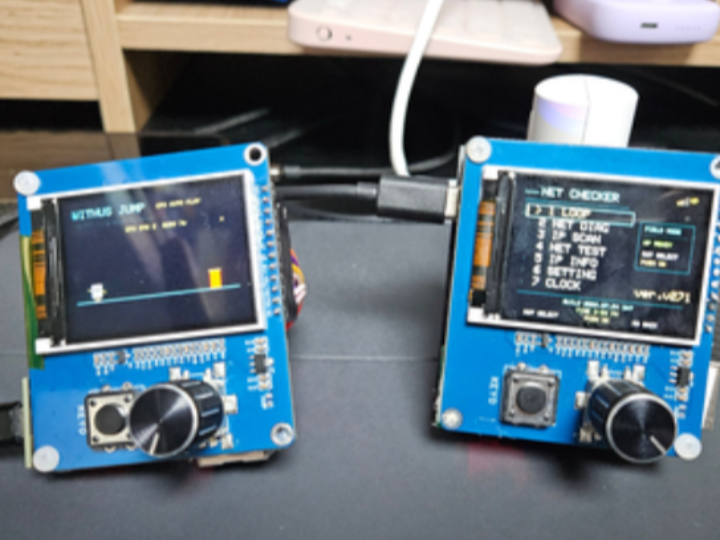
How to Build a Field-Ready ESP32 Network Checker with W5500?
Summary
This project is an improved version of the original ESP32 NET-CHECKER published on the WIZnet Maker platform. It redesigns the prototype into a more practical field diagnostic tool by improving hardware durability, modularity, and usability. The ESP32 handles the user interface and diagnostic logic, while the WIZnet W5500 provides reliable wired Ethernet connectivity for cable verification, IP diagnostics, and network connectivity testing.
What the Project Does
The original ESP32 NET-CHECKER was developed as a compact Ethernet diagnostic device for checking network connectivity in the field. This improved version focuses on transforming the prototype into a practical tool that technicians can carry and use during installation, maintenance, and troubleshooting.
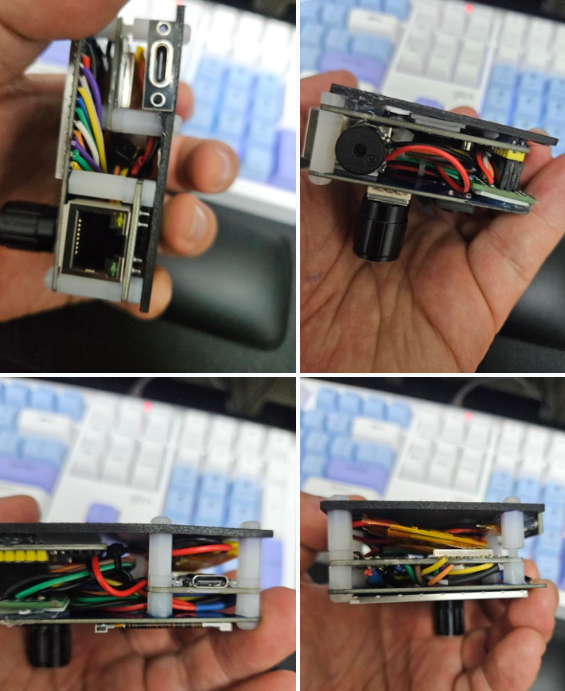
Several hardware improvements were made to increase durability and serviceability. Internal wiring was reorganized into a layered structure, cable management was improved, and the design now keeps the USB-C connector accessible while preserving the rotary encoder and push-button interface. A buzzer provides audible feedback for network events, and space has been reserved for a future battery pack.
The software also continues to evolve with additional diagnostic capabilities, including:
- LOOP
- NET DIAG
- IP SCAN
- NET TEST
- IP INFO
- SETTINGS
- CLOCK
These functions allow users to quickly determine whether a network problem originates from the Ethernet cable, IP configuration, gateway, Internet connection, or the local network itself.
This project is an improved version of the original ESP32 NET-CHECKER published on the WIZnet Maker platform:
https://maker.wiznet.io/TheoIm/projects/%2D%2D%2D%2Desp32%2D%2D%2D%2Dnet%2Dchecker/
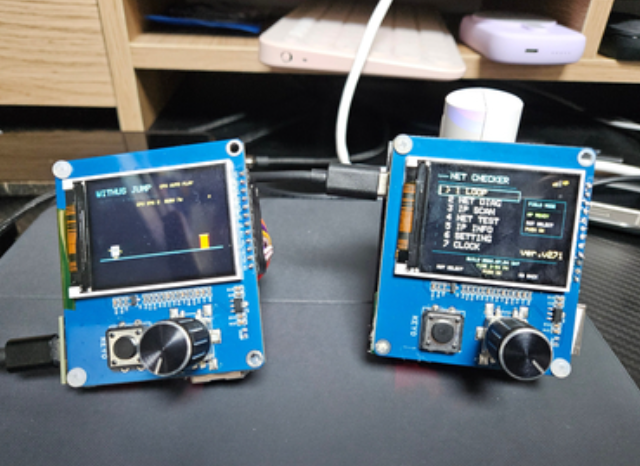
The improvements primarily target field usability, hardware reliability, and easier maintenance rather than changing the core diagnostic functionality.
Where WIZnet Fits
The WIZnet W5500 serves as the dedicated Ethernet interface for the diagnostic device.
Instead of permanently soldering the Ethernet module to the main board, the design intentionally keeps the W5500 module removable. RJ45 connectors experience repeated insertion and removal during field work, making them one of the most failure-prone components. By using a socketed module, technicians can replace only the W5500 module if mechanical damage occurs, avoiding the need to rebuild the entire device.
Another practical improvement is the planned use of a CAT6 coupler between the field Ethernet cable and the W5500 module:
Field cable → CAT6 coupler → Short patch cable → NET-CHECKER
This configuration shifts most mechanical stress to the inexpensive coupler rather than the W5500's RJ45 connector, reducing wear on the diagnostic device itself.
The W5500 is well suited to this application because its hardware TCP/IP offload engine reduces networking overhead on the ESP32 while providing stable wired Ethernet communication. For field diagnostics, deterministic Ethernet connectivity is often preferable to Wi-Fi when verifying cable integrity, DHCP behavior, and network availability.
Implementation Notes
The available project description does not include the source code, so the implementation cannot be verified at the code level.
Based on the published project description, the hardware and firmware improvements include:
- Replaceable W5500 Ethernet module for simplified maintenance.
- Audible LAN connect/disconnect notifications using an onboard buzzer.
- Real-time LAN status icon updates.
- Automatic switching between Ethernet and Wi-Fi information displays.
- Five configurable Static IP profiles for different deployment environments.
- AP credential recovery without deleting stored Wi-Fi credentials or Static IP profiles.
- Reserved internal space for a future battery-powered version.
- Planned improvements to power stability by adding additional decoupling capacitors to the W5500 3.3 V supply.
Because the source repository is not available, no verified code snippets can be included.
Practical Tips / Pitfalls
- Use a replaceable W5500 module if the Ethernet connector will experience frequent insertion cycles.
- Protect the RJ45 connector with an inexpensive CAT6 coupler to reduce mechanical wear.
- Keep multiple Static IP profiles for customer sites using different subnet configurations.
- Provide both visual and audible link-status notifications for technicians working away from the display.
- Ensure adequate 3.3 V power decoupling for the W5500, particularly in battery-powered designs.
- Validate Ethernet link status after cable reconnection to avoid stale network information being displayed.
FAQ
Why use the W5500 for this project?
The W5500 provides reliable wired Ethernet communication with hardware TCP/IP offloading, allowing the ESP32 to focus on user interface and diagnostic functions while maintaining stable network connectivity.
How is the W5500 connected to the ESP32?
The W5500 communicates with the ESP32 over an SPI interface. The removable module design allows damaged Ethernet hardware to be replaced without rebuilding the entire device.
What role does the W5500 play in this network checker?
It provides the wired Ethernet interface used for cable detection, IP acquisition, connectivity testing, and other network diagnostic functions performed by the device.
Can beginners build this project?
Basic experience with ESP32 development and SPI peripherals is recommended. Familiarity with Ethernet networking concepts such as DHCP, Static IP, and gateway configuration will make the project easier to understand.
Why use Ethernet instead of Wi-Fi for network diagnostics?
Ethernet provides a direct physical connection to the network infrastructure, making it much more suitable for verifying cable integrity, switch connectivity, DHCP operation, and wired network faults that cannot be accurately diagnosed over Wi-Fi.
Source
Improved Project
- Naver Blog: "현장 전용으로 다시 제작한 ESP32 네트워크 점검 장비 NET-CHECKER"
Original Project
- WIZnet Maker: ESP32 NET-CHECKER
https://maker.wiznet.io/TheoIm/projects/%2D%2D%2D%2Desp32%2D%2D%2D%2Dnet%2Dchecker/
Tags
#W5500 #ESP32 #Ethernet #NetworkDiagnostics #NETCHECKER #FieldService #IndustrialMaintenance #EmbeddedSystems