


Tiggy_Wifi_Controller
Open-source ESP32-S3 6-axis CNC motion controller. WiFi or W5500 Ethernet auto-detected. LinuxCNC, GRBL, Mach3 support. TCP+UDP real-time protocol.

WIZnet - W5500
x 1


platformio - PlatformIO Core
x 1

LinuxCNC - LinuxCNC
x 1
Arduino - Arduino IDE
x 1
📌 개요
Tiggy WiFi CNC 모션 컨트롤러는 기존 병렬 포트(Parallel Port) 방식의 CNC 드라이버를 대체하는 오픈소스 ESP32-S3 기반 6축 CNC 모션 컨트롤러 펌웨어입니다. WiFi 또는 WIZnet W5500 유선 이더넷으로 연결하며, 연결 방식은 자동으로 감지됩니다. LinuxCNC, GRBL 호환 G코드 센더, Mach3 플러그인(별도 구매)을 지원합니다. 6축 전체 기능을 무료 오픈소스로 제공하며, 별도 소프트웨어 설치 없이 브라우저 기반 Web Flasher로 즉시 플래시할 수 있습니다.
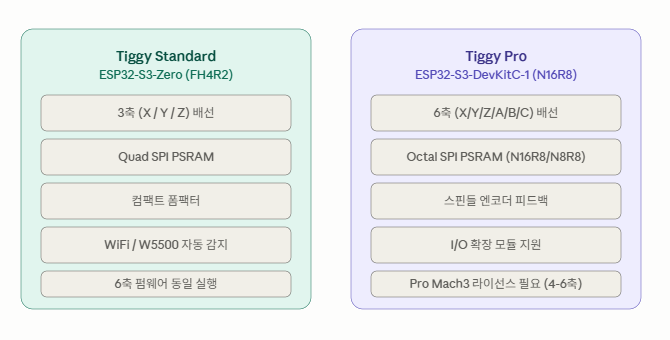
📌 지원 보드 비교
📌 주요 기능
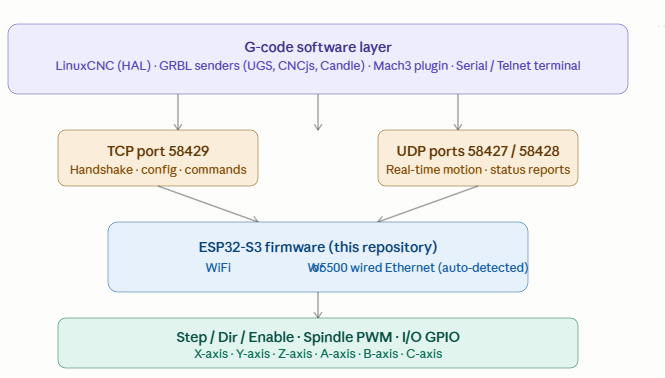
W5500 이더넷 + WiFi 자동 감지 W5500 유선 이더넷과 WiFi를 모두 지원하며, W5500 모듈이 연결되면 자동으로 유선 이더넷이 우선 사용됩니다. CNC 환경에서는 스테퍼 드라이버, VFD, 스핀들 모터에서 발생하는 전자기 간섭(EMI)으로 인해 WiFi가 불안정해질 수 있습니다. W5500 유선 이더넷은 이런 환경에서도 실시간 모션 패킷을 안정적으로 전송합니다.
6축 완전 무료 지원 X, Y, Z, A, B, C 6축 독립 스텝/방향 제어를 모두 무료로 제공합니다. LinuxCNC, GRBL 호환 센더에서는 6축 전체가 무료입니다. Mach3 플러그인에서는 4~6축 사용 시 Pro 라이선스가 필요합니다.
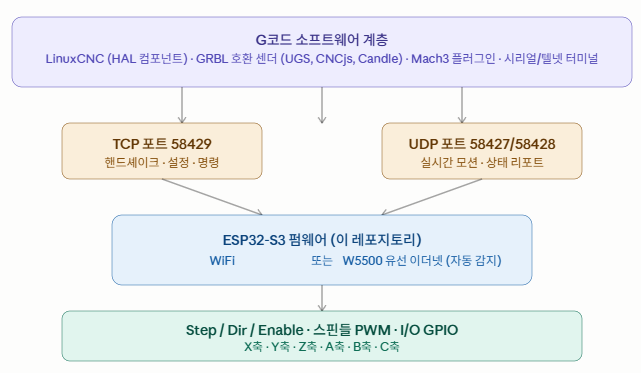
실시간 이중 프로토콜 (TCP + UDP) TCP 포트 58429(핸드셰이크, 설정, 명령)와 UDP 포트 58427/58428(실시간 모션 패킷, 상태 리포트)을 동시에 사용합니다. 신뢰성과 저지연을 동시에 확보하는 설계입니다.
스핀들 엔코더 피드백 스핀들 엔코더 피드백을 지원하여 나사 절삭(G33/G76)과 CSS(G96, 일정 표면 속도) 기능을 사용할 수 있습니다. 스핀들 PWM, 쿨런트(플러드/미스트), 차지 펌프 출력도 지원합니다.
브라우저 Web Flasher Chrome 또는 Edge에서 Web Flasher 페이지를 열고 USB 연결 후 보드를 선택하면 원클릭으로 플래시합니다. 별도 소프트웨어 설치가 필요 없습니다.
📌 시스템 아키텍처
📌 하드웨어 구성
| 보드 | MCU | 지원 축 | 특징 |
|---|---|---|---|
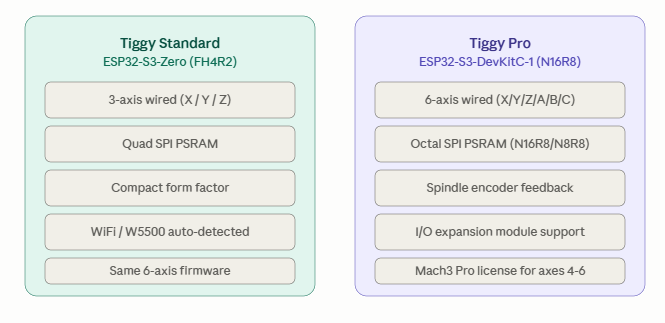
| Tiggy Standard | ESP32-S3-Zero (FH4R2) | 3축 (X/Y/Z) | 컴팩트, Quad SPI PSRAM |
| Tiggy Pro (Octal) | ESP32-S3-DevKitC-1 (N16R8/N8R8) | 6축 | Octal SPI PSRAM, I/O 제한 |
| Tiggy Pro (Quad) | ESP32-S3-DevKitC-1 (N8/N8R2) | 6축 | Quad SPI PSRAM, I/O 풍부 |
| Classic | ESP32-WROOM-32 | 6축 (I/O 제한) | 레거시 지원 |
모든 보드는 동일한 6축 펌웨어를 실행합니다. "지원 축"은 보드에 물리적으로 배선된 스텝/방향 GPIO 쌍의 수를 의미하며, 펌웨어 자체는 항상 6축을 지원합니다.
📌 빠른 시작
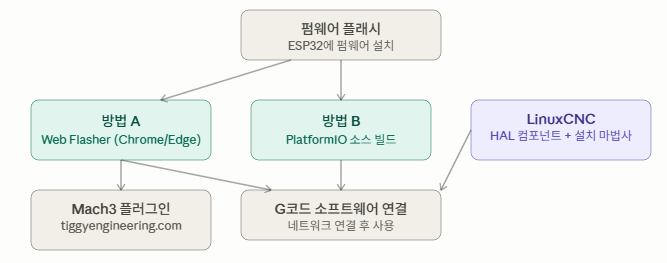
Web Flasher (가장 간단):
- Chrome 또는 Edge에서 https://michaelgaylor.github.io/Tiggy_Wifi_Controller/ 열기
- USB로 ESP32 연결 후 보드 선택
- Flash 클릭 — 별도 소프트웨어 설치 불필요
PlatformIO 빌드:
cd firmware
pio run -e esp32s3-devkitc -t upload    # Tiggy Pro (6축)
pio run -e esp32s3-zero -t upload       # Tiggy Standard (3축)
LinuxCNC 설치:
tar xzf Tiggy-LinuxCNC.tar.gz
cd linuxcnc-package
chmod +x install.sh
./install.sh
Mach3 설치:
Tiggy.dll과*.pinmap을C:\Mach3\PlugIns\에 복사M62-M65.m1s를C:\Mach3\macros\Mach3Mill\에 복사- Config > Select Motion Device > Tiggy Motion Controller
📌 WIZnet W5500 칩의 역할
사용 칩 모델명: W5500
Tiggy WiFi 컨트롤러에서 W5500은 WiFi와 함께 제공되는 선택적 유선 이더넷 인터페이스입니다. W5500 모듈이 연결되면 자동으로 감지되어 WiFi보다 우선적으로 사용됩니다.
CNC 환경은 스테퍼 드라이버, 스핀들 모터, VFD에서 강한 전자기 간섭이 발생합니다. 이 간섭이 2.4GHz WiFi 신호를 방해하면 실시간 모션 패킷이 유실될 수 있습니다. 특히 G33/G76 나사 절삭처럼 스핀들 RPM과 축 이동을 정밀하게 동기화해야 하는 작업에서 패킷 손실이 발생하면 공작물이 망가질 수 있습니다.
W5500의 하드웨어 TCP/IP 스택은 이런 노이즈 환경에서도 안정적으로 동작합니다. 하드웨어 레벨에서 TCP/IP를 처리하므로 ESP32 CPU 부하도 줄어들어, 실시간 스텝 생성과 네트워크 통신을 동시에 안정적으로 수행할 수 있습니다.
📌 시장 및 활용 가치
DIY CNC 메이커, 홈 머시닝 작업장, 소규모 제조업체, 레거시 Mach3 사용자의 병렬 포트 대체 수요가 핵심 시장입니다. LinuxCNC와 GRBL 센더에서 6축 전체가 완전 무료이며, Mach3에서도 3축까지는 무료 플러그인을 제공합니다. 오픈소스 펌웨어와 상업 플러그인을 결합한 구조로 지속 가능한 커뮤니티 프로젝트를 운영합니다.
📌 요약
Tiggy WiFi CNC 모션 컨트롤러는 ESP32-S3와 WIZnet W5500 유선 이더넷(자동 감지)을 활용해 6축 CNC 병렬 포트를 대체하는 오픈소스 펌웨어입니다. LinuxCNC HAL, GRBL 호환, Mach3 플러그인을 지원하며, TCP+UDP 이중 프로토콜로 실시간 모션 패킷을 전송합니다. 브라우저 Web Flasher로 즉시 시작 가능하며, EMI가 많은 CNC 환경에서 W5500이 WiFi보다 훨씬 안정적인 연결을 보장합니다. MIT 라이선스.
📌 FAQ
Q1. W5500과 WiFi 중 어떤 것이 우선 사용되나요? W5500 모듈이 연결되어 있으면 자동으로 유선 이더넷이 우선 사용됩니다. 별도 설정이 필요 없습니다.
Q2. 6축 전체를 무료로 사용할 수 있나요? 네. LinuxCNC, GRBL 센더, 시리얼/텔넷 등 모든 오픈소스 경로에서 6축 전체가 무료입니다. Mach3 플러그인에서만 4~6축에 Pro 라이선스가 필요합니다.
Q3. TCP와 UDP를 동시에 사용하는 이유는? TCP는 핸드셰이크, 설정, 명령의 신뢰성 있는 전송에 사용하고, UDP는 실시간 모션 패킷과 상태 리포트의 저지연 전송에 사용합니다. 두 프로토콜의 장점을 조합한 설계입니다.
Q4. Web Flasher는 어떤 브라우저를 지원하나요? Chrome과 Edge만 지원합니다. WebSerial API가 필요하며, Firefox는 현재 WebSerial을 지원하지 않습니다.
Q5. 스핀들 엔코더 피드백은 무엇에 사용하나요? 나사 절삭(G33, G76 싱크로나이즈드 탭핑)과 CSS(G96, 일정 표면 속도) 기능에 사용합니다. 선반이나 밀링 머신에서 스핀들 RPM과 축 이동을 동기화합니다.
Q6. CNC 환경에서 WiFi 대신 W5500을 써야 하는 이유는? 스테퍼 드라이버, VFD, 스핀들 모터에서 발생하는 EMI가 2.4GHz WiFi를 간섭합니다. 나사 절삭처럼 타이밍이 중요한 작업에서 패킷 손실이 공작물을 망가뜨릴 수 있습니다. W5500 유선 이더넷은 EMI에 면역이 있어 안정적입니다.
Q7. 어떤 G코드 소프트웨어와 호환되나요? LinuxCNC(HAL 컴포넌트), GRBL 호환 모든 G코드 센더(UGS, CNCjs, Candle 등), Mach3(플러그인)와 호환됩니다. 시리얼/텔넷 터미널로도 직접 G코드를 입력할 수 있습니다.
Q8. I/O 확장 모듈은 어떤 기능을 추가하나요? 펜던트 버튼과 릴레이 출력을 추가합니다. Mach3 Pro 라이선스에서 사용 가능합니다.
Q9. 자동 재연결은 어떻게 동작하나요? 연결이 끊기면 컨트롤러가 자동으로 재연결을 시도합니다. WiFi와 W5500 모두 적용됩니다.
Q10. Protocol Tester는 무엇인가요? Windows GUI 도구로, G코드 소프트웨어 없이 컨트롤러를 직접 테스트하고 설정할 수 있습니다. GitHub Releases에서 다운로드 가능합니다.
📌 참고 링크
- GitHub: https://github.com/MichaelGaylor/Tiggy_Wifi_Controller
- Web Flasher: https://michaelgaylor.github.io/Tiggy_Wifi_Controller/
- 사용자 매뉴얼: https://michaelgaylor.github.io/Tiggy_Wifi_Controller/plugin_manual.html
- 엔지니어링 레퍼런스: https://michaelgaylor.github.io/Tiggy_Wifi_Controller/engineering_reference.html
- Mach3 플러그인: https://www.tiggyengineering.com
📌 Overview
Tiggy WiFi CNC Motion Controller is an open-source ESP32-S3-based 6-axis CNC motion controller firmware that replaces legacy parallel port CNC drivers. It connects via WiFi or WIZnet W5500 wired Ethernet — auto-detected with no configuration needed. Compatible with LinuxCNC, GRBL-compatible G-code senders, and Mach3 plugin (sold separately). All 6 axes are fully free and open source. Flash firmware instantly via a browser-based Web Flasher
📌 Supported board comparison
📌 Key features
W5500 Ethernet + WiFi auto-detection Supports both W5500 wired Ethernet and WiFi. When a W5500 module is connected, wired Ethernet is automatically preferred — no configuration needed. In CNC environments, strong electromagnetic interference (EMI) from stepper drivers, VFDs, and spindle motors can disrupt WiFi. W5500 wired Ethernet delivers real-time motion packets reliably even in these conditions.
Full 6-axis support — completely free Independent step/direction control for all 6 axes (X, Y, Z, A, B, C) at no cost. All LinuxCNC and GRBL-compatible senders get full 6-axis support for free. A Pro license for the Mach3 plugin is only required for axes 4–6.
Real-time dual-protocol (TCP + UDP) TCP port 58429 handles handshake, configuration, and commands. UDP ports 58427/58428 handle real-time motion packets and status reports. This design captures the reliability of TCP and the low latency of UDP simultaneously.
Spindle encoder feedback Spindle encoder feedback enables threading (G33/G76) and CSS — Constant Surface Speed (G96). Also supports spindle PWM (CW/CCW), coolant (flood/mist), and charge pump outputs.
Browser Web Flasher Open the Web Flasher in Chrome or Edge, connect your ESP32 via USB, select your board, and click Flash — one click, no software installation required.
📌 System architecture
📌 Hardware
| Board | MCU | Wired axes | Notes |
|---|---|---|---|
| Tiggy Standard | ESP32-S3-Zero (FH4R2) | 3 (X/Y/Z) | Compact, Quad SPI PSRAM |
| Tiggy Pro (Octal) | ESP32-S3-DevKitC-1 (N16R8/N8R8) | 6 | Octal SPI PSRAM, limited I/O |
| Tiggy Pro (Quad) | ESP32-S3-DevKitC-1 (N8/N8R2) | 6 | Quad SPI PSRAM, more I/O |
| Classic | ESP32-WROOM-32 | 6 (limited I/O) | Legacy support |
All boards run the same 6-axis firmware. "Wired axes" refers to the number of step/dir GPIO pairs physically routed on the board — the firmware always supports 6 axes regardless of board.
📌 Quick start
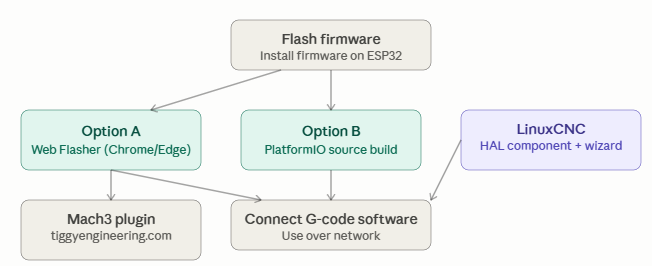
Web Flasher (easiest):
- Open https://michaelgaylor.github.io/Tiggy_Wifi_Controller/ in Chrome or Edge
- Connect your ESP32 via USB and select your board
- Click Flash — no software installation required
PlatformIO build:
cd firmware
pio run -e esp32s3-devkitc -t upload    # Tiggy Pro (6-axis)
pio run -e esp32s3-zero -t upload       # Tiggy Standard (3-axis)
LinuxCNC installation:
tar xzf Tiggy-LinuxCNC.tar.gz
cd linuxcnc-package
chmod +x install.sh
./install.sh
Mach3 installation:
- Copy
Tiggy.dlland*.pinmaptoC:\Mach3\PlugIns\ - Copy
M62-M65.m1stoC:\Mach3\macros\Mach3Mill\ - Config > Select Motion Device > Tiggy Motion Controller
📌 Role and Application of the WIZnet's Chip
Chip model: W5500
In the Tiggy WiFi Controller, W5500 is an optional wired Ethernet interface alongside WiFi. When a W5500 module is connected, it is auto-detected and used in preference to WiFi.
CNC environments generate strong electromagnetic interference from stepper drivers, spindle motors, and VFDs. This interference disrupts 2.4 GHz WiFi signals, causing real-time motion packets to drop. For operations like G33/G76 threading — which require precise synchronization of spindle RPM and axis movement — packet loss can directly ruin a workpiece.
The W5500 hardware TCP/IP stack operates reliably in these noisy environments. Because it processes TCP/IP in dedicated hardware, ESP32 CPU load is also reduced, allowing real-time step generation and network communication to run simultaneously without interference.
📌 Market and Application Value
Core markets include DIY CNC makers, home machining shops, small manufacturers, and legacy Mach3 users replacing parallel port drivers. LinuxCNC and GRBL senders support all 6 axes completely free. The Mach3 plugin provides 3-axis support for free, with a Pro license unlocking axes 4–6. The combination of open-source firmware and a commercial plugin creates a sustainable community-driven project.
📌 Summary
Tiggy WiFi CNC Motion Controller is an open-source firmware that replaces 6-axis CNC parallel ports using ESP32-S3 and WIZnet W5500 wired Ethernet (auto-detected). It supports LinuxCNC HAL, GRBL-compatible senders, and Mach3 plugin via a dual TCP+UDP real-time motion protocol. Flash instantly via browser Web Flasher. In EMI-heavy CNC environments, W5500 delivers far more stable connectivity than WiFi — a critical advantage for precision threading and synchronized motion. MIT licensed.
📌 FAQ
Q1. Which takes priority — W5500 or WiFi? If a W5500 module is connected, wired Ethernet is automatically preferred. No configuration needed.
Q2. Is full 6-axis support really free? Yes. All 6 axes are free for LinuxCNC, GRBL senders, and serial/telnet. Only the Mach3 plugin requires a Pro license for axes 4–6.
Q3. Why use both TCP and UDP at the same time? TCP handles reliable delivery for handshake, configuration, and commands. UDP handles low-latency real-time motion packets and status reports — combining the strengths of both protocols.
Q4. Which browsers does the Web Flasher support? Chrome and Edge only. The WebSerial API is required — Firefox does not currently support WebSerial.
Q5. What is spindle encoder feedback used for? Threading (G33/G76 synchronized tapping) and CSS — G96 Constant Surface Speed. It synchronizes spindle RPM with axis movement on lathes and milling machines.
Q6. Why use W5500 instead of WiFi in a CNC environment? EMI from stepper drivers, VFDs, and spindle motors interferes with 2.4 GHz WiFi. In timing-critical operations like threading, packet loss can ruin a workpiece. W5500 wired Ethernet is immune to EMI and delivers consistent real-time packet delivery.
Q7. Which G-code software is compatible? LinuxCNC (HAL component), any GRBL-compatible G-code sender (UGS, CNCjs, Candle, etc.), and Mach3 (plugin). Direct G-code input is also available via serial or telnet terminal.
Q8. What does the I/O expansion module add? Pendant buttons and relay outputs. Available with the Mach3 Pro license.
Q9. How does auto-reconnection work? On connection loss, the controller automatically attempts to reconnect. Applies to both WiFi and W5500.
Q10. What is the Protocol Tester? A Windows GUI tool for testing and configuring the controller directly without G-code software. Download from GitHub Releases.
📌 Reference links
- GitHub: https://github.com/MichaelGaylor/Tiggy_Wifi_Controller
- Web Flasher: https://michaelgaylor.github.io/Tiggy_Wifi_Controller/
- User manual: https://michaelgaylor.github.io/Tiggy_Wifi_Controller/plugin_manual.html
- Engineering reference: https://michaelgaylor.github.io/Tiggy_Wifi_Controller/engineering_reference.html
- Mach3 plugin: https://www.tiggyengineering.com