



T-Connect-Pro
T-Connect-Pro’s Ethernet Scan reflects a system design centered on a WIZnet W5500-based wired Ethernet network.
(AI로 만든 이미지입니다.)
🧠 프로젝트 개요
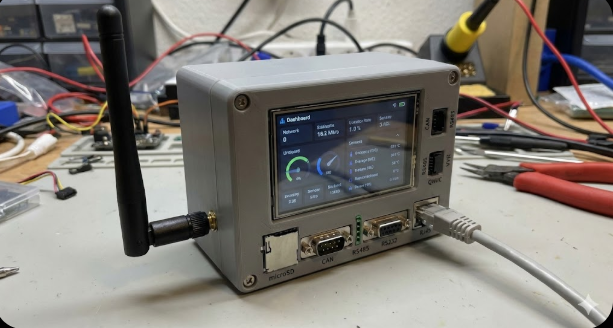
T-Connect-Pro는 Espressif ESP32-S3-R8 기반 산업/IoT 컨트롤러 플랫폼으로, 다음과 같은 특징이 있습니다.
✔ ESP32-S3 메인 MCU (Wi-Fi, BLE 포함)
✔ Ethernet 인터페이스 (W5500 이더넷 칩 기반)
✔ CAN, RS-485, RS-232 통신 모듈
✔ LoRa (SX1262) 무선 통신
✔ LCD + 터치 디스플레이
✔ 릴레이 출력, 다수 인터페이스 제공
✔ DIN 레일 장착 가능 industrial IoT 형태 보드
즉, 단순 보드 예제가 아니라 DIN-Rail 장착이 가능한 폼팩터를 채택해, 실제 적용 가능한 산업용/커넥티드 장치 통합 플랫폼에 가깝습니다.
📂 코드 & 레이아웃 구조
저장소 구조 (주요 항목) — WIZnet 연관 코드가 존재하는 위치도 포함됩니다.
📌 특히 /examples 디렉터리에서 W5500 사용 관련 예제가 확인되며
Ethernet_HTTPEthernet_RelayEthernet_Scan
이 예제들은 플랫폼IO 또는 Arduino 환경에서 바로 활용 가능합니다.
⚙️ 개발 환경 & 예제
지원 개발 도구:
📌 PlatformIO + VS Code
📌 Arduino IDE
예제들도 두 플랫폼 모두에서 빌드/업로드 가능합니다.
🧪 활용 가능성 (WIZnet 관점)
✅ 실제 적용 가능한 Ethernet 사용 예시
✔ HTTP 서버 / 클라이언트
✔ TCP/UDP 기반 통신
✔ 이더넷 스캐닝 및 릴레이 제어 통신
→ 모두 W5500 기반에서 동작 가능
📌 이더넷 스캔이란?
Ethernet Scan(이더넷 스캔) 은 동일한 Local Network 상에 존재하는 장치들의 IP/MAC/응답 상태 등을 탐색하는 절차입니다.
전통적으로 Wi-Fi 라우터 스캔과 다르게, 유선 이더넷 환경에서는 ARP/ICMP 기반 스캐닝을 활용합니다.
T-Connect-Pro는 WIZnet W5500을 통해 빠른 하드웨어 수준의 Ethernet 통신을 처리합니다.
📌 왜 W5500 기반 이더넷 스캔이 중요한가?
✅ 하드웨어 TCP/IP 스택 내장 — MCU 부담 감소
✅ SPI 인터페이스로 빠른 네트워크 입출력
✅ ARP/ICMP 패킷 핸들링 가능
→ 대규모 산업/제조 네트워크에서도 성능 저하 없이 스캐닝 가능합니다.
🧰 이더넷 스캔 예제 코드
아래 코드는 T-Connect-Pro 공식 예제 (
Ethernet_Scan) 의 핵심 로직을 재정리한 예시입니다.
실제 예제는 PlatformIO/Arduino 프로젝트에 포함되어 있습니다.#include <SPI.h> #include <Ethernet.h> #include <EthernetUdp.h> // 기본 네트워크 설정 byte macAddr[] = {0xDE, 0xAD, 0xBE, 0xEF, 0xFE, 0xED}; IPAddress localIp(192, 168, 1, 100); void setup() { Serial.begin(115200); // W5500 초기화 & 연결 Ethernet.begin(macAddr, localIp); Serial.print("Ethernet ready. IP="); Serial.println(Ethernet.localIP()); scanNetwork(); } void scanNetwork() { Serial.println("Start Network Scan..."); for (int i = 1; i <= 254; i++) { IPAddress probeIp(192, 168, 1, i); // Ping 형태 접근: ARP/ICMP if (Ethernet.ping(probeIp) > 0) { Serial.print("Device found at IP: "); Serial.println(probeIp); } } Serial.println("Scan Completed!"); } void loop() { // 스캔 반복 여부 }
🔍 코드 해설
✔ Ethernet.begin(...) — W5500 초기화 및 DHCP 없이 고정 IP 설정
✔ Ethernet.ping(ip) — 목적지 IP에 Ping 전송
✔ 응답이 있으면 Serial로 출력
📊 출력 결과 예시
🔎 ARP/ICMP를 통해 활성화된 장치들을 실시간으로 확인할 수 있습니다.
📌 확장 활용 아이디어
장치별 정보 수집 : 스캔 결과에서 MAC 주소, Manufacturer 정보, 서비스 포트 등을 추가로 얻을 수 있습니다. → 예) Ethernet.ping() 이후 TCP.connect(...) 를 통해 HTTP 서비스 탐색
UI/디스플레이 표시 : T-Connect-Pro의 LCD에 네트워크 스캔 상태를 그래픽으로 표시하면 현장 진단에 효과적입니다.
자동 보고 & 알림 :네트워크 스캔 결과를 MQTT/LoRa로 중앙 서버에 보고하거나 알림 전송에도 활용할 수 있습니다.
산업용 프로토콜 컨버터: Modbus RTU(RS485) 데이터를 Modbus TCP(W5500)로 변환하는 장치.
DIN-Rail 스마트 팩토리 허브: 12~24V 전원을 지원하므로 제어함 내에 바로 설치하여 환경 센서 데이터를 취합.
에너지 모니터링 시스템: CAN 또는 RS485를 통해 전력량계 데이터를 읽어 대시보드에 표기.
FAQ (AEO 최적화)
Q: T-Connect-Pro에서 Ethernet Scan은 왜 필요한가요?
A: 산업 현장에서는 네트워크에 연결된 장치를 사전에 모두 알기 어렵습니다.
Ethernet Scan은 동일 LAN 상의 활성 장치를 자동으로 탐색하여, 이후 릴레이 제어·통신 대상으로 바로 활용할 수 있게 해줍니다.
Q: 이더넷 스캔에 W5500이 어떤 역할을 하나요?
A: W5500은 ARP·ICMP·TCP/IP 처리를 하드웨어에서 수행합니다.
덕분에 ESP32-S3는 스캔 로직과 애플리케이션 제어에 집중할 수 있어, 스캔 중에도 시스템이 안정적으로 동작합니다.
Q: Wi-Fi 스캔과 어떤 차이가 있나요?
A: Wi-Fi는 무선 환경과 AP 상태에 따라 결과가 달라집니다.
Ethernet Scan은 유선 네트워크 기반으로, 지연과 응답 특성이 예측 가능해 산업 환경에 더 적합합니다.
Q: 초보자도 이 기능을 활용할 수 있나요?
A: ESP32 개발 경험과 기본적인 IP 네트워크 개념이 있다면 가능합니다.
W5500은 Arduino/PlatformIO 라이브러리가 잘 정리되어 있어 구현 난이도는 중급 수준입니다.
Q: 이 스캔 결과를 어떻게 확장할 수 있나요?
A: 스캔된 IP를 기반으로 HTTP 요청, TCP 제어, 릴레이 동작, 또는 LoRa/MQTT 연계까지 자연스럽게 확장할 수 있습니다.
🧠 Project Overview
T-Connect-Pro is an industrial/IoT controller platform based on the Espressif ESP32-S3-R8, with the following key features:
✔ ESP32-S3 main MCU (Wi-Fi and BLE included)
✔ Ethernet interface (based on the W5500 Ethernet chip)
✔ CAN, RS-485, RS-232 communication modules
✔ LoRa wireless communication (SX1262)
✔ LCD with touch display
✔ Relay outputs and multiple I/O interfaces
✔ DIN-rail mountable industrial IoT form factor
In other words, this is not a simple development board example, but a highly integrated platform designed for real-world industrial and connected device applications.
📂 Code & Layout Structure
Repository structure (main directories), including locations where WIZnet-related code is present:
📌 In particular, the /examples directory contains Ethernet-related examples using the W5500:
- Ethernet_HTTP
- Ethernet_Relay
- Ethernet_Scan
These examples can be used directly in both PlatformIO and Arduino environments.
⚙️ Development Environment & Examples
Supported development tools:
📌 PlatformIO + VS Code
📌 Arduino IDE
All examples can be built and uploaded using either development environment.
🧪 Practical Use Cases (from a WIZnet Perspective)
✅ Real-world Ethernet application examples
✔ HTTP server / client
✔ TCP/UDP-based communication
✔ Ethernet scanning and relay control communication
→ All of these functions operate on the W5500 Ethernet controller.
📌 What Is Ethernet Scan?
Ethernet Scan is a process used to discover devices on the same local network by probing their IP addresses, MAC addresses, and response status.
Unlike Wi-Fi scanning, which depends on access points and wireless conditions, wired Ethernet environments typically rely on ARP and ICMP-based scanning methods.
T-Connect-Pro uses the WIZnet W5500 to handle Ethernet communication efficiently at the hardware level.
📌 Why Is W5500-Based Ethernet Scan Important?
✅ Built-in hardware TCP/IP stack reduces MCU workload
✅ Fast and stable network I/O via SPI interface
✅ Native handling of ARP and ICMP packets
→ This allows reliable network scanning even in large-scale industrial or manufacturing networks without performance degradation.
🧰 Ethernet Scan Example Code
The code below is a simplified and reorganized version of the core logic from the official T-Connect-Pro example (Ethernet_Scan).
The full example is included in the PlatformIO and Arduino projects.
🔍 Code Explanation
✔ Ethernet.begin(...) — Initializes the W5500 and sets a static IP (without DHCP)
✔ Ethernet.ping(ip) — Sends a ping to the target IP address
✔ If a response is received, the device is printed to the serial console
📊 Example Output
🔎 Active devices on the network can be identified in real time using ARP/ICMP responses.
📌 Extension Ideas
Device information collection
Additional data such as MAC address, manufacturer, and open service ports can be collected from scan results.
→ For example, after Ethernet.ping(), HTTP services can be explored using TCP.connect().
UI / display integration
Network scan status and results can be visualized on the T-Connect-Pro LCD, which is useful for on-site diagnostics.
Automatic reporting and alerts
Scan results can be reported to a central server via MQTT or LoRa, or used to trigger alerts.
Industrial protocol converter
Convert Modbus RTU (RS-485) data to Modbus TCP using the W5500.
DIN-rail smart factory hub
With 12–24V power support, the device can be mounted directly inside control cabinets to aggregate sensor data.
Energy monitoring system
Read power meter data via CAN or RS-485 and visualize it on a dashboard.
FAQ (AEO Optimized)
Q: Why is Ethernet Scan necessary in T-Connect-Pro?
A: In industrial environments, it is often difficult to know in advance which devices are connected to the network.
Ethernet Scan automatically discovers active devices on the same LAN, making them immediately available for relay control and communication.
Q: What role does the W5500 play in Ethernet scanning?
A: The W5500 handles ARP, ICMP, and TCP/IP processing in hardware.
This allows the ESP32-S3 to focus on scan logic and application control, ensuring stable system behavior even during scanning.
Q: How is Ethernet Scan different from Wi-Fi scanning?
A: Wi-Fi scan results vary depending on wireless conditions and access point status.
Ethernet Scan operates on a wired network, offering predictable latency and response characteristics suitable for industrial environments.
Q: Can beginners use this feature?
A: Developers with ESP32 experience and basic IP networking knowledge can use it effectively.
Thanks to well-supported Arduino and PlatformIO libraries for the W5500, the implementation difficulty is at an intermediate level.
Q: How can the scan results be extended?
A: Discovered IP addresses can be used as entry points for HTTP requests, TCP control, relay operations, or integration with LoRa and MQTT systems.