



souliss
Build a serverless, distributed smart home using WIZnet W5500 and Souliss. Achieve high reliability with a "Network is the Brain" architecture. No cloud needed!
1. 프로젝트 개요 (Summary)
이 프로젝트는 Arduino 기반의 Souliss 프레임워크와 WIZnet W5500 이더넷 컨트롤러를 사용하여, 중앙 서버나 클라우드 없이도 완벽하게 동작하는 분산형 스마트홈 네트워크 구축 방법을 소개합니다.
일반적인 IoT 시스템이 중앙 서버에 의존하는 것과 달리, Souliss는 각 장치가 독립적인 지능을 갖는 아키텍처를 사용하여 높은 신뢰성과 보안성을 제공합니다.
2. Souliss?
Souliss는 클라우드 의존성을 제거하고 기기 간 직접 소통을 지향합니다.
- Nodes (노드): 네트워크의 구성 단위입니다. 외부와 소통하는 Gateway와 실제 제어를 담당하는 Peer로 나뉩니다.
- Slots (슬롯): 조명 상태, 온도값 등 실시간 데이터를 저장하는 메모리 공간입니다.
- Typicals (티피컬): 하드웨어의 동작 로직을 표준화한 모듈입니다. (예: T11-조명, T52-온도)
| 구분 | Typical | 기능 설명 |
|---|---|---|
| Lights | T11 | 기본적인 ON/OFF 조명 제어 |
| Motors | T21 | 커튼, 블라인드 등 모터 장치 제어 |
| Sensors | T52 / T53 | 온도 및 습도 데이터 처리 |
| RGB | T16 | RGB LED 스트립 색상 제어 |
3. 왜 WIZnet W5500인가? (Connectivity)
Souliss는 안정적인 통신을 위해 유선 Ethernet 연결을 강력히 권장하며, W5500은 최적의 파트너입니다.
- 하드웨어 TCP/IP 스택: MCU의 오버헤드를 줄여 소형 Arduino에서도 복잡한 네트워크 처리가 가능합니다.
- 안정적인 지연시간(Latency): 무선 간섭이 없어 스마트홈 제어 시 즉각적인 반응 속도를 보장합니다.
- vNet & MaCaco 최적화: Souliss의 고유 프로토콜 패킷을 손실 없이 전송합니다.
4. 사용자 인터페이스 (User Interfaces)
Souliss는 사용자가 기기를 제어할 수 있는 다양한 통로를 제공합니다.
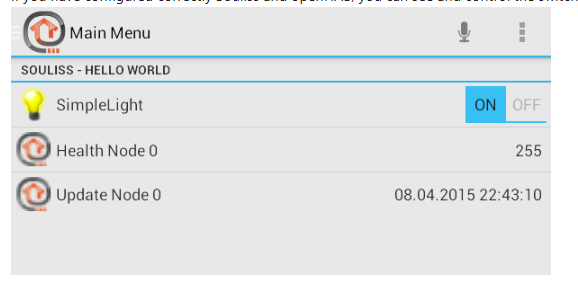
- SoulissApp (Android): 설정 없이 Gateway만 찾으면 하드웨어의
Typical구성을 읽어 UI를 자동 생성합니다. (음성 제어 및 Tasker 연동 지원)
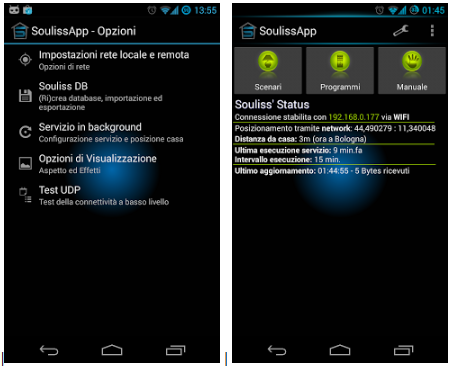
- Web Interfaces: W5500의 성능을 활용해 노드 내부에서 간단한 웹 페이지를 호스팅하거나 전용 웹 대시보드를 사용할 수 있습니다.
- Third-party Integration: openHAB이나 Home Assistant와 바인딩하여 타사 기기(Hue, Nest 등)와 통합 자동화를 구축할 수 있습니다.
5. 실전 구현 (Implementation Notes)
W5500 설정을 위해 souliss/conf/ethW5500.h 파일을 활용합니다.
[기본 예시 코드: T11 조명 제어]
#include "bconf/StandardArduino.h"
#include "conf/ethW5500.h"   // W5500 Ethernet 설정 활성화
#include "Souliss.h"

#define LIGHT_SLOT 0

void setup() {
    Initialize();

    // WIZnet W5500 고정 IP 설정
    Souliss_SetIPAddress({192,168,1,77}, {255,255,255,0}, {192,168,1,1});

    // 슬롯 0을 조명 장치(T11)로 설정
    Set_SimpleLight(LIGHT_SLOT);
}

void loop() {
    // Souliss 엔진 실행 및 하드웨어 8번 핀 제어
    Execute(8, LIGHT_SLOT);
}
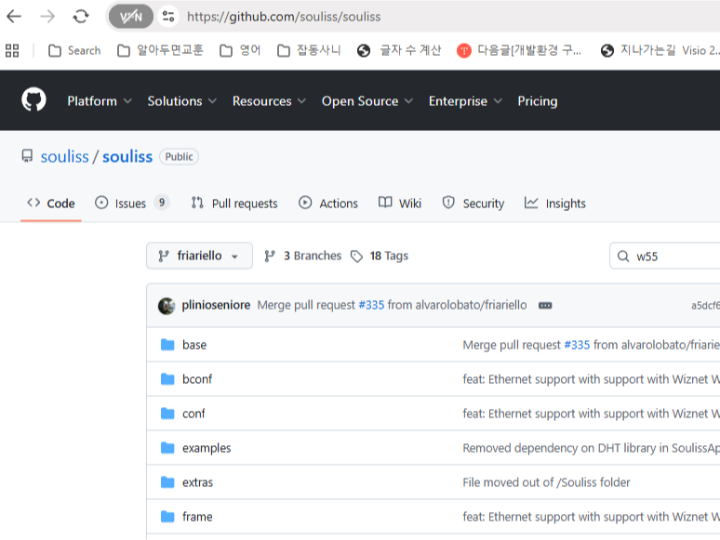
https://github.com/souliss/souliss/wiki/
6. Souliss 위키 주요 목차 (Main Contents)
Souliss 위키는 크게 개념 이해, 하드웨어 설정, 소프트웨어 개발, 인터페이스 연동으로 나뉩니다.
- Getting Started: Souliss의 철학 및 설치 가이드
- Concepts: Nodes, Slots, Typicals 등 핵심 아키텍처 설명
- Hardware Setup: 지원 보드 및 이더넷/무선 칩셋 설정법
- Typicals: 하드웨어 장치별 표준 로직 리스트
- User Interfaces: SoulissApp, 웹 인터페이스, openHAB 연동
- Advanced: 커스텀 프로토콜 개발 및 네트워크 최적화
7. 사용 프로토콜 (Protocols)
Souliss는 서로 다른 하드웨어 간의 원활한 통신을 위해 다층적인 가상 네트워크 구조를 사용합니다.
- vNet (Virtual Network): Souliss의 가장 핵심적인 통신 레이어입니다. 이더넷, Wi-Fi, RS485 등 서로 다른 물리적 매체를 하나로 묶어주는 역할을 합니다. 덕분에 사용자는 통신 방식에 상관없이 동일한 코드를 사용할 수 있습니다.
- MaCaco (Management and Control Communication): 노드 간에 상태 정보를 주고받기 위한 경량 프로토콜입니다. 장치의 상태(켜짐/꺼짐, 온도 등)를 동기화하는 데 최적화되어 있습니다.
- Supported Transports: * Ethernet: WIZnet W5100, W5200, W5500 (가장 안정적)
- Wireless: ESP8266, ESP32, nRF24L01 (2.4GHz 무선)
- USART/RS485: 유선 직렬 통신
8. vNet?
vNet은 OSI 7계층 모델의 네트워크 계층(Network Layer)과 유사한 역할을 합니다.
- 매체 독립성: 이더넷(WIZnet), Wi-Fi(ESP8266/32), RS485, nRF24L01 등 물리적 매체가 달라도 상위 애플리케이션 계층에서는 동일한 방식으로 데이터를 주고받을 수 있게 합니다.
- 통합 주소 체계: 각 장치는 물리적 주소(IP 등)와 별개로 vNet 주소를 가집니다.
8-1. vNet의 핵심 메커니즘 (Key Mechanisms)
① 주소 지정 (Addressing)
vNet은 2바이트(16비트) 주소 체계를 사용합니다.
- Subnet (상위 8비트): 네트워크의 논리적 그룹을 나눕니다.
- Device (하위 8비트): 해당 그룹 내의 개별 노드를 식별합니다.
- 이 주소 체계 덕분에 최대 65,535개의 노드를 가상 네트워크에 연결할 수 있습니다.
② 라우팅 및 브리징 (Routing & Bridging)
vNet의 가장 강력한 기능입니다.
- Gateway 역할: WIZnet W5500이 탑재된 노드가 이더넷과 무선(nRF24L01)을 동시에 가지고 있다면, 이 노드는 자동으로 브리지(Bridge) 역할을 수행합니다.
- 패킷 전달: 이더넷에서 들어온 제어 명령을 무선 노드로 전달하거나, 그 반대의 과정을 투명하게 처리합니다.
③ 데이터 구조 (vNet Packet)
vNet 패킷은 헤더와 페이로드로 구성되며, MaCaco 프로토콜 데이터를 실어 나릅니다.
- Header: 송신/수신 주소, 네트워크 제어 정보가 포함됩니다.
- Payload: 실제 제어 명령(조명 켜기, 온도 값 등)이 담깁니다.
8-2. WIZnet W5500에서의 vNet 동작 방식
WIZnet W5500은 vNet의 Ethernet Transport 역할을 수행합니다.
- 캡슐화(Encapsulation): Souliss가 보낼 vNet 패킷을 생성하면, W5500의 하드웨어 스택을 통해 UDP/IP 패킷으로 감싸져 네트워크로 전송됩니다.
- 멀티캐스트/브로드캐스트: vNet은 노드 탐색을 위해 브로드캐스트를 활용하는데, W5500은 하드웨어 수준에서 이를 효율적으로 처리하여 MCU의 부하를 줄여줍니다.
- 안정적인 수신: W5500의 내부 버퍼는 vNet 패킷이 몰리는 상황에서도 데이터 유실 없이 안정적으로 큐(Queue)에 보관해 줍니다.
9. 지원 보드 (Supported Boards)
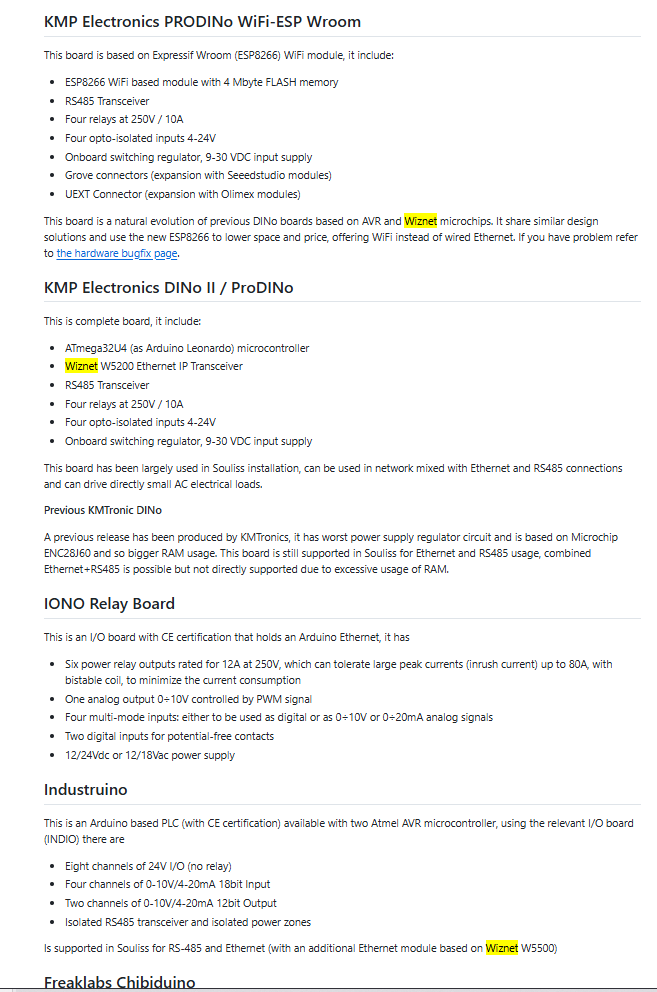
Souliss는 매우 넓은 범위의 하드웨어 생태계를 지원합니다.
Atmel AVR 기반 (Arduino 계열):
- Arduino Uno, Mega, Leonardo, Ethernet Board
- WIZnet 이더넷 쉴드와 결합 시 가장 표준적인 성능 발휘
- Espressif 기반:
- ESP8266 (NodeMCU, WeMos D1 등)
- ESP32 (강력한 성능과 블루투스/Wi-Fi 동시 지원)
기타 보드:
- Atmel AVR ATmega644/1284 (MightyCore 등)
- 다양한 써드파티 아두이노 호환 보드
10. FAQ
배선: W5500과 MCU 사이의 SPI 배선은 짧을수록 안정적입니다.
Q: 왜 W5500을 사용하는 것이 좋은가요?
A: W5500은 하드웨어 TCP/IP 스택을 내장하고 있어 MCU가 복잡한 네트워크 처리를 직접 수행할 필요가 없습니다. 이 덕분에 작은 마이크로컨트롤러에서도 안정적인 네트워크 통신을 구현할 수 있습니다.
Q: Arduino와 W5500은 어떻게 연결하나요?
A: SPI 인터페이스로 연결합니다. MISO, MOSI, SCK, CS 네 개의 기본 핀이 필요하며 대부분의 W5500 Ethernet Shield는 Arduino에 바로 연결할 수 있습니다.
Q: 이 프로젝트에서 W5500의 역할은 무엇인가요?
A: Souliss 노드 간 상태 동기화와 명령 전달을 위한 Ethernet 네트워크 인터페이스 역할을 합니다.
Q: 초보자도 구현할 수 있나요?
A: Arduino 개발 경험과 기본적인 네트워크 개념(IP 주소, LAN 환경)을 이해하고 있다면 충분히 구현할 수 있습니다.
Q: Wi-Fi 기반 스마트홈과 비교하면 어떤 차이가 있나요?
A: Wi-Fi는 무선 간섭과 연결 안정성 문제에 영향을 받을 수 있지만, Ethernet 기반 시스템은 더 안정적인 연결과 예측 가능한 지연시간을 제공합니다.
1. Project Summary
This project introduces a method for building a distributed smart home network that operates perfectly without a central server or cloud, using the Arduino-based Souliss framework and the WIZnet W5500 Ethernet controller.
Unlike typical IoT systems that rely on central servers, Souliss utilizes an architecture where each device possesses independent intelligence, providing high reliability and security
2. What is the suliss ?
Souliss eliminates cloud dependency and aims for direct communication between devices.
- Nodes: The building blocks of the network. They are divided into Gateways (communicating with the outside world) and Peers (handling actual control).
- Slots: Memory spaces that store real-time data, such as light status or temperature values.
- Typicals: Standardized modules for hardware logic. (e.g., T11 for Lights, T52 for Temperature)
| Category | Typical | Function Description |
|---|---|---|
| Lights | T11 | Basic ON/OFF light control |
| Motors | T21 | Motorized device control (Curtains, Blinds) |
| Sensors | T52 / T53 | Temperature and Humidity data processingv |
| RGB | T16 | RGB LED strip color control |
3. Why WIZnet W5500? (Connectivity)
Souliss strongly recommends wired Ethernet for stable communication, making the W5500 the ideal partner.
- Hardware TCP/IP Stack: Reduces MCU overhead, allowing complex network processing even on small Arduinos.
- Stable Latency: Guarantees instant response for smart home control by eliminating wireless interference.
- vNet & MaCaco Optimization: Ensures lossless transmission of Souliss's proprietary protocol packets.
4. User Interfaces
Souliss provides various channels for users to control their devices:
- SoulissApp (Android): Automatically generates a UI by reading the
Typicalconfiguration from the Gateway without manual setup. (Supports Voice Control and Tasker integration)
- Web Interfaces: Uses the W5500's performance to host simple web pages within the node or utilize dedicated web dashboards.
- Third-party Integration: Binds with openHAB or Home Assistant to integrate with third-party devices (Hue, Nest, etc.) for unified automation.
5. Implementation Notes
To configure the W5500, use the souliss/conf/ethW5500.h file.
[Basic Example: T11 Light Control]
#include "bconf/StandardArduino.h"
#include "conf/ethW5500.h"   // Enable W5500 Ethernet configuration
#include "Souliss.h"

#define LIGHT_SLOT 0

void setup() {
    Initialize();

    // Configure Static IP for WIZnet W5500
    Souliss_SetIPAddress({192,168,1,77}, {255,255,255,0}, {192,168,1,1});

    // Define Slot 0 as a Light Device (T11)
    Set_SimpleLight(LIGHT_SLOT);
}

void loop() {
    // Execute Souliss engine and control hardware Pin 8
    Execute(8, LIGHT_SLOT);
}
https://github.com/souliss/souliss/wiki/
6. Souliss Wiki: Main Contents
The
- Getting Started: Philosophy and installation guide.
- Concepts: Explanation of the core architecture (Nodes, Slots, Typicals).
- Hardware Setup: Configuration for supported boards and Ethernet/Wireless chipsets.
- Typicals: A comprehensive list of standard logic for hardware devices.
- User Interfaces: Guides for SoulissApp, Web Interface, and openHAB.
- Advanced: Custom protocol development and network optimization.
7. Protocols
Souliss uses a multi-layered virtual network structure for seamless communication:
- vNet (Virtual Network): The core communication layer that unifies different physical media (Ethernet, Wi-Fi, RS485).
- MaCaco (Management and Control Communication): A lightweight protocol optimized for synchronizing device states (ON/OFF, Temperature, etc.) between nodes.
- Supported Transports: * Ethernet: WIZnet W5100, W5200, W5500 (Most stable)
- Wireless: ESP8266, ESP32, nRF24L01
- USART/RS485: Wired serial communication
8. vNet Deep Dive
- vNet functions similarly to the Network Layer in the OSI 7-layer model.
- Media Independence: Allows the upper application layer to exchange data identically regardless of the physical medium (WIZnet Ethernet, Wi-Fi, RS485, etc.).
- Unified Addressing: Each device has a vNet address independent of its physical address (like an IP).
8.1 Key Mechanisms
- Addressing: Uses a 2-byte (16-bit) system.
- Subnet (Upper 8-bit): Divides the network into logical groups.
- Device (Lower 8-bit): Identifies individual nodes within a group. (Supports up to 65,535 nodes).
- Routing & Bridging: If a node has both Ethernet (W5500) and Wireless (nRF24), it automatically acts as a Bridge, transparently routing commands between different media.
- Data Structure: vNet packets consist of a Header (addressing/control info) and a Payload (MaCaco control commands).
8.2 vNet on WIZnet W5500
The WIZnet W5500 serves as the Ethernet Transport for vNet.
- Encapsulation: vNet packets are wrapped in UDP/IP packets via the W5500 hardware stack.
- Multicast/Broadcast: W5500 handles node discovery broadcasts at the hardware level, reducing MCU load.
- Reliable Reception: The internal buffer of the W5500 ensures no data loss even during high traffic.
9. Supported Boards
- Atmel AVR (Arduino): Uno, Mega, Leonardo. (Best performance when paired with WIZnet Ethernet Shields).
- Espressif: ESP8266, ESP32.
- Others: ATmega644/1284 (MightyCore) and various 3rd party compatible boards.
10. FAQ & Practical Tips
Wiring: Keep SPI wiring between the W5500 and MCU as short as possible for stability.
Q: Why use W5500? * A: Its hardware TCP/IP stack offloads network tasks from the MCU, enabling stable communication even on small microcontrollers.
Q: What is W5500's role in this project? * A: It acts as the Ethernet interface for command delivery and state synchronization between Souliss nodes.
Q: Ethernet vs. Wi-Fi? * A: While Wi-Fi is prone to interference, Ethernet provides a much more stable connection and predictable latency for mission-critical home automation.
-
code

-
wiki