


Pool-Matrix-Monitor
The pool monitor with LED matrix visualization. Uses WIZnet Ethernet for stable, real-time remote data logging and sensor tracking in high-moisture environments
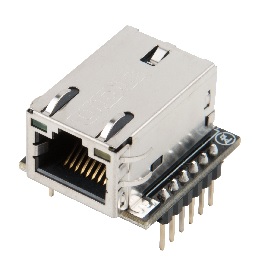
WIZnet - WIZ820io
x 1

Summary
Pool Matrix Monitor 프로젝트는 수영장 센서 데이터를 수집하고 LED 매트릭스에 시각화하는 DIY 모니터링 시스템입니다. 기본 구조는 센서 데이터를 마이크로컨트롤러에서 처리한 뒤 직관적인 시각 정보로 표시하는 것이며, WIZnet 기반 Ethernet을 추가하여 원격 모니터링과 데이터 로깅까지 확장할 수 있습니다. 로컬 표시에서 시작해 네트워크 확장으로 발전시킬 수 있는 구조가 이 프로젝트의 핵심입니다.
What the Project Does
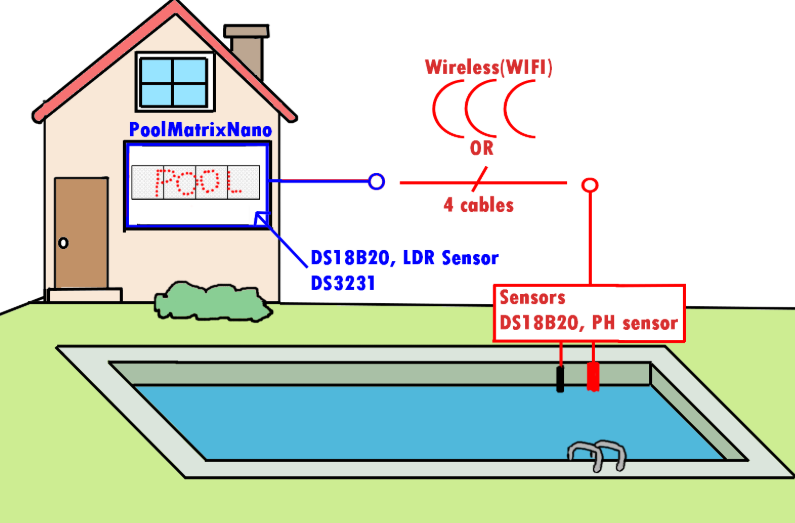
이 프로젝트는 수영장 상태를 실시간으로 확인할 수 있도록 설계된 시각화 중심 DIY 시스템입니다.
기본 데이터 흐름은 다음과 같습니다:
Sensors → Microcontroller → LED Matrix Display
                      ↓
         Ethernet Network
                      ↓
      (추후) ESP Wi-Fi 확장 가능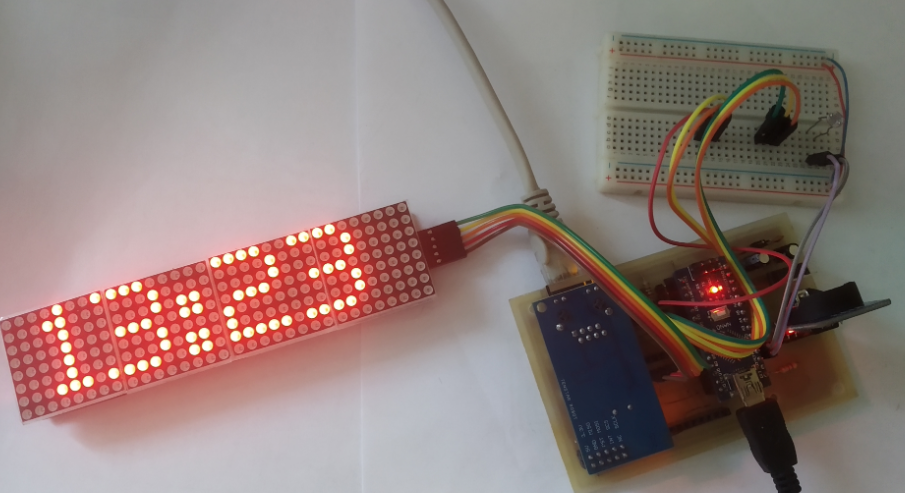
주요 기능:
- 수온, 수질(pH 등)과 같은 센서 데이터 수집
- MCU에서 데이터 처리
- LED 매트릭스를 통한 직관적 시각화
- Ethernet을 통한 원격 확장 가능
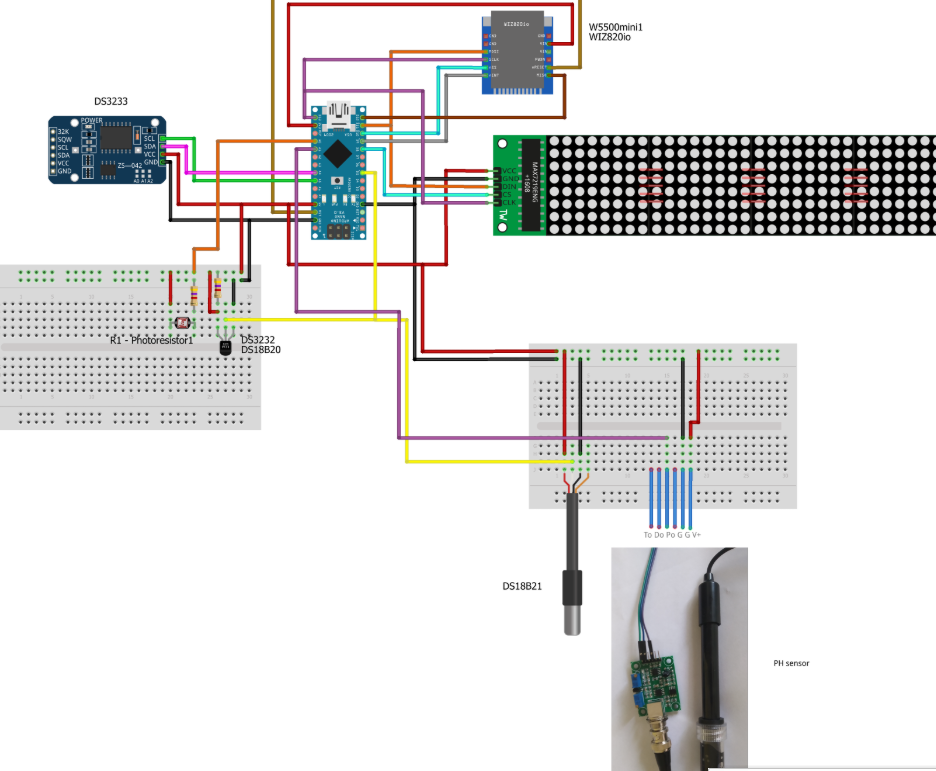

이 프로젝트의 매력은 단순한 수치 출력이 아니라 “보여주는 모니터링”에 있습니다. LED 매트릭스를 활용해 상태를 한눈에 확인할 수 있도록 구성되어 있어 DIY 프로젝트로서 완성도가 높습니다.
Ethernet를 이용하여 더 발전시킨다면 다음과 같은 확장이 가능합니다:
- PC에서 실시간 상태 확인
- 웹 기반 대시보드 구현
- 로컬 서버에 데이터 기록
- 향후 클라우드 연동
Ethernet이 먼저인 이유
DIY 풀 모니터링 시스템의 특성상:
- 고정 설치 환경
- 전원 상시 연결
- 신뢰성 중요
- 외부 환경 (습기, RF 간섭)
이 조건에서는 유선 Ethernet이 기본 통신 방식으로 더 안정적입니다.
WIZnet 기반 Ethernet은:
- MCU 자원 소모 적음
- 네트워크 안정성 높음
- 클라우드 업로드/웹서버 구현 용이
ESP는 어떤 역할일 가능성이 높은가?
ESP가 추가된다면 보통 다음 중 하나입니다:
- Wi-Fi 전용 업로드 모듈
- MQTT 클라이언트 역할
- 무선 원격 디버깅
- AP 모드 로컬 설정 페이지
즉, Ethernet을 대체하기보다는
유선 기반 시스템에 무선 접근성을 추가하는 구조일 가능성이 큽니다.
실전 구축 및 운영 팁
성공적인 프로젝트 완성을 위해 다음 사항을 고려해야 합니다.
- 방수 및 보호: 수영장 근처 설치 시 습기 보호를 위해 방수 케이스나 코팅 작업이 필수입니다.
- 전원 분리: LED 매트릭스의 전력 소모가 크므로, 로직 전원과 LED 전원을 분리 설계하는 것이 안정적입니다.
- 센서 보정: 정확한 수질 측정을 위해 정기적인 센서 보정(Calibration) 루틴을 소프트웨어에 포함하세요.
FAQ
Q: 왜 Wi-Fi 대신 WIZnet Ethernet을 사용할까요?
고정 설치 환경에서는 유선 Ethernet이 더 안정적이고 지연 시간이 예측 가능합니다. RF 간섭 영향을 받지 않는다는 점도 장점입니다.
Q: W5500은 어떻게 연결되나요?
SPI(MOSI, MISO, SCK, CS)로 연결되며, RESET 및 INT 핀을 추가로 사용할 수 있습니다. MAC과 PHY가 내부에 통합되어 있어 회로 구성이 단순합니다.
Q: 이 프로젝트에서 Ethernet의 역할은 무엇인가요?
로컬 LED 매트릭스 모니터를 네트워크 장치로 확장해 원격 확인과 데이터 기록이 가능하도록 만드는 역할을 합니다.
Q: 초보자도 도전할 수 있나요?
가능합니다. 먼저 센서 읽기와 LED 표시를 구현한 뒤, 두 번째 단계로 Ethernet을 추가하는 접근이 좋습니다.
Q: Wi-Fi 기반 ESP 솔루션과 비교하면 어떤 차이가 있나요?
Wi-Fi는 배선이 필요 없다는 장점이 있지만, 신호 간섭과 연결 안정성 문제를 고려해야 합니다. 고정형 모니터링 장치에는 Ethernet이 더 적합할 수 있습니다.

The Pool Matrix Monitor is a DIY monitoring system designed to collect pool sensor data and visualize it on an LED matrix. This project focuses on transforming raw sensor data into intuitive visual information through a microcontroller, with the potential to expand into remote monitoring and data logging using WIZnet-based Ethernet.
What the Project Does
This visualization-centric DIY system allows users to check pool status in real-time.
The Basic Data Flow:
- Sensors (Temperature, pH, etc.) collect data.
- Microcontroller (MCU) processes the information.
- LED Matrix Display provides an immediate visual readout.
- Ethernet Network enables remote expansion.
Sensors → Microcontroller → LED Matrix Display
                      ↓
         Ethernet Network
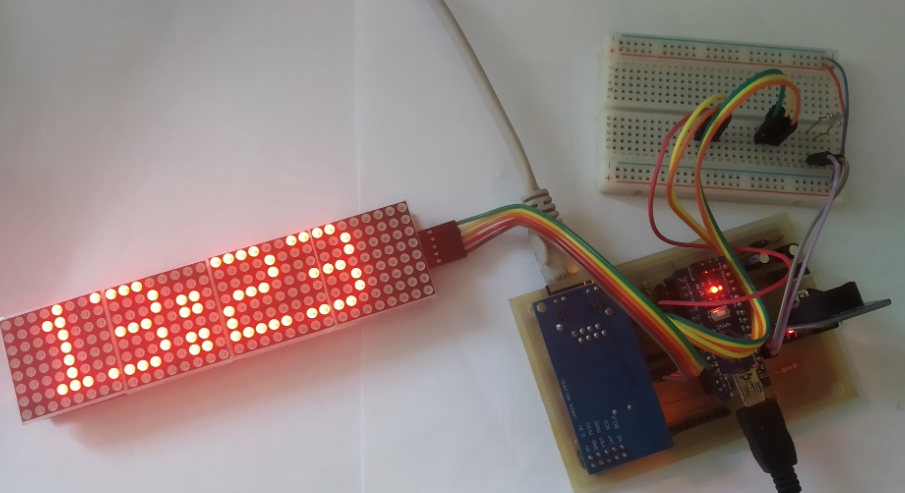
Key Features:
- Data Collection: Gathers critical metrics like water temperature and pH levels.
- Intuitive Visualization: Uses an LED matrix to make monitoring more engaging than simple numerical displays.
- Network Scalability: Integrating Ethernet allows for PC-based real-time monitoring, web dashboards, and local server data logging.
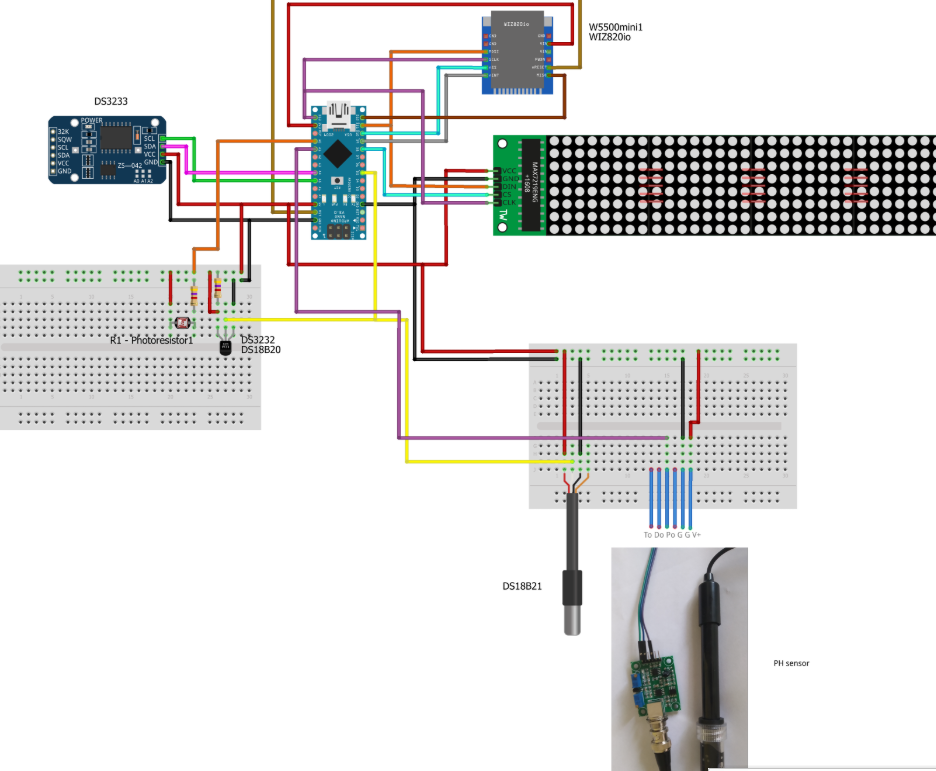
Why Ethernet First?
In a DIY pool monitoring setup, wired Ethernet is often superior to Wi-Fi due to the nature of the environment:
- Fixed Installation: The device is typically mounted in a permanent location.
- Constant Power: Monitoring systems usually have a steady power supply available.
- Reliability: Ethernet is more stable in outdoor environments where moisture and RF interference can disrupt wireless signals.
- Benefits of WIZnet-based Ethernet:
- Low Resource Consumption: Offloads the network stack, saving MCU CPU and RAM.
- High Stability: Provides a robust connection for cloud uploads and web server hosting.
The Role of Wireless (ESP Expansion)
If an ESP module is added, it typically serves to complement—rather than replace—the Ethernet connection. Its roles might include:
- Wireless Access: Providing an AP mode for local configuration pages.
- MQTT Client: Handling specific messaging protocols.
- Remote Debugging: Allowing for wireless troubleshooting.
Practical Implementation & Operation Tips
For a successful build, keep these professional tips in mind:
- Waterproofing: Use waterproof cases or specialized coatings, as moisture protection is mandatory near a pool.
- Power Separation: LED matrices consume significant power; isolate the logic power from the LED power for better stability.
- Sensor Calibration: Include software routines for regular calibration to ensure accurate pH and temperature readings.
FAQ
Q: Why use WIZnet Ethernet instead of Wi-Fi?
A: For fixed installations, wired Ethernet offers better stability, predictable latency, and zero susceptibility to RF interference.
Q: How is the W5500 connected?
A: It connects via the SPI interface (MOSI, MISO, SCK, CS). It features an integrated MAC and PHY, making the circuit design simple.
Q: Is this project beginner-friendly?
A: Yes. The best approach is to start by displaying sensor data on the LED matrix locally, then add the Ethernet functionality as a second stage.
-
PCB

-
Arduino code