



Pico LAN Gateway Node — UDP Discovery, HTTP Proxy & Metrics with W5500 (MicroPython)
MicroPython LAN gateway node on Raspberry Pi Pico + W5500. UDP auto-discovery, access rules, HTTP proxy, basic metrics. Lightweight IoT edge gateway. 2025 new.
프로젝트가 하는 일
이 프로젝트는 Raspberry Pi Pico와 WIZnet W5500을 사용해 LAN 안에서 단독으로 동작하는 게이트웨이 노드를 MicroPython으로 구현합니다. 별도 서버, 클라우드, 외부 브로커 없이 Pico 한 대가 소규모 네트워크 세그먼트에 필요한 네 가지 핵심 기능을 제공합니다.
- UDP 자동 디스커버리 — LAN에 있는 장치가 브로드캐스트로 게이트웨이를 자동으로 찾습니다. 수동 IP 설정 없이 IoT 센서가 플러그앤플레이 방식으로 게이트웨이를 탐색할 수 있습니다.
- 접근 규칙 — 클라이언트 주소 또는 목적지 기반의 허용/차단 정책을 설정합니다. 완전한 방화벽은 아니지만 임베디드 엣지 게이트웨이에 적합한 간단한 트래픽 필터링을 제공합니다.
- HTTP 프록시 — LAN 클라이언트의 HTTP 요청을 중계해 게이트웨이가 인터넷 접근을 제어합니다.
- 기본 메트릭 — 네트워크 사용 통계를 수집하고 보고합니다.
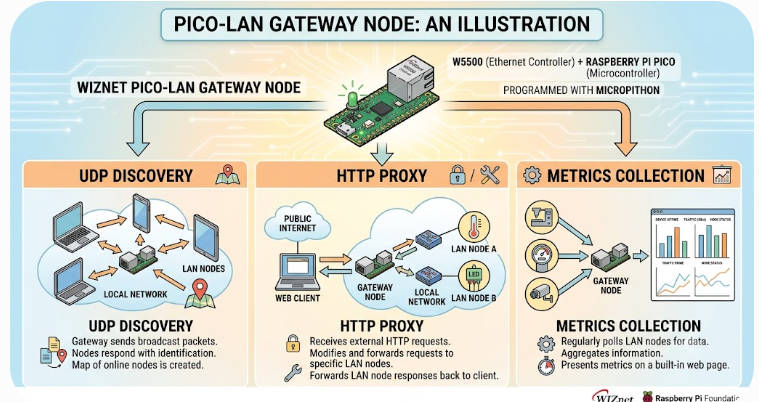
Image source: AI-generated
LAN 클라이언트 (브라우저 / IoT 센서 / 앱)
        │
        │  UDP 브로드캐스트 (디스커버리)
        │  HTTP 요청 (프록시 / 대시보드)
        ▼
  Raspberry Pi Pico + W5500
  ├── UDP 자동 디스커버리    LAN 장치가 게이트웨이를 자동 탐색
  ├── 접근 규칙             허용 / 차단 정책 적용
  ├── HTTP 프록시           LAN → 외부 HTTP 요청 중계
  ├── 메트릭 수집           /metrics, /health, /status
  └── 웹 대시보드           세션 인증 기반 관리 UI
MicroPython으로 구현되어 C 컴파일 없이 Python 코드만으로 기능을 수정하고 확장할 수 있습니다. 홈랩이나 임베디드 네트워크 환경에서 커스텀 IoT 엣지 게이트웨이를 빠르게 구축하는 출발점으로 활용할 수 있습니다.
최초 부팅 시 브라우저에서 Pico IP로 접속하면 /setup 페이지로 리다이렉트됩니다. 관리자 비밀번호를 설정하면 settings.py가 Pico에 저장되고, 이후 /login에서 로그인합니다. 보호된 엔드포인트는 유효한 세션 쿠키와 클라이언트 토큰이 있어야 접근할 수 있습니다.
WIZnet이 들어가는 위치
이 프로젝트에서 사용하는 WIZnet 제품은 W5500입니다. Raspberry Pi Pico는 Wi-Fi 모듈을 내장하고 있지만 이 프로젝트는 W5500을 통한 유선 이더넷을 사용합니다. W5500은 하드와이어드 TCP/IP 스택을 SPI 인터페이스로 제공하는 WIZnet의 이더넷 컨트롤러로, RJ45 포트를 통해 LAN에 직접 연결됩니다.
MicroPython의 network.WIZNET5K 드라이버가 W5500을 직접 지원하므로 별도 이더넷 라이브러리 없이 표준 socket API를 그대로 사용할 수 있습니다. W5500은 이 프로젝트에서 DHCP 주소 취득, HTTP 소켓 수신, UDP 디스커버리 패킷 송수신을 모두 담당합니다.
게이트웨이는 항상 LAN에서 접근 가능해야 합니다. Wi-Fi는 AP 상태, 무선 간섭, 인증 세션 만료 같은 운영 변수가 있습니다. W5500 기반 유선 이더넷은 고정된 물리 경로를 제공하므로 지속적으로 서비스를 제공해야 하는 게이트웨이 역할에 더 안정적입니다. UDP 디스커버리처럼 브로드캐스트 기반 기능도 유선 환경에서 더 예측 가능하게 동작합니다.
구현 노트
하드웨어
| 항목 | 내용 |
|---|---|
| 보드 | Raspberry Pi Pico (RP2040) |
| 이더넷 | WIZnet W5500 모듈 (SPI) |
| 언어 | MicroPython |
| 연결 | W5500 모듈 경유 RJ45 |
배선
| W5500 핀 | Pico 핀 |
|---|---|
| VCC / 3.3V | 3V3(OUT) |
| GND | GND |
| SCK / SCLK | GP18 |
| MISO / DOUT | GP16 |
| MOSI / DIN | GP19 |
| CS / SS | GP17 |
| RST / RESET | GP20 |
| INT | 미연결 |
W5500에 VBUS, VSYS, 3V3_EN을 연결하지 마세요. 3V3(OUT)만 사용합니다.
설치 방법
# 1. 저장소 클론 git clone https://github.com/HIre-Me-For-Unique-Stratergies/pico-lan-gateway-node
 # 2. Pico에 W5500_EVB_PICO 타겟 MicroPython 펌웨어 플래시 # micropython.org/download 에서 W5500 EVB Pico 타겟 선택  # 3. Thonny 또는 mpremote로 파일 업로드
펌웨어 확인
import socket
import network
print(hasattr(network, "WIZNET5K"))  # True 이면 정상
파일 구조
/main.py                  ← MicroPython 부트 진입점
/gateway_pico/
  ├── main.py             ← 앱 진입점 (서버 루프)
  ├── config.py           ← IP, 포트, 접근 규칙 설정
  ├── auth.py             ← 세션 / 토큰 인증
  ├── discovery.py        ← UDP 자동 디스커버리
  ├── local_backend.py    ← 내부 백엔드 로직
  ├── metrics.py          ← 요청 카운터, 응답 시간
  ├── rules.py            ← 접근 규칙 (허용 / 차단)
  ├── ui.py               ← HTML 대시보드 렌더링
  ├── status_led.py       ← 내장 LED 상태 표시
  └── audit_log.py        ← 요청 감사 로그
네트워크 설정과 접근 규칙은 config.py에서 수정합니다.
엔드포인트
| 경로 | 설명 |
|---|---|
/setup | 최초 관리자 비밀번호 설정 |
/login | 로그인 |
/logout | 세션 쿠키 삭제 |
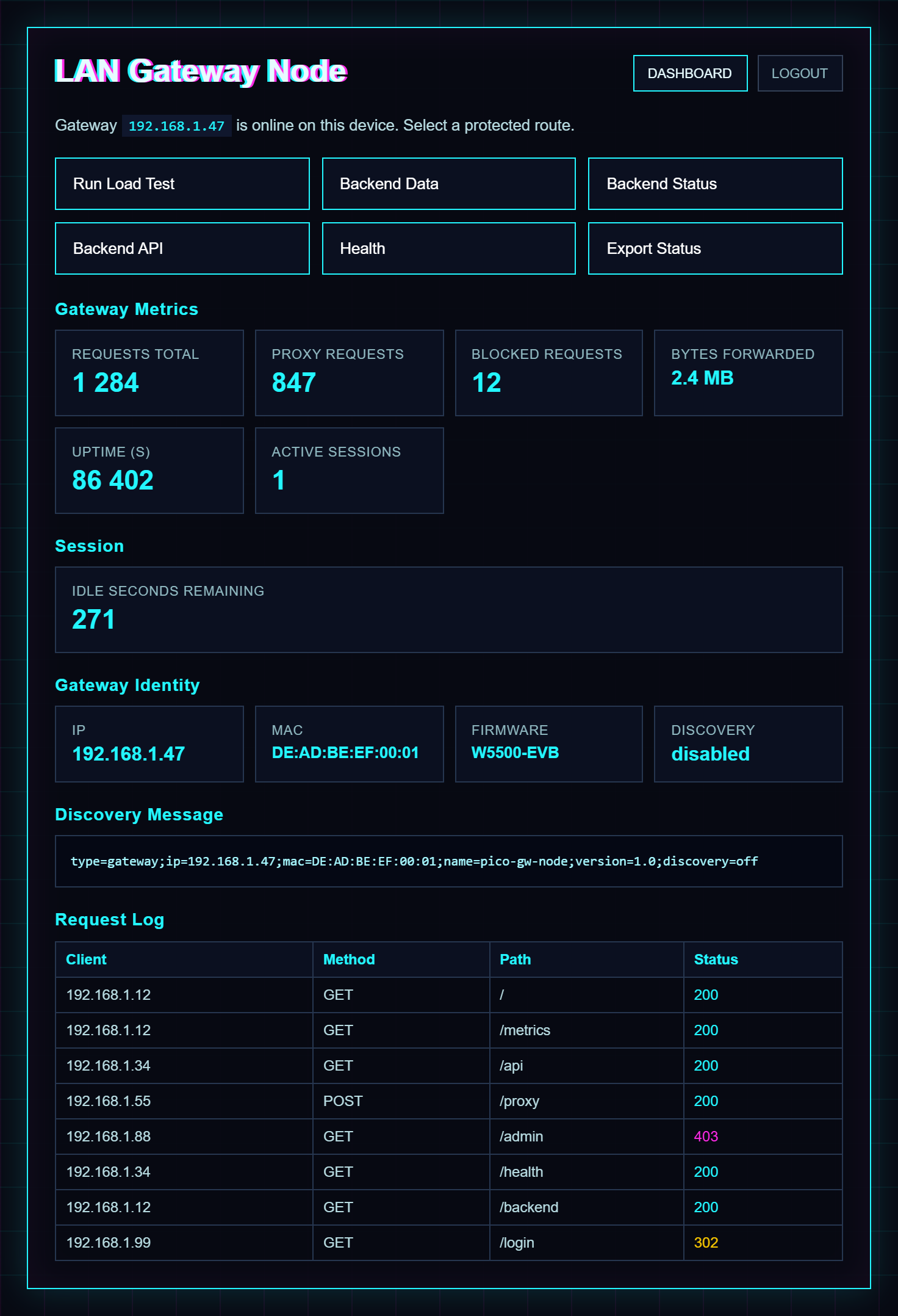
/ | 현재 IP, 메트릭, 요청 로그 대시보드 |
/metrics | 요청 카운터 및 최근 로그 |
/backend | 내부 백엔드 요약 |
/status | 내부 백엔드 상태 JSON |
/api | 내부 백엔드 API 데이터 |
/health | 진단 정보 JSON |
/export | 시크릿 없는 평문 상태 내보내기 |
/test/start | 인프로세스 백엔드 부하 테스트 |
/admin | 의도적으로 차단됨 |
보안 모델
- 최초 실행 관리자 비밀번호 설정 — 설정 전까지 보호 경로 미제공
- POST 방식 비밀번호 전송, 솔트 기반 SHA-256 해시 (반복 적용)
- 런타임 세션 토큰과 클라이언트 토큰 (메모리 내 보관, 해시 검증)
- 비활동 타임아웃 기반 세션 자동 만료
- 로그인 폼 CSRF 토큰, 실패 로그인 잠금
- 영구 순환 감사 로그
- UDP 디스커버리 기본 비활성
- 클라이언트별 레이트 리미팅
settings.py는 .gitignore에 포함되어 있으므로 커밋하지 마세요.
실무 팁 / 주의사항
- Pico IP가 바뀌지 않도록 라우터에서 DHCP 예약을 설정하세요. UDP 디스커버리가 있더라도 고정 주소가 운영에 더 안정적입니다.
- UDP 디스커버리는 기본적으로 비활성화되어 있습니다.
config.py에서 활성화하면 LAN 브로드캐스트로 게이트웨이 IP를 자동 탐색할 수 있습니다. - HTTPS가 필요한 경우 Pico 펌웨어 자체는 TLS를 제공하지 않으므로 LAN TLS 역방향 프록시나 VPN을 앞단에 배치해야 합니다.
- 접근 규칙은 완전한 방화벽이 아닙니다. 홈랩이나 소규모 IoT 세그먼트 수준의 트래픽 필터링에 적합하며, 보안이 중요한 프로덕션 환경에는 별도 방화벽 장비와 함께 사용해야 합니다.
- MicroPython은 C/C++ 펌웨어 대비 처리 속도가 느립니다. 홈랩이나 소규모 IoT 세그먼트의 적당한 트래픽에는 충분하지만, 요청량이 많은 프로덕션 게이트웨이에는 C/C++ 구현을 고려해야 합니다.
- Thonny로 파일을 업로드할 때
gateway_pico/디렉터리를 먼저 생성하세요.
FAQ
Q: 게이트웨이에 왜 C 대신 MicroPython을 사용했나요?
A: MicroPython은 빠른 프로토타이핑과 쉬운 커스터마이징이 가능합니다. 홈랩이나 IoT 세그먼트 수준의 트래픽을 처리하는 게이트웨이 노드에서는 Python의 처리 오버헤드가 허용 가능하며, 개발 속도 이점이 큽니다. 더 높은 처리량이 필요한 프로덕션 게이트웨이라면 C/C++ 구현을 사용해야 합니다.
Q: UDP 자동 디스커버리는 어디에 쓰이나요?
A: LAN에 있는 장치가 브로드캐스트 UDP 프로브를 전송해 수동 설정 없이 게이트웨이 IP 주소를 찾을 수 있습니다. IP를 직접 설정하기 어려운 플러그앤플레이 IoT 센서가 게이트웨이를 동적으로 탐색하는 데 유용합니다.
Q: 어떤 접근 규칙을 지원하나요?
A: 클라이언트 주소 또는 목적지 기반의 허용/차단 로직을 제공합니다. 완전한 방화벽은 아니지만 임베디드 엣지 게이트웨이 용도에 적합한 간단한 트래픽 필터링이 가능합니다.
Q: 왜 Pico W의 Wi-Fi 대신 W5500 유선 이더넷을 사용하나요?
A: 게이트웨이는 항상 LAN에서 접근 가능해야 합니다. Wi-Fi는 AP 상태, 무선 간섭, 인증 세션 만료 같은 운영 변수가 있어 장시간 무인 운영에 불안정할 수 있습니다. W5500은 하드와이어드 TCP/IP 스택과 고정된 물리 경로를 제공하므로 더 안정적입니다.
Q: W5500_EVB_PICO 펌웨어는 어디서 받나요?
A: micropython.org/download 에서 WIZnet W5500 EVB Pico 타겟을 선택해 다운로드할 수 있습니다. 일반 Pico 펌웨어와 다르므로 반드시 올바른 타겟을 선택해야 합니다.
Q: 초보자도 따라할 수 있나요?
A: Thonny 사용법, MicroPython 파일 업로드, SPI 배선 기초를 알고 있다면 구현할 수 있습니다. 실제 LAN 서비스로 배치할 경우 DHCP 예약, 접근 규칙 설정, 세션 타임아웃, 물리 보안까지 함께 검토하는 것을 권장합니다.
What the Project Does
This project implements a LAN gateway node on the Raspberry Pi Pico and WIZnet W5500 using MicroPython. Without a separate server, cloud service, or external broker, a single Pico provides four key functions for small network segments.
- UDP auto-discovery — devices on the LAN can discover the gateway automatically via broadcast, enabling plug-and-play IoT sensors to find the gateway dynamically without manual IP configuration.
- Access rules — configurable allow/deny policies based on client address or destination. Not a full firewall, but provides simple traffic filtering appropriate for embedded edge gateway use cases.
- HTTP proxy — forwards HTTP requests from LAN clients, enabling gateway-controlled access.
- Basic metrics — collects and reports simple network usage statistics.
Image source: AI-generated
LAN clients (browser / IoT sensors / apps)
        │
        │  UDP broadcast (discovery)
        │  HTTP requests (proxy / dashboard)
        ▼
  Raspberry Pi Pico + W5500
  ├── UDP auto-discovery    LAN devices locate the gateway automatically
  ├── Access rules          Allow / deny policy enforcement
  ├── HTTP proxy            LAN → external HTTP request forwarding
  ├── Metrics collection    /metrics, /health, /status
  └── Web dashboard         Session-authenticated management UI
All logic is written in MicroPython, making it easy to modify and extend without C compilation. It serves as a practical starting point for building custom IoT edge gateways in home lab or embedded network environments.
On first boot, navigating to the Pico's IP address redirects to /setup. After creating the admin password, settings.py is written to the Pico and login is available at /login. Protected endpoints require a valid session cookie and a client token.
Where WIZnet Fits
The WIZnet product used in this project is the W5500. Although the Raspberry Pi Pico W includes a built-in Wi-Fi module, this project uses wired Ethernet through the W5500. The W5500 is WIZnet's Ethernet controller that provides a hardwired TCP/IP stack over a standard SPI interface, connecting to the LAN directly through an RJ45 port.
MicroPython's network.WIZNET5K driver supports the W5500 natively, so the standard socket API works without any additional Ethernet library. The W5500 handles DHCP address acquisition, HTTP socket listening, and UDP discovery packet sending and receiving.
A gateway must remain continuously accessible on the LAN. Wi-Fi introduces operational variables — access point availability, wireless interference, and authentication session expiry — that can cause unexpected disconnections in unattended deployments. W5500-based wired Ethernet provides a fixed physical path, making it more stable for a persistent gateway. Broadcast-based functions such as UDP discovery also behave more predictably over wired infrastructure.
Implementation Notes
Hardware
| Item | Details |
|---|---|
| Board | Raspberry Pi Pico (RP2040) |
| Ethernet | WIZnet W5500 module (SPI) |
| Language | MicroPython |
| Connection | RJ45 via W5500 module |
Wiring
| W5500 Pin | Pico Pin |
|---|---|
| VCC / 3.3V | 3V3(OUT) |
| GND | GND |
| SCK / SCLK | GP18 |
| MISO / DOUT | GP16 |
| MOSI / DIN | GP19 |
| CS / SS | GP17 |
| RST / RESET | GP20 |
| INT | Leave unconnected |
Do not power the W5500 from VBUS, VSYS, or 3V3_EN. Use 3V3(OUT) only.
Setup
# 1. Clone the repository git clone https://github.com/HIre-Me-For-Unique-Stratergies/pico-lan-gateway-node
 # 2. Flash MicroPython firmware — W5500_EVB_PICO target # Download from micropython.org/download  # 3. Upload files to Pico using Thonny or mpremote
Verifying the Firmware
import socket
import network
print(hasattr(network, "WIZNET5K"))  # Should print True
File Layout
/main.py                  — MicroPython boot entry point
/gateway_pico/
  ├── main.py             — app entry point (server loop)
  ├── config.py           — IP, port, access rule settings
  ├── auth.py             — session and token authentication
  ├── discovery.py        — UDP auto-discovery
  ├── local_backend.py    — internal backend logic
  ├── metrics.py          — request counters and response timing
  ├── rules.py            — access rules (allow / deny)
  ├── ui.py               — HTML dashboard rendering
  ├── status_led.py       — onboard LED status indicator
  └── audit_log.py        — persistent rotating audit log
Network settings and access rules are configured in config.py.
Endpoints
| Path | Purpose |
|---|---|
/setup | First-run admin password setup |
/login | Admin login |
/logout | Clears session cookies |
/ | Dashboard: current IP, metrics, request log |
/metrics | Request counters and recent log |
/backend | Gateway-rendered local backend summary |
/status | Local backend status JSON |
/api | Local backend API data |
/health | JSON health and diagnostics |
/export | Plain-text status export without secrets |
/test/start | In-process backend load test |
/admin | Intentionally blocked |
Security Model
- First-run admin password setup — protected routes unavailable until the password is created
- Password submitted via POST, salted SHA-256 hashing with configurable round count
- Runtime session and client tokens held in memory, verified by hash
- Automatic inactivity-based session expiry
- CSRF token on login and setup forms, failed-login lockout
- Persistent rotating audit log
- UDP discovery disabled by default
- Per-client rate limiting
Do not commit settings.py — it is listed in .gitignore.
Practical Tips / Pitfalls
- Set up a DHCP reservation on the router to keep the Pico's IP address stable. UDP discovery is available, but a fixed address is more reliable for ongoing operations.
- UDP discovery is disabled by default. Enable it in
config.pyto allow LAN broadcast-based gateway detection. - The Pico firmware does not provide HTTPS or TLS directly. For encrypted access, place the Pico behind a LAN TLS reverse proxy or VPN.
- The access rules are not a full firewall. They are suitable for home lab or small IoT segment traffic filtering and should be paired with a dedicated firewall device in security-sensitive production environments.
- MicroPython is slower than C/C++ firmware. It is sufficient for moderate traffic in home lab and small IoT segments, but high-throughput production gateways should use a C/C++ implementation.
- Create the
gateway_pico/directory on the Pico file system before uploading module files with Thonny.
FAQ
Q: Why use MicroPython for a gateway instead of C?
A: MicroPython enables rapid prototyping and easy customization. For a gateway node handling moderate traffic in a home lab or IoT segment, the Python overhead is acceptable and the development speed advantage is significant. More demanding production gateways would use C/C++.
Q: What is UDP auto-discovery used for?
A: Devices on the LAN can send a broadcast UDP probe to discover the gateway's IP address without manual configuration. This is useful for plug-and-play IoT sensors that need to find a gateway dynamically.
Q: What kind of access rules are supported?
A: The access rules provide basic allow/deny logic based on client address or destination. This is not a full firewall, but enables simple traffic filtering appropriate for embedded edge gateway use cases.
Q: Why use the W5500 instead of the built-in Wi-Fi on the Pico W?
A: A gateway must remain accessible from the LAN at all times. Wi-Fi introduces operational variables — access point availability, interference, and session expiry — that can cause unexpected disconnections in unattended deployments. The W5500 provides a hardwired TCP/IP stack with a fixed physical path, which is more stable for a persistent gateway.
Q: Where can I get the W5500_EVB_PICO firmware?
A: Download it from micropython.org/download and select the WIZnet W5500 EVB Pico target. This is separate from the standard Pico firmware.
Q: Can beginners follow this project?
A: Yes, if they are familiar with Thonny, MicroPython file uploads, and basic SPI wiring. For deployment as an actual LAN service, also review DHCP reservation, access rule configuration, session timeout settings, and physical security.
Key Takeaway: This MicroPython gateway node on W5500 and Pico demonstrates how much networking functionality can be packed into a tiny, scriptable embedded system. UDP discovery, access rules, HTTP proxy, and metrics collection make it a practical starting point for custom IoT edge gateways — without complex C firmware development.