



ncSender
ncSender streams G-code over Ethernet via Node.js, enabling remote CNC control and monitoring without direct USB connection.
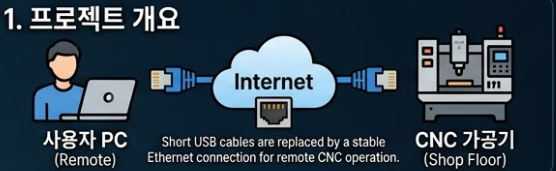
1. 프로젝트 개요
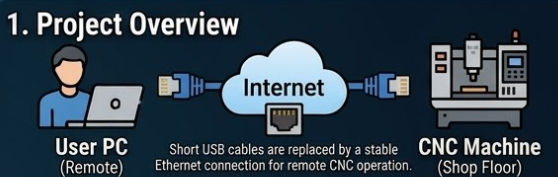
일반적인 CNC 조각기나 3D 프린터는 짧은 USB 케이블로 PC와 직접 연결됩니다. 하지만 실제 가공 환경은 분진이 많고 소음이 심해, 작업자가 기계 바로 옆에서 PC를 조작하기 어려운 경우가 많습니다.
ncSender는 이러한 한계를 극복하기 위해 이더넷(Ethernet) 통신을 활용하여, 웹 브라우저가 있는 곳이라면 어디서든 CNC를 원격으로 제어하고 모니터링할 수 있게 해주는 오픈소스 G-code 송신기입니다.
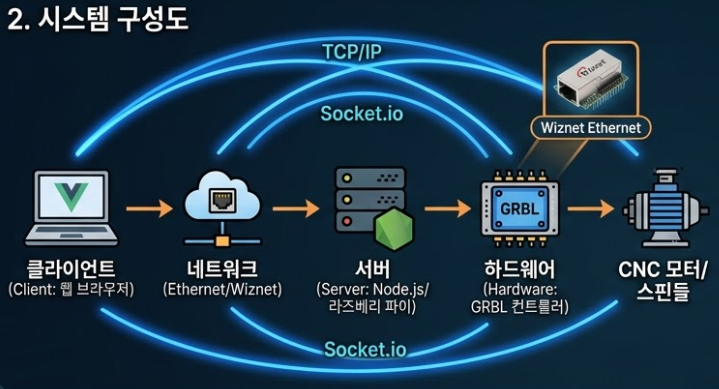
2. 시스템 구성도 (System Architecture)
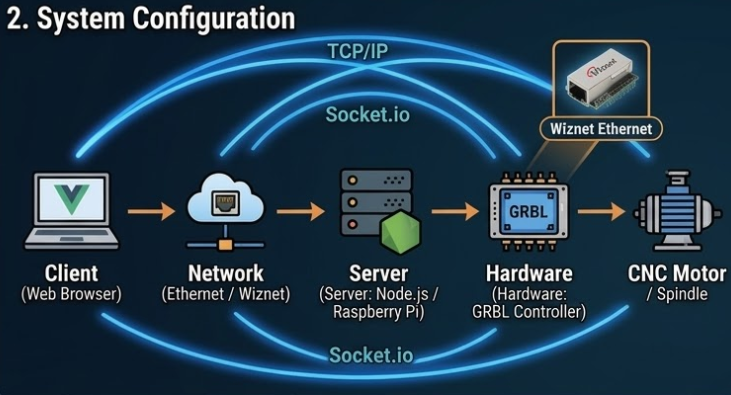
이 프로젝트는 웹 서비스 - 서버 - 하드웨어의 3단계 구조로 동작합니다.
- 클라이언트(Client): 노트북, 태블릿, 스마트폰 등 웹 브라우저를 사용할 수 있는 모든 기기.
- 서버(Server): Node.js 기반의 중계 서버. CNC 장비와 연결된 PC나 라즈베리 파이에서 실행됩니다.
- 하드웨어(Hardware): GRBL 펌웨어가 탑재된 CNC 컨트롤러 (Arduino 등).
- 네트워크(Connectivity): 이더넷(Wiznet) 망을 통해 데이터가 안정적으로 전송됩니다.
데이터 흐름은 다음과 같습니다:
- 웹 클라이언트(브라우저)가 Socket.io를 통해 명령 또는 G-code 전송
- Node.js 서버가 이를 수신 및 처리
- 서버가 SerialPort를 통해 GRBL 컨트롤러로 G-code를 순차 전송
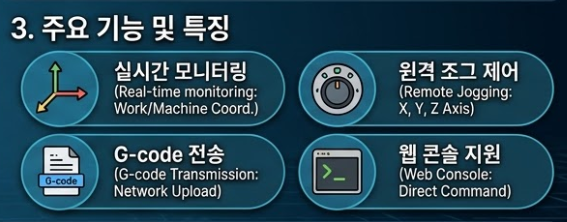
3. 주요 기능 및 특징
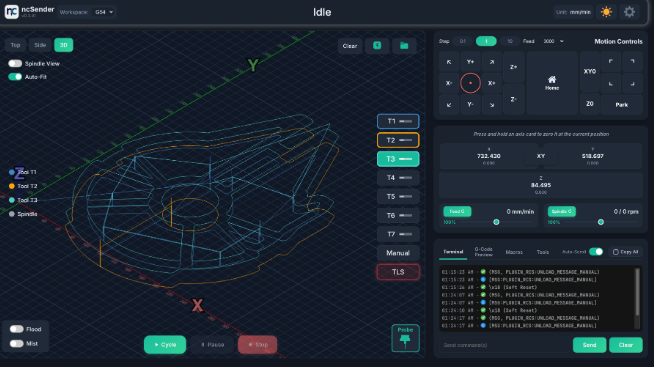
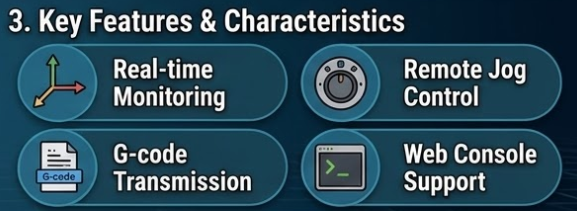
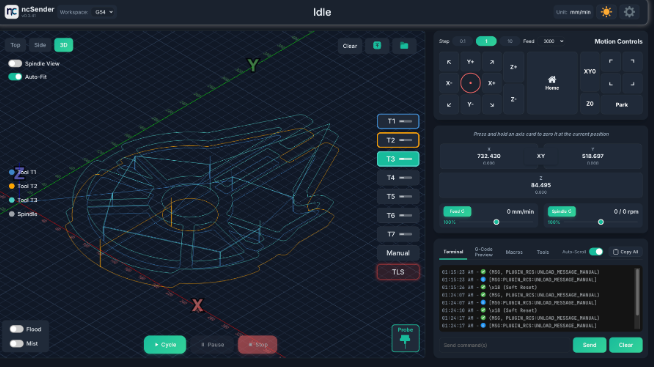
- 실시간 모니터링: 작업 좌표(Work Position)와 기계 좌표(Machine Position)를 네트워크를 통해 실시간으로 확인합니다.
- 원격 조그 제어(Jogging): X, Y, Z축 이동을 웹 UI에서 버튼 클릭으로 제어합니다.
- G-code 전송: 이더넷을 통해 업로드된 G-code 파일을 CNC로 전송하여 가공을 시작합니다.
- 웹 콘솔 지원: GRBL 명령어를 직접 입력하고 장비의 응답을 터미널에서 즉시 확인 가능합니다.
4. 기술 스택 (Tech Stack)
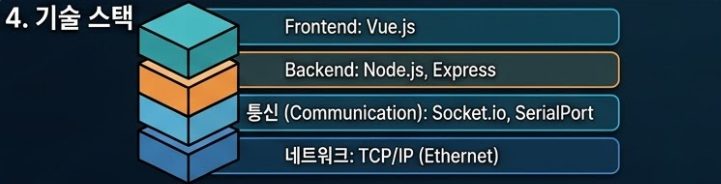
- Frontend: Vue.js (반응형 웹 인터페이스)
- Backend: Node.js, Express
- Communication: Socket.io (실시간 데이터 통신), SerialPort (GRBL 하드웨어 통신)
- Network: TCP/IP 기반 이더넷 통신
5. 왜 CNC 제어에 이더넷(Wiznet)이 필요한가?
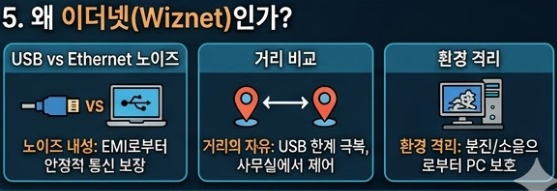
CNC 가공 시 발생하는 강력한 전자기 노이즈(EMI)는 일반적인 USB 통신의 연결을 끊어버리는 주된 원인입니다. Wiznet의 이더넷 기술을 활용하면 다음과 같은 장점을 얻을 수 있습니다.
- 노이즈 내성: USB보다 통신 안정성이 뛰어나 가공 중 연결 끊김 현상을 방지합니다.
- 거리의 자유: USB 케이블의 한계를 넘어, 작업실 외부의 쾌적한 사무실에서도 장비를 제어할 수 있습니다.
- 환경 격리: PC를 분진과 소음으로부터 보호할 수 있어 하드웨어 수명이 연장됩니다.
FAQ
Q: 왜 W5500을 사용하나요?
A: 하드웨어 TCP/IP 스택을 통해 MCU 부하 없이 안정적인 통신이 가능하며, CNC 환경의 EMI에서도 USB보다 훨씬 안정적인 연결을 제공합니다.
Q: CNC 컨트롤러와 어떻게 연결하나요?
A: W5500은 MCU와 SPI로 연결되고, MCU는 UART를 통해 GRBL과 통신하는 구조입니다.
Q: 이 프로젝트에서 WIZnet의 역할은 무엇인가요?
A: G-code를 TCP/IP로 수신하고 이를 CNC 컨트롤러로 전달하는 네트워크 전송 계층 역할을 합니다.
Q: 초보자도 구현할 수 있나요?
A: 기본적인 TCP/IP, 시리얼 통신, GRBL 이해가 필요하며, 중급 수준의 임베디드/서버 지식이 요구됩니다.
Q: USB나 Wi-Fi와 비교하면 어떤가요?
A: USB는 노이즈에 취약하고, Wi-Fi는 지연이 불안정합니다. 이더넷은 낮은 지연과 높은 신뢰성을 제공하여 G-code 스트리밍에 적합합니다.
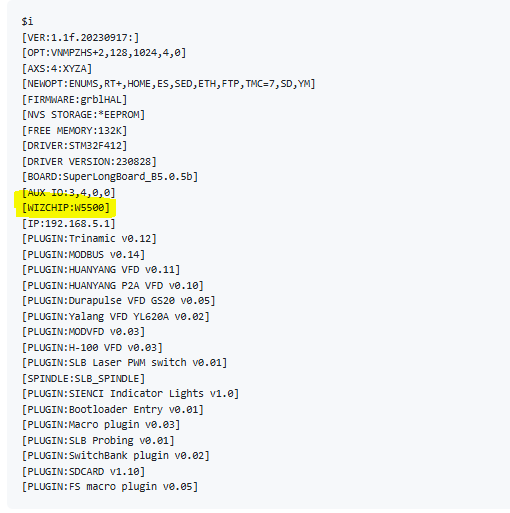
디버깅 메세지를 보면 W5500이 쓰여짐을 볼수 있습니다
1. Project Overview
Typical CNC routers or 3D printers are connected directly to a PC via short USB cables. However, real-world machining environments are often filled with dust and noise, making it difficult for operators to work right next to the machine.
To overcome these limitations, ncSender utilizes Ethernet communication. It is an open-source G-code sender that allows users to remotely control and monitor their CNC machines from anywhere with a web browser.
2. System Architecture
This project operates on a three-tier structure: Web Service - Server - Hardware.
- Client: Any device capable of running a web browser, such as a laptop, tablet, or smartphone.
- Server: A Node.js-based relay server. It runs on a PC or Raspberry Pi connected to the CNC hardware.
- Hardware: A CNC controller (e.g., Arduino) loaded with GRBL firmware.
- Connectivity: Data is transmitted stably through an Ethernet (Wiznet) network.
3. Key Features & Characteristics
- Real-time Monitoring: Check Work Position (WPos) and Machine Position (MPos) in real-time over the network.
- Remote Jog Control: Control X, Y, and Z-axis movements via button clicks on the web UI.
- G-code Transmission: Upload G-code files over Ethernet and send them to the CNC to start machining.
- Web Console Support: Enter GRBL commands directly and receive immediate feedback from the machine through a built-in terminal.
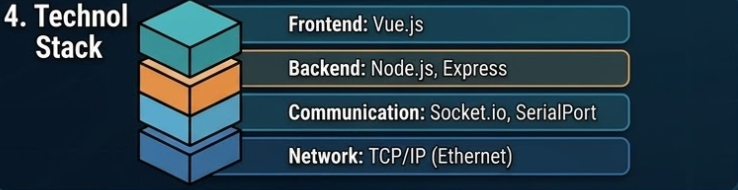
4. Tech Stack
- Frontend: Vue.js (Responsive Web Interface)
- Backend: Node.js, Express
- Communication: Socket.io (Real-time data), SerialPort (GRBL hardware communication)
- Network: TCP/IP-based Ethernet communication
5. Why is Ethernet (Wiznet) Needed for CNC Control?
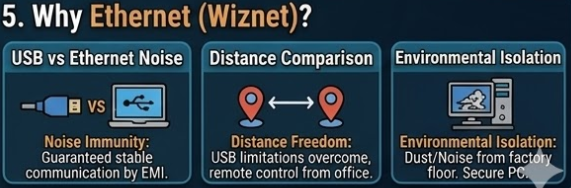
The strong electromagnetic interference (EMI) generated during CNC machining is a major cause of connection drops in standard USB communication. Utilizing Wiznet's Ethernet technology provides the following advantages:
- Noise Immunity: Superior communication stability compared to USB, preventing disconnections during critical machining tasks.
- Distance Freedom: Overcomes the length limitations of USB cables, allowing you to control equipment from a clean office outside the workshop.
- Environmental Isolation: Protects the control PC from dust and noise, thereby extending the lifespan of your hardware.
FAQ
Q: Why use WIZnet W5500 for this project?
A: The W5500 provides a hardware TCP/IP stack, eliminating the need for a software network stack and reducing MCU load. It also ensures stable, low-latency communication in noisy CNC environments where USB is unreliable.
Q: How does W5500 connect to a CNC controller?
A: It connects to a microcontroller via SPI (MISO, MOSI, SCK, CS), and the MCU communicates with the GRBL controller via UART. The W5500 handles Ethernet while the MCU bridges data to serial.
Q: What role would WIZnet play in this system?
A: It acts as the network transport layer, receiving G-code over TCP/IP and delivering it to the CNC controller, while also transmitting status data back to the client.
Q: Can beginners build this system?
A: Intermediate knowledge is required, including basic networking (TCP/IP), serial communication, and familiarity with GRBL and Node.js environments.
Q: How does Ethernet compare to USB or Wi-Fi for CNC control?
A: Ethernet provides more stable and deterministic communication than USB (which is noise-sensitive) and Wi-Fi (which has variable latency). This makes it better suited for continuous G-code streaming.
Debug messages indicate that the W5500 is being used