


MODBUS over Ethernet with ESP32 & W5500 – TCP/IP + DHCP Test Run
Test run using ESP32 + WIZnet W5500 implementing MODBUS over Ethernet with DHCP and TCP/IP via PlatformIO and Arduino framework.

WIZnet - W5500
x 1

📌 프로젝트 개요 (Overview)
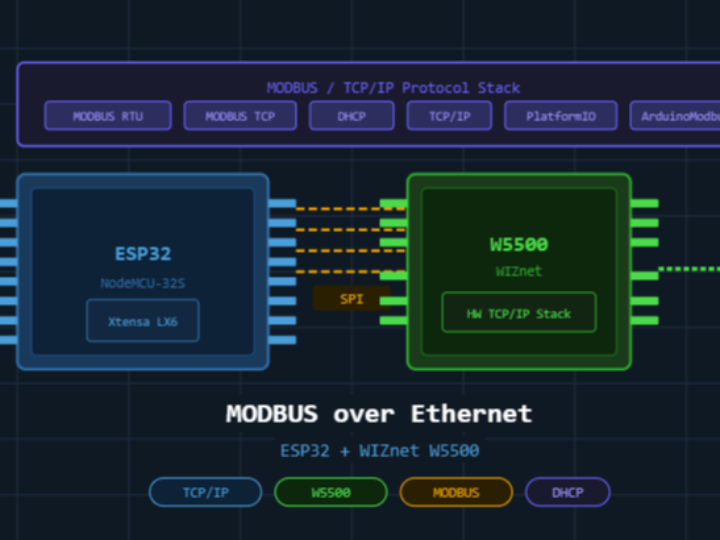
이 프로젝트는 ESP32(NodeMCU-32S) + WIZnet W5500 조합을 이용하여
Ethernet 기반 MODBUS 통신을 검증하는 실험 프로젝트입니다.
핵심 목적은 다음과 같습니다:
- Wi-Fi 없이
- 하드웨어 TCP/IP 스택(W5500)을 사용하여
- 산업용 수준의 안정적인 MODBUS 통신 구현 가능 여부 검증
👉 즉, MCU는 Application Layer만 처리하고
👉 L2~L4는 완전히 W5500이 처리하는 구조입니다.
🔌 하드웨어 구성 (Hardware Connection)
구조
ESP32 <--SPI--> W5500 <--RJ45--> Ethernet Network인터페이스
- SPI (MOSI, MISO, SCK, CS)
- W5500 내부 MAC + TCP/IP Offload Engine 사용
특징 (칩 관점)
- ESP32는 Bus Master (SPI Master)
- W5500은 Network Co-processor
- Register + Buffer 기반 packet 처리
👉 사실상 구조는:
"MCU + NIC (Network Interface Controller)"

⚙️ 주요 기능 (What This Project Does)
1. MODBUS over TCP 구현
- ArduinoModbus + modbus-esp8266 사용
- MODBUS TCP framing 처리
2. DHCP 기반 IP 할당
- 고정 IP 없음
- W5500 DHCP Client 사용
👉 실제 현장에서는 이게 꽤 중요함 (설치 편의성)
🧩이 프로젝트에서 하는 일 (What This Project Does)
- ArduinoModbus 및 modbus-esp8266 라이브러리를 사용하여 MODBUS over TCP 구현
- DHCP를 통해 IP 주소를 동적으로 할당 — 고정 IP 설정 불필요
- ESP32와 호스트 머신 간 TCP/IP 소켓 통신 수립
- SPI 인터페이스를 통해 WIZnet W5500을 하드웨어 이더넷 컨트롤러로 사용
- 기존 장치와의 호환성을 위해 MODBUS RTU over TCP 지원
- ESPAsyncWebServer를 통해 경량 비동기 웹 서버를 선택적으로 제공
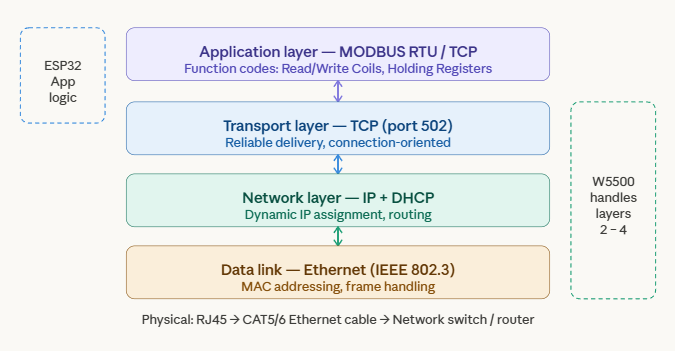
![]() MODBUS 프로토콜 스택 (MODBUS protocol stack)
MODBUS 프로토콜 스택 (MODBUS protocol stack)
W5500은 Layer 2~4 (Ethernet, IP, TCP)를 하드웨어에서 처리하므로, ESP32는 Layer 5에서 MODBUS 애플리케이션 로직만 처리합니다.
AI(Claude)로 생성된 이미지
사용된 하드웨어 (Hardware Used)
- 마이크로컨트롤러: ESP32 (NodeMCU-32S)
- 이더넷 컨트롤러: WIZnet W5500 (하드웨어 TCP/IP 스택)
- 인터페이스: SPI (MOSI, MISO, SCK, CS)
- 연결: W5500 모듈의 RJ45
- 전원: NodeMCU 보드의 USB
통신 흐름 (Communication flow)
전원 인가부터 MODBUS 폴링까지의 과정:
DHCP가 자동으로 IP를 할당하고, 포트 502에서 슬레이브 장치와 TCP 연결이 이루어진 후,
MODBUS 요청과 응답이 폴링 루프에서 반복됩니다.
통신 흐름:
boot → DHCP IP 할당 → TCP 핸드셰이크 → MODBUS 요청 및 응답 루프
AI(Claude)로 생성된 이미지
소프트웨어 및 라이브러리 (Software & Libraries)
- Framework: Arduino (PlatformIO, espressif32)
- arduino-libraries/Ethernet
- arduino-libraries/ArduinoModbus
- emelianov/modbus-esp8266
- esp32async/ESPAsyncWebServer
- Filesystem: LittleFS (min_spiffs partition)
FAQ
Q1. ESP32의 내장 Wi-Fi 대신 W5500을 사용하는 이유는?
WIZnet W5500은 하드웨어 기반 TCP/IP 스택을 제공하여
ESP32 CPU의 네트워크 처리 부담을 줄여줍니다.
이는 Wi-Fi 간섭이 흔한 산업 환경이나,
MODBUS 폴링을 위해 안정적인 유선 연결이 필요한 환경에서 매우 중요합니다.
Q2. 여러 개의 MODBUS 스케치를 동시에 실행할 수 있나요?
아니요 — 한 번에 하나의 스케치만 실행됩니다.
/src 폴더에서 프로젝트를 변경하려면
platformio.ini의 build_src_filter를 원하는 파일로 수정한 후 다시 업로드해야 합니다.
Q3. MODBUS 슬레이브 장치와도 동작하나요?
네! ArduinoModbus 라이브러리는
Master(Client)와 Slave(Server) 모드를 모두 지원합니다.
PLC의 레지스터를 폴링하거나,
마스터의 요청에 응답하는 것도 가능합니다.
Q4. DHCP는 무엇이며 왜 사용하나요?
DHCP(Dynamic Host Configuration Protocol)는
네트워크 라우터에 연결될 때 자동으로 IP 주소를 할당해주는 프로토콜입니다.
따라서 IP를 직접 설정할 필요가 없어
다양한 네트워크 환경에서 쉽게 배포할 수 있습니다.
Q5. PlatformIO 대신 Arduino IDE에서도 사용할 수 있나요?
네! /src 폴더의 .cpp 파일을 새로운 Arduino 스케치로 복사하면 됩니다.
필요한 라이브러리:
- Ethernet
- ArduinoModbus
- modbus-esp8266
Q6. 지원되는 MODBUS Function Code는 무엇인가요?
ArduinoModbus 라이브러리는 다음을 지원합니다:
- Read Coils (FC01)
- Read Discrete Inputs (FC02)
- Read Holding Registers (FC03)
- Read Input Registers (FC04)
- Write Single Coil (FC05)
- Write Single Register (FC06)
- Write Multiple Registers (FC16)
핵심 요약 (Key Takeaway)
이 프로젝트는 ESP32에 유선 Ethernet과 MODBUS를 추가하려는 사용자에게 좋은 출발점이 됩니다.
WIZnet W5500은 신뢰성 있는 하드웨어 기반 TCP/IP 스택을 제공하여 산업 환경이나 노이즈에 민감한 환경에 적합합니다.
또한 DHCP 지원과 모듈화된 PlatformIO 구조를 통해 실제 환경에서 쉽게 확장하고 적용할 수 있습니다.
Overview
This project is a hands-on test run exploring MODBUS communication over Ethernet using an ESP32 (NodeMCU-32S) paired with a WIZnet W5500 Ethernet module. The goal is to validate reliable industrial-grade communication using a hardware TCP/IP stack — without relying on Wi-Fi.
Hardware connection
The ESP32 communicates with the W5500 via SPI, which then handles all Ethernet/TCP/IP processing in hardware and connects to the local network via RJ45.
Image generated by AI(Cladue)
What This Project Does
- Implements MODBUS over TCP using ArduinoModbus and modbus-esp8266 libraries
- Assigns IP address dynamically via DHCP — no hardcoded IP needed
- Establishes TCP/IP socket communication between ESP32 and a host machine
- Uses WIZnet W5500 as the hardware Ethernet controller via SPI interface
- Supports MODBUS RTU over TCP for legacy device compatibility
- Optionally serves a lightweight async web server via ESPAsyncWebServer
MODBUS protocol stack
The W5500 offloads layers 2–4 (Ethernet, IP, TCP) in hardware, so the ESP32 only handles the MODBUS application logic at layer 5.

Image generated by AI(Cladue)
Hardware Used
- Microcontroller: ESP32 (NodeMCU-32S)
- Ethernet Controller: WIZnet W5500 (Hardware TCP/IP Stack)
- Interface: SPI (MOSI, MISO, SCK, CS)
- Connection: RJ45 via W5500 module
- Power: USB via NodeMCU board
Communication flow
From power-on to MODBUS polling: DHCP assigns an IP automatically, a TCP connection is established to the slave device on port 502, then MODBUS requests and responses cycle in a polling loop.
Image generated by AI(Cladue)
Software & Libraries
- Framework: Arduino via PlatformIO (espressif32)
- arduino-libraries/Ethernet
- arduino-libraries/ArduinoModbus
- emelianov/modbus-esp8266
- esp32async/ESPAsyncWebServer
- Filesystem: LittleFS (min_spiffs partition)
How to Run
- Clone the repo:
git clone https://github.com/HritikGauranga/MODBUS_TEST_RUN - Open
platformio.ini, setbuild_src_filter = +<DHCPTCPRTU.cpp> - Connect ESP32 + W5500 via SPI and plug in Ethernet cable
- Flash:
pio run --target upload - Open Serial Monitor at 115200 baud to see DHCP IP and MODBUS output
FAQ
Q1. Why use W5500 instead of built-in Wi-Fi on ESP32?
The WIZnet W5500 provides a hardware-based TCP/IP stack which offloads network processing from the ESP32 CPU. This is critical in industrial environments where Wi-Fi interference is common, or where a stable wired connection is required for MODBUS polling.
Q2. Can I run multiple MODBUS sketches at the same time?
No — only one sketch runs at a time. To switch between projects in the /src folder, edit build_src_filter in platformio.ini to point to your desired file, then re-flash.
Q3. Does this work with MODBUS slave devices?
Yes! The ArduinoModbus library supports both Master (Client) and Slave (Server) modes. You can poll registers from a PLC or respond to MODBUS requests from a master.
Q4. What is DHCP and why is it used here?
DHCP (Dynamic Host Configuration Protocol) automatically assigns an IP address to the W5500 when it connects to a network router. This means you don't need to hardcode IP addresses — making it much easier to deploy on different networks.
Q5. Can I use this with Arduino IDE instead of PlatformIO?
Yes! Simply copy any .cpp file from the /src folder into a new Arduino sketch. Install the required libraries: Ethernet, ArduinoModbus, and modbus-esp8266.
Q6. What MODBUS function codes are supported?
The ArduinoModbus library supports: Read Coils (FC01), Read Discrete Inputs (FC02), Read Holding Registers (FC03), Read Input Registers (FC04), Write Single Coil (FC05), Write Single Register (FC06), and Write Multiple Registers (FC16).
Key Takeaway
This project is a great starting point for anyone wanting to add wired Ethernet and MODBUS to an ESP32. WIZnet W5500 provides a reliable, hardware-based TCP/IP stack — ideal for industrial or noise-sensitive environments. Combined with DHCP support and the modular PlatformIO structure, it's easy to extend and deploy in real-world applications.
Source Code: https://github.com/HritikGauranga/MODBUS_TEST_RUN