



MicroPython RGB LED Controller via Ethernet HTTP API — W5500 + Multithreading
MicroPython + W5500 Ethernet RGB LED controller with HTTP REST API. Multithreading for concurrent control. Polish developer. IoT lighting project
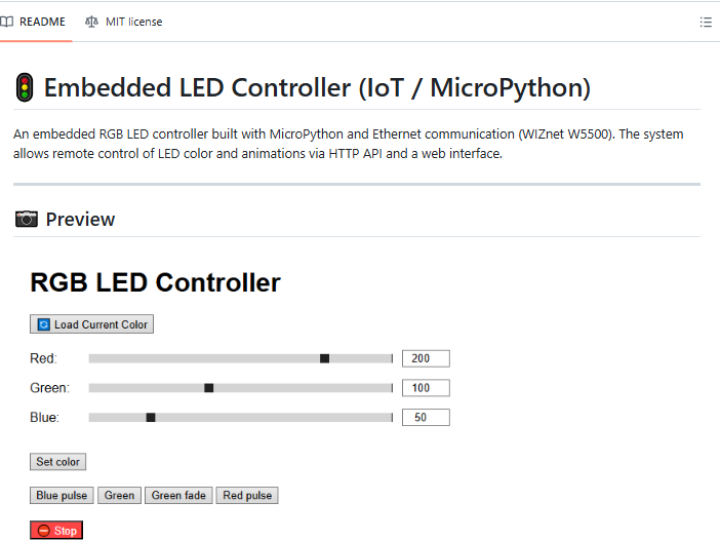
Overview
This is an embedded RGB LED controller built with MicroPython and WIZnet W5500 Ethernet, exposing an HTTP REST API for controlling LEDs over a wired network. Developed by a Polish maker, the project uses MicroPython's threading support to handle concurrent HTTP requests while simultaneously driving the LED output — making it a practical example of multithreaded IoT LED control without an OS.
What This Project Does
- Serves an HTTP REST API over W5500 Ethernet for RGB LED control commands
- Supports concurrent control requests using MicroPython multithreading (
_thread) - Controls RGB LED color, brightness, and patterns via simple HTTP POST/GET requests
- Wired Ethernet connection provides reliable, low-latency LED control compared to WiFi
Hardware
- MCU: Any MicroPython-compatible board (ESP32, Pico, etc.)
- Ethernet: WIZnet W5500 module (SPI)
- LED output: RGB LED strip or individual LEDs (GPIO PWM or WS2812-compatible)
- Language: MicroPython
API Usage Example
POST /led
Content-Type: application/json
{"r": 255, "g": 128, "b": 0}   # Set orange color
How to Set Up
- Clone:
git clone https://github.com/kuba122388/embedded-led-controller - Flash MicroPython on your board
- Copy project files via Thonny or
mpremote - Configure W5500 SPI pins and network settings
- Connect W5500 module and RGB LED hardware
- Send HTTP requests from any client on the same network
FAQ
Q1. Why use Ethernet instead of WiFi for LED control? Ethernet provides deterministic latency without the reconnection delays common in WiFi. For LED effects synchronized with music or events, consistent low latency matters. W5500 also eliminates WiFi interference issues in electrically noisy environments.
Q2. How does multithreading work in MicroPython? MicroPython's _thread module provides basic threading. One thread runs the HTTP server handling incoming control commands, while another drives the LED output — preventing LED glitches when HTTP traffic is heavy.
Q3. Can this control WS2812 (NeoPixel) strips? Depending on the implementation, WS2812 control can be added via MicroPython's neopixel module or PIO (on RP2040). Check the repository for LED driver details.
Key Takeaway
A clean MicroPython example of Ethernet-connected embedded LED control — showing how W5500 brings wired network reliability to Python-based IoT projects without the complexity of C firmware. The multithreading approach ensures responsive HTTP API control without blocking LED output.
Source Code: https://github.com/kuba122388/embedded-led-controller