



Embedded Web Server from Scratch on W5500-EVB-Pico
Hand-built embedded web server on W5500-EVB-Pico (RP2040 + W5500) in C, serving a personal blog from scratch. No frameworks, no OS.
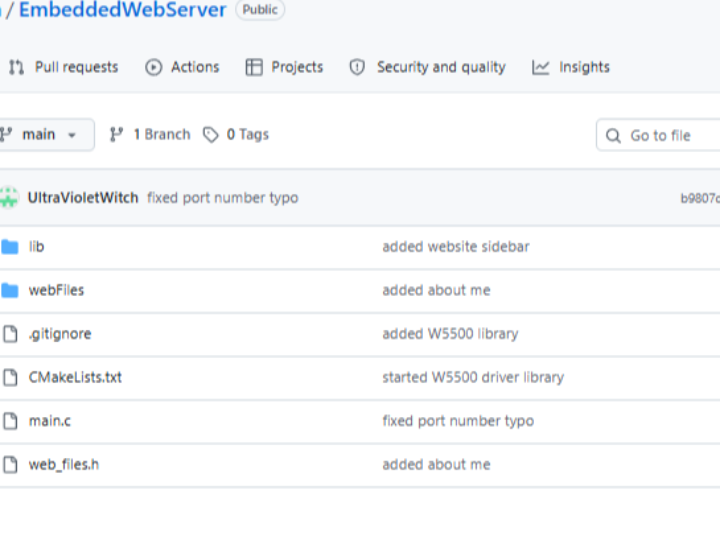
📌 개요
이 프로젝트는 WIZnet W5500-EVB-Pico 보드(RP2040 + W5500 통합)에서 HTTP로 개인 블로그를 호스팅하는 처음부터 직접 구현한 임베디드 웹서버입니다. 웹 프레임워크, RTOS, 외부 네트워크 라이브러리(lwIP, Mongoose 등) 없이 C언어(C11)만으로 작성된 포트폴리오 프로젝트로, 임베디드 하드웨어에서 소켓 수준의 네트워크 프로그래밍에 대한 깊은 이해를 실증합니다.
"Embedded Web Server from Scratch" = 임베디드 웹서버를 아무 라이브러리도 쓰지 않고 밑바닥부터 직접 만들었다"
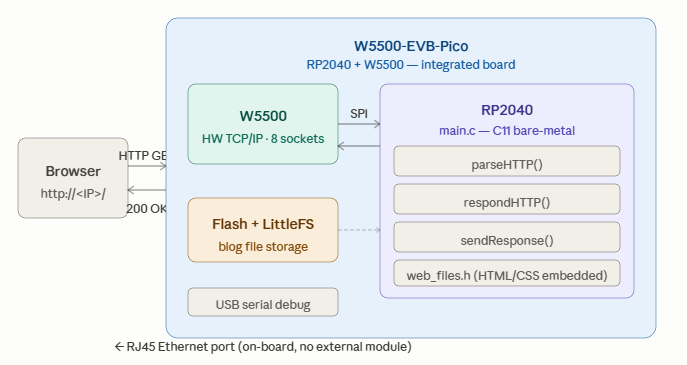
W5500-EVB-Pico는 이 프로젝트에 최적의 플랫폼입니다. RP2040 마이크로컨트롤러와 WIZnet W5500 이더넷 컨트롤러가 하나의 보드에 통합되어 있어, 별도의 이더넷 모듈 배선 없이 컴팩트한 폼팩터만으로 완전한 유선 HTTP 서버를 구현할 수 있습니다.
📌 시스템 아키텍처
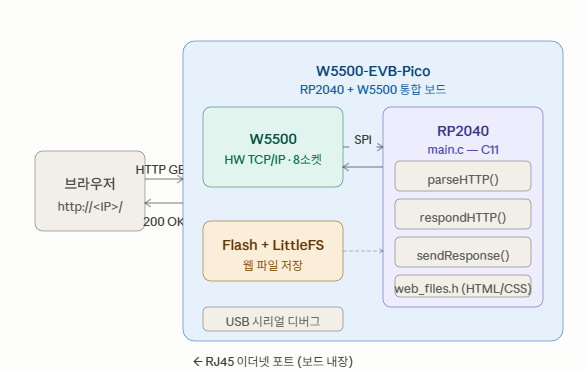
📌 주요 기능
- W5500 TCP 소켓을 사용해 HTTP/1.1 서버 처음부터 직접 구현
- 수신된 HTTP GET 요청을 파싱하고 HTML 블로그 콘텐츠 서빙
- W5500의 8개 하드웨어 소켓으로 다수의 클라이언트 동시 연결 처리
- RP2040 베어메탈 실행 (OS, FreeRTOS 없음)
- 마이크로컨트롤러 플래시에 직접 블로그 콘텐츠를 저장해 서빙
- LittleFS 파일시스템으로 RP2040 내장 Flash 관리
- USB 시리얼 디버그 지원 (
pico_enable_stdio_usb)
📌 왜 처음부터 직접 구현했나?
이 프로젝트는 학습 중심의 포트폴리오 작품입니다. lwIP나 Mongoose 같은 라이브러리를 사용하는 대신 TCP 서버, HTTP 파서, 응답 생성기를 직접 구현함으로써 소켓 프로그래밍, HTTP 프로토콜 구조, 임베디드 C 개발에 대한 철저한 이해를 보여줍니다.
실제 구현된 핵심 요소:
| 요소 | 내용 |
|---|---|
| HTTP 메서드 파서 | GET POST HEAD PUT DELETE OPTIONS TRACE CONNECT 8가지 |
| HTTP 헤더 파서 | Accept Content-Type Content-Length 등 47개 헤더 타입 |
| 상태 코드 | 200 OK 404 Not Found 등 40개 reason phrase 직접 정의 |
| 커스텀 W5500 드라이버 | lib/W5500/에 SPI 레지스터 수준 드라이버 직접 작성 |
| HTTP 구조체 | http_request http_response request_line status_line http_header http_body |
| 라우터 | respondHTTP() — URI 기반 콘텐츠 라우팅 |
📌 Hardware
| 항목 | 내용 |
|---|---|
| 보드 | WIZnet W5500-EVB-Pico (RP2040 + W5500 보드 내장) |
| 이더넷 | RJ45 포트 보드 직결 — 별도 이더넷 모듈 불필요 |
| 언어 | C (C11 표준) |
| 프레임워크 | Raspberry Pi Pico SDK 2.2.0+ (베어메탈) |
| 빌드 | CMake 3.12+ |
| 파일시스템 | LittleFS (RP2040 내장 Flash) |
| 디버그 | USB 시리얼 (UART 비활성화) |
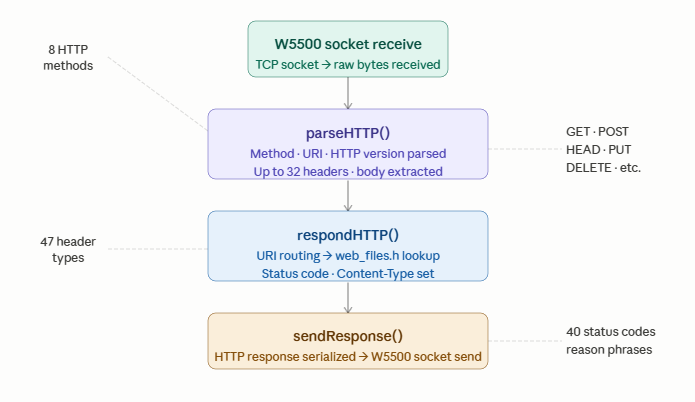
📌 HTTP 처리 흐름
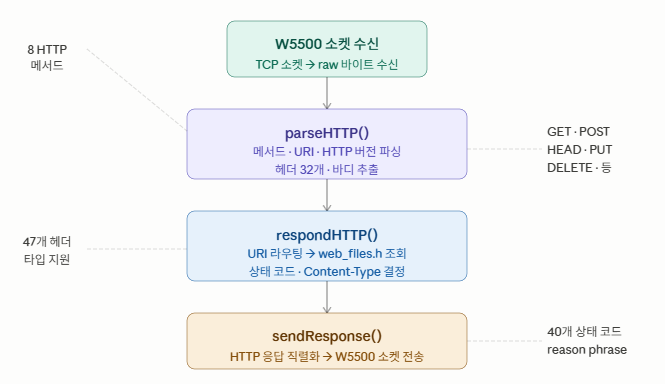
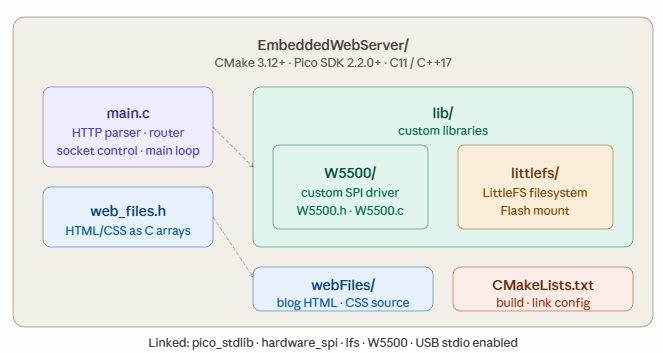
📌 소스 구조
EmbeddedWebServer/
├── main.c          # HTTP 파서, 응답 생성, 메인 루프
├── web_files.h     # HTML/CSS 플래시 임베딩 헤더
├── CMakeLists.txt  # CMake 빌드 설정 (Pico SDK 2.2.0+)
├── lib/
│   ├── W5500/      # 커스텀 W5500 SPI 드라이버
│   └── littlefs/   # LittleFS 파일시스템 라이브러리
└── webFiles/       # 블로그 HTML/CSS 소스 파일
링크 라이브러리: pico_stdlib · hardware_spi · lfs · W5500
핵심 구조체 (main.c)
struct http_request {
    struct request_line rq_line;  // 메서드, URI, HTTP 버전
    struct http_header headers[32]; // 최대 32개 헤더
    uint8_t header_cnt;
    struct http_body body;
};

struct http_response {
    struct status_line stat_line; // 상태 코드, reason phrase
    struct http_header headers[32];
    uint8_t header_cnt;
    struct http_body body;
};
📌 소스 구조 다이어그램
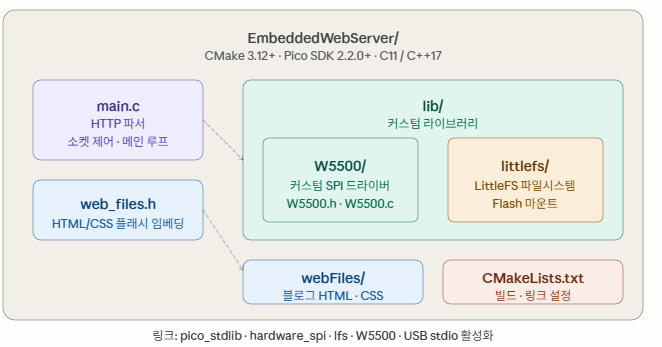
빌드 및 플래시
요구사항:
- Raspberry Pi Pico SDK 2.2.0 이상
- CMake 3.12+
- ARM GCC 툴체인
PICO_SDK_PATH환경변수 설정
# 1. 저장소 클론
git clone https://github.com/UltraVioletWitch/EmbeddedWebServer

# 2. 빌드 디렉토리 생성
mkdir build && cd build

# 3. CMake 구성
cmake ..

# 4. 빌드
make -j4

# 5. 플래시
# BOOTSEL 버튼을 누른 채 USB 연결 → webServer.uf2를 드라이브에 복사
cp webServer.uf2 /media/RPI-RP2/
접속 방법:
- W5500-EVB-Pico를 RJ45 케이블로 네트워크에 연결
- USB 시리얼 모니터에서 할당된 IP 주소 확인
- 브라우저에서
http://<할당된 IP>/접속
📌 WIZnet W5500 칩의 역할
사용 칩 모델명: W5500 (W5500-EVB-Pico에 통합)
이 프로젝트에서 W5500은 단순한 이더넷 컨트롤러를 넘어 프로젝트 전체의 핵심 기반입니다. W5500-EVB-Pico에는 W5500이 보드에 직접 통합되어 있어 외부 모듈 없이 RJ45 커넥터만으로 유선 이더넷 HTTP 서버가 가능합니다.
역할:
- TCP 소켓 관리: W5500의 하드웨어 TCP/IP 스택이 8개 독립 소켓을 제공해 HTTP 클라이언트 연결을 처리
- SPI 인터페이스: Pico SDK
hardware_spi로 RP2040과 W5500이 SPI 통신 - HTTP 서버 네트워크 계층:
parseHTTP()→respondHTTP()→sendResponse()전 과정의 네트워크 전송을 W5500 소켓이 담당 - 안정적인 유선 연결: WiFi 없이 RJ45 유선 연결로 24시간 블로그 호스팅
처음부터 구현한 의미: 커스텀 W5500 드라이버(lib/W5500/)를 직접 작성한 것은 W5500 칩의 SPI 레지스터 레벨 동작을 완전히 이해하고 제어한다는 의미입니다. 이는 단순히 라이브러리를 사용하는 것과 달리 깊은 하드웨어 수준의 이해를 보여주는 포트폴리오 작품입니다.
📌 시장 및 활용 가치
임베디드 시스템 포트폴리오 프로젝트, 네트워크 프로그래밍 학습, 저전력 개인 블로그/웹서버 구축 시나리오에서 활용됩니다. W5500-EVB-Pico는 저비용($10 수준)으로 안정적인 유선 이더넷 HTTP 서버를 구현할 수 있어, Raspberry Pi나 클라우드 서버 없이 마이크로컨트롤러로 웹 호스팅이 가능함을 보여줍니다.
📌 WIZnet 전략적 가치
이 프로젝트는 W5500-EVB-Pico가 학습·포트폴리오 목적의 임베디드 웹서버 플랫폼으로 채택된 사례입니다. 커스텀 HTTP 파서와 커스텀 W5500 드라이버를 모두 직접 작성한 "처음부터 구현" 접근법은 W5500 칩과 W5500-EVB-Pico 보드의 기술적 깊이와 활용 가능성을 잘 보여줍니다. lwIP나 ioLibrary 없이도 W5500을 완전히 제어할 수 있음을 실증하는 드문 레퍼런스입니다.
📌 요약
W5500-EVB-Pico(RP2040 + W5500 통합)에서 C(C11)로 처음부터 구현한 임베디드 HTTP/1.1 웹서버입니다. HTTP 파서(8메서드, 47헤더, 40상태코드), 커스텀 W5500 SPI 드라이버, LittleFS 파일시스템을 외부 네트워크 라이브러리 없이 직접 작성해 개인 블로그를 호스팅합니다. Raspberry Pi Pico SDK 2.2.0+, CMake 기반 빌드. 깊은 하드웨어·네트워크 프로그래밍 이해를 보여주는 포트폴리오 프로젝트입니다.
📌 FAQ
Q1. 웹서버에 W5500-EVB-Pico를 선택한 이유는? W5500-EVB-Pico는 W5500을 보드에 직접 통합해 외부 배선을 제거합니다. RP2040 + W5500 조합은 8개의 하드웨어 TCP/UDP 소켓과 하드웨어 TCP/IP 스택을 제공해, 소프트웨어 TCP/IP 오버헤드 없이 간단하고 안정적인 임베디드 웹서버를 구현하기에 최적입니다.
Q2. 지원하는 HTTP 기능은? 처음부터 구현한 방식으로 정적 블로그 콘텐츠 서빙에 필요한 HTTP/1.1 서브셋을 구현했습니다. GET 요청 파싱, 응답 헤더(Content-Type, Content-Length), HTTP 200/404 응답을 지원합니다. 파서 수준에서는 8가지 메서드와 47개 헤더 타입을 처리합니다.
Q3. 동시 연결을 처리할 수 있나요? W5500은 8개의 독립적인 하드웨어 소켓을 제공합니다. 여러 소켓을 활용해 동시 클라이언트를 처리할 수 있으며, 정확한 동시성 모델은 구현 세부사항에 따라 다릅니다.
Q4. 왜 lwIP나 Mongoose 같은 라이브러리를 쓰지 않았나요? 이 프로젝트의 핵심 목표가 "처음부터 직접 구현"입니다. 라이브러리를 사용하지 않음으로써 소켓 프로그래밍, HTTP 프로토콜 구조, W5500 레지스터 동작을 모두 직접 이해하고 구현하는 능력을 포트폴리오로 증명합니다.
Q5. LittleFS는 어떻게 사용하나요? RP2040 내장 Flash에 LittleFS를 마운트해 웹 파일을 저장합니다. lib/littlefs/ 디렉토리에 포함된 LittleFS 라이브러리를 CMake로 링크합니다. 웹 콘텐츠는 web_files.h에 C 배열로도 임베딩됩니다.
Q6. 웹 콘텐츠를 수정하려면? webFiles/ 디렉토리의 HTML/CSS 파일을 수정하고 web_files.h를 재생성한 후 다시 빌드·플래시하면 됩니다.
Q7. IP 주소는 어떻게 확인하나요? pico_enable_stdio_usb=1 설정으로 USB 시리얼 모니터에서 부팅 시 출력되는 DHCP 할당 IP를 확인합니다. 고정 IP도 W5500 드라이버 초기화에서 설정 가능합니다.
Q8. Pico SDK 2.2.0이 반드시 필요한가요? CMakeLists.txt에 명시적으로 요구합니다. 이하 버전에서는 빌드가 실패합니다.
Q9. 커스텀 W5500 드라이버는 어떻게 동작하나요? lib/W5500/의 드라이버는 Pico SDK hardware_spi로 W5500 SPI 레지스터에 직접 접근합니다. 소켓 열기/닫기, 데이터 송수신, 연결 상태 확인 등을 레지스터 수준에서 제어하며, WIZnet 공식 ioLibrary 없이 데이터시트 기반으로 작성됐습니다.
Q10. 이 프로젝트로 무엇을 배울 수 있나요? TCP 소켓 프로그래밍, HTTP/1.1 프로토콜 구조, SPI 드라이버 작성, LittleFS 파일시스템 통합, CMake 빌드 시스템, 베어메탈 RP2040 개발을 하나의 실제 동작하는 프로젝트로 학습할 수 있습니다.
📌 참고 링크
- GitHub: https://github.com/UltraVioletWitch/EmbeddedWebServer
- W5500-EVB-Pico 문서: https://docs.wiznet.io/Product/iEthernet/W5500/w5500-evb-pico
- WIZnet W5500 데이터시트: https://docs.wiznet.io/Product/iEthernet/W5500/datasheet
📌 Overview
This is a from-scratch embedded web server running on the WIZnet W5500-EVB-Pico board (RP2040 + W5500 integrated), serving a personal blog over HTTP. Written entirely in C (C11) with no web frameworks, no RTOS, and no external network libraries (lwIP, Mongoose, etc.), this portfolio project demonstrates deep understanding of network programming at the socket level on embedded hardware.
The W5500-EVB-Pico is the perfect platform for this project. The RP2040 microcontroller paired with an onboard WIZnet W5500 Ethernet controller delivers a complete wired HTTP server in a compact form factor — with no external Ethernet module or wiring required.
📌 System Architecture
📌 Key Features
- Implements an HTTP/1.1 server from scratch using W5500 TCP sockets
- Parses incoming HTTP GET requests and serves HTML blog content
- Handles multiple client connections using W5500's 8 hardware sockets
- Runs on RP2040 bare-metal (no OS, no FreeRTOS)
- Blog content served directly from the microcontroller's flash
- LittleFS filesystem for RP2040 onboard Flash management
- USB serial debug support (
pico_enable_stdio_usb)
📌 Why Build from Scratch?
This is a learning-focused portfolio project. Implementing the TCP server, HTTP parser, and response builder from scratch — rather than using a library like lwIP or Mongoose — demonstrates thorough knowledge of socket programming, HTTP protocol structure, and embedded C development.
Core elements implemented directly:
| Element | Details |
|---|---|
| HTTP method parser | GET POST HEAD PUT DELETE OPTIONS TRACE CONNECT — all 8 |
| HTTP header parser | 47 header types including Accept, Content-Type, Content-Length |
| Status codes | 40 reason phrases including 200 OK, 404 Not Found — defined directly |
| Custom W5500 driver | SPI register-level driver written from scratch in lib/W5500/ |
| HTTP structs | http_request, http_response, request_line, status_line, http_header, http_body |
| Router | respondHTTP() — URI-based content routing |
📌 Hardware
| Item | Details |
|---|---|
| Board | WIZnet W5500-EVB-Pico (RP2040 + W5500 integrated on-board) |
| Ethernet | RJ45 port on-board — no external Ethernet module needed |
| Language | C (C11 standard) |
| Framework | Raspberry Pi Pico SDK 2.2.0+ (bare-metal) |
| Build | CMake 3.12+ |
| Filesystem | LittleFS (RP2040 onboard Flash) |
| Debug | USB serial (UART disabled) |
📌 HTTP Request Processing Flow
📌 Source Structure
EmbeddedWebServer/
├── main.c          — HTTP parser, routing, response builder, main loop (457 lines)
├── web_files.h     — HTML/CSS embedded as C arrays
├── CMakeLists.txt  — CMake build config (Pico SDK 2.2.0+)
├── lib/
│   ├── W5500/      — Custom W5500 SPI driver (written from scratch)
│   └── littlefs/   — LittleFS filesystem library
└── webFiles/       — Blog HTML/CSS source (about me, projects, etc.)
Linked libraries: pico_stdlib · hardware_spi · lfs · W5500
Core structs in main.c:
struct http_request {
    struct request_line rq_line;    // method, URI, HTTP version
    struct http_header headers[32]; // up to 32 headers
    uint8_t header_cnt;
    struct http_body body;
};

struct http_response {
    struct status_line stat_line;   // status code, reason phrase
    struct http_header headers[32];
    uint8_t header_cnt;
    struct http_body body;
};
📌 Source Structure Diagram
📌 Build Workflow
Requirements:
- Raspberry Pi Pico SDK 2.2.0 or later
- CMake 3.12+
- ARM GCC toolchain
PICO_SDK_PATHenvironment variable set
# 1. Clone
git clone https://github.com/UltraVioletWitch/EmbeddedWebServer

# 2. Create build directory and configure
mkdir build && cd build
cmake ..

# 3. Build
make -j4

# 4. Flash
# Hold BOOTSEL while connecting USB
# → drag and drop webServer.uf2 to the Pico USB drive

# 5. Access
# Check assigned IP from USB serial monitor
# → open http://<IP>/ in a browser
📌 Role and Application of the WIZnet's Chip
Chip model: W5500 (integrated on W5500-EVB-Pico)
In this project, the W5500 goes beyond a simple Ethernet controller — it is the foundation of the entire network layer. Integrated at board level on the W5500-EVB-Pico, the W5500 handles all network communication for the HTTP server.
Core roles of the W5500:
- Hardware TCP/IP stack — RP2040 uses TCP sockets directly without software TCP/IP overhead
- 8 independent hardware sockets — supports simultaneous HTTP client connections
- SPI interface — communicates with RP2040 via Pico SDK
hardware_spi - On-board RJ45 — no external Ethernet module needed, wiring minimized
- Network transport layer — handles all network transmission across the full
parseHTTP()→respondHTTP()→sendResponse()pipeline
What the custom driver means: Writing the W5500 driver from scratch in lib/W5500/ means directly understanding and controlling the W5500 chip at the SPI register level. Unlike using the WIZnet official ioLibrary, this is a datasheet-driven implementation demonstrating deep hardware understanding — covering socket open/close, data send/receive, and connection state checking at the register level.
📌 Market & Application Value
- Portfolio project — proves embedded C, socket programming, and HTTP protocol implementation skills in a single working project
- Low-cost web hosting proof of concept — demonstrates that a microcontroller alone can serve a web server without Raspberry Pi or cloud infrastructure
- Educational reference — provides a fully functional from-scratch implementation for embedded networking learners
- W5500-EVB-Pico platform reference — validates the practical utility of the integrated board as a WIZnet ecosystem showcase
📌 WIZnet Strategic Value
This project demonstrates W5500-EVB-Pico adopted as an embedded web server platform for learning and portfolio purposes. Writing both a custom HTTP parser and a custom W5500 driver from scratch shows the technical depth and versatility of the W5500 chip and the W5500-EVB-Pico board. It is a rare reference implementation proving that W5500 can be fully controlled without lwIP or ioLibrary — driven directly from a datasheet.
📌 Summary
A from-scratch embedded HTTP/1.1 web server implemented in C (C11) on the W5500-EVB-Pico (RP2040 + W5500 integrated). An HTTP parser (8 methods, 47 header types, 40 status codes), a custom W5500 SPI driver, and a LittleFS filesystem were all written without any external network library to host a personal blog. The W5500's hardware TCP/IP stack simplifies socket-level programming while the RP2040 provides ample processing power — making this a compelling embedded web hosting platform. Built with Raspberry Pi Pico SDK 2.2.0+ and CMake. A portfolio project demonstrating deep understanding of socket programming, HTTP protocol structure, and embedded C development.
📌 FAQ
Q1. Why use W5500-EVB-Pico for a web server? The W5500-EVB-Pico integrates W5500 directly on the board, eliminating external wiring. The RP2040 + W5500 combination provides 8 hardware TCP/UDP sockets and a hardware TCP/IP stack — making it well-suited for a simple but reliable embedded web server without software TCP/IP overhead.
Q2. What HTTP features are supported? Targeting the minimal HTTP/1.1 subset needed for serving static blog content: GET request parsing, response headers (Content-Type, Content-Length), and HTTP 200/404 responses. At the parser level, 8 methods and 47 header types are handled.
Q3. Can this handle multiple simultaneous connections? The W5500 provides 8 independent hardware sockets. Multiple sockets can be used to handle concurrent clients — the exact concurrency model depends on the implementation details.
Q4. Why not use a library like lwIP or Mongoose? The core goal of this project is "build from scratch." Not using a library means directly understanding and implementing socket programming, HTTP protocol structure, and W5500 register behavior — proving that ability as a portfolio piece.
Q5. How is LittleFS used? LittleFS is mounted on the RP2040's onboard Flash to store web files. The lib/littlefs/ library is linked via CMake. Web content is also embedded as C arrays in web_files.h.
Q6. How do I modify the blog content? Edit the HTML/CSS files in the webFiles/ directory, regenerate web_files.h, then rebuild and reflash.
Q7. How do I find the IP address? The DHCP-assigned IP is printed at boot via the USB serial monitor (pico_enable_stdio_usb=1). A static IP can also be set in the W5500 driver initialization.
Q8. Is Pico SDK 2.2.0 strictly required? Yes — explicitly required in CMakeLists.txt. Builds will fail on earlier versions.
Q9. How does the custom W5500 driver work? The driver in lib/W5500/ accesses W5500 SPI registers directly using Pico SDK hardware_spi. It controls socket open/close, data send/receive, and connection state at the register level — written from the datasheet without the WIZnet official ioLibrary.
Q10. What can I learn from this project? TCP socket programming, HTTP/1.1 protocol structure, SPI driver implementation, LittleFS filesystem integration, CMake build system, and bare-metal RP2040 development — all in one working project.
📌 Reference Links
- GitHub: https://github.com/UltraVioletWitch/EmbeddedWebServer
- W5500-EVB-Pico docs: https://docs.wiznet.io/Product/iEthernet/W5500/w5500-evb-pico
- WIZnet W5500 datasheet: https://docs.wiznet.io/Product/iEthernet/W5500/datasheet