



cybergear_m5_ros2
cybergear_m5_ros2
👤Author
Project Sternbergia Team
A robotics-focused engineering group developing ROS2-based control systems, embedded motion modules, and cross-platform teleoperation tools.
They explore real-time feedback, multi-sensor integration, and advanced actuator protocols with low-cost hardware like M5Stack and ESP32.
🔗 GitHub: https://github.com/project-sternbergia/cybergear_m5_ros2
🔗 ROS2 Project Page: https://github.com/project-sternbergia
🎯PROJECT DESCRIPTION
This project demonstrates a ROS2-compatible controller for T-Motor CyberGear smart actuators using the M5Stack (ESP32) platform.
The goal is to provide a portable, wireless, and low-cost ROS2 teleoperation interface that can:
publish actuator commands
receive real-time feedback
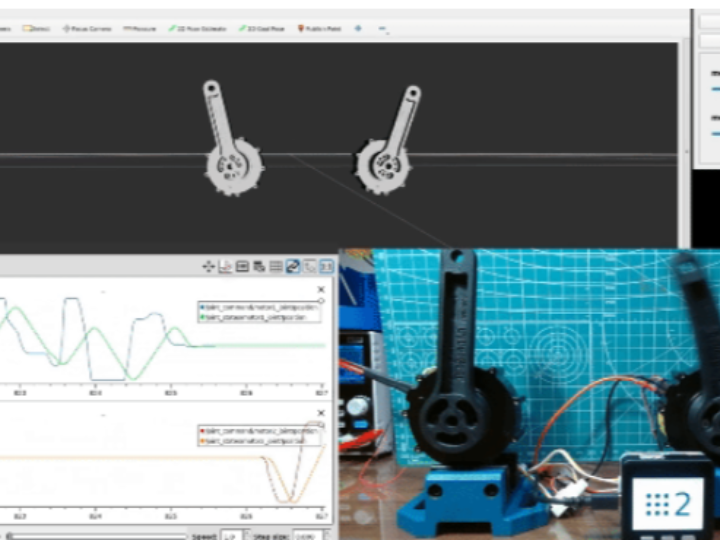
visualize motor state
act as a standalone testing tool or integrated ROS2 node
It closely follows the architecture of the "CyberGear ROS2 Controller" but replaces the Python + USB interface with an embedded ESP32 Wi-Fi bridge.
🧩COMPONENTS
🧠 Main Hardware
- M5Stack Core / Core2 (ESP32 기반)
- T-Motor CyberGear Actuator (RS485 / CAN variants)
- UART → CyberGear interface board or TTL adaptor
🔌 Communication
- Wi-Fi (ROS2 micro-ROS or custom UDP bridge)
- UART serial protocol to CyberGear actuator
- ROS2 topics for command & feedback
💻 Software
- micro-ROS or custom ROS2 bridge firmware
- M5Stack UIFlow or Arduino-ESP32
- CyberGear actuator command library
- PC-side ROS2 Humble/Foxy workspace
🛠SYSTEM OVERVIEW
[M5Stack (ESP32)]
   |  CyberGear serial protocol
   ↓
[T-Motor CyberGear Actuator]
   ↑
   |  Wi-Fi (ROS2 or UDP bridge)
[ROS2 PC (Humble/Foxy)]
   ↑
   |  Teleop UI / RViz / Node Graph
[User]
🔧KEY FEATURES
✔ 1. ROS2-Compatible Wireless Control
The ESP32 publishes and subscribes to ROS2 topics using micro-ROS or a UDP translator:
/cybergear/command
/cybergear/feedback
Commands include:
- target position
- velocity
- torque
- mode switching (position/velocity/torque)
✔ 2. Real-Time Telemetry
The actuator returns:
- position
- velocity
- torque
- temperature
- error flags
M5Stack visualizes these values on its built-in LCD.
✔ 3. Portable Embedded Controller
Unlike USB-based CyberGear controllers, this device:
- works wirelessly
- can be battery-powered
- acts as both a tester and a ROS2 node
- can control multiple CyberGear actuators with minor firmware changes
✔ 4. ROS2 Integration & Visualization
On the ROS2 PC, users can:
- monitor live feedback in RViz
- use joystick or keyboard teleop
- chain multiple CyberGear actuators
- integrate into mobile robots or joint test rigs

🧠 ENGINEERING INSIGHTS
✔ Lightweight ROS2 Node on ESP32
By offloading actuator control to ESP32, the PC only handles high-level ROS2 logic.
This reduces USB latency and simplifies wiring.
✔ Deterministic CyberGear Serial Commands
The firmware ensures that:
- serial timing
- checksum logic
- actuator state machine
match CyberGear specifications.
✔ M5Stack as a Visualization Device
The LCD UI allows:
- torque graph
- velocity meter
- mode switch buttons
- temperature warnings
A powerful front-end without a PC.
✔ Extensible Architecture
The modular design makes it easy to extend:
- CAN Bus support
- multi-actuator arrays
- BLE joystick teleop
rover/manipulator integrations
📘REFERENCE LINKS
- Project GitHub: https://github.com/project-sternbergia/cybergear_m5_ros2
- CyberGear Specs: https://store.t-motor.com/goods.php?id=1225
- micro-ROS: https://micro.ros.org/
- Original Related Project (Benjamin):
https://maker.wiznet.io/Benjamin/projects/cybergear%2Dros2%2Dcontroller