


Custom W5500 SPI Ethernet Driver for ESP-IDF
Custom W5500 SPI Ethernet driver for ESP-IDF fully integrated with esp_eth, esp_netif, and LwIP. 2025. Low-level driver layer for production ESP32 Ethernet proj
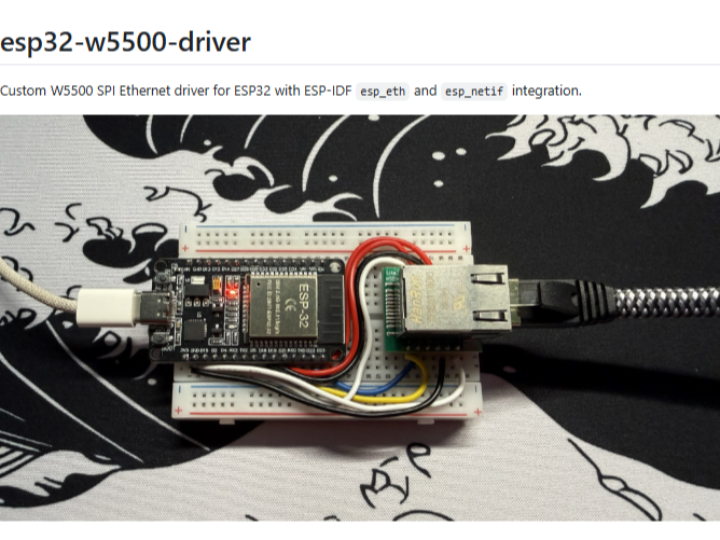

Espressif - ESP32
x 1

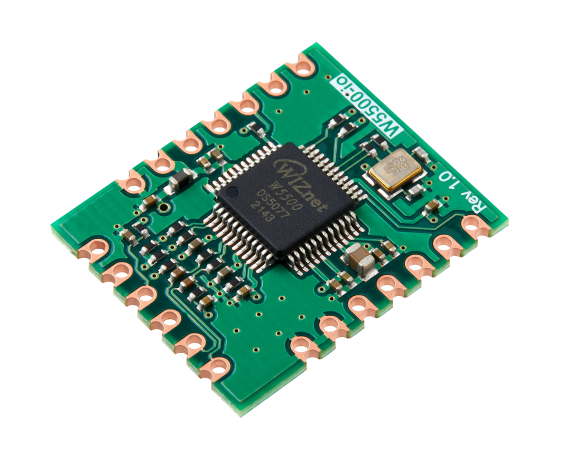
WIZnet - W5500-io
x 1
Overview
이 프로젝트는 ESP32에서 WIZnet W5500을 SPI Ethernet 장치로 사용하기 위한 custom driver입니다.
핵심은 W5500을 단순 socket chip처럼 사용하는 것이 아니라, ESP-IDF의 native Ethernet 구조인 esp_eth, esp_netif, lwIP 네트워크 스택과 완전히 통합하는 것입니다.
Official ESP-IDF에서도 SPI Ethernet과 W5500 지원이 존재하지만, W5500 전용 driver customization, custom SPI pin configuration, interrupt 처리, esp_netif 연동 구조를 자세히 보여주는 예제는 많지 않습니다.
이 프로젝트는 Embedded C로 작성된 W5500 SPI Ethernet driver 구현 예제로, ESP-IDF v5.x 환경에서 TCP, UDP, MQTT, HTTP, WebSocket 등 lwIP 기반 네트워크 기능을 W5500 Ethernet을 통해 사용할 수 있도록 구성되어 있습니다.
Original Source Code:
https://github.com/Teja-Tatimatla/esp32-w5500-driver
Components
Hardware components
- ESP32 development board
- WIZnet W5500 Ethernet module
- Ethernet cable
- USB cable
- Router or Ethernet switch
Software
- ESP-IDF v5.x
- Git
- Embedded C
- Serial monitor / idf.py monitor
What This Project Does
이 프로젝트는 다음 기능을 제공합니다.
- W5500 SPI Ethernet driver를 esp_eth abstraction layer에 구현
- esp_netif와 연동하여 IP 할당, DHCP client, network interface 관리 지원
- ESP-IDF의 lwIP TCP/IP stack과 연결
- TCP, UDP, MQTT, HTTP, WebSocket 등 표준 ESP-IDF 네트워크 API 사용 가능
- W5500 SPI 초기화 처리
- MAC / PHY configuration 처리
- interrupt 기반 또는 polling 기반 frame RX/TX 구조 구현 가능
- ESP-IDF v5.x를 대상으로 한 2025년 구현 예제
즉, application 입장에서는 Wi-Fi 대신 W5500 Ethernet을 사용하더라도 기존 ESP-IDF 네트워크 API를 거의 동일하게 사용할 수 있습니다.
Why a Custom Driver?
W5500은 자체 Hardwired TCP/IP stack과 hardware socket을 가진 Ethernet controller입니다. 일반적으로는 W5500 socket API를 직접 사용해 TCP/UDP 통신을 구현합니다.
하지만 ESP-IDF 기반 firmware에서는 이미 esp_netif, lwIP, esp_http_client, esp-mqtt, socket API 등 강력한 네트워크 stack이 제공됩니다. 이 프로젝트는 W5500을 ESP-IDF의 Ethernet driver framework 안에 통합하여, W5500을 하나의 native Ethernet interface처럼 사용할 수 있게 합니다.
Custom driver가 필요한 대표적인 경우는 다음과 같습니다.
- 기본 예제와 다른 SPI pin configuration을 사용해야 하는 경우
- interrupt mode와 polling mode를 세밀하게 제어해야 하는 경우
- W5500의 동작을 project-specific하게 조정해야 하는 경우
- custom esp_netif network interface와 통합해야 하는 경우
- Arduino ETH.h보다 낮은 계층에서 직접 driver 제어가 필요한 경우
- production firmware에서 유지보수 가능한 native ESP-IDF 구조가 필요한 경우
Architecture
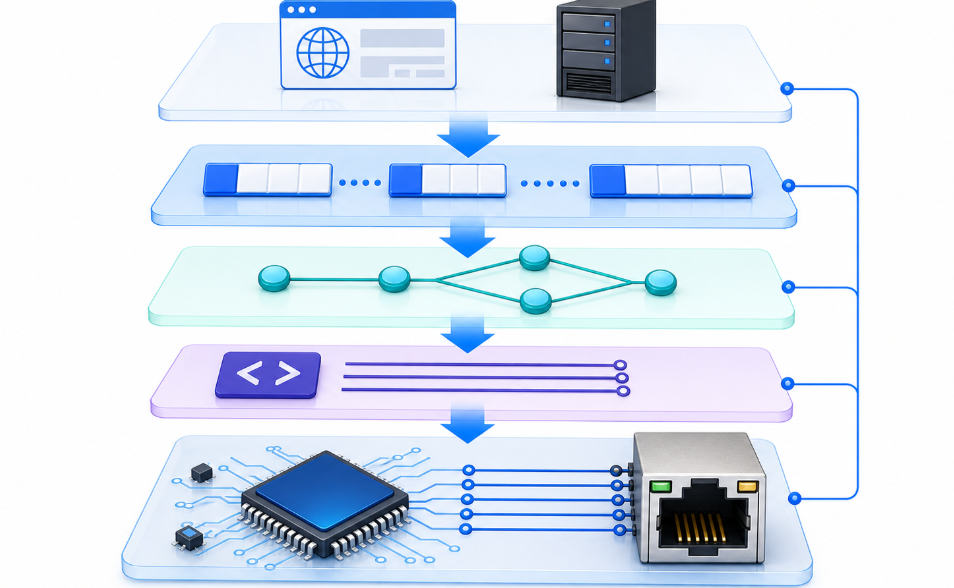
이 프로젝트의 전체 구조는 다음과 같습니다.
Application
TCP / UDP / MQTT / HTTP / WebSocket via lwIP APIs
    ↓
lwIP TCP/IP Stack
    ↓
esp_netif
Network interface abstraction, DHCP, IP management
    ↓
esp_eth
ESP-IDF Ethernet driver framework
    ↓
W5500 SPI Driver
This project
    ↓
SPI Bus
    ↓
WIZnet W5500 Hardware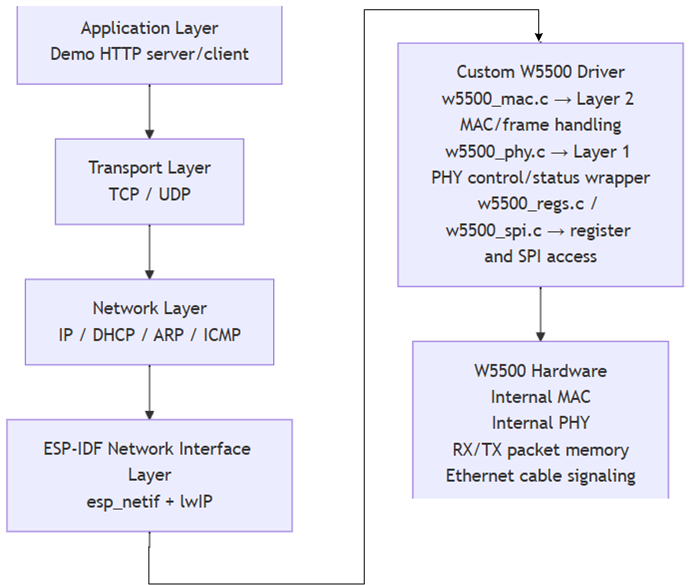
W5500은 SPI를 통해 ESP32와 연결되며, driver layer에서 Ethernet frame 송수신, register access, MAC/PHY 제어를 담당합니다.
그 위에서는 esp_eth, esp_netif, lwIP가 일반적인 ESP-IDF 네트워크 흐름을 처리합니다.
Hardware Configuration
| ESP32 | W5500 |
|---|---|
| 3V3 | VCC |
| GND | GND |
| GPIO23 | MOSI |
| GPIO19 | MISO |
| GPIO18 | SCLK |
| GPIO21 | SCSn / CS |
| GPIO22 | RESET / RSTn |
| GPIO4 | INTn |
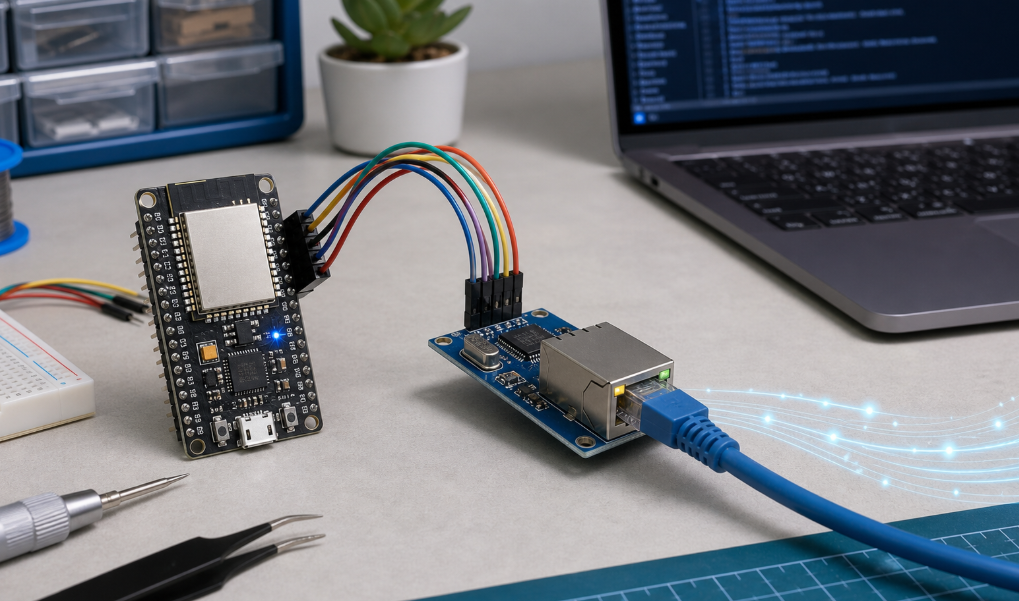
핀 번호는 예제 기준입니다. 실제 board나 custom hardware에서는 SPI pin, CS, RESET, INT 설정을 menuconfig 또는 sdkconfig에서 프로젝트에 맞게 수정해야 합니다.
How to Build
ESP-IDF v5.x 환경을 준비한 뒤 source code를 clone합니다.
git clone https://github.com/Teja-Tatimatla/esp32-w5500-driver cd esp32-w5500-driverESP-IDF 환경을 활성화합니다.
. $IDF_PATH/export.shSPI pin, clock, interrupt 설정 등을 menuconfig 또는 sdkconfig에서 확인합니다.
idf.py menuconfigBuild를 실행합니다.
idf.py buildFlash 및 monitor를 실행합니다
idf.py -p /dev/ttyUSB0 flash monitorWindows 환경에서는 port 이름이 다를 수 있습니다.
idf.py -p COMx flash monitorTest Endpoint
정상적으로 동작하면 serial monitor에서 Ethernet link up, DHCP IP 할당, HTTP server 시작 로그를 확인할 수 있습니다.
ESP32가 IP 주소를 받은 뒤 같은 네트워크의 브라우저에서 다음 주소로 접속합니다.
http://[esp32_ip]/status예상 응답은 다음과 같은 JSON 형태입니다.
{ "status": "ok", "ethernet": "up", "ip": "192.168.x.x", "driver": "W5500 in MACRAW mode" }이 테스트를 통해 W5500 SPI driver, esp_eth, esp_netif, DHCP, lwIP, HTTP server가 모두 정상적으로 연결되었는지 확인할 수 있습니다.
FAQ
Q1. Arduino ETH.h 방식과 어떤 차이가 있나요?
Arduino ETH.h는 driver 세부 구조를 추상화해서 간단히 사용할 수 있게 해줍니다. 이 프로젝트는 ESP-IDF native layer에서 동작하므로 더 낮은 계층의 제어가 가능하고, esp_eth, esp_netif, lwIP와 직접 통합됩니다. ESP-IDF 기반 production firmware에 더 적합한 구조입니다.
Q2. DHCP를 지원하나요?
네. esp_netif와 통합되어 있기 때문에 DHCP client는 lwIP stack에서 처리됩니다. LAN8720, IP101 같은 일반 Ethernet PHY를 사용할 때와 유사한 방식으로 IP를 할당받을 수 있습니다.
Q3. MQTT, HTTP, WebSocket을 사용할 수 있나요?
네. W5500 driver가 esp_netif와 lwIP에 등록되면 esp-mqtt, esp_http_client, esp_websocket_client, BSD socket API 등을 Ethernet을 통해 사용할 수 있습니다.
Q4. SPI speed는 어느 정도까지 가능한가요?
W5500은 최대 80 MHz SPI를 지원합니다. 다만 일반적인 ESP32 board, module wiring, PCB trace 환경에서는 안정성을 위해 20-40 MHz 수준으로 설정하는 경우가 많습니다. ESP-IDF에서는 spi_device_interface_config_t.clock_speed_hz를 통해 설정할 수 있습니다.
Key Takeway
이 프로젝트는 ESP32와 W5500을 사용하는 ESP-IDF 기반 wired Ethernet firmware의 foundation layer로 활용할 수 있는 custom driver 예제입니다.
W5500을 ESP-IDF의 esp_eth, esp_netif, lwIP 구조에 통합함으로써 TCP, UDP, MQTT, HTTP, WebSocket 같은 표준 네트워크 기능을 W5500 Ethernet 위에서 투명하게 사용할 수 있습니다.
Arduino abstraction보다 낮은 계층에서 driver를 직접 제어하고 싶거나, custom hardware pin map과 production-oriented ESP-IDF firmware 구조가 필요한 경우 좋은 참고 프로젝트입니다.
Tags
W5500, WIZnet, ESP32, ESP-IDF, SPI Ethernet, esp_eth, esp_netif, lwIP, MQTT, HTTP, WebSocket, Embedded C, Ethernet Driver, Wired Ethernet
Overview
This project provides a custom driver for using the WIZnet W5500 as an SPI Ethernet device with ESP32.
The key point is that the W5500 is not used simply as a socket chip. Instead, it is fully integrated with ESP-IDF’s native Ethernet architecture, including esp_eth, esp_netif, and the lwIP networking stack.
Official ESP-IDF already provides SPI Ethernet and W5500 support, but detailed examples for W5500-specific driver customization, custom SPI pin configuration, interrupt handling, and esp_netif integration are still limited.
This project is an Embedded C implementation of a W5500 SPI Ethernet driver. It is designed for ESP-IDF v5.x and enables lwIP-based networking features such as TCP, UDP, MQTT, HTTP, and WebSocket over W5500 Ethernet.
Original Source Code:
https://github.com/Teja-Tatimatla/esp32-w5500-driver
Components
Hardware Components
- ESP32 development board
- WIZnet W5500 Ethernet module
- Ethernet cable
- USB cable
- Router or Ethernet switch
Software
- ESP-IDF v5.x
- Git
- Embedded C
- Serial monitor / idf.py monitor
What This Projects Does
This project provides the following features:
- Implements the W5500 SPI Ethernet driver at the esp_eth abstraction layer
- Integrates with esp_netif for IP assignment, DHCP client, and network interface management
- Connects to the ESP-IDF lwIP TCP/IP stack
- Enables standard ESP-IDF network APIs such as TCP, UDP, MQTT, HTTP, and WebSocket
- Handles W5500 SPI initialization
- Handles MAC / PHY configuration
- Supports interrupt-based or polling-based frame RX/TX structure
- Targets ESP-IDF v5.x as a 2025 implementation example
From the application perspective, even when using W5500 Ethernet instead of Wi-Fi, existing ESP-IDF networking APIs can be used almost the same way.
Why a Custom Driver?
The W5500 is an Ethernet controller with a built-in Hardwired TCP/IP stack and hardware sockets. In many cases, developers use the W5500 socket API directly to implement TCP/UDP communication.
However, ESP-IDF firmware already provides a powerful networking stack including esp_netif, lwIP, esp_http_client, esp-mqtt, and socket APIs. This project integrates the W5500 into ESP-IDF’s Ethernet driver framework so that it can be used as a native Ethernet interface.
A custom driver is useful in cases such as:
- When the SPI pin configuration differs from the default example
- When fine control over interrupt mode or polling mode is required
- When W5500 behavior needs to be adjusted for a specific project
- When integration with a custom esp_netif network interface is required
- When lower-level driver control is needed compared to Arduino ETH.h
- When a maintainable native ESP-IDF structure is required for production firmware
Architecture
The overall architecture of this project is as follows:
Application
TCP / UDP / MQTT / HTTP / WebSocket via lwIP APIs
    ↓
lwIP TCP/IP Stack
    ↓
esp_netif
Network interface abstraction, DHCP, IP management
    ↓
esp_eth
ESP-IDF Ethernet driver framework
    ↓
W5500 SPI Driver
This project
    ↓
SPI Bus
    ↓
WIZnet W5500 HardwareThe W5500 is connected to the ESP32 through SPI. At the driver layer, it handles Ethernet frame transmission and reception, register access, and MAC/PHY control.
Above that layer, esp_eth, esp_netif, and lwIP handle the standard ESP-IDF networking flow.
Hardware Configuration
| ESP32 | W5500 |
|---|---|
| 3V3 | VCC |
| GND | GND |
| GPIO23 | MOSI |
| GPIO19 | MISO |
| GPIO18 | SCLK |
| GPIO21 | SCSn / CS |
| GPIO22 | RESET / RSTn |
| GPIO4 | INTn |
These pin numbers are based on the example configuration. For an actual board or custom hardware, the SPI pins, CS, RESET, and INT settings should be adjusted in menuconfig or sdkconfig according to the project hardware.
How to Build
Prepare the ESP-IDF v5.x environment and clone the source code.
git clone https://github.com/Teja-Tatimatla/esp32-w5500-driver
cd esp32-w5500-driver
Activate the ESP-IDF environment.
. $IDF_PATH/export.shCheck SPI pin, clock, and interrupt settings in menuconfig or sdkconfig.
idf.py menuconfigBuild the project.
idf.py buildFlash and monitor the firmware.
idf.py -p /dev/ttyUSB0 flash monitorOn Windows, the port name may be different.
idf.py -p COMx flash monitorTest Endpoint
If everything is working correctly, the serial monitor will show logs for Ethernet link up, DHCP IP assignment, and HTTP server startup.
After the ESP32 receives an IP address, open the following address in a browser on the same network:
http://[esp32_ip]/statusThe expected response is a JSON object similar to this:
{ "status": "ok", "ethernet": "up", "ip": "192.168.x.x", "driver": "W5500 in MACRAW mode" }This test confirms that the W5500 SPI driver, esp_eth, esp_netif, DHCP, lwIP, and HTTP server are all connected and working correctly.
Activate the ESP-IDF environment.
. $IDF_PATH/export.shCheck SPI pin, clock, and interrupt settings in menuconfig or sdkconfig.
idf.py menuconfigBuild the project.
idf.py buildFlash and monitor the firmware.
idf.py -p /dev/ttyUSB0 flash monitorOn Windows, the port name may be different.
idf.py -p COMx flash monitorTest Endpoint
If everything is working correctly, the serial monitor will show logs for Ethernet link up, DHCP IP assignment, and HTTP server startup.
After the ESP32 receives an IP address, open the following address in a browser on the same network:
http://[esp32_ip]/statusThe expected response is a JSON object similar to this:
{ "status": "ok", "ethernet": "up", "ip": "192.168.x.x", "driver": "W5500 in MACRAW mode" }This test confirms that the W5500 SPI driver, esp_eth, esp_netif, DHCP, lwIP, and HTTP server are all connected and working correctly.
FAQ
Q1. What is the difference from the Arduino ETH.h approach?
Arduino ETH.h abstracts the driver details and makes Ethernet easy to use. This project works at the native ESP-IDF layer, allowing lower-level control and direct integration with esp_eth, esp_netif, and lwIP. It is more suitable for production firmware based on ESP-IDF.
Q2. Does it support DHCP?
Yes. Because it is integrated with esp_netif, the DHCP client is handled by the lwIP stack. It can receive an IP address in a similar way to common Ethernet PHYs such as LAN8720 or IP101.
Q3. Can I use MQTT, HTTP, or WebSocket?
Yes. Once the W5500 driver is registered with esp_netif and lwIP, esp-mqtt, esp_http_client, esp_websocket_client, and BSD socket APIs can be used over Ethernet.
Q4. What SPI speed can be used?
The W5500 supports SPI up to 80 MHz. However, in typical ESP32 board, module wiring, or PCB trace environments, 20-40 MHz is often used for stable operation. In ESP-IDF, this can be configured through spi_device_interface_config_t.clock_speed_hz.
Key Takeaway
This project is a custom driver example that can serve as a foundation layer for ESP-IDF-based wired Ethernet firmware using ESP32 and W5500.
By integrating the W5500 with ESP-IDF’s esp_eth, esp_netif, and lwIP architecture, standard networking features such as TCP, UDP, MQTT, HTTP, and WebSocket can be used transparently over W5500 Ethernet.
This is a useful reference project for developers who need lower-level driver control than Arduino abstraction, custom hardware pin mapping, or a production-oriented ESP-IDF firmware structure.
Tags
W5500, WIZnet, ESP32, ESP-IDF, SPI Ethernet, esp_eth, esp_netif, lwIP, MQTT, HTTP, WebSocket, Embedded C, Ethernet Driver, Wired Ethernet
Q1. What is the difference from the Arduino ETH.h approach?
Arduino ETH.h abstracts the driver details and makes Ethernet easy to use. This project works at the native ESP-IDF layer, allowing lower-level control and direct integration with esp_eth, esp_netif, and lwIP. It is more suitable for production firmware based on ESP-IDF.
Q2. Does it support DHCP?
Yes. Because it is integrated with esp_netif, the DHCP client is handled by the lwIP stack. It can receive an IP address in a similar way to common Ethernet PHYs such as LAN8720 or IP101.
Q3. Can I use MQTT, HTTP, or WebSocket?
Yes. Once the W5500 driver is registered with esp_netif and lwIP, esp-mqtt, esp_http_client, esp_websocket_client, and BSD socket APIs can be used over Ethernet.
Q4. What SPI speed can be used?
The W5500 supports SPI up to 80 MHz. However, in typical ESP32 board, module wiring, or PCB trace environments, 20-40 MHz is often used for stable operation. In ESP-IDF, this can be configured through spi_device_interface_config_t.clock_speed_hz.
Tags
W5500, WIZnet, ESP32, ESP-IDF, SPI Ethernet, esp_eth, esp_netif, lwIP, MQTT, HTTP, WebSocket, Embedded C, Ethernet Driver, Wired Ethernet