


Systembase eHaLow/Br
The eHaLow/Br by SystemBase is a next-generation wireless LAN gateway bridge designed for long-range IoT data transmission.
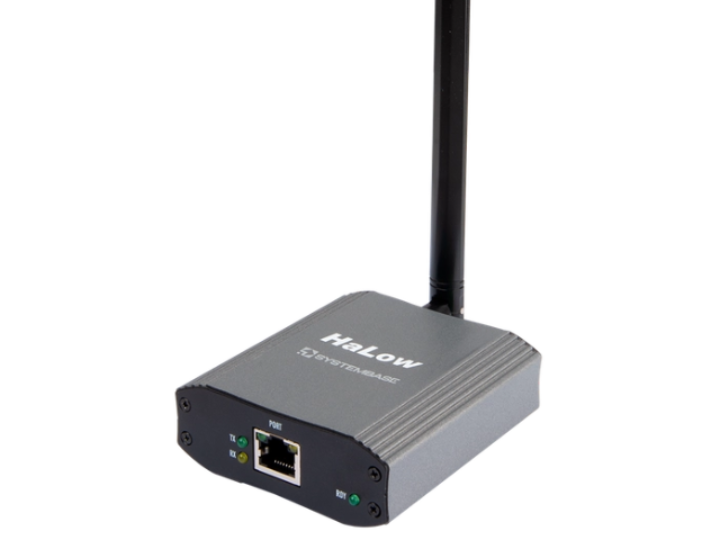

WIZnet - W5500
x 1

1. Overview
2. Project at a Glance
Category | Details |
|---|---|
Creator | SystemBase (시스템베이스) |
Repository | Closed Source (Commercial Product) |
MCU | Internal Application MCU (Not specified in public docs) |
WIZnet Chip | W5500 (Assumed for 10/100 Base-TX Ethernet PHY/MAC) |
Interface | Ethernet (RJ45), Wi-Fi HaLow (Antenna) |
License | Proprietary / Commercial |
3. Features
4. System Architecture
Legacy Field Device ↔ Ethernet Cable ↔ RJ45 Connector ↔ WIZnet W5500 (Ethernet MAC/PHY) ↔ Bridge MCU (Data Translation via MACRAW) ↔ Wi-Fi HaLow Module ↔ Antenna ↔ Remote GatewayDC Power Input ↔ DC-DC Converters / LDOs ↔ 3.3V (MCU & W5500) / 1.8V-3.3V (HaLow RF Module)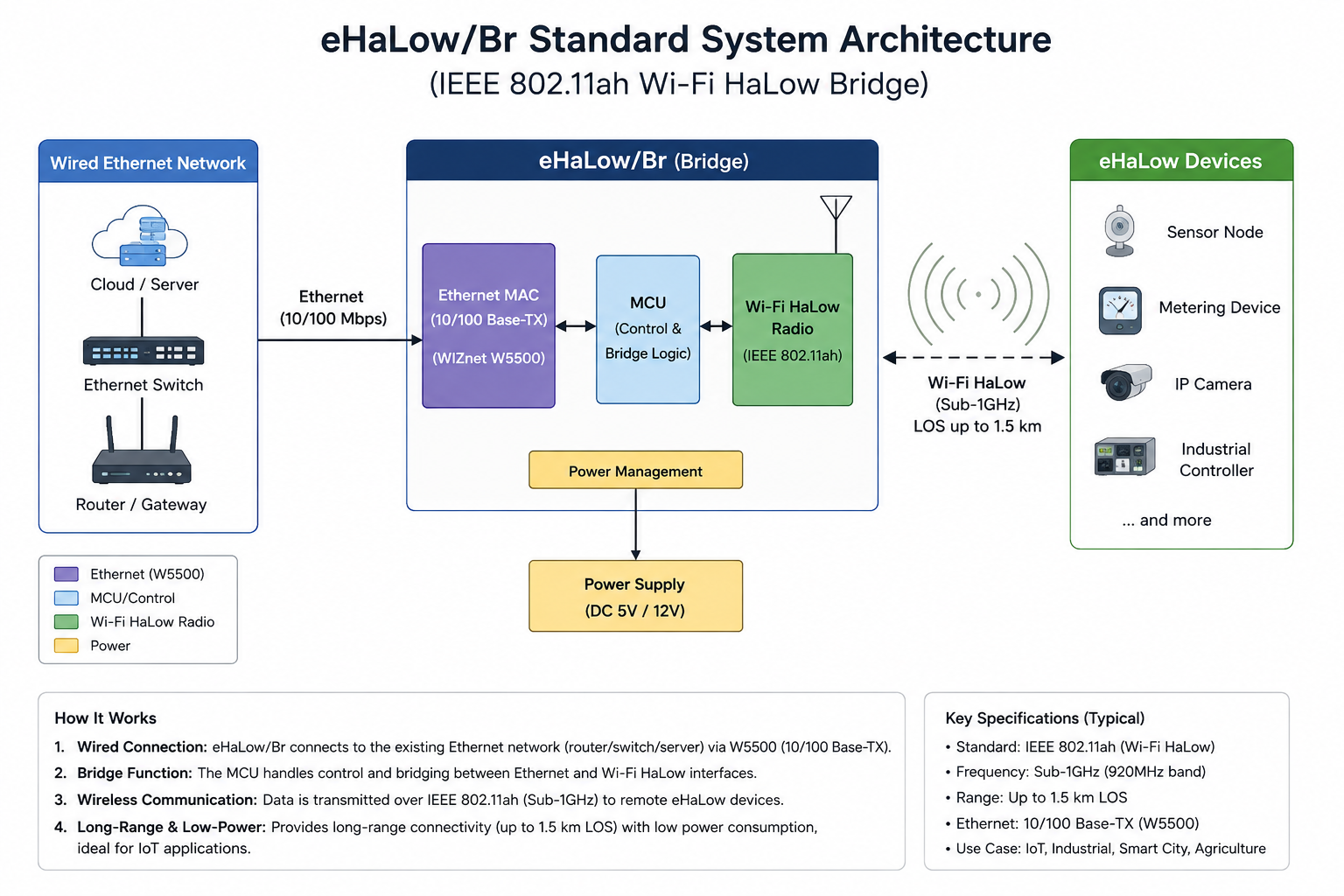
5. Role of W5500
6. Developer Reuse Points
MACRAW socket mode. Below are 5 example reference code blocks for developers building a similar Ethernet-to-HaLow bridge:
// Example Pinmap for W5500 + Host MCU + HaLow Module
#define W5500_CS_PIN    17
#define W5500_MOSI_PIN  19
#define W5500_MISO_PIN  16
#define W5500_SCK_PIN   18
#define W5500_INT_PIN   20

#define HALOW_UART_TX   4
#define HALOW_UART_RX   5
// Example initialization using ioLibrary_Driver
wiz_NetInfo netInfo = {
    .mac  = {0x00, 0x08, 0xdc, 0xab, 0xcd, 0xef}, // Local MAC
    .ip   = {192, 168, 1, 100},
    .sn   = {255, 255, 255, 0},
    .gw   = {192, 168, 1, 1},
    .dns  = {8, 8, 8, 8},
    .dhcp = NETINFO_STATIC
};
// Apply settings to W5500
wizchip_setnetinfo(&netInfo);
// Opening socket 0 in MACRAW mode to capture raw Ethernet frames for the HaLow bridge
uint8_t bridge_socket = 0;
uint16_t arbitrary_port = 5000;

// Sn_MR_MACRAW allows grabbing the entire Ethernet frame
if (socket(bridge_socket, Sn_MR_MACRAW, arbitrary_port, 0) == bridge_socket) {
    printf("W5500 MACRAW socket opened successfully. Ready for bridging.\n");
}
// Example of initializing the wireless HaLow module via UART
void init_halow_module(void) {
    // Set operation mode to 802.11ah
    uart_send_string(HALOW_UART, "AT+WIFICONF=802.11ah\r\n");
    delay(100);
    // Connect to HaLow AP
    uart_send_string(HALOW_UART, "AT+CONNECT=SSID_HALOW_GATEWAY,PASSWORD123\r\n");
    printf("HaLow wireless connection initiated.\n");
}
# Example CMake build routine for a custom W5500-HaLow project
mkdir build && cd build
cmake -DWIZNET_CHIP=W5500 -DHALOW_SUPPORT=ON -DBRIDGE_MODE=MACRAW ..
make -j4
7. Related Existing Contents in Maker Site (maker.wiznet.io)
Maker Project Name | WIZnet Chip / MCU | Network Type | Comparison to this HaLow Article |
|---|---|---|---|
W5500-EVB-Pico Ethernet to LoRaWAN | W5500 + RP2040 | LoRaWAN | Uses LoRa for long range. LoRaWAN has a much lower bandwidth than 802.11ah HaLow, making HaLow superior for bridging actual Ethernet IP traffic. |
WizFi360 MQTT Bridge | WizFi360 / W5500 | Wi-Fi (802.11 b/g/n) | Uses traditional 2.4GHz Wi-Fi. It handles high bandwidth well but lacks the 1.5km extended range provided by the eHaLow/Br's sub-1GHz frequencies. |
RP2040 W5500 Industrial Gateway | W5500 + RP2040 | Modbus TCP (Wired) | Focuses entirely on wired-to-wired industrial bridging. eHaLow/Br uniquely translates wired LAN into a long-range wireless medium. |
8. Market Value of this Article
9. WIZnet Strategic Value of this Article
10. Reason for Selection
11. Validation / Limitations
12. Summary
13. FAQ
1. Overview
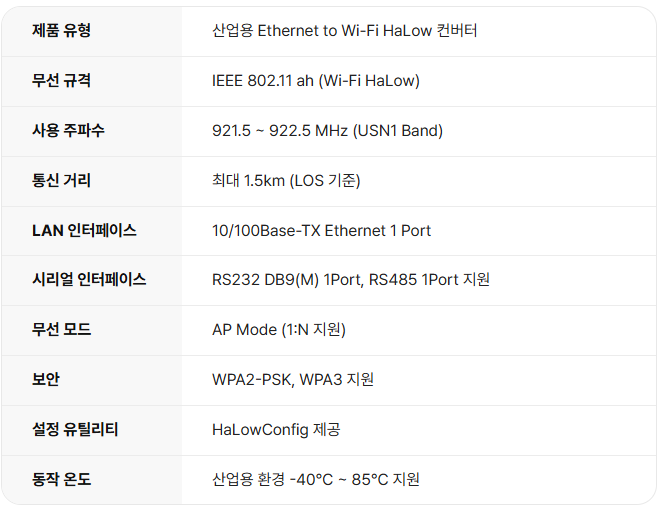
2. Project at a Glance
Category | Details |
|---|---|
Creator | 시스템베이스 (SystemBase) |
Repository | 비공개 소스 (상용 제품) |
MCU | 내부 애플리케이션 MCU (공개 문서에 명시되지 않음) |
WIZnet Chip | W5500 (10/100 Base-TX 이더넷 PHY/MAC용으로 추정됨) |
Interface | 이더넷 (RJ45), Wi-Fi HaLow (안테나) |
License | 독점 / 상용 |
3. Features
4. System Architecture
기존 현장 장비(Legacy Field Device) ↔ 이더넷 케이블 ↔ RJ45 커넥터 ↔ WIZnet W5500 (Ethernet MAC/PHY) ↔ 브리지 MCU (MACRAW를 통한 데이터 변환) ↔ Wi-Fi HaLow 모듈 ↔ 안테나 ↔ 원격 게이트웨이DC 전원 입력 ↔ DC-DC 컨버터 / LDO ↔ 3.3V (MCU & W5500) / 1.8V-3.3V (HaLow RF 모듈)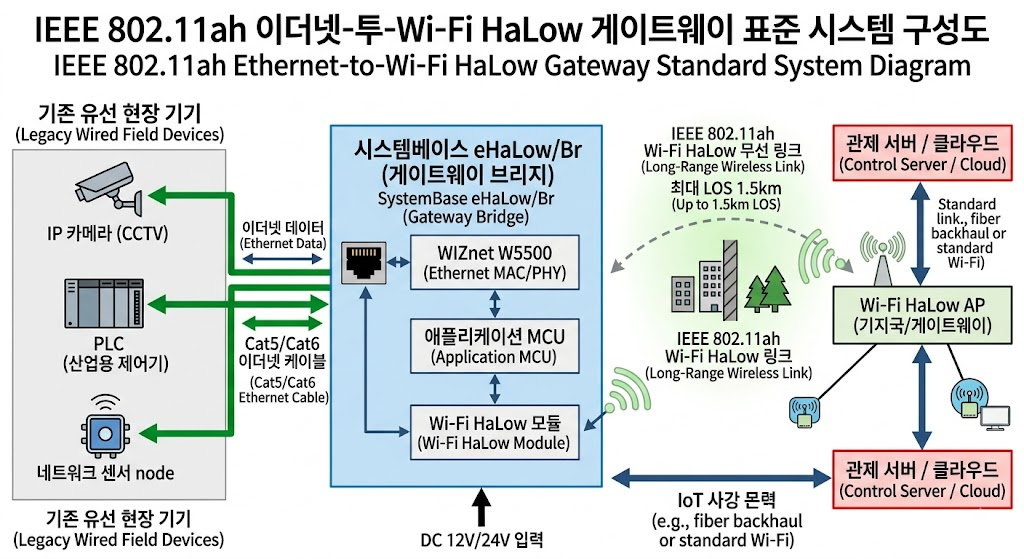
5. Role of W5500
6. Developer Reuse Points
MACRAW 소켓 모드를 사용하면 투명한 브리지를 구축할 수 있습니다. 아래는 유사한 이더넷-HaLow 브리지를 구축하려는 개발자를 위한 5가지 예제 참조 코드 블록입니다:
// W5500 + Host MCU + HaLow 모듈을 위한 예제 핀맵
#define W5500_CS_PIN    17
#define W5500_MOSI_PIN  19
#define W5500_MISO_PIN  16
#define W5500_SCK_PIN   18
#define W5500_INT_PIN   20

#define HALOW_UART_TX   4
#define HALOW_UART_RX   5
// ioLibrary_Driver를 사용한 초기화 예제
wiz_NetInfo netInfo = {
    .mac  = {0x00, 0x08, 0xdc, 0xab, 0xcd, 0xef}, // 로컬 MAC 주소
    .ip   = {192, 168, 1, 100},
    .sn   = {255, 255, 255, 0},
    .gw   = {192, 168, 1, 1},
    .dns  = {8, 8, 8, 8},
    .dhcp = NETINFO_STATIC
};
// 설정값을 W5500에 적용
wizchip_setnetinfo(&netInfo);
// HaLow 브리지를 위해 원시 이더넷 프레임을 캡처하도록 MACRAW 모드에서 소켓 0 오픈
uint8_t bridge_socket = 0;
uint16_t arbitrary_port = 5000;

// Sn_MR_MACRAW는 전체 이더넷 프레임을 가져올 수 있게 함
if (socket(bridge_socket, Sn_MR_MACRAW, arbitrary_port, 0) == bridge_socket) {
    printf("W5500 MACRAW 소켓이 성공적으로 열렸습니다. 브리징 준비 완료.\n");
}
// UART를 통한 무선 HaLow 모듈 초기화 예제
void init_halow_module(void) {
    // 작동 모드를 802.11ah로 설정
    uart_send_string(HALOW_UART, "AT+WIFICONF=802.11ah\r\n");
    delay(100);
    // HaLow AP에 연결
    uart_send_string(HALOW_UART, "AT+CONNECT=SSID_HALOW_GATEWAY,PASSWORD123\r\n");
    printf("HaLow 무선 연결이 시작되었습니다.\n");
}
# 맞춤형 W5500-HaLow 프로젝트를 위한 CMake 빌드 루틴 예제
mkdir build && cd build
cmake -DWIZNET_CHIP=W5500 -DHALOW_SUPPORT=ON -DBRIDGE_MODE=MACRAW ..
make -j4
7. Related Existing Contents in Maker Site (maker.wiznet.io)
Maker Project Name | WIZnet Chip / MCU | Network Type | Comparison to this HaLow Article |
|---|---|---|---|
W5500-EVB-Pico Ethernet to LoRaWAN | W5500 + RP2040 | LoRaWAN | 장거리를 위해 LoRa를 사용합니다. LoRaWAN은 802.11ah HaLow보다 대역폭이 훨씬 낮기 때문에 실제 이더넷 IP 트래픽을 브리징하는 데는 HaLow가 더 우수합니다. |
WizFi360 MQTT Bridge | WizFi360 / W5500 | Wi-Fi (802.11 b/g/n) | 기존의 2.4GHz Wi-Fi를 사용합니다. 높은 대역폭 처리는 뛰어나지만 eHaLow/Br의 Sub-1GHz 주파수가 제공하는 1.5km 확장된 도달 범위가 부족합니다. |
RP2040 W5500 Industrial Gateway | W5500 + RP2040 | Modbus TCP (유선) | 유선-유선 산업용 브리징에만 초점을 맞춥니다. eHaLow/Br은 유선 LAN을 장거리 무선 매체로 변환한다는 점에서 차별화됩니다. |
[참조할만한 글]
https://github.com/khlee1025/newratek - maker 사이트 내 Halow를 사용하는 유일한 글
제목 : NRC7394 W5500 Bridge Firmware for Fixed Wi-Fi HaLow Node Deployment
8. Market Value of this Article
9. WIZnet Strategic Value of this Article
10. Reason for Selection
11. Validation / Limitations
12. Summary