



『MSX0 Stack』の操作方法 - ハードウェア
This Qiita article is a manual-style guide summarizing the hardware usage and peripheral module connection methods of the MSX0 Stack.
This Qiita article is a manual-style guide summarizing the hardware usage and peripheral module connection methods of the MSX0 Stack. The core content explains that the MSX0 Stack is an **M5Stack Core2-based product** and describes how to use microSD, LCD touch, Keyboard/GamePad Faces, Grove sensors, LTE/LoRa/PoE/wired LAN modules, etc. The article was published in October 2023 and updated in April 2026. ([Qiita][1])
## Summary of the Article's Main Content
The MSX0 Stack is an **MSX-series IoT/retro computing device based on the M5Stack Core2**. The basic configuration involves combining the MSX0 Stack main body with Faces II Bottom, Keyboard Face, or GamePad Face, and it can also be combined with M5GO Bottom2. ([Qiita][1])
When using it for the first time, you must set the rear slide switch to the charging position, insert a microSD into the top microSD slot, and then turn on the power. If you boot without a microSD, only ROM Basic runs, and your actual capabilities are limited. ([Qiita][1])
Since the microSD card contains system files, tools, and update files, the author recommends backing up the entire contents to a PC first. Although the MSX0 Stack officially appears to use FAT32 microSD cards of 16GB or less, it explains that there are cases where 32GB cards also work in practice. ([Qiita][1])
The LCD is a touch panel, and you switch between Unit0 and Unit1 by swiping the screen. It explains that the MSX0 Stack has a structure where two MSX units operate simultaneously, and that Unit0 settings are changed from the system menu on Unit1. ([Qiita][1])
In terms of hardware specifications, since it is based on the M5Stack Core2, it features an ESP32-D0WDQ6-V3, Wi-Fi, Bluetooth, a 2-inch LCD, a touchscreen, a microSD slot, and a battery. In other words, it is essentially a small platform capable of wireless connectivity and embedded IoT experiments. ([Qiita][1])
## The Role of the W5500 in This Article
In this article, the **W5500 appears as an Ethernet controller that adds wired LAN functionality to the MSX0 Stack**. The article introduces the “W5500-equipped LAN module for M5Stack” as a **wired LAN module** and describes it as an option equivalent to Plan G. Both PoE-compatible and non-PoE-compatible products are mentioned. ([Qiita][1])
In other words, since the MSX0 Stack body is fundamentally ESP32-based, it includes Wi-Fi and Bluetooth capabilities; however, this means that **for industrial use or when a stable network connection is required, a W5500-based LAN module can be installed to use wired Ethernet**.
The role of the W5500 can be summarized from the WIZnet perspective as follows:
| Perspective | Role of the W5500 |
| ------- | -------------------------------------------------------------- |
| Network Function | Provides wired Ethernet connection to the MSX0 Stack |
| System Structure | Role of the External LAN Interface for the ESP32/MSX0 Stack |
| Purpose | Network connection more stable than Wi-Fi, IoT data transmission and reception, expanded remote access possibilities |
| Product Form | W5500 LAN module for M5Stack, PoE-compatible/non-compatible versions |
| Note | It is explained that some modules do not have a MAC address assigned, so a local MAC or a separate MAC address must be used. |
A particularly important point is the explanation in the article stating that **since LAN modules equipped with the W5500 may not be assigned a MAC address, use a local MAC address or refer to the MAC address of an inexpensive USB wired LAN adapter**. This demonstrates that although the W5500 itself is used as an Ethernet MAC+PHY/TCP/IP offloading chip, a **MAC address management policy** is required during actual productization. ([Qiita][1])
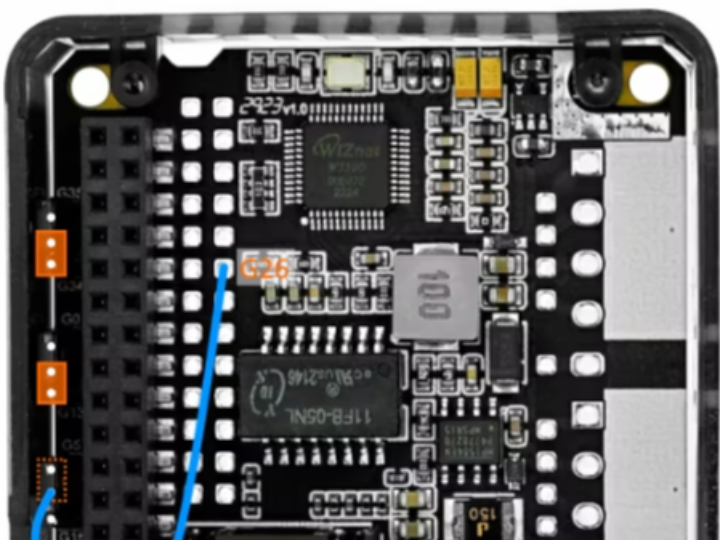
The article also mentions a new, cheaper version called the “Wired LAN Module 13.2”. It explains that using this version with the MSX0 Stack requires jumper configuration and wiring changes, and that INT should be set to G34, RST to G13, and CS to G26. In other words, the W5500 module is not merely an accessory to be plugged in; as an **SPI-based Ethernet module, pin mapping and hardware configuration are critical**. ([Qiita][1])
## Summary in One Line
In this article, the W5500 is the core LAN module that adds a stable wired Ethernet connection to MSX0 Stack/M5Stack Core2-based IoT devices. From WIZnet's perspective, this is an example demonstrating that the W5500 is being used as a **wired network backhaul component that complements Wi-Fi** within the “Retro Computing + IoT + M5Stack ecosystem.”
============
이 Qiita 글은 『MSX0 Stack』의 하드웨어 사용법과 주변 모듈 연결 방법을 정리한 매뉴얼형 글입니다.
핵심은 MSX0 Stack이 M5Stack Core2 기반 제품이며, microSD, LCD 터치, 키보드/게임패드 Face, Grove 센서, LTE/LoRa/PoE/유선 LAN 모듈 등을 어떻게 사용하는지 설명하는 것입니다. 글은 2023년 10월 게시되었고, 2026년 4월에 업데이트되었습니다. (Qiita)
글의 주요 내용 요약
MSX0 Stack은 M5Stack Core2를 기반으로 한 MSX 계열 IoT/레트로 컴퓨팅 장치입니다. 기본 구성은 MSX0 Stack 본체에 Faces II Bottom, Keyboard Face 또는 GamePad Face 등을 조합하는 방식이며, M5GO Bottom2와도 조합할 수 있습니다. (Qiita)
처음 사용할 때는 뒷면 슬라이드 스위치를 충전 가능한 위치로 설정하고, 상단 microSD 슬롯에 microSD를 삽입한 후 전원을 켜야 합니다. microSD 없이 부팅하면 ROM Basic만 실행되고 실질적으로 할 수 있는 일이 제한됩니다. (Qiita)
microSD 카드에는 시스템 파일, 도구, 업데이트 파일 등이 들어 있으므로, 글쓴이는 먼저 PC로 전체 백업을 권장합니다. MSX0 Stack은 공식적으로는 16GB 이하 FAT32 microSD를 사용하는 것으로 보이지만, 실제로는 32GB 카드도 동작하는 사례가 있다고 설명합니다. (Qiita)
LCD는 터치 패널이며, 화면 스와이프를 통해 Unit0와 Unit1을 전환합니다. MSX0 Stack 내부에는 두 개의 MSX 유닛이 동시에 동작하는 구조이고, Unit1 쪽 시스템 메뉴에서 Unit0 설정을 변경하는 구조라고 설명합니다. (Qiita)
하드웨어 스펙 측면에서는 M5Stack Core2 기반이므로 ESP32-D0WDQ6-V3, Wi-Fi, Bluetooth, 2인치 LCD, 터치스크린, microSD 슬롯, 배터리 등을 갖습니다. 즉 기본적으로 무선 연결과 임베디드 IoT 실험이 가능한 소형 플랫폼입니다. (Qiita)
W5500이 이 글에서 맡는 역할
이 글에서 W5500은 MSX0 Stack에 유선 LAN 기능을 추가하는 Ethernet 컨트롤러 역할로 등장합니다. 글에서는 “M5Stack용 W5500 탑재 LAN 모듈”을 유선 LAN 모듈로 소개하고 있으며, Plan G와 동등한 옵션으로 설명합니다. PoE 대응 제품과 PoE 비대응 제품이 함께 언급됩니다. (Qiita)
즉, MSX0 Stack 본체는 기본적으로 ESP32 기반이라 Wi-Fi/Bluetooth 기능은 있지만, 산업용 또는 안정적인 네트워크 연결이 필요한 경우에는 W5500 기반 LAN 모듈을 장착해 유선 Ethernet을 사용할 수 있다는 의미입니다.
W5500의 역할을 WIZnet 관점에서 정리하면 다음과 같습니다.
| 관점 | W5500의 역할 |
|---|---|
| 네트워크 기능 | MSX0 Stack에 유선 Ethernet 연결 제공 |
| 시스템 구조 | ESP32/MSX0 Stack의 외부 LAN 인터페이스 역할 |
| 사용 목적 | Wi-Fi보다 안정적인 네트워크 연결, IoT 데이터 송수신, 원격 접속 가능성 확대 |
| 제품 형태 | M5Stack용 W5500 LAN 모듈, PoE 대응/비대응 버전 |
| 주의점 | 일부 모듈에는 MAC 주소가 할당되어 있지 않아 로컬 MAC을 쓰거나 별도 MAC 주소를 활용해야 한다고 설명됨 |
특히 중요한 부분은, 글에서 W5500 탑재 LAN 모듈에는 MAC 주소가 부여되어 있지 않은 경우가 있으므로 로컬 MAC 주소를 사용하거나 저가 USB 유선 LAN 어댑터의 MAC 주소를 참고하라고 설명한 점입니다. 이는 W5500 자체가 Ethernet MAC+PHY/TCP/IP 오프로딩 칩으로 쓰이지만, 실제 제품화 시에는 MAC 주소 관리 정책이 필요하다는 것을 보여줍니다. (Qiita)
또한 글은 “유선 LAN 모듈 13.2”라는 더 저렴한 새 버전도 언급합니다. 이 버전을 MSX0 Stack에서 쓰려면 점퍼 설정과 배선 변경이 필요하며, INT는 G34, RST는 G13, CS는 G26 쪽으로 설정해야 한다고 설명합니다. 즉 W5500 모듈은 단순히 꽂기만 하는 액세서리가 아니라, SPI 기반 Ethernet 모듈로서 핀 매핑과 하드웨어 설정이 중요합니다. (Qiita)
한 줄로 정리
이 글에서 W5500은 MSX0 Stack/M5Stack Core2 기반 IoT 장치에 안정적인 유선 Ethernet 연결을 추가하는 핵심 LAN 모듈입니다. WIZnet 입장에서는 “레트로 컴퓨팅 + IoT + M5Stack 생태계” 안에서도 W5500이 Wi-Fi를 보완하는 유선 네트워크 백홀 부품으로 사용되고 있음을 보여주는 사례입니다.