Indoor / Outdoor Weather Monitor on W55MH32-ADK
Indoor / Outdoor Weather Monitor on W55MH32-ADK
0
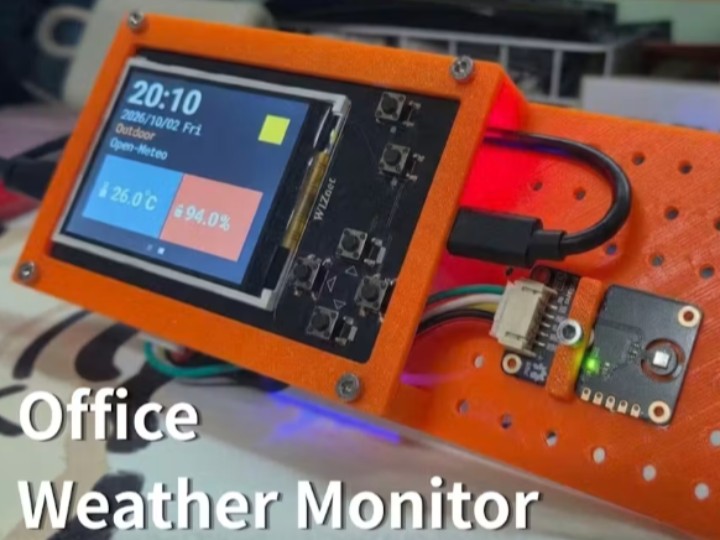
Project description
1. Value of This IoT Project
From the perspective of developers and makers, this project offers value as a practical, high-quality IoT guide rather than just a collection of example code.
* **Practical Hybrid Data Integration:**
* Indoor data: Real-time, direct measurement using a temperature and humidity sensor (AHT20).
* Outdoor data: Retrieval of weather information via the Open-Meteo REST API using Ethernet-based HTTP GET requests, eliminating the need for an external weather sensor.
* **UI/UX-Focused Graphical Implementation:**
* Efficient GUI design that performs partial redraws—updating only the changed data—to minimize the load on the SPI display.
* An interactive UI experience where the display background dynamically shifts (e.g., switching to a "Rainy UI") based on external weather conditions.
* **High Accessibility via MicroPython:**
* Core logic—including boot order, DHCP configuration, HTTP fetching, and UI redrawing—is organized into separate MicroPython files with detailed comments, making it easy for beginners to follow along.
* **Optimized Network Configuration for Desktop Environments:**
* Provides practical tips for enabling internet access on the board without an additional router connection by bridging the PC's Wi-Fi connection to the Ethernet port using Windows Internet Connection Sharing (ICS).
2. Role of the W5500 (Ethernet Core) in the Project
In this project, the W5500 acts as the core connectivity engine, responsible for receiving external weather API data and maintaining real-time network communication.
* Hardware TCP/IP Offloading (TCP/IP Offloading Engine):
* It handles network processing independently in hardware, allowing the MCU (MH32/MicroPython) to dedicate its resources to tasks like sensor data measurement and display graphics rendering, rather than consuming them for complex TCP/IP stack software processing or network packet calculations.
* Automatic IP Assignment (DHCP Client):
* Upon booting, the board uses W5500 control logic to automatically obtain an IP address (via DHCP) from the connected PC or network, thereby preparing the system for network communication. * REST API-based Open-Meteo HTTP Communication:
* Sends plain HTTP GET requests to an external weather data server (Open-Meteo) at approximately 5-minute intervals, reliably receiving and parsing data such as weather codes (Rain, Sun, etc.), temperature, humidity, and precipitation.
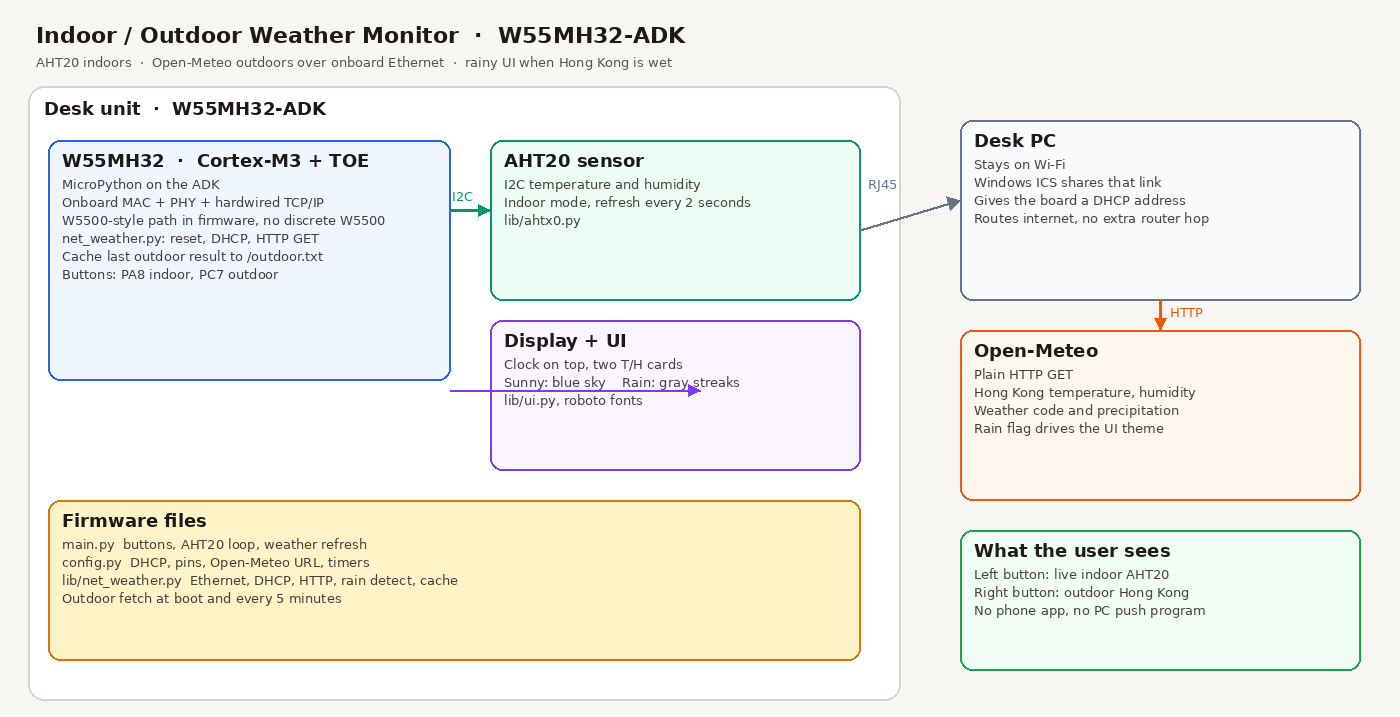
3. System Architecture
4. Q&A
4-1. Hardware and Sensor Configuration
Q1. What is the difference between the methods used to collect indoor and outdoor weather data?
> A. Indoor data is measured in real-time using an AHT20 temperature and humidity sensor connected directly to the board. In contrast, outdoor data is obtained without a separate external sensor; instead, weather information for the desired location is retrieved and displayed via the Open-Meteo REST API using W5500 Ethernet communication.
Q2. What method was used to prevent screen ghosting or lag during the display refresh process?
> A. To minimize bottlenecks in SPI display transmission, a partial update method was applied; rather than redrawing the entire screen every time, only the specific data areas where values changed are redrawn.
4-2. Network and W5500 Utilization
Q3. How was the Ethernet internet connection established via a PC without connecting to an external router?
> A. The Windows Internet Connection Sharing (ICS) feature was utilized. By configuring a bridge to share the PC's Wi-Fi internet connection through its Ethernet LAN port, the W5500 board was enabled to access the internet (and make API calls) solely through the LAN cable connection to the PC.
Q4. What is the primary advantage provided by the W5500 hardware TCP/IP chipset in this project?
> A. Since the hardware offloads communication tasks—eliminating the need for the MCU (MicroPython environment) to process the TCP/IP protocol stack via software—MCU resources can be dedicated to sensor measurements and display UI rendering.
5. References
5-1. Ethernet Weather Station (W5100 + Arduino UNO)
* Key Components: Arduino UNO + W5100 Ethernet Shield + DHT22/BMP085 sensors.
* Key Features: Instead of fetching external API data, it directly processes readings from temperature, humidity, and pressure sensors; it hosts an internal web server to serve a weather webpage to PC or mobile browsers on the same network.
5-2. Wireless Weather Monitor (RP2040 + WizFi360)
* Key Components: Raspberry Pi RP2040 + WizFi360 (Wi-Fi module) + GC9A01 circular LCD
* Key Features: Receives OpenWeatherMap API data via the wireless Wi-Fi module and displays weather conditions and temperature/humidity graphics on the round display.
Comparison Feature | Indoor / Outdoor Weather Monitor (W55MH32-ADK) | Ethernet Weather Station (W5100) | Wireless Weather Monitor (WizFi360) |
|---|---|---|---|
Connectivity | Wired Ethernet (W5500 Hardwired TCP/IP) | Wired Ethernet (W5100 Shield) | Wireless Wi-Fi (WizFi360 Module) |
Development Stack | MicroPython | C/C++ (Arduino IDE) | C/C++ (Arduino IDE) |
Data Collection | Hybrid (Indoor: AHT20 Sensor / Outdoor: Open-Meteo REST API) | Direct Sensors (DHT22 Temp/Humidity + BMP085 Barometric Pressure) | API Focus (OpenWeather API for outdoor weather data) |
Display / UI | On-board SPI Display (Dynamic theme UI / Partial redraw) | No physical screen (Embedded Web Server UI) | Round LCD Display (Weather icons & stats) |
Network Role | REST API HTTP Client (Data Receiver) | HTTP Web Server (Local Network Monitoring) | REST API Client (Wireless Data Receiver) |
====
1. 이 IoT 글(프로젝트)의 가치
개발자 및 메이커 관점에서 이 글은 단순한 예제 코드 모음이 아닌 실용적이고 완성도 높은 IoT 가이드로서의 가치를 가집니다.
* 실용적인 융합 모드 구성:
* 실내 데이터: 온습도 센서(AHT20)를 통해 실시간 직저 측정.
* 실외 데이터: 외부 기상 센서 없이 Open-Meteo REST API를 이더넷 HTTP GET 요청으로 수신.
* 사용자 경험(UI/UX) 관점의 그래픽 구현:
* SPI 디스플레이 부하를 줄이기 위해 변경된 데이터만 부분 갱신(Redraw)하는 효율적인 GUI 설계.
* 외부 날씨 정보(예: 홍콩 비 소식)에 맞춰 디스플레이 배경이 '비 오는 배경(Rainy UI)'으로 동적 변경되는 UI 연동 경험 제공.
* MicroPython 기반의 높은 개발 접근성:
* `boot order`, `DHCP 설정`, `HTTP Fetch`, `UI Redraw` 등의 핵심 로직이 MicroPython 파일로 분리되어 있으며, 주석이 상세히 작성되어 있어 초보자도 쉽게 따라 할 수 있음.
* 책상 위 환경에 최적화된 우회 네트워크 구성:
* 별도 공유기 라인을 추가하지 않고, PC의 Wi-Fi 연결을 Windows 인터넷 공유(ICS)를 통해 이더넷 포트로 브릿지하여 보드가 인터넷에 접속할 수 있도록 구현한 실용적인 팁 제공.
3. 프로젝트에서 W5500 (Ethernet Core)의 역할
W5500은 이 프로젝트에서 외부 날씨 API 데이터를 수신하고 실시간 네트워크 통신을 유지하는 핵심 커넥티비티 엔진입니다.
* 하드웨어 TCP/IP 오프로딩 (TCP/IP Offloading Engine):
* MCU(MH32/MicroPython)가 복잡한 TCP/IP 스택 소프트웨어 처리 및 네트워크 패킷 계산에 리소스를 빼앗기지 않고, 센서 데이터 측정 및 디스플레이 그래픽 렌더링에 전념할 수 있도록 네트워크 처리를 하드웨어 독립적으로 수행.
* 자동 IP 할당 (DHCP Client):
* 보드가 부팅되면 W5500 제어 로직을 통해 브릿지된 PC/네트워크로부터 자동 IP(DHCP)를 할당받아 네트워크 통신 준비 상태 전환.
* REST API 기반 Open-Meteo HTTP 통신:
* 약 5분 주기로 외부 기상 데이터 서버(Open-Meteo)에 Plain HTTP GET 요청을 전송하고, 날씨 코드(Rain, Sun 등), 온도, 습도, 강수량 데이터를 안정적으로 수신 및 파싱.
4. Q&A
4-1. 하드웨어 및 센서 구성
Q1. 실내 및 실외 날씨 데이터를 수집하는 방식에 어떤 차이가 있나요?
> A. 실내 데이터는 보드에 직접 연결된 AHT20 온습도 센서를 이용해 실시간으로 직접 측정합니다. 반면 실외 데이터는 별도의 외부 센서 없이, W5500 이더넷 통신을 통해 Open-Meteo REST API로부터 원하는 지역의 기상 정보를 받아와 표시합니다.
Q2. 디스플레이 갱신 과정에서 화면 잔상이나 느려짐 현상을 방지하기 위해 어떤 방식을 사용했나요?
> A. SPI 디스플레이 전송 병목을 최소화하기 위해 전체 화면을 매번 다시 그리지 않고, 값이 변경된 데이터 영역만 골라 갱신(Redraw)하는 부분 업데이트 방식을 적용했습니다.
4-2. 네트워크 및 W5500 활용
Q3. 외부 공유기 라인 추가 연결 없이 PC를 통해 이더넷 인터넷을 연결한 방법은 무엇인가요?
> A. Windows의 인터넷 공유(ICS, Internet Connection Sharing) 기능을 활용했습니다. PC의 Wi-Fi 인터넷 연결을 이더넷 랜 포트로 공유 브릿지 설정하여, W5500 보드가 PC의 랜선 통신만으로 인터넷(API 호출)에 접속할 수 있도록 구성했습니다.
Q4. 이 프로젝트에서 W5500 하드웨어 TCP/IP 칩셋이 제공하는 가장 큰 장점은 무엇인가요?
> A. MCU(MicroPython 환경)가 소프트웨어로 TCP/IP 프로토콜 스택을 직접 처리할 필요 없이 하드웨어가 통신을 전담(Offloading)해주므로, 센서 측정 및 디스플레이 UI 렌더링에 MCU 리소스를 집중할 수 있습니다.
5. references
5-1. Ethernet Weather Station (W5100 + Arduino UNO)
* 주요 구성: Arduino UNO + W5100 이더넷 쉴드 + DHT22/BMP085 센서
* 핵심 특징: 외부 API 수신 대신 온습도/기압 센서 측정값을 직접 파싱한 후, 하드웨어 내에 웹 서버(Web Server)를 구축하여 동일 네트워크의 PC/모바일 브라우저에 기상 웹페이지를 제공.
5-2. Wireless Weather Monitor (RP2040 + WizFi360)
* 주요 구성: Raspberry Pi RP2040 + WizFi360 (Wi-Fi 모듈) + GC9A01 원형 LCD
* 핵심 특징: 무선 Wi-Fi 모듈을 통해 OpenWeatherMap API 데이터를 수신하고, 라운드 타입 디스플레이에 기상 상태 및 온도/습도 그래픽을 출력.
비교 항목 | Indoor / Outdoor Weather Monitor (W55MH32-ADK) | Ethernet Weather Station (W5100) | Wireless Weather Monitor (WizFi360) |
|---|---|---|---|
핵심 네트워크 | 유선 이더넷 (W5500 하드웨어 IP) | 유선 이더넷 (W5100 쉴드) | 무선 Wi-Fi (WizFi360 모듈) |
개발 언어/환경 | MicroPython | C/C++ (Arduino IDE) | C/C++ (Arduino IDE) |
데이터 수집 방식 | 하이브리드 (실내: AHT20 센서 / 실외: Open-Meteo REST API) | 다이렉트 센서 (DHT22 온습도, BMP085 기압 센서 직접 측정이 위주) | API 위주 (OpenWeather API로 외부 기상 정보 수신) |
디스플레이/UI | 디스플레이 탑재 (날씨 코드 기반 동적 UI 변경/부분 갱신) | 외부 화면 없음 (자체 Web Server 구축 후 웹페이지 출력) | 원형 LCD 화면 (API 날씨 아이콘 및 정보 표시) |
네트워크 역할 | REST API HTTP Client (데이터 수신) | HTTP Web Server (내부망 모니터링 및 제어) | REST API Client (Wi-Fi 무선 수신) |

