



Don’t Forget to Set - Never forget to arm your alarm again
Don’t Forget to Set - Never forget to arm your alarm again
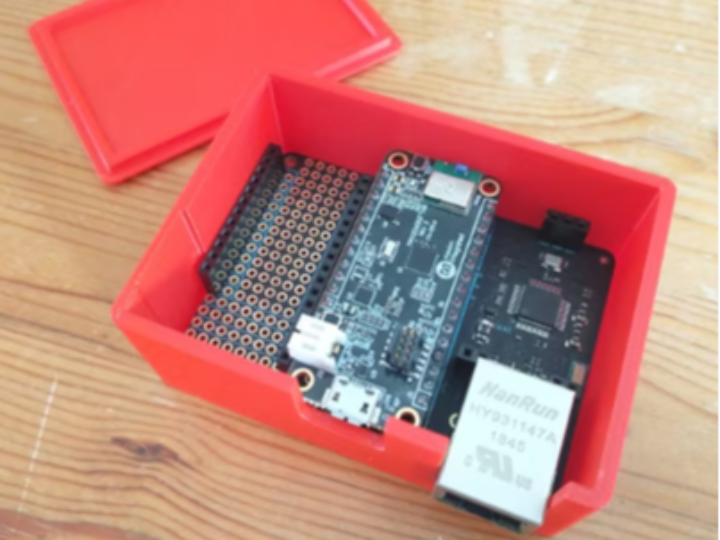
The following text is a project submitted to element14’s Smart Security and Surveillance Design Challenge. The title is “Don’t Forget to Set - Never forget to arm your alarm again,” and the date is May 24, 2026. ([element14 Community][1])
1. Summary of the Entire Post
The purpose of this project is very practical.
> Since people often forget to turn on their alarms when leaving the house, the goal is to create a device that automatically turns on the alarm once everyone has left.
The author noticed a problem: while there is a voice notification to cancel the alarm when entering the house, there is no notification to set the alarm when leaving. Therefore, recognizing that door opening sensors alone make it difficult to distinguish between "just stepping out to the garden briefly" and "going out," the author chose a different method to determine if anyone remains inside the house. ([element14 Community][1])
The core idea is to detect Bluetooth Key Finder tags attached to a keychain. When all registered Bluetooth tags disappear out of range, it determines that "no one is home" and sets the alarm. A key feature is that it utilizes existing low-cost Bluetooth trackers without creating a separate smartphone app. However, it explains that products with constantly changing MAC addresses, such as the Apple AirTag or Samsung Galaxy SmartTag, cannot be used. ([element14 Community][1])
The core of the hardware is the MAX32630FTHR board. This board scans for Bluetooth trackers using BLE functionality. The author intended to use the MAX32630FTHR, originally designed for Mbed environments, within the Arduino IDE. In this process, the author resolved various technical issues, including the outdated structure of the Arduino core, access to the PAN1326B Bluetooth module, UART/RTS/CTS configuration, 32.768kHz oscillator setup, and HCI command processing. ([element14 Community][1])
Integration with alarm systems was handled through Amazon Alexa integration rather than directly using unofficial APIs from specific alarm companies. Since many alarm systems already integrate with Alexa, the author determined that connecting to Alexa would make it easier to expand to multiple alarm systems. In the actual implementation, a method was used to trigger an Alexa routine via a network request using a service such as Virtual Smart Home's URL Routine Trigger. ([element14 Community][1])
Finally, the author also fabricated a 3D-printed case and displayed the device status via an LED indicator. Red indicates starting, green indicates a known tag was recently detected, and flashing blue indicates a random tag detection. Ultimately, the system worked well, and it is concluded to have become a practical security automation device that reduces human error in forgetting to set alarms. ([element14 Community][1])
2. The Role of the W5500 in This Article
In this project, the W5500 is an Ethernet controller responsible for the internet connection.
Since it is difficult to directly handle the internet communication required for the alarm system/Alexa integration using only the MAX32630FTHR board, the author used a Particle Ethernet FeatherWing. This FeatherWing is an Ethernet adapter based on the WIZnet W5500. The text specifies “Particle Ethernet FeatherWing, an Ethernet adapter based on the WIZnet W5500.” ([element14 Community][1])
In other words, the position of the W5500 in the overall structure is as follows:
| Component | Role |
| -- | - |
| MAX32630FTHR | Main MCU, performs Bluetooth tracker detection logic |
| PAN1326B Bluetooth Module | BLE tracker scan |
| WIZnet W5500 / Particle Ethernet FeatherWing | Provides internet connection |
| Alexa / Virtual Smart Home | Triggers alarm setting routine |
| Alarm System | Target ultimately arm/set |
The W5500 does not directly detect Bluetooth tags. Nor does it directly determine the alarm logic. It is a network interface that enables the result to be transmitted to Alexa via the internet after a determination is made that “everyone has gone out” based on the BLE scan results.
3. Technically Important Points
The author discusses the compatibility issues between the MAX32630FTHR's outdated Arduino core and Ethernet library more than the W5500 itself. In the past, when using the W5500, one had to use the Ethernet2 library instead of Arduino's default Ethernet library; now, that functionality has been integrated into the main Ethernet library. However, the Arduino core for the MAX32630FTHR is outdated and does not align well with modern network abstraction structures. ([element14 Community][1])
Therefore, the author chose to modify the existing Ethernet2 library instead of modifying the MAX32630FTHR Arduino core itself. This is because significantly modifying the common core or library could lead to long-term compatibility issues. Additionally, the text mentions that "the network stack is on the W5500 chip," explaining that the security risks required for this project are relatively reduced because the network stack is located within the W5500 chip. ([element14 Community][1])
4. Significant Points from WIZnet's Perspective
This article serves as a prime example demonstrating the advantages of the W5500.
First, the MCU does not need to handle complex TCP/IP processing directly.
The MAX32630FTHR focuses on application logic such as BLE scanning, HCI commands, and tracker status determination, while the W5500-based FeatherWing handles Ethernet communication.
Second, it acts as an expansion module that allows for the easy addition of Ethernet to existing MCU boards.
This project utilized wired Ethernet rather than Wi-Fi. For security and surveillance devices, a wired connection offering stable power and network connectivity can be a significant advantage.
Third, in the "Security Automation IoT Hub," the W5500 serves as the conduit for cloud/Alexa connections.
In this project, the W5500 is neither a sensor nor an alarm device, but a core communication component that enables local devices to connect with external services. To summarize in one line:
> In this project, the W5500 is a wired Ethernet communication engine that connects BLE-based occupancy/away detection devices to the Internet, enabling them to trigger Alexa routines and alarm systems.
=============================================
아래 글은 element14의 Smart Security and Surveillance Design Challenge에 올라온 프로젝트입니다. 제목은 “Don’t Forget to Set - Never forget to arm your alarm again”이고, 작성일은 2026년 5월 24일입니다. ([element14 Community][1])
1. 글 전체 요약
이 프로젝트의 목적은 매우 실용적입니다.
> 집을 나갈 때 알람을 켜는 것을 자주 잊어버리기 때문에, 사람이 모두 집을 나가면 자동으로 알람을 켜 주는 장치를 만드는 것입니다.
작성자는 집에 들어올 때는 알람을 해제하라는 음성 알림이 있지만, 집을 나갈 때는 알람을 설정하라는 알림이 없다는 문제를 느꼈습니다. 그래서 문 열림 센서만으로는 “정원에 잠깐 나간 것인지, 외출한 것인지” 구분하기 어렵다고 보고, 집 안에 사람이 남아 있는지 판단하는 다른 방법을 선택했습니다. ([element14 Community][1])
핵심 아이디어는 열쇠고리에 붙어 있는 Bluetooth Key Finder 태그를 감지하는 것입니다. 집에 등록된 Bluetooth 태그들이 모두 범위 밖으로 사라지면, “집에 아무도 없다”고 판단하고 알람을 설정합니다. 별도 스마트폰 앱을 만들지 않고, 이미 사용 중인 저가형 Bluetooth tracker를 활용한다는 점이 특징입니다. 다만 Apple AirTag나 Samsung Galaxy SmartTag처럼 MAC 주소가 계속 바뀌는 제품은 사용할 수 없다고 설명합니다. ([element14 Community][1])
하드웨어의 중심은 MAX32630FTHR 보드입니다. 이 보드는 BLE 기능을 이용해 Bluetooth tracker를 스캔합니다. 작성자는 원래 Mbed 환경용 보드인 MAX32630FTHR를 Arduino IDE에서 사용하려고 했고, 이 과정에서 Arduino core의 오래된 구조, PAN1326B Bluetooth 모듈 접근, UART/RTS/CTS 설정, 32.768kHz oscillator 설정, HCI command 처리 등 여러 기술적 문제를 해결했습니다. ([element14 Community][1])
알람 시스템과의 연동은 직접 특정 알람 회사의 비공식 API를 쓰지 않고, Amazon Alexa 연동을 통해 처리했습니다. 많은 알람 시스템이 이미 Alexa와 연동되므로, Alexa에 연결하면 여러 알람 시스템으로 확장하기 쉽다고 판단한 것입니다. 실제 구현에서는 Virtual Smart Home의 URL Routine Trigger 같은 서비스를 이용해 네트워크 요청으로 Alexa routine을 트리거하는 방식을 사용했습니다. ([element14 Community][1])
마지막으로 작성자는 3D 프린팅 케이스도 제작했고, LED 상태 표시를 통해 장치 상태를 보여주었습니다. 빨간색은 시작 중, 초록색은 알려진 태그가 최근 감지됨, 파란색 점멸은 임의의 태그 감지를 의미합니다. 최종적으로 이 시스템은 잘 동작했고, 알람 설정을 잊는 인간의 실수를 줄여 주는 실용적인 보안 자동화 장치가 되었다고 결론짓습니다. ([element14 Community][1])
2. 이 글에서 W5500의 역할
이 프로젝트에서 W5500은 인터넷 연결을 담당하는 Ethernet 컨트롤러입니다.
작성자는 MAX32630FTHR 보드만으로는 알람 시스템/Alexa 연동을 위해 필요한 인터넷 통신을 직접 처리하기 어렵기 때문에, Particle Ethernet FeatherWing을 사용했습니다. 이 FeatherWing은 WIZnet W5500 기반 Ethernet 어댑터입니다. 글에서는 “Particle Ethernet FeatherWing, an Ethernet adapter based on the WIZnet W5500”라고 명시합니다. ([element14 Community][1])
즉, 전체 구조에서 W5500의 위치는 다음과 같습니다.
| 구성 요소 | 역할 |
| -- | - |
| MAX32630FTHR | 메인 MCU, Bluetooth tracker 감지 로직 수행 |
| PAN1326B Bluetooth 모듈 | BLE tracker 스캔 |
| WIZnet W5500 / Particle Ethernet FeatherWing | 인터넷 연결 제공 |
| Alexa / Virtual Smart Home | 알람 설정 routine 트리거 |
| 알람 시스템 | 최종적으로 arm/set 되는 대상 |
W5500은 Bluetooth 태그를 직접 감지하지 않습니다. 알람 로직을 직접 판단하는 것도 아닙니다. BLE 스캔 결과를 바탕으로 “모두 외출했다”는 판단이 내려진 뒤, 그 결과를 인터넷을 통해 Alexa 쪽으로 전달할 수 있게 해 주는 네트워크 인터페이스입니다.
3. 기술적으로 중요한 포인트
작성자는 W5500 자체보다 MAX32630FTHR의 오래된 Arduino core와 Ethernet 라이브러리 호환성 문제를 많이 언급합니다. 과거에는 W5500 사용 시 Arduino의 기본 Ethernet 라이브러리가 아니라 Ethernet2 라이브러리를 써야 했고, 지금은 그 기능이 메인 Ethernet 라이브러리로 통합되었습니다. 하지만 MAX32630FTHR용 Arduino core가 오래되어 최신 네트워크 추상화 구조와 잘 맞지 않았습니다. ([element14 Community][1])
그래서 작성자는 MAX32630FTHR Arduino core 자체를 수정하는 대신, 기존 Ethernet2 라이브러리를 수정해서 사용하는 방식을 택했습니다. 공통 core나 라이브러리를 크게 수정하면 장기적으로 호환성 문제가 생길 수 있기 때문입니다. 또한 글에서는 “network stack is on the W5500 chip”이라고 언급하며, 네트워크 스택이 W5500 칩 안에 있기 때문에 이 프로젝트에서 필요한 보안 리스크가 상대적으로 줄어든다고 설명합니다. ([element14 Community][1])
4. WIZnet 관점에서 볼 때 의미 있는 점
이 글은 W5500의 장점을 잘 보여주는 사례입니다.
첫째, MCU가 복잡한 TCP/IP 처리를 직접 하지 않아도 됩니다.
MAX32630FTHR 쪽은 BLE 스캔, HCI command, tracker 상태 판단 같은 애플리케이션 로직에 집중하고, Ethernet 통신은 W5500 기반 FeatherWing이 담당합니다.
둘째, 기존 MCU 보드에 Ethernet을 쉽게 추가하는 확장 모듈 역할을 합니다.
이 프로젝트는 Wi-Fi가 아니라 유선 Ethernet을 사용했습니다. 보안·감시 장치에서는 전원과 네트워크가 안정적인 유선 연결이 장점이 될 수 있습니다.
셋째, “보안 자동화 IoT 허브”에서 W5500이 클라우드/Alexa 연결 통로가 됩니다.
W5500은 이 프로젝트에서 센서도 아니고 알람 장치도 아니지만, 로컬 디바이스가 외부 서비스와 연결되도록 해 주는 핵심 통신 부품입니다.
한 줄로 정리하면:
> 이 프로젝트에서 W5500은 BLE 기반 재실/외출 판단 장치를 인터넷에 연결하여 Alexa routine과 알람 시스템을 트리거하게 해 주는 유선 Ethernet 통신 엔진입니다.