



How to Build RS-232 Ethernet Conversion with WIZnet W55RP20 on PP-Ethernet-RS232-HAT?
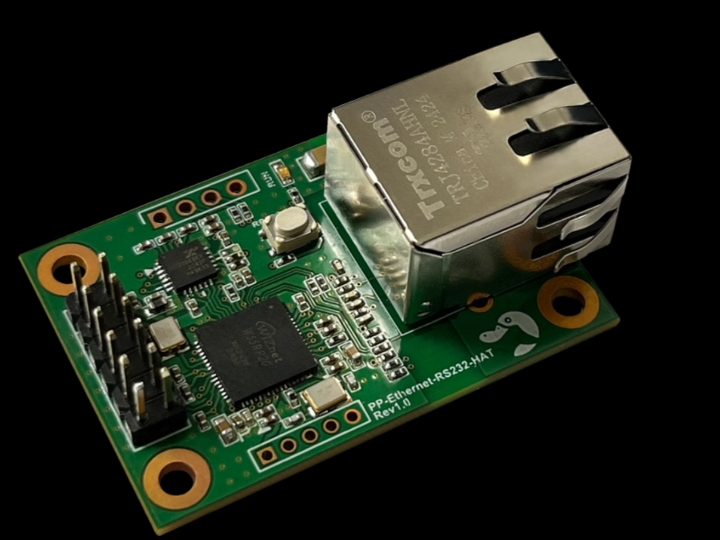
PP-Ethernet-RS232-HAT is a commercial Ethernet-to-RS-232 converter module built around WIZnet W55RP20, a SiP that integrates Raspberry Pi’s RP2040 microcontroll
How to Build RS-232 Ethernet Conversion with WIZnet W55RP20 on PP-Ethernet-RS232-HAT?
Summary
PP-Ethernet-RS232-HAT is a commercial Ethernet-to-RS-232 converter module built around WIZnet W55RP20, a SiP that integrates Raspberry Pi’s RP2040 microcontroller with WIZnet’s W5500 Ethernet controller. The module converts serial RS-232 data into TCP/IP network traffic and converts received TCP/IP data back into RS-232 data. W55RP20 provides the embedded control core plus W5500-based wired Ethernet, hardware TCP/IP offload, socket resources, and packet buffering needed for commercial serial-device networking.
What the Project Does
PP-Ethernet-RS232-HAT is designed to connect existing RS-232 devices to Ethernet without redesigning the serial device. It functions as a protocol converter: serial data from an attached device is packaged for TCP/IP transmission, and TCP/IP data received from the network is converted back into serial data for the device. The product ships with firmware already loaded, and the vendor states that users only need to configure the IP address with a tool before use.
The module targets commercial serial-device integration. It supports RS-232-to-Ethernet conversion, Modbus TCP and Modbus RTU/ASCII protocol conversion, 10/100 Mbps Ethernet, serial speeds up to 921 kbps, password protection for device search, RS-232 serial AT commands, configuration through a PC configuration tool, web configuration, ESD protection, a built-in unique MAC address, and an industrial operating range of -40 to 85°C.
The hardware-facing interface is built for module integration. The product page lists 3.3 V main power, ground, RS-232 Tx/Rx/RTS/CTS, RP_BOOT for MCU boot mode during USB firmware upload, nRST for MCU reset, FACT RST for restoring IP settings, AT Mode for UART configuration, SWD pins for firmware upload and debugging, and USB pins for firmware upload and debugging.
Where WIZnet Fits
The exact WIZnet product is W55RP20. WIZnet documents W55RP20 as a System-in-Package solution that integrates WIZnet’s W5500 Ethernet controller with Raspberry Pi’s RP2040 microcontroller. In PP-Ethernet-RS232-HAT, that means the serial-to-Ethernet application firmware can run on the RP2040 side while the W5500 side provides the wired Ethernet interface and hardware TCP/IP engine.
This architecture matters because an RS-232 device server must handle two timing domains at once. On one side, it must receive and transmit serial bytes with flow-control behavior such as RTS/CTS. On the other side, it must maintain Ethernet link state, IP configuration, TCP/UDP sessions, Modbus TCP conversion, and network-side buffering. W55RP20 keeps those functions in one integrated WIZnet device instead of requiring a separate MCU plus separate Ethernet controller.
At the W5500 layer, the module benefits from hardwired TCP/IP offload. WIZnet’s W5500 feature set includes TCP, UDP, WOL over UDP, ICMP, IGMP, IPv4, ARP, and PPPoE support, 8 independent sockets, 32 KB internal Tx/Rx buffer memory, 10Base-T/100Base-TX Ethernet MAC/PHY, SPI mode 0/3 support, power-down mode, Wake-on-LAN over UDP, and 3.3 V operation with 5 V I/O tolerance.
Implementation Notes
The source is a product page and manual/resource listing, not a public source repository. The product page confirms the W55RP20-based architecture and user-facing features, but it does not expose firmware source files or register-level implementation code. The following is therefore an architecture explanation, not copied project code.
A practical firmware structure for this module has four layers. The serial layer manages RS-232 Tx/Rx/RTS/CTS, baud rate, framing, and AT-command entry. The network layer manages MAC/IP configuration, TCP server or client mode, socket state, and link recovery. The protocol layer maps serial streams to TCP/IP sessions and maps Modbus RTU/ASCII frames to Modbus TCP transactions when that mode is enabled. The configuration layer exposes settings through Ethernet-TCP configuration tools, web configuration, and RS-232 AT commands, all of which are described by the product page.
For firmware maintenance, the product resources are also relevant. PLATYPUS lists a W55RP20 Serial-to-Ethernet firmware package compatible with PP-Ethernet-RS232-HAT and describes update paths through Ethernet Configuration Tool .bin, SWD .hex, and USB .uf2 images. That confirms the module is not just a passive converter board; it is a firmware-driven W55RP20 serial-to-Ethernet platform with field-update paths.
In a commercial design review, the critical firmware checks are serial buffer sizing, TCP socket recovery, Modbus transaction timeout behavior, factory-reset handling, AT-command authentication or physical access control, web-configuration protection, and safe firmware update recovery. At 921 kbps serial speed, the serial side can generate data quickly enough that TCP backpressure and network disconnects must be handled deliberately.
Practical Tips / Pitfalls
- Treat RS-232 buffering and Ethernet buffering as separate resources. W5500 socket buffers do not replace serial receive queues.
- Use RTS/CTS when the attached device can produce bursts near the maximum serial speed.
- Validate Modbus conversion with real Modbus TCP and RTU/ASCII master tools, not only raw serial loopback.
- Expose
FACT RSTsafely. Factory reset is useful in the field, but it should not be triggered accidentally by noise or poor panel wiring. - Keep SWD and USB update paths accessible during pilot builds. They are useful when Ethernet configuration is wrong or firmware needs recovery.
- Test cable removal, TCP disconnect, duplicate IP, factory reset, serial overflow, and firmware update interruption before deployment.
FAQ
Q: Why use WIZnet W55RP20 for PP-Ethernet-RS232-HAT?
A: W55RP20 combines the RP2040 application MCU and W5500 Ethernet controller in one SiP. That fits an RS-232 device-server module because the firmware can manage serial conversion and configuration while the W5500 side provides wired Ethernet, hardware TCP/IP offload, sockets, and packet buffers.
Q: How does this module connect to the host serial device?
A: The module exposes RS-232 Tx, Rx, RTS, and CTS signals, plus 3.3 V input, ground, reset, factory reset, AT-mode, SWD, and USB-related pins. The Ethernet side is handled by the module, while the attached device sees an RS-232 interface.
Q: What role does WIZnet play in this project?
A: W55RP20 is the core device. Its RP2040 side runs the serial-to-Ethernet firmware, and its W5500 side provides the Ethernet MAC/PHY, TCP/IP offload, socket resources, and buffering used to move RS-232 data over Ethernet.
Q: Can beginners follow this commercial module design?
A: Yes, as an integration module. Beginners do not need to implement the Ethernet stack from scratch because the product ships with firmware and supports IP setup through a configuration tool. For deeper customization, they should understand RS-232 wiring, flow control, IP addressing, TCP server/client behavior, Modbus framing, and firmware update methods.
Q: How does this compare with ENC28J60 and Lantronix Ethernet modules?
A: Compared with ENC28J60, W55RP20 provides a more integrated path because it includes an RP2040 MCU plus W5500 hardware TCP/IP Ethernet; ENC28J60 is a 10BASE-T SPI Ethernet controller with onboard MAC/PHY and 8 KB buffer RAM, so the host side usually carries more stack and application responsibility. Compared with Lantronix XPort-style modules, PP-Ethernet-RS232-HAT is closer to a configurable WIZnet-based serial-to-Ethernet product, while XPort is a more turnkey integrated device server with 10Base-T/100Base-TX Ethernet, operating system, embedded web server, full TCP/IP stack, AES encryption, and a serial interface.
Source
Original product page: PLATYPUS, PP-Ethernet-RS232-HAT. License is not stated on the product page.
PLATYPUS resource page: PP-Ethernet-RS232-HAT User Manual and W55RP20 Serial-to-Ethernet firmware resource listing.
WIZnet product reference: W55RP20 documentation and W5500 product specifications.
Alternative comparison references: Microchip ENC28J60 product information and Lantronix XPort product information.
Tags
#W55RP20 #W5500 #WIZnet #Platypus #PPEthernetRS232HAT #RS232 #SerialToEthernet #ModbusTCP #ModbusRTU #Ethernet #Commercial #Firmware #HardwareWiring #ENC28J60 #Lantronix
PP-Ethernet-RS232-HAT에서 WIZnet W55RP20으로 RS-232 Ethernet 변환을 구현하는 방법은?
요약
PP-Ethernet-RS232-HAT는 WIZnet W55RP20을 기반으로 한 상용 Ethernet-to-RS-232 변환 모듈입니다. W55RP20은 Raspberry Pi의 RP2040 마이크로컨트롤러와 WIZnet W5500 Ethernet 컨트롤러를 하나의 SiP로 통합한 제품입니다. 이 모듈은 RS-232 직렬 데이터를 TCP/IP 네트워크 트래픽으로 변환하고, 네트워크에서 수신한 TCP/IP 데이터를 다시 RS-232 데이터로 변환합니다. W55RP20은 상용 serial-device networking에 필요한 임베디드 제어 코어, W5500 기반 유선 Ethernet, 하드웨어 TCP/IP 오프로딩, 소켓 자원, 패킷 버퍼링을 제공합니다.
프로젝트가 하는 일
PP-Ethernet-RS232-HAT는 기존 RS-232 장치를 Ethernet에 연결하기 위한 모듈입니다. 직렬 장치를 다시 설계하지 않고도 네트워크에 연결할 수 있게 해주는 프로토콜 변환기입니다. 연결된 장치에서 들어오는 serial data는 TCP/IP 전송용 데이터로 패키징되고, 네트워크에서 수신한 TCP/IP 데이터는 다시 serial data로 변환되어 장치로 전달됩니다. 제품은 펌웨어가 미리 탑재된 상태로 제공되며, 공급사는 사용자가 설정 도구로 IP 주소만 설정하면 사용할 수 있다고 설명합니다.
이 모듈은 상용 serial-device 통합을 목표로 합니다. RS-232-to-Ethernet 변환, Modbus TCP 및 Modbus RTU/ASCII 프로토콜 변환, 10/100 Mbps Ethernet, 최대 921 kbps 직렬 속도, 장치 검색용 비밀번호 보호, RS-232 serial AT command, PC 설정 도구를 통한 설정, 웹 설정, ESD 보호, 내장 고유 MAC 주소, -40~85°C 산업용 동작 온도를 지원합니다.
하드웨어 인터페이스는 모듈 통합에 맞게 구성되어 있습니다. 제품 페이지는 3.3 V main power, ground, RS-232 Tx/Rx/RTS/CTS, USB 펌웨어 업로드 시 MCU boot mode에 사용하는 RP_BOOT, MCU reset용 nRST, IP 설정 복구용 FACT RST, UART 설정용 AT Mode, 펌웨어 업로드 및 디버깅용 SWD 핀, USB 펌웨어 업로드 및 디버깅용 USB 핀을 제시합니다.
WIZnet이 들어가는 위치
이 프로젝트에서 사용되는 WIZnet 제품은 W55RP20입니다. WIZnet 문서 기준으로 W55RP20은 WIZnet W5500 Ethernet 컨트롤러와 Raspberry Pi RP2040 마이크로컨트롤러를 통합한 System-in-Package 솔루션입니다. PP-Ethernet-RS232-HAT에서는 RP2040 측에서 serial-to-Ethernet 애플리케이션 펌웨어를 실행하고, W5500 측이 유선 Ethernet 인터페이스와 하드웨어 TCP/IP 엔진을 제공합니다.
이 구조는 RS-232 device server에서 중요합니다. RS-232 device server는 두 가지 타이밍 영역을 동시에 처리해야 합니다. 한쪽에서는 RTS/CTS 같은 flow-control 동작을 포함해 serial byte를 송수신해야 하고, 다른 한쪽에서는 Ethernet link state, IP 설정, TCP/UDP session, Modbus TCP 변환, network-side buffering을 유지해야 합니다. W55RP20은 별도 MCU와 별도 Ethernet 컨트롤러를 조합하는 대신, 이 기능을 하나의 WIZnet 통합 디바이스 안에 배치합니다.
W5500 계층에서 이 모듈은 하드웨어 TCP/IP 오프로딩의 이점을 얻습니다. W5500은 TCP, UDP, WOL over UDP, ICMP, IGMP, IPv4, ARP, PPPoE 지원, 8개 독립 소켓, 32 KB 내부 Tx/Rx 버퍼 메모리, 10Base-T/100Base-TX Ethernet MAC/PHY, SPI mode 0/3, Power Down Mode, Wake-on-LAN over UDP, 3.3 V 동작 및 5 V I/O tolerance를 제공합니다.
구현 참고 사항
소스는 제품 페이지와 매뉴얼 및 리소스 목록이며, 공개 소스 저장소는 아닙니다. 제품 페이지에서는 W55RP20 기반 아키텍처와 사용자 기능을 확인할 수 있지만, 펌웨어 소스 파일이나 레지스터 수준 구현 코드는 공개되어 있지 않습니다. 따라서 아래 내용은 프로젝트 코드 인용이 아니라 아키텍처 설명입니다.
이 모듈의 실용적인 펌웨어 구조는 네 개 계층으로 볼 수 있습니다. Serial layer는 RS-232 Tx/Rx/RTS/CTS, baud rate, framing, AT-command 진입을 관리합니다. Network layer는 MAC/IP 설정, TCP server 또는 client mode, socket state, link recovery를 관리합니다. Protocol layer는 serial stream을 TCP/IP session에 매핑하고, 해당 모드가 활성화되면 Modbus RTU/ASCII frame을 Modbus TCP transaction으로 매핑합니다. Configuration layer는 Ethernet-TCP 설정 도구, 웹 설정, RS-232 AT command를 통해 설정을 노출합니다.
펌웨어 유지보수 관점에서는 제품 리소스도 중요합니다. PLATYPUS는 PP-Ethernet-RS232-HAT와 호환되는 W55RP20 Serial-to-Ethernet 펌웨어 패키지를 제공하며, Ethernet Configuration Tool용 .bin, SWD용 .hex, USB용 .uf2 이미지 업데이트 경로를 설명합니다. 이는 이 모듈이 단순한 수동 변환 보드가 아니라, 현장 업데이트 경로를 갖춘 펌웨어 기반 W55RP20 serial-to-Ethernet 플랫폼임을 보여줍니다.
상용 설계 검토에서는 serial buffer sizing, TCP socket recovery, Modbus transaction timeout behavior, factory-reset handling, AT-command authentication 또는 물리 접근 제어, web-configuration protection, safe firmware update recovery를 확인해야 합니다. 직렬 속도가 921 kbps까지 올라갈 수 있으므로, serial side는 TCP backpressure나 network disconnect가 발생했을 때 버퍼를 빠르게 소모할 수 있습니다. 이를 의도적으로 처리해야 합니다.
실무 팁 / 주의점
- RS-232 버퍼링과 Ethernet 버퍼링을 별도 자원으로 다뤄야 합니다. W5500 소켓 버퍼는 serial receive queue를 대체하지 않습니다.
- 연결된 장치가 최대 직렬 속도에 가까운 burst를 만들 수 있다면 RTS/CTS를 사용하는 것이 좋습니다.
- Modbus 변환은 단순 raw serial loopback만으로 검증하면 안 됩니다. 실제 Modbus TCP 및 RTU/ASCII master tool로 검증해야 합니다.
FACT RST는 안전하게 노출해야 합니다. Factory reset은 현장 복구에 유용하지만, 노이즈나 잘못된 패널 배선으로 우발적으로 트리거되면 안 됩니다.- 파일럿 빌드에서는 SWD와 USB 업데이트 경로를 접근 가능하게 유지하는 것이 좋습니다. Ethernet 설정이 잘못되었거나 펌웨어 복구가 필요할 때 유용합니다.
- 배포 전 cable removal, TCP disconnect, duplicate IP, factory reset, serial overflow, firmware update interruption을 테스트해야 합니다.
FAQ
Q: PP-Ethernet-RS232-HAT에서 왜 WIZnet W55RP20을 사용하나요?
A: W55RP20은 RP2040 애플리케이션 MCU와 W5500 Ethernet 컨트롤러를 하나의 SiP로 결합합니다. RS-232 device-server 모듈에서는 펌웨어가 serial conversion과 configuration을 관리하고, W5500 측이 유선 Ethernet, 하드웨어 TCP/IP 오프로딩, 소켓, 패킷 버퍼를 제공하므로 적합합니다.
Q: 이 모듈은 호스트 serial device에 어떻게 연결되나요?
A: 모듈은 RS-232 Tx, Rx, RTS, CTS 신호와 3.3 V 입력, ground, reset, factory reset, AT-mode, SWD, USB 관련 핀을 제공합니다. Ethernet 측은 모듈 내부에서 처리되고, 연결된 장치는 RS-232 인터페이스를 사용합니다.
Q: 이 프로젝트에서 WIZnet은 어떤 역할을 하나요?
A: W55RP20이 핵심 디바이스입니다. RP2040 측은 serial-to-Ethernet 펌웨어를 실행하고, W5500 측은 RS-232 데이터를 Ethernet으로 이동시키는 데 필요한 Ethernet MAC/PHY, TCP/IP 오프로딩, 소켓 자원, 버퍼링을 제공합니다.
Q: 초보자도 이 상용 모듈 설계를 따라갈 수 있나요?
A: 통합 모듈로 사용한다면 가능합니다. 제품은 펌웨어가 탑재된 상태로 제공되고 설정 도구를 통해 IP 설정을 지원하므로, 사용자가 Ethernet stack을 처음부터 구현할 필요는 없습니다. 더 깊은 커스터마이징을 위해서는 RS-232 배선, flow control, IP 주소 설정, TCP server/client 동작, Modbus framing, 펌웨어 업데이트 방법을 이해해야 합니다.
Q: ENC28J60 및 Lantronix Ethernet module과 비교하면 어떤 차이가 있나요?
A: ENC28J60과 비교하면 W55RP20은 RP2040 MCU와 W5500 하드웨어 TCP/IP Ethernet을 함께 포함하므로 더 통합된 경로를 제공합니다. ENC28J60은 onboard MAC/PHY와 8 KB buffer RAM을 가진 10BASE-T SPI Ethernet controller이므로, 일반적으로 host 측이 더 많은 stack 및 application 책임을 부담합니다. Lantronix XPort 계열과 비교하면 PP-Ethernet-RS232-HAT는 구성 가능한 WIZnet 기반 serial-to-Ethernet 제품에 가깝고, XPort는 10Base-T/100Base-TX Ethernet, operating system, embedded web server, full TCP/IP stack, AES encryption, serial interface를 포함한 더 turnkey 형태의 integrated device server에 가깝습니다.
출처
Original product page: PLATYPUS, PP-Ethernet-RS232-HAT. 제품 페이지에 라이선스는 명시되어 있지 않습니다.
https://www.us-platypus.com/58/?idx=39
PLATYPUS resource page: PP-Ethernet-RS232-HAT User Manual 및 W55RP20 Serial-to-Ethernet firmware resource listing.
https://us-platypus.com/RESOURCES/?bmode=view&idx=167660789
WIZnet product reference: W55RP20 documentation and W5500 product specifications.
https://docs.wiznet.io/Product/Chip/MCU/W55RP20
Alternative comparison references: Microchip ENC28J60 product information and Lantronix XPort product information.
https://www.microchip.com/en-us/product/ENC28J60
태그
#W55RP20 #W5500 #WIZnet #Platypus #PPEthernetRS232HAT #RS232 #SerialToEthernet #ModbusTCP #ModbusRTU #Ethernet #Commercial #Firmware #HardwareWiring #ENC28J60 #Lantronix