



How to Build PoE RS-232 Ethernet Conversion with WIZnet W55RP20 on PP-Ethernet-RS232-PoE?
PP-Ethernet-RS232-PoE is a commercial RS-232-to-Ethernet converter module built around WIZnet W55RP20.
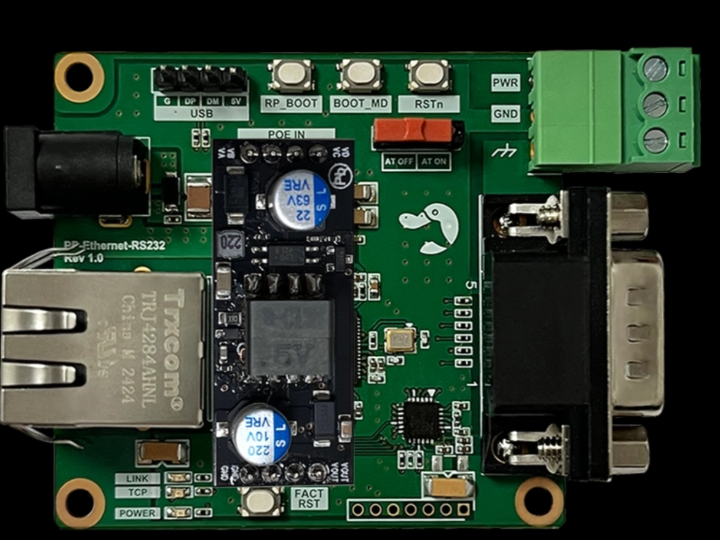
How to Build PoE RS-232 Ethernet Conversion with WIZnet W55RP20 on PP-Ethernet-RS232-PoE?
Summary
PP-Ethernet-RS232-PoE is a commercial RS-232-to-Ethernet converter module built around WIZnet W55RP20. The module converts data from RS-232 serial devices into TCP/IP network traffic and converts received TCP/IP data back into RS-232 data for the attached device. W55RP20 provides the RP2040-class application MCU, W5500-based wired Ethernet, hardwired TCP/IP stack, socket handling, buffering, and firmware execution path needed for a compact serial device server with optional PoE support.
What the Project Does
PP-Ethernet-RS232-PoE is designed to connect existing RS-232 equipment to Ethernet without replacing the serial device. The product page describes it as an Ethernet-to-RS-232 converter that transforms serial-device data into TCP/IP data for network transmission and converts TCP/IP data received over the network back into serial data.
The module targets commercial embedded integration rather than open-ended development-board experimentation. The confirmed feature set includes RS-232-to-Ethernet conversion based on W55RP20, a magnetic RJ45 modular jack, 10/100 Mbps Ethernet, serial communication up to 230 kbps, PHY link and TCP connection status pins, MQTT and Modbus support, RS-232 RX, TX, RTS, CTS signals, optional PoE module support, and USB/SWD debugging support.
Control is exposed through both serial and Ethernet paths. The page states that the module can be controlled through an Ethernet-TCP configuration tool and through serial AT commands, which means the device can be installed as a configurable serial device server rather than requiring the host system to implement its own TCP/IP stack.
Where WIZnet Fits
The exact WIZnet product is W55RP20. WIZnet documents W55RP20 as a System-in-Package that integrates the W5500 Ethernet controller with Raspberry Pi’s RP2040 microcontroller. In this module, the RP2040 side runs the serial-to-Ethernet firmware and control logic, while the W5500 side provides the wired Ethernet interface and hardwired TCP/IP processing.
This placement is important for RS-232 device servers because the firmware must handle two different timing domains. The serial side must process RX, TX, RTS, and CTS behavior at up to 230 kbps, while the Ethernet side must maintain link state, TCP/UDP sessions, Modbus or MQTT handling, configuration access, and recovery after cable removal or TCP disconnect. PP-Ethernet-RS232-PoE exposes PHY-link and TCP-connection status pins, which are useful for panel indicators, PLC input monitoring, or supervisory diagnostics.
At the WIZnet network layer, W55RP20 provides a hardwired TCP/IP stack and supports TCP, UDP, IPv4, ICMP, ARP, IGMP, and PPPoE. It also includes 2 MB Flash, 264 KB SRAM, dual ARM Cortex-M0+ cores, UART, SPI, I2C, USB, PIO, watchdog, and other MCU peripherals needed to build a self-contained networked serial converter.
Implementation Notes
The PLATYPUS source is a product page, not a public firmware repository. It verifies that PP-Ethernet-RS232-PoE uses W55RP20 and confirms the external features, but it does not expose the production firmware source or register-level implementation files. Therefore, no PLATYPUS-specific code can be quoted.
Two short source-confirmed implementation anchors matter for system integration. The product feature list states: “RS-232 to Ethernet based on W55RP20” and “Status pins: PHY link status / TCP connection status.” These are not marketing-only details; they define the two main firmware boundaries. The first confirms that serial data conversion is handled inside a W55RP20-based module, and the second confirms that network state is externally observable without parsing firmware logs.
A practical firmware architecture can be understood as four layers. The RS-232 layer handles byte reception, transmit timing, RTS/CTS flow control, framing, and serial AT-command entry. The network layer manages IP configuration, TCP server or client mode, socket state, link state, and reconnect behavior. The protocol layer maps serial streams to TCP/IP sessions and handles Modbus or MQTT features when enabled. The configuration layer exposes settings through Ethernet-TCP configuration and serial AT commands.
For register and hardware design, the critical boundary is between serial buffering and W5500-side Ethernet buffering. RS-232 input can continue while the Ethernet peer is disconnected, the TCP socket is closed, or the PoE-powered device is rebooting. Commercial firmware should define what happens during those cases: drop old data, block serial input with flow control, preserve a bounded queue, or reset the TCP session. The W55RP20 watchdog, status pins, USB/SWD debug paths, and factory configuration path should be treated as part of the reliability design rather than optional bring-up features.
Practical Tips / Pitfalls
- Use
RTS/CTSwhen the connected RS-232 device can send bursts faster than the network side can forward. - Wire PHY-link and TCP-connection status pins to visible indicators or host inputs; they make field diagnosis much faster.
- Test optional PoE operation with the actual cable length, switch, injector, and grounding used in deployment.
- Validate Modbus and MQTT modes separately from raw serial tunneling; they have different timeout and framing behavior.
- Keep USB and SWD access available during pilot production so firmware recovery remains possible.
- Test TCP disconnect, cable removal, duplicate IP, PoE power cycling, serial overflow, and configuration reset before release.
FAQ
Q: Why use WIZnet W55RP20 for PP-Ethernet-RS232-PoE?
A: W55RP20 combines an RP2040-class MCU with W5500 Ethernet in one package. That is a good fit for RS-232-to-Ethernet conversion because the MCU side can run configuration, serial framing, Modbus/MQTT handling, and recovery logic while the W5500 side provides hardwired TCP/IP and wired Ethernet transport.
Q: How does it connect to the platform?
A: The attached device connects through RS-232 RX, TX, RTS, and CTS. The network side is exposed through the module’s RJ45 Ethernet path, and the module also provides status pins for PHY link and TCP connection. Optional PoE can be added by installing a PoE module.
Q: What role does WIZnet play in this project?
A: W55RP20 is the core conversion device. It runs the serial-to-Ethernet firmware and provides the Ethernet MAC/PHY, hardwired TCP/IP stack, supported protocols, socket resources, and buffering required to move RS-232 traffic over Ethernet.
Q: Can beginners use this module?
A: Yes, as a configured commercial module. The product page states that it comes preloaded with firmware and only needs IP configuration through a tool before use. Deeper integration still requires understanding RS-232 wiring, flow control, IP addressing, TCP server/client behavior, Modbus timing, and firmware update access.
Q: How does this compare with a Lantronix XPort module?
A: Both target serial-to-Ethernet conversion, but they sit at different integration points. PP-Ethernet-RS232-PoE is a W55RP20-based converter module with RS-232 signals, status pins, optional PoE, MQTT/Modbus support, and USB/SWD debug access. Lantronix XPort is a more turnkey embedded device server in an RJ45-style package with 10Base-T/100Base-TX Ethernet, its own operating system, embedded web server, full TCP/IP stack, 256-bit AES option, configuration utilities, and upgrade paths through TFTP or serial. The W55RP20 approach gives more WIZnet/RP2040-centered firmware and hardware integration flexibility; XPort reduces network-stack design work but is a more closed module-level device-server path.
Source
Original product page: PLATYPUS, PP-Ethernet-RS232-PoE. License is not stated on the product page.
WIZnet product reference: W55RP20 documentation and feature list.
Related WIZnet firmware reference: W55RP20-S2E repository, which documents W55RP20 serial-to-Ethernet firmware concepts, internal RP2040-to-W5500 connections, and function pins.
Alternative comparison reference: Lantronix XPort product information.
Tags
#W55RP20 #W5500 #WIZnet #Platypus #PPEthernetRS232PoE #RS232 #SerialToEthernet #PoE #Modbus #MQTT #Ethernet #Commercial #Firmware #HardwareWiring #Lantronix
PP-Ethernet-RS232-PoE에서 WIZnet W55RP20으로 PoE RS-232 Ethernet 변환을 구현하는 방법은?
요약
PP-Ethernet-RS232-PoE는 WIZnet W55RP20을 기반으로 한 상용 RS-232-to-Ethernet 변환 모듈입니다. 이 모듈은 RS-232 직렬 장치의 데이터를 TCP/IP 네트워크 트래픽으로 변환하고, 네트워크에서 수신한 TCP/IP 데이터를 다시 연결 장치용 RS-232 데이터로 변환합니다. W55RP20은 compact serial device server에 필요한 RP2040급 애플리케이션 MCU, W5500 기반 유선 Ethernet, 하드웨어 TCP/IP 스택, 소켓 처리, 버퍼링, 펌웨어 실행 경로를 제공하며, 선택적으로 PoE 구성을 지원합니다.
프로젝트가 하는 일
PP-Ethernet-RS232-PoE는 기존 RS-232 장비를 교체하지 않고 Ethernet에 연결하기 위해 설계된 모듈입니다. 제품 페이지는 이 모듈을 Ethernet-to-RS-232 converter로 설명하며, serial device data를 네트워크 전송용 TCP/IP data로 변환하고, 네트워크에서 받은 TCP/IP data를 다시 serial data로 변환한다고 설명합니다.
이 모듈은 개발 보드 실험보다 상용 임베디드 통합을 목표로 합니다. 확인된 기능에는 W55RP20 기반 RS-232-to-Ethernet 변환, magnetic RJ45 modular jack, 10/100 Mbps Ethernet, 최대 230 kbps serial communication, PHY link 및 TCP connection status pin, MQTT 및 Modbus 지원, RS-232 RX, TX, RTS, CTS 신호, 선택적 PoE module 지원, USB/SWD debugging 지원이 포함됩니다.
제어는 serial과 Ethernet 양쪽 경로로 제공됩니다. 제품 페이지는 Ethernet-TCP configuration tool과 serial AT command를 통해 모듈을 제어할 수 있다고 설명합니다. 따라서 호스트 시스템이 직접 TCP/IP 스택을 구현하지 않아도, 이 장치를 configurable serial device server로 설치할 수 있습니다.
WIZnet이 들어가는 위치
이 프로젝트에서 사용되는 정확한 WIZnet 제품은 W55RP20입니다. WIZnet 문서 기준으로 W55RP20은 W5500 Ethernet controller와 Raspberry Pi RP2040 microcontroller를 통합한 System-in-Package입니다. 이 모듈에서는 RP2040 측이 serial-to-Ethernet 펌웨어와 제어 로직을 실행하고, W5500 측이 유선 Ethernet 인터페이스와 하드웨어 TCP/IP 처리를 제공합니다.
이 배치는 RS-232 device server에서 중요합니다. 펌웨어는 두 가지 다른 timing domain을 처리해야 합니다. Serial 측은 최대 230 kbps에서 RX, TX, RTS, CTS 동작을 처리해야 하고, Ethernet 측은 link state, TCP/UDP session, Modbus 또는 MQTT 처리, configuration access, cable removal 또는 TCP disconnect 이후 복구를 유지해야 합니다. PP-Ethernet-RS232-PoE는 PHY-link와 TCP-connection status pin을 제공하므로 panel indicator, PLC input monitoring, supervisory diagnostics에 활용할 수 있습니다.
WIZnet 네트워크 계층에서 W55RP20은 hardwired TCP/IP stack을 제공하며 TCP, UDP, IPv4, ICMP, ARP, IGMP, PPPoE를 지원합니다. 또한 2 MB Flash, 264 KB SRAM, dual ARM Cortex-M0+ core, UART, SPI, I2C, USB, PIO, watchdog, 기타 MCU peripheral을 포함해 self-contained networked serial converter를 만들 수 있습니다.
구현 참고 사항
PLATYPUS 소스는 제품 페이지이며 공개 펌웨어 저장소가 아닙니다. 해당 페이지에서는 PP-Ethernet-RS232-PoE가 W55RP20을 사용한다는 점과 외부 기능은 확인할 수 있지만, production firmware source나 register-level implementation file은 공개하지 않습니다. 따라서 PLATYPUS 프로젝트별 코드는 인용할 수 없습니다.
시스템 통합에서 중요한 소스 기반 구현 단서는 두 가지입니다. 제품 기능 목록의 “RS-232 to Ethernet based on W55RP20”와 “Status pins: PHY link status / TCP connection status”입니다. 이 두 항목은 단순한 홍보 문구가 아니라 주요 펌웨어 경계를 정의합니다. 첫 번째는 serial data conversion이 W55RP20 기반 모듈 내부에서 처리된다는 점을 확인하고, 두 번째는 firmware log를 파싱하지 않아도 network state를 외부에서 관찰할 수 있음을 확인합니다.
실용적인 펌웨어 아키텍처는 네 개 계층으로 이해할 수 있습니다. RS-232 계층은 byte reception, transmit timing, RTS/CTS flow control, framing, serial AT-command entry를 처리합니다. Network 계층은 IP configuration, TCP server 또는 client mode, socket state, link state, reconnect behavior를 관리합니다. Protocol 계층은 serial stream을 TCP/IP session에 매핑하고, 활성화된 경우 Modbus 또는 MQTT 기능을 처리합니다. Configuration 계층은 Ethernet-TCP configuration과 serial AT command를 통해 설정을 노출합니다.
Register 및 hardware design 관점에서 중요한 경계는 serial buffering과 W5500-side Ethernet buffering 사이입니다. RS-232 입력은 Ethernet peer가 끊어졌거나, TCP socket이 닫혔거나, PoE-powered device가 재부팅 중일 때도 계속 들어올 수 있습니다. 상용 펌웨어는 이러한 경우의 동작 정책을 정의해야 합니다. 예를 들어 오래된 데이터를 버릴지, flow control로 serial input을 막을지, 제한된 queue를 유지할지, TCP session을 reset할지 결정해야 합니다. W55RP20 watchdog, status pin, USB/SWD debug path, factory configuration path는 단순 bring-up 기능이 아니라 reliability design의 일부로 다뤄야 합니다.
실무 팁 / 주의점
- 연결된 RS-232 장치가 network side보다 빠르게 burst data를 보낼 수 있다면
RTS/CTS를 사용해야 합니다. - PHY-link 및 TCP-connection status pin을 visible indicator나 host input에 연결하면 현장 진단이 훨씬 빨라집니다.
- 선택적 PoE 동작은 실제 배포에 사용할 cable length, switch, injector, grounding 조건에서 테스트해야 합니다.
- Modbus 및 MQTT mode는 raw serial tunneling과 별도로 검증해야 합니다. timeout 및 framing 동작이 다릅니다.
- 파일럿 생산 단계에서는 USB와 SWD 접근을 유지해야 펌웨어 복구가 가능합니다.
- 출시 전에 TCP disconnect, cable removal, duplicate IP, PoE power cycling, serial overflow, configuration reset을 테스트해야 합니다.
FAQ
Q: PP-Ethernet-RS232-PoE에서 왜 WIZnet W55RP20을 사용하나요?
A: W55RP20은 RP2040급 MCU와 W5500 Ethernet을 하나의 패키지에 결합합니다. RS-232-to-Ethernet 변환에서는 MCU 측이 configuration, serial framing, Modbus/MQTT handling, recovery logic을 실행하고, W5500 측이 hardwired TCP/IP와 유선 Ethernet transport를 제공하므로 적합합니다.
Q: 이 모듈은 플랫폼에 어떻게 연결되나요?
A: 연결 장치는 RS-232 RX, TX, RTS, CTS를 통해 접속합니다. 네트워크 측은 모듈의 RJ45 Ethernet 경로로 노출되며, 모듈은 PHY link와 TCP connection을 위한 status pin도 제공합니다. PoE module을 장착하면 선택적으로 PoE를 추가할 수 있습니다.
Q: 이 프로젝트에서 WIZnet은 어떤 역할을 하나요?
A: W55RP20은 핵심 변환 디바이스입니다. Serial-to-Ethernet 펌웨어를 실행하고, RS-232 traffic을 Ethernet으로 이동시키는 데 필요한 Ethernet MAC/PHY, hardwired TCP/IP stack, 지원 프로토콜, socket resource, buffering을 제공합니다.
Q: 초보자도 이 모듈을 사용할 수 있나요?
A: 설정형 상용 모듈로 사용하는 경우 가능합니다. 제품 페이지는 모듈에 펌웨어가 사전 탑재되어 있고, 사용 전 설정 도구로 IP 설정만 하면 된다고 설명합니다. 더 깊은 통합에는 RS-232 wiring, flow control, IP addressing, TCP server/client behavior, Modbus timing, firmware update access에 대한 이해가 필요합니다.
Q: Lantronix XPort module과 비교하면 어떤 차이가 있나요?
A: 둘 다 serial-to-Ethernet 변환을 목표로 하지만 통합 지점이 다릅니다. PP-Ethernet-RS232-PoE는 RS-232 signal, status pin, optional PoE, MQTT/Modbus support, USB/SWD debug access를 제공하는 W55RP20 기반 converter module입니다. Lantronix XPort는 RJ45 스타일 패키지의 더 turnkey한 embedded device server로, 10Base-T/100Base-TX Ethernet, 자체 operating system, embedded web server, full TCP/IP stack, 256-bit AES option, configuration utility, TFTP 또는 serial을 통한 upgrade path를 제공합니다. W55RP20 접근은 WIZnet/RP2040 중심의 펌웨어 및 하드웨어 통합 유연성이 크고, XPort는 network-stack 설계 부담을 줄이는 더 폐쇄적인 module-level device-server 경로에 가깝습니다.
출처
Original product page: PLATYPUS, PP-Ethernet-RS232-PoE. 제품 페이지에 라이선스는 명시되어 있지 않습니다.
https://us-platypus.com/58/?idx=46
WIZnet product reference: W55RP20 documentation and feature list.
https://docs.wiznet.io/Product/Chip/MCU/W55RP20
Related WIZnet firmware reference: W55RP20-S2E repository, W55RP20 serial-to-Ethernet firmware concepts, internal RP2040-to-W5500 connections, and function pins.
https://github.com/WIZnet-ioNIC/W55RP20-S2E/blob/main/README.md
Alternative comparison reference: Lantronix XPort product information.
https://www.lantronix.com/products/xport/
태그
#W55RP20 #W5500 #WIZnet #Platypus #PPEthernetRS232PoE #RS232 #SerialToEthernet #PoE #Modbus #MQTT #Ethernet #Commercial #Firmware #HardwareWiring #Lantronix