Linux w5500 driver and use
Linux w5500 driver and use
0
Project description
1. Drive
Driver source: a: kernel driver; b: official driver
a. Kernel: linux kernel w5500 driver, including two source files w5100.c and w5100-spi.c
/kernel/drivers/net/ethernet/wiznet/w5100.c
kernel/drivers/net/ethernet/wiznet/w5100-spi.c
kernel/drivers/net/ethernet/wiznet/w5100.h
It can be configured into the kernel through make menuconfig, and the kernel can be reprogrammed.
Or copy these two files separately, compile them into modules, and manually insmod
Compile separately: write two makefiles to compile w5500.ko and w5500-spi.ko
obj-m := w5500.o
w5500-objs := w5100.o

KDIR := /home/kernel
PWD := $(shell pwd)

default :
$(MAKE) -C $(KDIR) SUBDIRS=$(PWD) modules
obj-m := w5500-spi.o
w5500-spi-objs := w5100-spi.o

KDIR := /home/kernel
PWD := $(shell pwd)

default :
$(MAKE) -C $(KDIR) SUBDIRS=$(PWD) modules
Load the driver in sequence, insmod w5500.ko && insmod w5500-spi.ko (note the mounting order)
Then execute ifconfig -a to view the newly added network device of ethx
Problems in the kernel driver:
1. There is no rst hardware reset in the kernel driver, only soft reset. The rst pin on your own board has leads, which needs to
be dealt with
static int w5100_hw_reset(struct w5100_priv *priv) Add control of hardware reset in function
b. Wiz official website driver:
www.w5500.com
Download the linux driver file, there are two files app and driver in the file, use the driver code in the driver file
The kernel version targeted in the driver code is a bit low. If you use 4.19, you need to modify some function usage
methods according to the version .
Modify the makefile for your own environment.
obj-m := w5500-wiz.o
w5500-wiz1-objs := module.o netdrv.o dev.o queue.o

KDIR := /home/kernel
PWD := $(shell pwd)

default :
$(MAKE) -C $(KDIR) SUBDIRS=$(PWD) modules
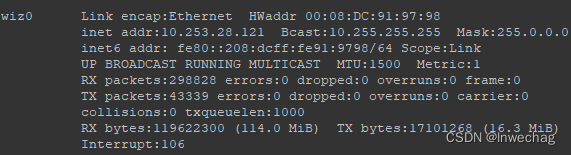
insmod w5500-wiz.ko loads the driver, and generates a new network card wiz0 after ifconfig -a
Before loading the driver, you need to modify the device tree file
2. w5500 device tree
Add reset control pin
Add spi0 device tree description: SPI rate, interrupt pin, etc.
Problems in
1 &pinctrl {
2 ......
3
4 w5500{
5 w5500_reset_gpio: w5500_reset_gpio{
6 rockchip,pins =
7 <3 RK_PB0 RK_FUNC_GPIO &pcfg_pull_none>,/* LU45 P3B0 复位 */
8 };
9 };
10
11 };
12
13 w5500-eth{
14 gpio_reset = <&gpio3 RK_PB0 GPIO_ACTIVE_LOW>;
15 pinctrl-names = "default";
16 pinctrl-0 = <&w5500_reset_gpio>;
17 status = "okay";
18 };
19
20 &spi0 {
21 pinctrl-names = "default", "high_speed";
22 pinctrl-0 = <&spi0m1_cs0 &spi0m1_pins>;
23 pinctrl-1 = <&spi0m1_cs0 &spi0m1_pins_hs>;
24 status = "okay";
25
26 w5500-wiz0@0x00{
27 compatible = "w5500-wiz0";
28 reg = <0>;
29 spi-max-frequency = <40000000>; /* SPI支持80M速率,实际使用高于50M时寄存器读出错误*/
30 interrupt-parent = <&gpio3>;
31 interrupts = <RK_PA7 IRQ_TYPE_LEVEL_LOW>;
32 };
33};
Problems in the process:
After the device tree is configured and the driver is loaded, you can enter the probe; use ifconfig -a to check that the network port
device has added eth2.
After the driver is initialized or reset by other operations, a default parameter will be read to indicate the current spi interface and
the reset situation.
1 if ((read_data = w5100_read16(priv, rtr)) != RTR_DEFAULT){
2
3 printk("read data16: %d,\n", read_data);
4
5 return -ENODEV;
6
7 }
The actual data is inconsistent with RTR_DEFAULT; the driver will always restart.
Replace the driver with the one provided by the official website of wiznet.
Modify the driver to adapt to the 4.1 kernel. Configure hardware reset and interrupt pins.
Modify the reset pin to use the device tree of function operation.
After entering the probe, generate device wiz0 in the network port
Question 1: The judgment logic of the API return value of the application pin and the driver is wrong.
Question 2: When the driver is loaded, read the version number verification. The read version number does not match the actual
one.
The final problem point: configure the spi rate in the device tree, and the above operations will configure the spi rate to 80MHz
spi-max-frequency = <40000000> ;
SPI rate problem: The spi of W5500 can theoretically support up to 80Mhz. After setting it to 80M at the beginning, the spi
communication data is abnormal, the register read error, and then the driver restarts. Finally, it is normal to set the rate to 40Mhz.
Due to the fact that the data line and clock line of the spi are not processed during hardware design, the data is abnormal after
the rate is increased.
3. Connect to the network
Set IP:
1. Use a fixed IP
1 ifconfig wiz0 192.168.1.121 up
2 ifconfig wiz0 netmask 255.255.255.0 broadcast 192.168.1.255
3 route add -net 192.168.1.0 netmask 255.255.255.0 gw 192.168.1.1 dev wiz0
4 route add default gw 192.168.1.1 dev wiz0
2. Use dhcp to automatically obtain IP
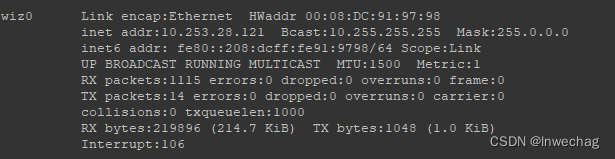
udhcpc -i wiz0After setting the IP, use ifconfig to view the network card
Specify the network card PING:
ping -I wiz0 192.168.1.102
PING extranet:
ping -I wiz0 www.baidu.com
DNS service is required:
/etc resolv.conf file add DNS
This file will be cleared after restarting, you can add the following to the startup file
1 echo "nameserver 1.1.1.1" >> /etc/resolv.conf
2 echo "nameserver 8.8.8.8" >> /etc/resolv.conf

