



How Do You Build a TCP Client on ESP32 Using W6100 and ioLibrary?
This article explains how an ESP32 integrates with the WIZnet W6100 Ethernet controller using the official ioLibrary to implement a TCP client.
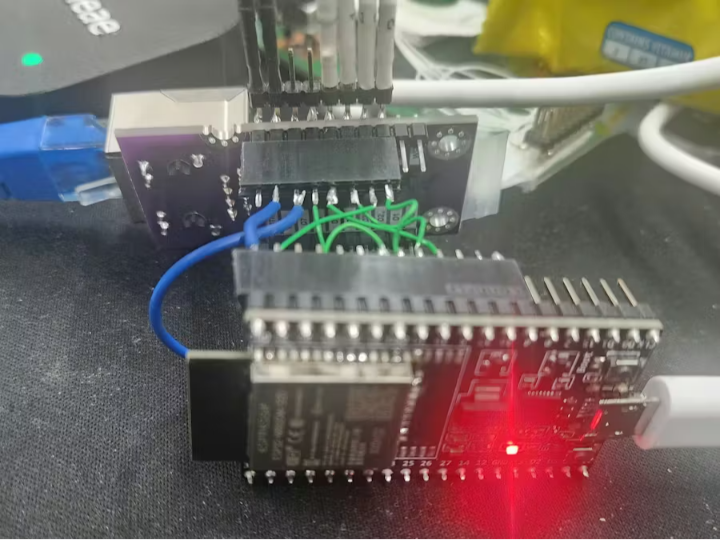
How Do You Build a TCP Client on ESP32 Using W6100 and ioLibrary?
SPI Integration, Driver Architecture, and Hardware TCP/IP Offloading Explained
(ESP32와 W6100, ioLibrary로 TCP 클라이언트를 구현하면 무엇이 달라지는가?)
Summary (40–60 words)
This article explains how an ESP32 integrates with the WIZnet W6100 Ethernet controller using the official ioLibrary to implement a TCP client. By analyzing SPI integration, ioLibrary’s architectural role, and socket-level data flow, it shows how hardware TCP/IP offloading simplifies firmware design and improves reliability compared to software stacks.
1. Why Combine ESP32 with W6100?
ESP32 is widely used for IoT because of its:
Strong CPU performance
Rich peripheral set
Wi-Fi and Bluetooth support
However, Wi-Fi introduces:
RF instability
Complex software TCP/IP stacks
Non-deterministic latency
The WIZnet W6100 addresses these issues by providing:
Full hardware TCP/IP offloading
Dual-stack IPv4 / IPv6 capability
Deterministic Ethernet behavior over SPI
ESP32 handles application logic. W6100 guarantees network correctness.
2. High-Level System Architecture
ESP32 + W6100 Partitioning
Key point:
ESP32 does not run a full TCP/IP stack
ioLibrary bridges application logic and W6100 hardware
3. ESP32 ↔ W6100 SPI Integration
Hardware Integration Essentials
The integration requires:
SPI signals (SCK, MOSI, MISO)
CS (chip select)
RESET
Power and ground
Critical engineering rule:
CS must remain asserted for the entire W6100 SPI frame.
Any violation results in:
Corrupted register writes
Broken socket behavior
“TCP works once, then fails” symptoms
4. What ioLibrary Actually Does (and Does Not Do)
ioLibrary Responsibilities
ioLibrary:
Defines register access macros
Implements socket-level APIs
Manages TX/RX buffer pointers
Translates socket commands into register operations
What ioLibrary Does NOT Do
ioLibrary does not:
Implement TCP/IP algorithms in software
Hide W6100’s socket model
Eliminate the need to understand buffer flow
This is intentional.
ioLibrary exposes hardware behavior instead of abstracting it away.
5. TCP Client Workflow Using ioLibrary (Conceptual)
Socket Initialization Flow
From this point:
TCP handshake is fully handled by W6100 hardware
ESP32 only monitors socket state registers
6. TCP Data Transmission Path
TX Data Flow (Conceptual)
Key engineering rule:
SEND without correct TX pointer update transmits nothing.
This is a common beginner error and a frequent debugging case.
7. TCP Data Reception Path
RX Data Flow (Conceptual)
If RECV is not issued:
RX buffer fills up
TCP window closes
Server appears to “stop sending”
This is not a network issue — it is buffer management.
8. Why Hardware TCP/IP Matters on ESP32
Using W6100 offloading provides:
No TCP state machine in firmware
No retransmission logic in software
No heap fragmentation from lwIP
Predictable CPU load
This is especially important for:
Long-running connections
Industrial gateways
Dual-stack IPv4/IPv6 environments
9. IPv6 Readiness (Why W6100 Is Different)
Unlike W5500, W6100 supports:
Native IPv6
Dual-stack operation
Future-proof Ethernet deployments
With ioLibrary:
IPv6 handling is still socket-based
Complexity stays inside hardware
This is a major advantage for modern networks.
10. Performance and Determinism
Throughput
Limited by:
SPI clock
Buffer size
Application copy efficiency
Not limited by TCP/IP complexity.
Latency
Dominated by:
Network path
Remote server behavior
W6100 adds negligible, deterministic latency.
11. Common Integration Pitfalls
❌ TCP connects but no data sent
Cause:
TX pointer not updated
❌ RX works once, then stops
Cause:
RECV not issued
❌ Random failures under load
Cause:
CS timing violation
Concurrent SPI access
These are integration mistakes, not ioLibrary bugs.
12. Why This Architecture Scales Well
ESP32 + W6100 + ioLibrary:
Keeps firmware simple
Makes network behavior observable
Enables deterministic debugging
Fits industrial IoT expectations
13. Key Takeaway
Using ioLibrary with W6100 on ESP32 turns TCP networking into a controlled register-and-buffer workflow instead of a complex software stack problem.
When SPI discipline and socket lifecycle are respected:
TCP clients remain stable
Performance is predictable
Debugging becomes straightforward
FAQ (Engineer-Focused)
Q1. Does ioLibrary replace lwIP on ESP32?
Yes. TCP/IP runs in W6100 hardware, not in software.
Q2. Is this suitable for production systems?
Yes, especially for fixed Ethernet and industrial IoT.
Q3. Do I still need to understand TCP?
Yes — at the socket and buffer level.
Q4. Can this coexist with Wi-Fi?
Yes. Ethernet and Wi-Fi can be used independently.
Q5. Is IPv6 practical on embedded devices?
With W6100 hardware offloading, yes.
Source
Hackster project: ESP32 + W6100 with ioLibrary (TeddyWiz)
WIZnet W6100 Datasheet
WIZnet ioLibrary documentation
Tags
W6100, WIZnet, ESP32, ioLibrary, Hardware TCP/IP, IPv6, TCP Client, Embedded Ethernet, Industrial IoT
🇰🇷 한국어 번역 (1:1 Full Translation)
ESP32와 W6100, ioLibrary로 TCP 클라이언트를 구현하면 무엇이 달라지는가?
SPI 통합, 드라이버 구조, 하드웨어 TCP/IP 오프로딩 해설
요약
본 문서는 ESP32가 WIZnet W6100 이더넷 컨트롤러와 ioLibrary를 사용해 TCP 클라이언트를 구현하는 구조를 설명한다. SPI 통합 방식, ioLibrary의 역할, 소켓 기반 데이터 흐름을 분석함으로써 하드웨어 TCP/IP 오프로딩이 펌웨어 복잡도를 어떻게 줄이고 신뢰성을 높이는지 보여준다.
1. ESP32 + W6100 조합의 의미
Wi-Fi 대신
결정적인 이더넷을 선택하는 이유가 있다.
2. 시스템 아키텍처
3. ioLibrary의 역할
ioLibrary는
하드웨어를 숨기지 않는다.
4. TCP 송수신 흐름
TX 포인터와
RX 포인터가 핵심이다.
5. IPv6 준비성
W6100은
미래 네트워크를 고려한다.
6. 흔한 오류
SEND만 호출
RECV 누락
CS 타이밍 위반
7. 핵심 메시지
W6100 + ioLibrary는 TCP를 소프트웨어 문제가 아닌 하드웨어 제어 문제로 만든다.
태그
W6100, ESP32, ioLibrary, TCP 클라이언트, 하드웨어 TCP/IP, 임베디드 이더넷