WizFi220_evaluationModule_connectionError
Wireless
No replies yet. Be the first to reply.
Join the discussion.
Wireless
No replies yet. Be the first to reply.
Join the discussion.
Share projects and connect with makers.
Joined before the site update? first.
New to WIZnet Makers?
We sent a verification link to your address. Open it to activate your account, then log in.
Accounts from this email provider are reviewed by an administrator after verification. Approval usually takes one business day.
Already have an account?
Enter your email address. If it belongs to an account, we'll send a link to set a new password. Members who joined before the site update use this to set their password.
If an account uses that address, we sent a link to set a new password. The link works once and expires in 30 minutes.
Know your password?
Need an account?
RE: WizFi220_evaluationModule_connectionError
by ssekim ·
Hello Gaurav
There are some unclear part in your environments.
“I am not being able to connect” ==> What does it mean?
Could you show me the ?
RE: WizFi220_evaluationModule_connectionError
by gauravptalukdar89 ·
Hi ssekim,
Thanks for the response from your part.
I got it up and started today morning. it is working with AT command mode. with “ATA” command I got connected.
Now I would like to use the data mode (not command mode). I would like to know how this will connect in data mode on every power cycle without any AT command.
Thanks,
G
RE: WizFi220_evaluationModule_connectionError
by kaizen ·
Hi
For setting data mode on every power cycle without any AT command, you can use AT command as below.
RE: WizFi220_evaluationModule_connectionError
by gauravptalukdar89 ·
Thanks a lot Kaisen,
That helped.
Now I am facing another problem. I have two routers on the same network. The scenario is that my PC (client) is connected to router 1(primary router) and the WizFi220(connected to an oven via serial) is connected to router 2 (which is connected to router 1).
I am being able to talk to the WizFi device only when both client and server are on the same router. I would welcome any suggestion to configure the Wizfi device or manage any other settings so that I can connect to the WizFi device even it is connected to a different router.
The main objective is to monitor the Oven remotely over WiFi.
P.S: Both are on the same subnet (255.255.255.0) but have different default gateway (Router 1:10.96.66.1 and Router 2: 192.168.0.1). I have attached an image to depict my scenario in a better way.
RE: WizFi220_evaluationModule_connectionError
by kaizen ·
Hi
I have question about this problem. Do you want to connect Laptop(client) to WizFi220(server) on the different network? right?
If it’s right, I wonder What is the IP address of Laptop and WizFi220?
RE: WizFi220_evaluationModule_connectionError
by gauravptalukdar89 ·
Hey Kaizen,
I am not that good in networking, but I think they are on the same network. The line coming from my ISP is fed into router 1 (SSID lets say xxx) where my laptop is connected and then router 2 (SSID lets say yyy) is connected to router 1 The WizFi device is connected to router 2.
Here are a few more clarifications:
Please clarify me on this scenario whether they are considered to be on different or same network. What are the configurations I have to change, if there is any? I might need to ask my network staff to make the changes if required.
PS: Both the client and server works fine if they are both connected to one router either Router 1 or Router 2.
Thanks for your time,
Gaurav
RE: WizFi220_evaluationModule_connectionError
by kaizen ·
Hi
If you set subnet 255.255.255.0 to Router 1 and Router 2, I think your Router 1( ex, your Laptop ) can’t communicate with Router 2( ex, WizFi220).
I have two idea.
If you don’t want change Router’s IP, Change the Router 1 and Router 2’s subnet value to 255.255.0.0.
Or If you don’t want change Router’s Subnet, Change the Router 2’s IP address to 10.96.66.xx.
Thank you.
RE: WizFi220_evaluationModule_connectionError
by gauravptalukdar89 ·
Thanks for the help Kaizen.
I got your point.
Now I have pushed the reserved button twice consecutively and many times thereafter. I went through the data sheet and it said that the device is restored to factory default if the reserved button is pressed twice. Now I am unable to get into command mode to configure the device back again. I tried switching the hardware trigger for changing over from data mode to command mode but in vain. I opened up the hyperterminal and typed ‘AT’ and it got typed something as ‘}w}’.
Please provide me the steps to get it up again.
Thanks,
G
RE: WizFi220_evaluationModule_connectionError
by kaizen ·
Hi gauravptalukdar89
Reserved button is GPIO21. If you click the GPIO21 button twice consecutively, the WizFi210 is restored to factory default and changed . But this action needs some delay as below.
And this action is finished successfully, you can show log message via HyperTerminal.
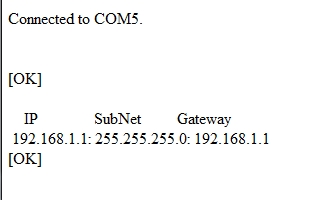
Thank you.