WIZ107SR S2E Not Communicating
Serial-to-Ethernet & ConfigTool
No replies yet. Be the first to reply.
Join the discussion.
Serial-to-Ethernet & ConfigTool
No replies yet. Be the first to reply.
Join the discussion.
Share projects and connect with makers.
Joined before the site update? first.
New to WIZnet Makers?
We sent a verification link to your address. Open it to activate your account, then log in.
Accounts from this email provider are reviewed by an administrator after verification. Approval usually takes one business day.
Already have an account?
Enter your email address. If it belongs to an account, we'll send a link to set a new password. Members who joined before the site update use this to set their password.
If an account uses that address, we sent a link to set a new password. The link works once and expires in 30 minutes.
Know your password?
Need an account?
RE: WIZ107SR S2E Not Communicating
by rena ·
Hi @nileshakorde,
If the firewall is on, data would not be sent.
Please check the firewall status and turn off it, and test again.
For the serial command mode, When using the Hercules tool you can use the CR/LF with
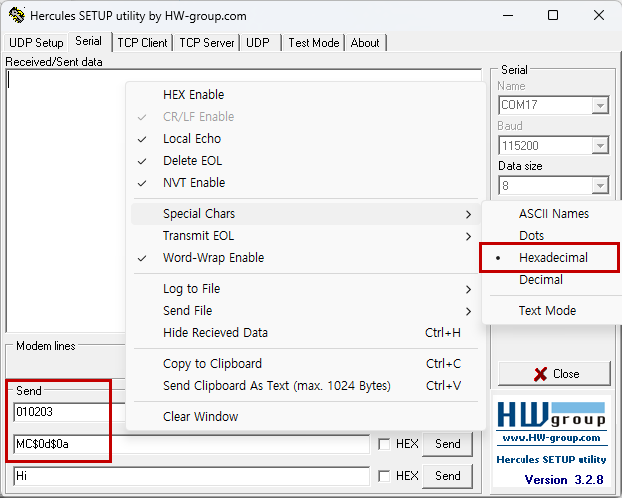
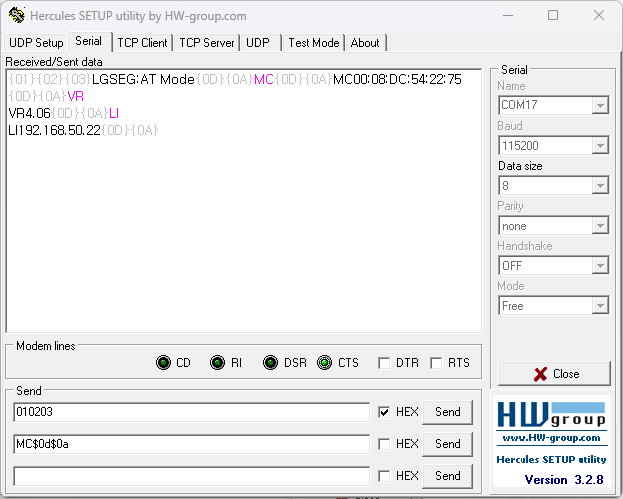
$0d$0alike below.To check the operation, change the view settings in the tool and check. And try sending it in the Send window at the bottom as follows.
RE: WIZ107SR S2E Not Communicating
by nileshakorde ·
Thanks Rena for prompt support.
Unfortunately, suggested steps did not help me to establish communication to LAN module from serial port.
Please find detailed setup and steps at my end.
Firewall being put OFF
WIZ100SR module configuration using Configuration Tool
Hercules utility connected to module in one PC as TCP Client
Second PC using Hercules Serial and setting are as shown below
Uploading: 105HerculesSerial1.png…
RE: WIZ107SR S2E Not Communicating
by nileshakorde ·
Continued…
Second PC using Hercules Serial and setting are as shown below
Data is sent from serial to TCP, however data received by TCP client is corrupt. Though corrupt data received, data received at TCP is same each time.
Similar data corruption occurs when data is sent from TCP to TTL/serial.
Note that to confirm I have changed baud rate to 9600 while transferring data.
Also, when I try to read mac or version using serial commands, I do not get any response from module.
RE: RE: WIZ107SR S2E Not Communicating
by rena ·
The Baud rate seems to be set incorrectly in this part.
Could you try changing it to a different Baud rate setting?
And, if the debug message option is enabled, a message should be output through the serial port like below.
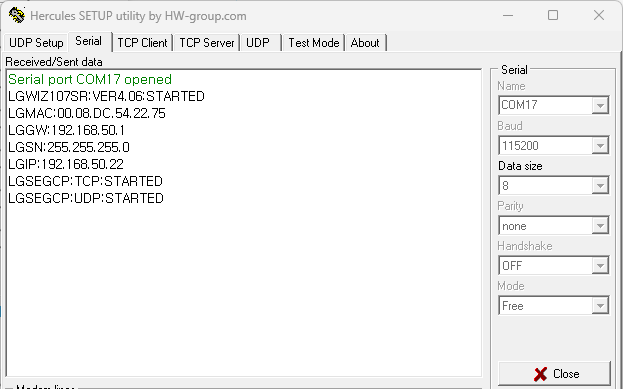
There seems to be a problem with serial communication.
How are PCs and devices connected?
RE: WIZ107SR S2E Not Communicating
by nileshakorde ·
Please guide me how to enable debug messages option
I have tried with different baud rates but get similar results. Also tried with different serial tool instead of Hercules.
RE: WIZ107SR S2E Not Communicating
by nileshakorde ·
Madam,
I have checked documentation and settings and found Debug Mode was already on. Same can be seen in earlier shared screen shoots. I am sharing fresh screen shoot again.
RE: WIZ107SR S2E Not Communicating
by rena ·
Yes, I checked the debug option already enabled.
But the firmware version is very low.
I think you have to upload the latest firmware(v4.0.6) first.
Please download the F/W file and upload with Config Tool.
RE: WIZ107SR S2E Not Communicating
by nileshakorde ·
Share
Now I have pasted correct screenshot. FirmwareVersion is 4.06 at my end.
Earlier image was just to represent Debug Setting which has caused by confusion. Sorry for that.
Now I am aware of Debug Message Output setting, but I am not getting desired result.
RE: WIZ107SR S2E Not Communicating
by nileshakorde ·
Madam,
Request you to provide response asap. If you have any India partner or team out here in India than please help me to connect with them.
We are completely stuck, and our project is not progressing. We are working on few repeat orders using this module and our design, development, enclosure is completely based on this module.
We have used earlier same modules and delivered.
Trying out any other modules at this stage, and 11th hour is challenge for us.
Thanks in advance.
RE: RE: WIZ107SR S2E Not Communicating
by rena ·
It is difficult to determine the problem…
You can try a factory reset.
The settings will be reset with factory default, so you can set the default options and test.
I think you have to also check the device connection.
WIZnet’s India branch is placed in Bengaluru.
You can contact with WIZnet India team. Please refer to the below link.
RE: WIZ107SR S2E Not Communicating
by nileshakorde ·
Madam,
As suggested Factory Reset step, I have carried it again and left baudrate default.
Data received at both end TCP and SERIAL end is corrupted.
RE: RE: WIZ107SR S2E Not Communicating
by rena ·
The symptom seems to be that the serial communication is abnormal.
Is the module TTL version? Or is it RS-232? Please check it.
If the communication level is not right the data could be broken.
RE: WIZ107SR S2E Not Communicating
by nileshakorde ·
Using USB to TTL CP2102 (HW 598)
Also as suggested tried with another USB to TTL but that gave similar results. Data received at both ends is corrupted.