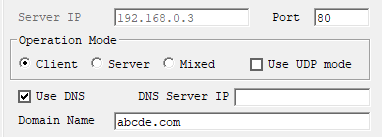
WIZ100SR에서 URL통신방법
Serial-to-Ethernet & ConfigTool
No replies yet. Be the first to reply.
Join the discussion.
Serial-to-Ethernet & ConfigTool
No replies yet. Be the first to reply.
Join the discussion.
Share projects and connect with makers.
Joined before the site update? first.
New to WIZnet Makers?
We sent a verification link to your address. Open it to activate your account, then log in.
Accounts from this email provider are reviewed by an administrator after verification. Approval usually takes one business day.
Already have an account?
Enter your email address. If it belongs to an account, we'll send a link to set a new password. Members who joined before the site update use this to set their password.
If an account uses that address, we sent a link to set a new password. The link works once and expires in 30 minutes.
Know your password?
Need an account?
RE: WIZ100SR에서 URL통신방법
by rena ·
안녕하세요.
WIZ100SR 제품도 DNS 기능을 지원합니다. 매뉴얼의 13페이지 - Use DNS 부분을 참조해 주세요.
Configuration tool 사용 시 Network 탭에서 Use DNS 옵션을 체크한 뒤 Domain name에 연결할 서버 주소를 입력하시고, 포트는 Server IP 우측의 Port에 적어주시면 될 것 같습니다. (http의 경우 80)