W7500P, DHCP not working
MCU & Boards
No replies yet. Be the first to reply.
Join the discussion.
MCU & Boards
No replies yet. Be the first to reply.
Join the discussion.
Share projects and connect with makers.
Joined before the site update? first.
New to WIZnet Makers?
We sent a verification link to your address. Open it to activate your account, then log in.
Accounts from this email provider are reviewed by an administrator after verification. Approval usually takes one business day.
Already have an account?
Enter your email address. If it belongs to an account, we'll send a link to set a new password. Members who joined before the site update use this to set their password.
If an account uses that address, we sent a link to set a new password. The link works once and expires in 30 minutes.
Know your password?
Need an account?
RE: W7500P, DHCP not working
by rajovic ·
I tried several different routers and the behaviour is the same, DHCP server does not respond to DHCP_DISCOVER from W7500p. I caught DHCP_DISCOVER message from the MCU by Wireshark, so the MCU sends the message.
Please advise
RE: RE: W7500P, DHCP not working
by becky ·
Can you connect to the router 1 ?
If you can that, please check the difference and debug message of W7500P.
The SSID is not relevant with W7500P because W7500P is using Ethernet and SSID used to WiFi.
Is it right laptop is assigned ip via ethernet?
RE: W7500P, DHCP not working
by rajovic ·
hello.
I cannot connect to any router via DHCP, I have tried three so far (one Tenda, one TP-LINK, and a direct cable connection to my company ethernet infrastructure). Also, I cannot connect statically, that is W7500P is not visible on the subnet. If I connect a laptop on the same cable instead of W7500P it gets IP address (through DHCP) fine and is visible on the subnet.
If I directly connect W7500P and a laptop only then I can communicate with the W7500P (the both are assigned IP address manually).
Here is the Wireshark capture of DHCP_DISCOVER message from W7500P:
Dynamic Host Configuration Protocol (Discover)
Message type: Boot Request (1)
Hardware type: Ethernet (0x01)
Hardware address length: 6
Hops: 0
Transaction ID: 0x1234567e
Seconds elapsed: 0
Bootp flags: 0x8000, Broadcast flag (Broadcast)
1… … … … = Broadcast flag: Broadcast
.000 0000 0000 0000 = Reserved flags: 0x0000
Client IP address: 0.0.0.0
Your (client) IP address: 0.0.0.0
Next server IP address: 0.0.0.0
Relay agent IP address: 0.0.0.0
Client MAC address: Wiznet_01:02:03 (00:08:dc:01:02:03)
Client hardware address padding: 00000000000000000000
Server host name not given
Boot file name not given
Magic cookie: DHCP
Option: (53) DHCP Message Type (Discover)
Option: (61) Client identifier
Option: (12) Host Name
Option: (55) Parameter Request List
Option: (255) End
Padding: 000000000000000000000000000000000000000000000000…
I hope this helps you to better understand my issue.
Thank you for you interest
RE: RE: W7500P, DHCP not working
by irina WIZnet ·
First, If you have several DHCP server, I think you should add the delay of 200ms between call of like DHCP_run() in main loop.
Could you please add the delay and try again?
RE: RE: W7500P, DHCP not working
by becky ·
Your Wire shark capture has not problem.
It is normal work that W7500 first sends DISCOVER message.
RE: W7500P, DHCP not working
by rajovic ·
I have added the delay in the main loop between calls to DHCP_run(), but no change.
Can you confirm/check that the DHCP example works as is on the GitHub? Or anyone else who tried it?
RE: W7500P, DHCP not working
by rajovic ·
I downloaded DHCP server application onto my laptop (http://tftpd32.jounin.net), and now this server assigns IP address to W7500P correctly if I connect laptop and W7500P through cable.
But still I could not obtain IP from any of four routers I tried (TP-Link and Tenda), and W7500P is not visible on subnet even in Loopback example (with manual IP).
The good experiment would be if somebody tries the DHCP example with a router and confirm it works as is. Sounds lame, but maybe DHCP servers on routers need more information in Discover message?
RE: W7500P, DHCP not working
by irina WIZnet ·
Do you use a board made by yourself using the W7500P? or use WIZ750SR?
If you use like WIZ750Sr module, you can use the DHCP code on the Github.
WIZ750SR Github : https://github.com/Wiznet/WIZ750SR
When I use the WIZ750SR, I could check the DHCP packet like below figure.
RE: W7500P, DHCP not working
by rajovic ·
I use a board made by myself after WIZwiki-W7500P.
Could you expand Wireshark so I could see the content of Discover packet?
RE: RE: W7500P, DHCP not working
by irina WIZnet ·
You can see the DHCP discover packet as below figure.
Have you ever succeeded in connecting DHCP when you use the WIZwiki-W7500P?
There is a DHCP-related example that we provide and first, I think you test the DHCP protocol using WIZwiki-W7500P.
RE: W7500P, DHCP not working
by rajovic ·
Dear Irina,
Can you expand Parameter request list in wireshark, so I can check against my design?
Yes, I have tried the example with WizWiki-7500P board.
Thank you
RE: W7500P, DHCP not working
by irina WIZnet ·
The first thing I’d like to do is check your schematic.
Because the example of DHCP is hardcoding and if you didn’t change the source code, it would be no problem.
Also, As @mc said, it would be good to compare the discover packets when PC get an address assigned using DHCP.
RE: W7500P, DHCP not working
by rajovic ·
Schematic Prints1.pdf (79.2 KB) Schematic Prints2.pdf (57.1 KB) Schematic Prints3.pdf (66.0 KB)
Here are the schematics of my project.
And here are screenshots from a PC discovery packet
Please note that if I connect directly PC and W7500P, and run a DHCP server application on the PC, W7500P gets an IP address from the DHCP server
RE: RE: W7500P, DHCP not working
by irina WIZnet ·
The first thing you do is check the packet of between PC and Router as shown in figure.
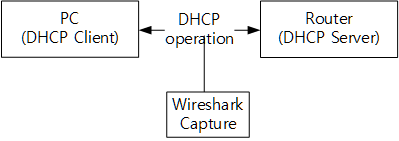
Could you please let me tell the DHCP tool on the PC?
I want to test as same environment.
RE: W7500P, DHCP not working
by rajovic ·
The above screenshots are of the discover packet sent from PC to router, after which the PC gets IP address from the router.
Do you want to see some other packet?
As for DHCP tool for PC, I try three different tools, all work the same, for example
http://www.dhcpserver.de/cms/
RE: RE: W7500P, DHCP not working
by irina WIZnet ·
I will request to hardware engineer(@Scott) your schematic.
If you can access admin account in router, you can see to manager the assigned IP in DHCP Server.Could you check if W7500P is assigned IP.
Isn’t it a problem with the router?