How to implement Password Wizfi220 + Disconnection problem
Wireless
No replies yet. Be the first to reply.
Join the discussion.
Wireless
No replies yet. Be the first to reply.
Join the discussion.
Share projects and connect with makers.
Joined before the site update? first.
New to WIZnet Makers?
We sent a verification link to your address. Open it to activate your account, then log in.
Accounts from this email provider are reviewed by an administrator after verification. Approval usually takes one business day.
Already have an account?
Enter your email address. If it belongs to an account, we'll send a link to set a new password. Members who joined before the site update use this to set their password.
If an account uses that address, we sent a link to set a new password. The link works once and expires in 30 minutes.
Know your password?
Need an account?
RE: How to implement Password Wizfi220 + Disconnection problem
by irina WIZnet ·
Hi, POOM
First of all, thank you for using our chips.
→ It is going to be helpful to you.
If you want to know more specific, please refer to the link below.
http://www.wiznet.io/product-item/wizfi220/ - Programmer’s Guide
→ You mean,
when WizFi220 is used in house without setting password, it works fine.
But, when it is used in open space without setting password, it doesn’t works. right?
From what I know, when it works as a limitedAP mode, there is no differences in house or else.
So, I recommend to set the password to prevent from other people to connect.
Regards,
Tom.
RE: RE: How to implement Password Wizfi220 + Disconnection problem
by POOM ·
Hi Tom,
for the first problem we will try even if we already followed the example in the guide, but we will try again.
for the second item the problem is without password (OPEN), and as you can see from the attachment video the network is resetting and disappearing from the available connections in our customer’s Android Wi-fi device list.
We suppose its because its an OPEN and LIMITED network and if large audience attempt to connect to it the server can crash and resetting itself, can you confirm? Or which can be the reason? That’s why we want to implement PASSWORD access and keep the connected device to max 3. Do you think we’re on the right way for the solution?
Thanks
Davide
RE: How to implement Password Wizfi220 + Disconnection problem
by irina WIZnet ·
Hi POOM
POOM
Did you set the password as example that I attached?
I think that’ll be work fine.
And, From what I know that is right.
and then ‘attached video’ means your product vedio…? I cannot find the problem at your product video. It looks just product video.
Regards,
Tom.
RE: How to implement Password Wizfi220 + Disconnection problem
by POOM ·
Hi Tom,
no in the original post I have attached a ZIP file containing the error during an exibithion, did you open it? Or I think was too large and was not included in the post?
We’re working with your Wizfi220 development kit and we’re sending AT-Commands to create our LimitedAP server network.
Yesterday we tested your example but it doesn’t work… so currently we’re at this level:
If we do not put any password (OPEN) the list of commands are the follow and everything is OK with exception of the disconnectin problem when too many devices connected to the Wizfi220 server (as stated in the first post):
AT
AT+WD
AT+WM=2
AT+WAUTH=0
AT+NDHCP=0
AT+NSET=192.168.55.1,255.255.255.0,192.168.55.1
AT+WA=WizFi210-PPlayerPC,8,
AT+DHCPSRVR=1
AT+NSTCP=5000
AT+XDUM=0
With your example it doesn’t work:
AT
ATE0
AT+XDUM=0
AT+BDATA=1
AT+WD
AT+WM=2
AT+WAUTH=1
AT+WWEP1=1234567890
AT+NSET=192.168.55.1,255.255.255.0,192.168.55.1
AT+WA=LimitedAp
AT+NAUTO=0,1,192.168.3.105,5000
ATA2
We did some tests according to the manual and starting from your example we were able to build the network but the devices still cannot connect. AT-Commands as follow:
AT
AT+XDUM=0
AT+BDATA=1
AT+WD
AT+WM=2
AT+WAUTH=1
AT+WWEP1=1234567890
AT+NSET=192.168.55.1,255.255.255.0,192.168.55.1
AT+WA=LimitedAp, ,8,
AT+NAUTO=0,1,192.168.3.105,5000
ATA2
and the network is creating but the device (PC in this case) is not able to connect because it doesn’t receive the IP address in my opinion, so it’s coming back asking AGAIN the password.
Considerations:
a) We removed the Echo since we need to see the command and the answer, not just the answer in our program to load the AT-commands via serial (you will see the video)
b) ATA2 is not accepted as command and the chip answer is [ERROR]
c) we had to add ", , 8, " after the AT+WA=LimitedAp from your example otherwise it doesn’t work
d) in the manual we see that the first parameter of AT+NAUTO for a Server is “1” but in your example you put “0”, is it correct? In any case we tried also with 1 but it still doesn’t work…
e) in AT+NAUTO commands yu gave me this strange IP (192.168.3.105) as server parameter, but in the manual we have different command (AT+NAUTO =1,1,5000) and that’s all. In any case we tried also with this command but it still doesn’t work…
Its impossible to send you the video since max dimension file size is 3Mb. I sent them to wiznet@discoursemail.com
Video Examples
Please let me know if you received it or please give me an email where I can send them to you.
I think we need a direct telephone contact, its really difficult to explain and receive your support only with this forum…
Thanks
Davide
+39.346.490.10.91
RE: RE: How to implement Password Wizfi220 + Disconnection problem
by irina WIZnet ·
Hi ! POOM:)
First of all, I cannot watch your video.
May I get a video with my e-mail?
My e-mail address is ‘tom@wiznet.io’. Or you can use a cloud drive and attach the link.
And then, I apologize for the confusion.
I tested it works well.
I attached the log and AT cmd.
/*
AT+WD
AT+WM=2
AT+WAUTH=1
AT+WWEP1=1234567890
AT+NSET=192.168.10.1,255.255.255.0,192.168.10.1
AT+DHCPSRVR=1
AT+WA=LimitedAP_TEST
AT+NAUTO=1,1,5001
ATA2
*/
I hope it is helpful.
Regards,
Tom.
RE: How to implement Password Wizfi220 + Disconnection problem
by POOM ·
Hi Tom,
I sent you the video examples to your email, please review it and let me know.
We need to sort out soon.
thanks
regards
Davide
RE: RE: How to implement Password Wizfi220 + Disconnection problem
by POOM ·
Hi Tom,
we tried with your second topic (printscreen in BLUE) and it works very well, finally!
But its really different from the first AT-COMMAND list you gave us at the beginning (see below picture), this doesn’t work at all!
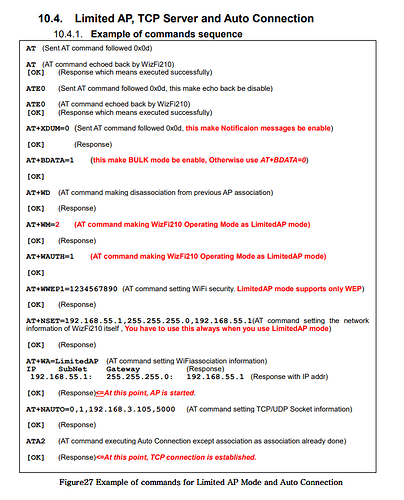
Now we will test next saturday the network created by Wizfi220 with LARGE AUDIENCE and I will let you know if the disconnection problem of the server will persist or its solved.
Thank you very much for now
Davide
RE: How to implement Password Wizfi220 + Disconnection problem
by irina WIZnet ·
Hi ! POOM:)
I am glad to hear that !
if you have any update please let me know !
Regards,
Tom.
RE: How to implement Password Wizfi220 + Disconnection problem
by POOM ·
Hi Tom!
Sorry to come back to you again but we still have a problem: we cannot communicate to the server through SERIAL PORT after the device connection to server.
In summary:
FYI when we implemented the network without the password (open) the serial channel was working properly and the red led was OFF during the communication.
Is there some command to enable the serial communication?
We really appreciate your support.
Thanks
Regards
Davide Stefanon
POOM! Music Labs
davide.stefanon@gmail.com
RE: How to implement Password Wizfi220 + Disconnection problem
by POOM ·
HI,
Can somebody answer and support please??
Thanks
Regards
Davide
RE: How to implement Password Wizfi220 + Disconnection problem
by irina WIZnet ·
Hi, POOM !
I am apologize for late response.
When you want to change a Data Mode to Command Mode, You should input ‘+++’ without ‘CR LF’.
After input ‘+++’, you can use an AT command to WizFi220.
When you want to return to a previous connection, you can use a ‘ATO’.
Regards,
Tom.
RE: How to implement Password Wizfi220 + Disconnection problem
by POOM ·
Hi
Thanks now it works, but the dialogue between server and device is now encrypted/codified like:
[ESC] [S] [MY COMMAND] [ESC] [E]
We didn’t have such encryption with the “open” network and it was like:
[MY COMMAND]
Is there any instruction to remove such codification? Otherwise we have to change completely our firmware…
Thanks
Davide
RE: How to implement Password Wizfi220 + Disconnection problem
by irina WIZnet ·
Hi, POOM !
If you want to use data mode, you can use an ‘ATO’ command to return to a data mode.