W7500 isp mistake
MCU & Boards
No replies yet. Be the first to reply.
Join the discussion.
MCU & Boards
No replies yet. Be the first to reply.
Join the discussion.
Share projects and connect with makers.
Joined before the site update? first.
New to WIZnet Makers?
We sent a verification link to your address. Open it to activate your account, then log in.
Accounts from this email provider are reviewed by an administrator after verification. Approval usually takes one business day.
Already have an account?
Enter your email address. If it belongs to an account, we'll send a link to set a new password. Members who joined before the site update use this to set their password.
If an account uses that address, we sent a link to set a new password. The link works once and expires in 30 minutes.
Know your password?
Need an account?
RE: W7500 isp mistake
by lawrence WIZnet ·
hello, Eric
If you do all clear with the steps on the web page, could you capture the error message or the problem?
Below url is the way how to use this.
[url]http://wizwiki.net/wiki/doku.php?id=products:wizwiki_w7500:start_getting_started:write_firmware:isp[/url]
Please concern
upply power once while pressing the SW2,BOOT switch.
Before click the open button of ISP tool, we suggest you to test it in other terminal windows.
After opening serial port using the terminal windows,enter the capital “U”. If it is in the ISP mode, you can see the returned character.
thank you
RE: W7500 isp mistake
by ebelouet ·
HI,
Thank you, i have communication with module and serial complet, but when I using isp bouton, i have message box after 1 minutes
RE: W7500 isp mistake
by lawrence WIZnet ·
hello,
When I did ISP tool, it works well and download binary file.
I type something you could miss
First, Have to check TX, RX with USB converter and WIZwiki-W7500.
even you check Serial complete message, you have to check serial communication. But as you said, you did it well… so pass!
may you see this one. type the ‘U’ in serial terminal
Second, you must check board is on boot mode. after supply power, release the boot botton. make sure.
Third, it is WIZwiki-W7500.
…
other things do not make it happen…
If you are all clear… could you let me the all process you did ??
thank you
lawrence
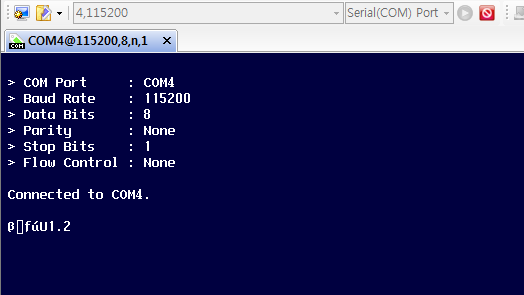
RE: W7500 isp mistake
by ebelouet ·
hi,
Thank you for ansering, as you see on picture, only 46000 baud make serial open, but when i try to isp, i have this mistake ?
Sincerely
Eric
RE: W7500 isp mistake
by lawrence WIZnet ·
hello, Eric
Thank you for your capturing.
In ISP download, the baudrate is fixed as 115200
(see this page,
[url]http://wizwiki.net/wiki/lib/exe/fetch.php?w=800&tok=63cabc&media=products:wizwiki_w7500:getting_started:isp.png[/url])
Baudrate does not affect serial open, may the pc uart2usb driver has problem.
Could you re-install the pc uart2usb driver and try again?
The ISP tool must communicate with 115200 baudrate.
thank you
lawrence
RE: RE: W7500 isp mistake
by AlexeiBazlaev ·
Hello!
I have almost the same problem with WIZwiki-W7500P under Win10 x64:
Although I had successfuly connected this board on another PC
Also there is another problem which i can not fix:
Even after successful loading of the new firmware into the WIZwiki-W7500P through the CMSIS-DAP onboard debugger, after power on reset it does not start to work! Like if there were no any firmware. Moreover after power on reset the D7 red led flashes very quickly like if LPC was trying to load some firmware into the W7500P, and after 15-20 seconds D7 is turned off and that is all. Nothing happens then. The W7500P does not work how it worked immediately after loading of the new firmware!
Please could you explain me what could be wrong with the serial communication and what else i should do to save firmware in the flash of the W7500P even after power on reset?