WizFi250 인증
Wireless
No replies yet. Be the first to reply.
Join the discussion.
Wireless
No replies yet. Be the first to reply.
Join the discussion.
Share projects and connect with makers.
Joined before the site update? first.
New to WIZnet Makers?
We sent a verification link to your address. Open it to activate your account, then log in.
Accounts from this email provider are reviewed by an administrator after verification. Approval usually takes one business day.
Already have an account?
Enter your email address. If it belongs to an account, we'll send a link to set a new password. Members who joined before the site update use this to set their password.
If an account uses that address, we sent a link to set a new password. The link works once and expires in 30 minutes.
Know your password?
Need an account?
RE: WizFi250 인증
by ssekim ·
WizFi250은 KC, CE, FCC, IC 등의 인증을 갖고 있습니다.
메일로 인증서 파일을 보내 드리도록 하겠습니다.
RE: WizFi250 인증
by craftwizard ·
답변 감사합니다.
문의내용 2번 사항에 대해서는 어떻게 되는것인가요?
이러면 접속을 할 수 없는것인가요?
그리고 WPA-PSK TKIP인 경우에도 접속이 안되나요? 몇번을 해보왔지만 접속이 되지않네요 ㅠ.ㅠ
RE: WizFi250 인증
by wizdaniel ·
안녕하세요.
먼저 WPAPSK TKIP 에 접속 결과입니다.
위에 제가 작성한 AT명령으로 접속 성공하는 것을 확인했습니다.
또한, Unknown으로 뜨는 경우에는 WizFi250에 define되어 있지 않은 암호화 방식일 경우 unknown으로 뜰 수도 있습니다.
[url]http://wizwiki.net/wiki/doku.php?id=products:wizfi250:wizfi250pg:start#at_wsec[/url]
하지만, 아래 결과를 보시면, Unknown일 경우라도 공유기에 접속을 성공했습니다.
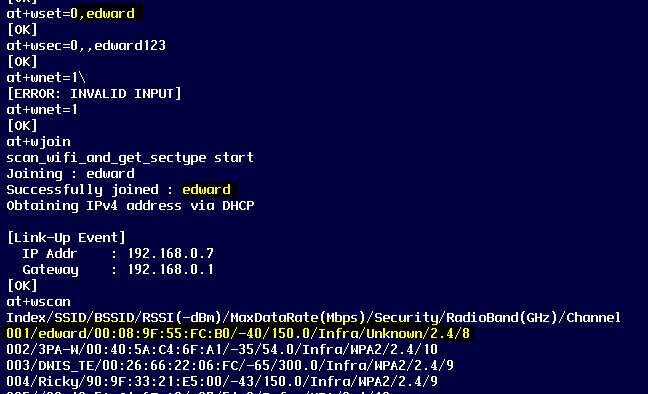
위의 Unknown의 AP 설정은 WPAPSK-AES 였던것으로 확인했습니다.
RE: WizFi250 인증
by craftwizard ·
답변 감사합니다.
저도 다시 확인해보니 WPAAES로 되어서 Unkown으로 나오네요 ^^