Wizfi250 communication
Wireless
No replies yet. Be the first to reply.
Join the discussion.
Wireless
No replies yet. Be the first to reply.
Join the discussion.
Share projects and connect with makers.
Joined before the site update? first.
New to WIZnet Makers?
We sent a verification link to your address. Open it to activate your account, then log in.
Accounts from this email provider are reviewed by an administrator after verification. Approval usually takes one business day.
Already have an account?
Enter your email address. If it belongs to an account, we'll send a link to set a new password. Members who joined before the site update use this to set their password.
If an account uses that address, we sent a link to set a new password. The link works once and expires in 30 minutes.
Know your password?
Need an account?
RE: Wizfi250 communication
by wizdaniel ·
Hi soellicha.
Q: When I have the module connected as AP , when I try to connect to it with the android, then the app seems to be connected with the module but when I send the command “AT” I do not get an answer! Will the module give me an answer when connected like that or not? What I have to do in order to speak to it and know that is listening?
[quote]A: When you send the command “AT” at the APP, you can’t get an answer. The App(TCP Clinet) just sent “AT” as a DATA, not an AT Command for module control.
If you want to control the module at the APP(TCP Client), you have to use the command “AT+MAIRCMD”. Please refer to the following link.
[url]http://wizwiki.net/wiki/doku.php?id=products:wizfi250:wizfi250pg:start#air_command_mode_-_wizfi250aircmd[/url][/quote]
[quote]1. The “AT” was sent by APP(TCP Client).
[/quote]
Q: I try to send AT+FGPIO= 1, 5 in order to have 5Volts at general port #5 but it does not work. Is this the way to activate the general I/O pins?
[quote]A: There is the way to activate the general I/O pins.
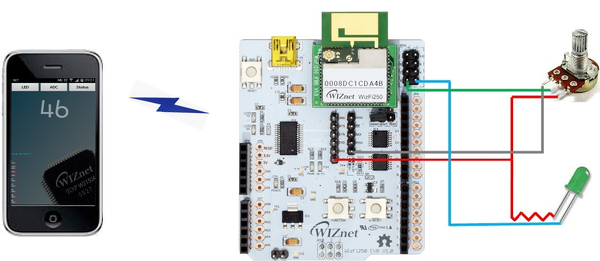
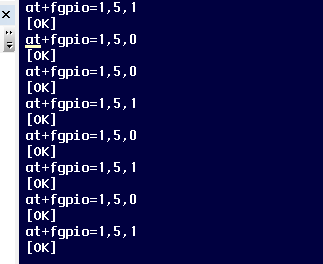
AT+FGPIO=1,5,1 << it means that a GPIO 5 set to HIGH
AT+FGPIO=1,5,0 << it means that a GPIO 5 set to LOW
First option: to set GPIO value.
Second option: GPIO number
Third option: 1=HIGH, 0=LOW
Please refer to the following connections.
I recommend using 3.3V instead of 5V
[/quote]
[quote]
 [/quote]
Thanks.