Wizfi630 wifi 설정 문의
Wireless
No replies yet. Be the first to reply.
Join the discussion.
Wireless
No replies yet. Be the first to reply.
Join the discussion.
Share projects and connect with makers.
Joined before the site update? first.
New to WIZnet Makers?
We sent a verification link to your address. Open it to activate your account, then log in.
Accounts from this email provider are reviewed by an administrator after verification. Approval usually takes one business day.
Already have an account?
Enter your email address. If it belongs to an account, we'll send a link to set a new password. Members who joined before the site update use this to set their password.
If an account uses that address, we sent a link to set a new password. The link works once and expires in 30 minutes.
Know your password?
Need an account?
RE: Wizfi630 wifi 설정 문의
by ssekim ·
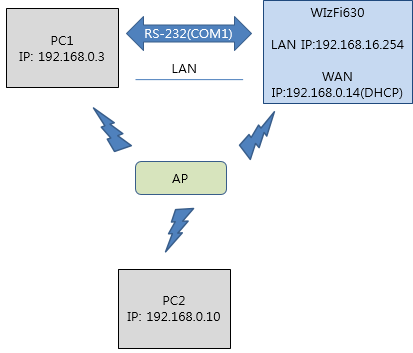
아래 그림에서 WizFi630과 MCU과 LAN으로 연결되어 있는 것인가요?
즉, MCU의 IP 192.168.0.xxx는 WizFi630이 할 당해준 거신가요?
그렇다면, WizFi630이 Client mode일 때, PC, WizFi630, MCU가 모두 같은 IP를 사용하는 방법은 없습니다.
MCU가 NAT를 통해 사설망에 있다고 가정하시고 통신을 설계하셔야 할 듯 합니다.
그런데, 정확히 어디서 통신이 안 되는 것인지, 조금 더 구체적인 설명 부탁 드립니다.
(Ping 이 안 되는 것인지? TCP 접속이 안 되는 것인지? TCP 접속의 Server Client는 무엇인지? 등)
RE: Wizfi630 wifi 설정 문의
by william ·
문의 사항이 있어서 연락드렸습니다.
테스트 환경은 첨부한 내용과 같습니다.
제가 WizFi630-QuickStartGuide_KR_V1_1.pdf 문서를 보면서 WizFi630 통신테스트를 하고 있습니다.
이 문서에서 Client모드 테스트인 2.2. (P.10) 테스트를 하는데
마지막 부분에서 WizFi630을 TCP서버로 설정해놓고 CommTestProgram라는 TCP/IP&Serial 테스트프로그램으로
Serial to TCP or TCP to Serial 통신을 해보았는데 응답이 없어서 문의드립니다.
테스트 환경으로는 일단 Ping테스트는 되고 TCP서버를 설정하면 Client PC 에서 접속도 되는데 데이터 send를 하면 응답이 없습니다.
확인 부탁드리겠습니다.
이상입니다.
감사합니다.
RE: Wizfi630 wifi 설정 문의
by ssekim ·
현재 Command mode인지 Data mode인지 확인해 볼 필요가 있을 것 같습니다.
등의 Serial Command를 입력하셔서 현재 Command mode가 아닌지 확인해 보시기 바랍니다.
Command mode라고 하면 Data mode로 바꾸셔야 합니다.
그리고, 아래 옵션도 확인해 보시기 바랍니다.