Can't connect to W5500 over wireless bridge
Ethernet Chips
No replies yet. Be the first to reply.
Join the discussion.
Ethernet Chips
No replies yet. Be the first to reply.
Join the discussion.
Share projects and connect with makers.
Joined before the site update? first.
New to WIZnet Makers?
We sent a verification link to your address. Open it to activate your account, then log in.
Accounts from this email provider are reviewed by an administrator after verification. Approval usually takes one business day.
Already have an account?
Enter your email address. If it belongs to an account, we'll send a link to set a new password. Members who joined before the site update use this to set their password.
If an account uses that address, we sent a link to set a new password. The link works once and expires in 30 minutes.
Know your password?
Need an account?
RE: Can't connect to W5500 over wireless bridge
by Fredjikrang ·
Just so you know, I am somewhat of a beginner when it comes to networks.
The radios do not have NAT. They are configured with IP addresses on the same subnet as the router and W5500. The router is also not set up to do NAT.
The radios only have one ethernet port, and it is connected to a local port on the router.
The radios are set up in a transparent bridge mode (WDS.)
As I said, we can ping devices on both sides of the bridge. We can’t ping the W5500 over the bridge, but we can ping the W5500 if we are connected directly to the router.
RE: Can't connect to W5500 over wireless bridge
by kaizen ·
Hi
I wonder your environment is as below.
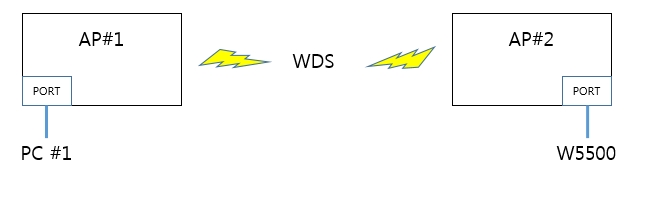
If yes, I need information about AP#1, AP#2, PC#1 and W5500 ip address in order to verify your network environment.
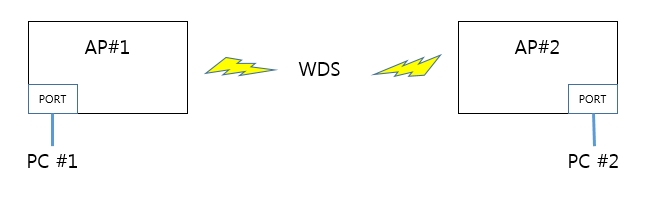
Additionally, Would you test using PC#2 instead of W5500 as below?
RE: Can't connect to W5500 over wireless bridge
by Fredjikrang ·
It is the same as your image, except that it has a router on the W5500 side. We have connected the network as specified in your second image as well and had no problem pinging either of the computers.
The IP addresses are as follows:
192.168.10.1- Router
192.168.10.20- AP 1
192.168.10.21- AP 2
192.168.10.193- W5500
192.168.10.101- Computer 1
192.168.10.230- Computer 2
RE: Can't connect to W5500 over wireless bridge
by Fredjikrang ·
Here is a complete diagram of the network.
dropbox.com/s/fn2vmds00ssel … system.pdf
RE: Can't connect to W5500 over wireless bridge
by kaizen ·
Hi
I have been checking your document.
If W5500 receive ping request packet from your PC(IP:192.168.10.230), W5500 must send response packet to your PC.
So I think W5500 didn’t receive ping request packet because your or did filter the ping request packet due to don’t know mac information of W5500.
If you can possible, I recommend W5500 to send dummy packet of UDP to your PC(IP:192.168.10.230) in order to add W5500’s mac information in your or .
RE: Can't connect to W5500 over wireless bridge
by Fredjikrang ·
We tried your suggestions without any luck.
Any other ideas?