



Summary of Networking Knowledge (Based on W5500 Ethernet)
Summary of Networking Knowledge (Based on W5500 Ethernet)
I. Overview
Recently, our company's intelligent power distribution terminal (hereinafter referred to as the terminal) needs to add Ethernet functionality, so I've compiled some basic information on this topic.
First and foremost, and very importantly, what is the purpose of setting IP addresses, subnet masks, default gateways, DNS servers, and MAC addresses? These settings are to enable communication, whether between computers or between devices.
II. Ethernet and the Internet
1. Internet, Ethernet, Local Area Network, Internet
To achieve interconnection, a network is needed. Below, we'll discuss the differences between Ethernet and the Internet . First, let's talk about a computer network (Network), which connects one or more computers, enabling communication and information sharing between them. This is a network.
1) Internet
The English word is Internet ( inter- pref. meaning "together, interacting") , which means "a network of networks". It is a general term that refers to a network of interconnected computer networks, where the communication protocols (i.e., communication rules) between these networks can be arbitrary.
The Internet is a proper noun; it is the largest, most open, interconnected computer network in the world. It uses the TCP/IP protocol suite for communication and its predecessor was ARPNET in the United States .
2) TCP/IP
TCP/IP stands for Transmission Control Protocol/Internet Protocol . It refers to a suite of protocols that enable information transmission between multiple different networks. The TCP/IP protocol suite doesn't just refer to the two protocols TCP and IP, but rather to a suite of protocols including FTP, SMTP, TCP, UDP, and IP. It's simply called TCP/IP because TCP and IP are the most representative protocols within the TCP/IP suite.
The components of the TCP/IP protocol:
TCP/IP is a crucial protocol for ensuring the timely and complete transmission of network data. Strictly speaking, TCP/IP is a four-layer architecture, encompassing the application layer, transport layer, network layer, and data link layer. TCP/IP is the most fundamental protocol of the Internet.
(1) The main protocols of the application layer include FTP, SMTP, HTTP, Telnet , etc., which are used to receive data from the transport layer or transmit data to the transport layer according to different application requirements and methods; and directly provide services for the application process.
Different types of applications will use different application layer protocols according to their needs, such as FTP protocol for file transfer, SMTP protocol for email transfer, HTTP protocol for World Wide Web , and Telnet protocol for remote login service .
The application layer can also encrypt, decrypt, and format data. It can establish or terminate connections with other nodes, thus conserving network resources.
(2) The main protocols of the transport layer are UDP and TCP . It is a channel for users to combine data between the platform and the internal data of the computer information network, and can realize data transmission and data sharing.
(3) The main protocols of the network layer are ICMP, IP, and IGMP , which are mainly responsible for the transmission of data packets in the network, the establishment and termination of network connections, and the search for IP addresses.
(4) The network access layer, also called the network interface layer or data link layer, mainly includes ARP and RARP. Its main functions are to provide link management error detection and to effectively handle information details related to different communication media. Since the network interface layer combines the physical layer and the data link layer, it is both the physical medium for transmitting data and can provide an accurate and error-free line for the network layer.
Communication process and related protocols:
In network communication, the host sending data is called the source host, and the host receiving data is called the destination host. When the source host sends data, the data is transmitted from upper to lower layers within the source host. The application process in the source host first hands the data over to the application layer, which adds necessary control information to form a message stream, which is then passed down to the transport layer. The transport layer adds its own control information to the received data units to form segments and datagrams, which are then passed to the network layer. The network layer adds its own control information to form IP datagrams, which are then passed to the network interface layer. The network interface layer assembles the IP datagrams from the network layer into frames and transmits them as a bit stream to the network hardware (i.e., the physical layer), at which point the data leaves the source host.
(1) Link layer
The Ethernet protocol stipulates that all devices accessing the network must have a network adapter, or network interface card (NIC), and data packets must be transmitted from one NIC to another. The NIC address is the sending and receiving address of the data packet . With MAC addresses, Ethernet uses broadcast to send data packets to all hosts within the subnet. Each host in the subnet, upon receiving the packet, reads the destination MAC address in the header and compares it with its own MAC address. If they match, the host proceeds to the next step; otherwise, the packet is discarded.
The main task of the link layer is to group electrical signals into data frames with specific meanings, and then send them to the receiver in the form of broadcast through the physical medium.
----------------
(2) Network layer
IP protocol
The network layer introduces the IP protocol, which defines a new set of addresses that allows us to distinguish whether two hosts belong to the same network. This set of addresses is called the network address, also known as the IP address. The IP protocol divides this 32-bit address into two parts: the first part represents the network address, and the second part represents the host's address within the local area network (LAN). If two IP addresses are in the same subnet, their network addresses will be the same. To determine the network address within an IP address, the IP protocol also introduces a subnet mask. The network address can be obtained by performing a bitwise AND operation between the IP address and the subnet mask.
ARP protocol
ARP, or Address Resolution Protocol, is a network layer protocol that retrieves the MAC address from the IP address . Its working principle is as follows: ARP first initiates a request packet. The header of this packet contains the IP address of the target host. This packet is then repackaged at the link layer to generate an Ethernet packet, which is ultimately broadcast to all hosts within the subnet. Each host receives this packet, extracts the IP address from the header, and compares it with its own IP address. If they match, the host returns its own MAC address; otherwise, the packet is discarded. ARP receives the returned message to determine the target machine's MAC address. Simultaneously, ARP stores the returned MAC address and its corresponding IP address in its local ARP cache for a certain period. Subsequent requests will directly query the ARP cache to conserve resources.
Routing protocols
First, the IP protocol is used to determine if the two hosts are on the same subnet. If they are, the ARP protocol is used to look up the corresponding MAC address, and then the data packet is broadcast to all hosts within that subnet. If they are not on the same subnet, Ethernet forwards the data packet to the subnet's gateway for routing. The gateway acts as a bridge between subnets on the Internet , so it forwards the packet multiple times, eventually reaching the subnet containing the target IP address. Then, it obtains the target machine's MAC address via ARP and finally broadcasts the data packet to the recipient. The physical device that performs this routing protocol is the router. The router acts as a traffic hub, selecting and configuring routes based on channel conditions to forward data packets using the optimal path.
The main tasks of the network layer are to define network addresses, distinguish network segments, perform MAC addressing within subnets, and route data packets between different subnets.
----------------
(3) Transport layer
The link layer defines the host's identity, i.e., the MAC address; while the network layer defines the IP address, specifying the network segment the host belongs to. With these two addresses, data packets can be sent from one host to another. However, in reality, data packets are sent from an application on one host and then received by an application on the other host. Since each computer may be running multiple applications simultaneously, it's impossible to determine which application should receive the packet after it's sent to the host. Therefore, the transport layer introduces the UDP protocol to solve this problem and identify each application.
UDP protocol
The UDP protocol defines ports, and each application on the same host needs to specify a unique port number. It also stipulates that data packets transmitted over the network must include port information. When a data packet arrives at the host, the corresponding application can be found based on the port number. The UDP protocol is relatively simple and easy to implement, but it lacks an acknowledgment mechanism. Once a data packet is sent, it's impossible to know whether the recipient has received it, resulting in poor reliability. To solve this problem and improve network reliability, the TCP protocol was developed.
TCP protocol
TCP, or Transmission Control Protocol, is a connection-oriented, reliable, byte-stream-based communication protocol. Simply put, TCP is a UDP protocol with an acknowledgment mechanism. Each data packet sent requires an acknowledgment; if a packet is lost, no acknowledgment is received, and the sender must retransmit the packet. To ensure reliable transmission, TCP builds upon UDP with a three-way acknowledgment mechanism ( as shown in Wireshark packet captures ), meaning a reliable connection must be established with the other party before any data is sent or received. Like UDP packets, TCP packets consist of a header and data. The only difference is that TCP packets have no length limit and can theoretically be infinitely long. However, to ensure network efficiency, the length of a TCP packet typically does not exceed the length of an IP packet, ensuring that a single TCP packet does not need to be fragmented.
The main task of the transport layer is to define ports, identify application identities, and enable port-to-port communication. The TCP protocol can guarantee the reliability of data transmission.
----------------
(4) Application layer
In theory, with the support of the above three-layer protocols, data can be transferred from an application on one host to an application on another host. However, the data transmitted at this time is a byte stream, which cannot be well recognized by the program and has poor operability. Therefore, the application layer defines various protocols to standardize data formats, such as HTTP, FTP, and SMTP. In the request header, the request data format Accept and the response data format Content-Type are defined respectively. With this specification, when the other party receives the request, it knows which format to use to parse it, then processes the request, and finally returns the data according to the format required by the requester. When the requesting party receives the response, it interprets it according to the specified format.
The main task of the application layer is to define the data format and interpret the data according to the corresponding format.
3) Ethernet
Ethernet is the most common communication protocol standard used in current local area networks (LANs). It uses CSMA/CD (Carrier Sense Multiple Access with Collision Detection) technology and operates at a rate of 10 Mbps (this refers only to the standard Ethernet rate) over various types of cabling. Ethernet is similar to the IEEE 802.3 series of standards.
Ethernet can be considered a type of Local Area Network (LAN), and since most LANs currently use the Ethernet standard, Ethernet can be considered a LAN. Furthermore, the communication protocols between LANs must be identical; that is, computers (or computer networks) within a LAN are only allowed to communicate using the same communication rules. Different LANs, however, can communicate using any other communication rules (while internally using only one communication rule), thus forming the Internet.
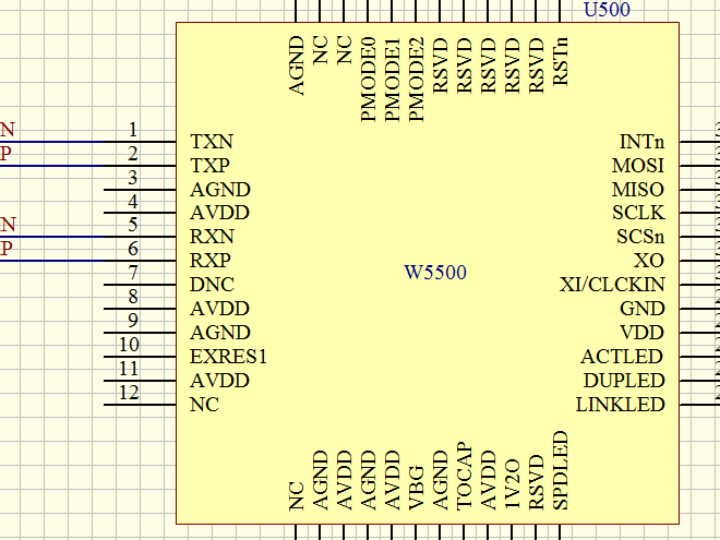
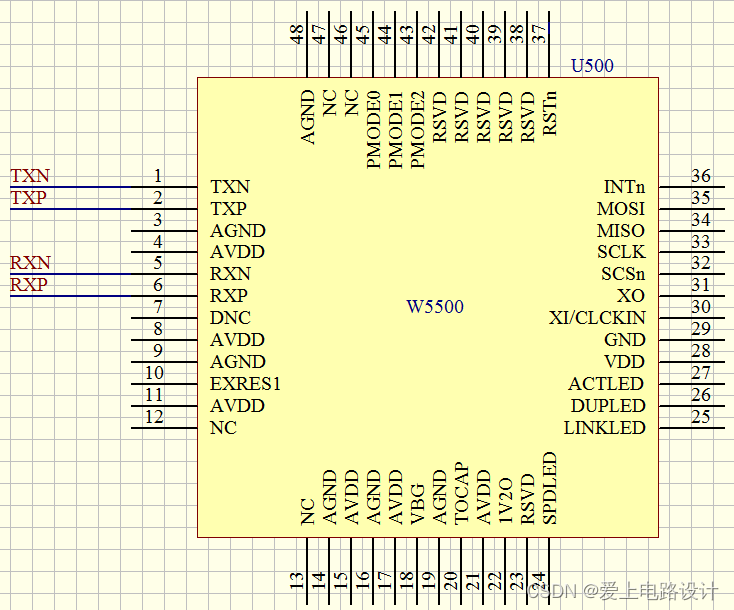
(1) Ethernet based on W5500 solution
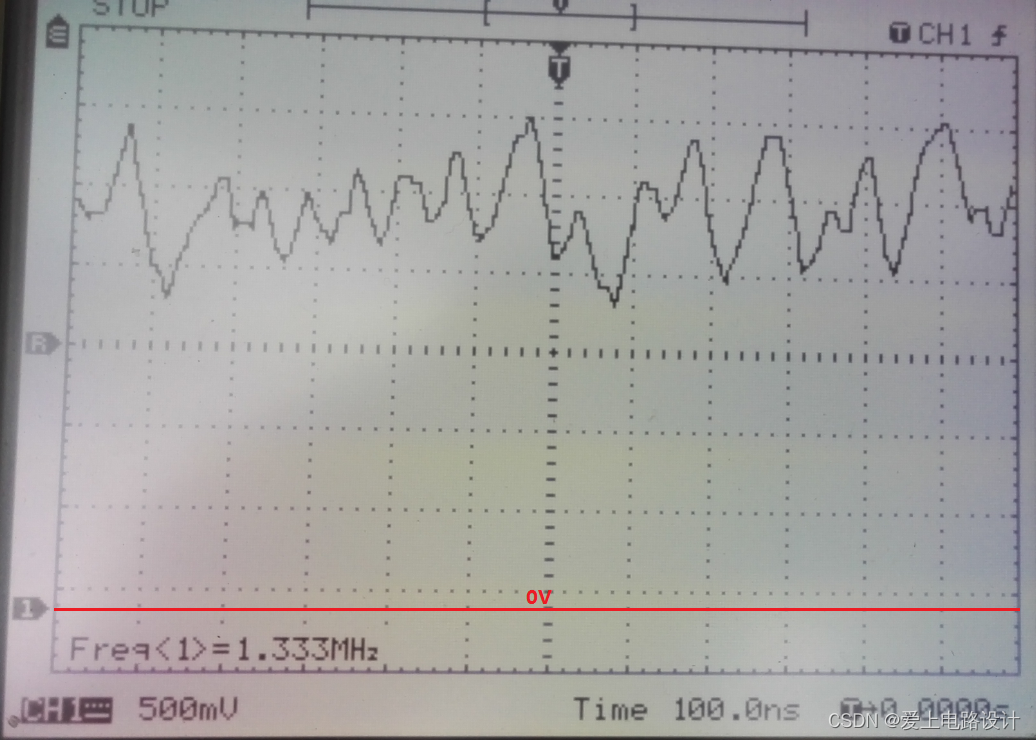
HR911105A Ethernet port pin 1 , W5500 TXP, TXN waveforms:
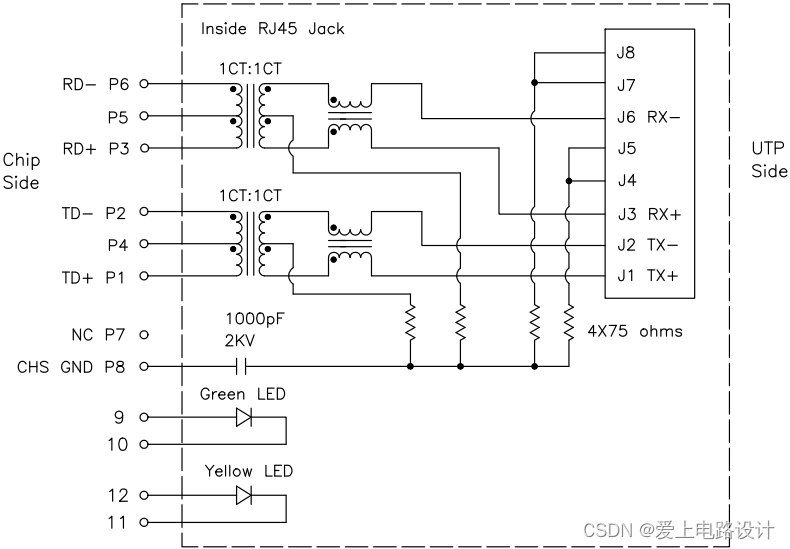
Top view and PCB footprint of HR911105A network port:
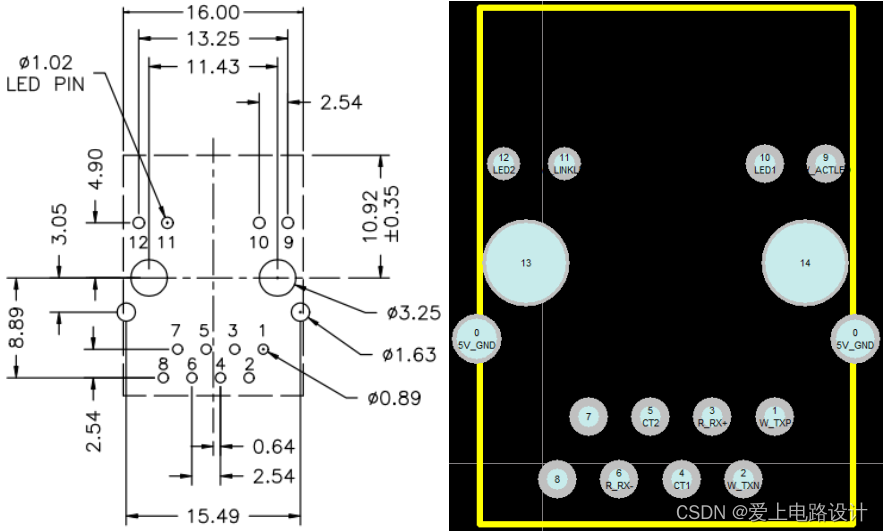
HR911105A network port internal structure diagram:
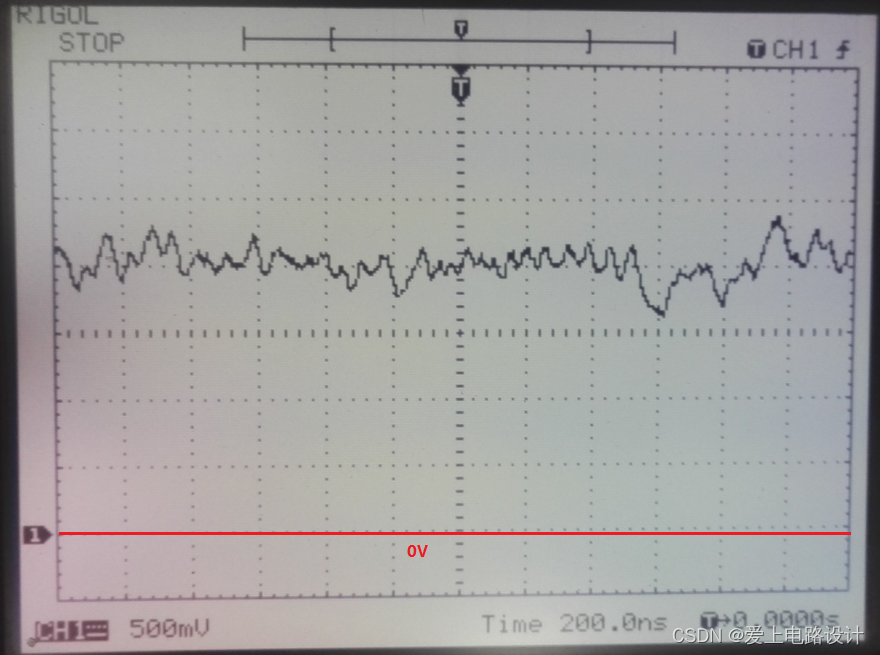
W5500 RXP and RXN waveforms:
----------------
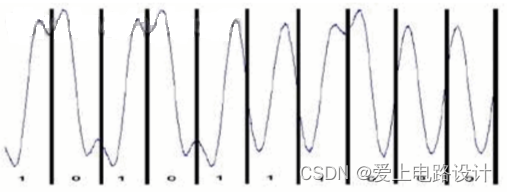
(2) Manchester encoding rules for 10M Ethernet
------------------------------
Therefore: Ethernet <= LAN <= Internet != Internet.
2. Ethernet physical layer coding technology
1) Traditional Ethernet (10M) sends NLP (General Link Pulse) when there is no data transmission. This pulse is sent every 16ms, each 100ns wide and 1V peak.
2) Fast Ethernet (100M) uses 4B5B block encoding. When there is no data to send, it sends the character IDLE. The 5B encoding of IDLE is "11111", which is all "1"s. However, it should be noted that the line encoding of 100BASE-TX is Multilevel Three-Level Code (MLT-3), and the encoding rule is "1 changes but 0 remains unchanged, positive and negative alternate". Therefore, the waveform will show positive, negative and zero alternating.
In addition, if the port is AUTO, an FLP will be sent before success. NLP is sent every 16ms, and FLP is sent in a string of 9 (17, including negotiation pages) every 16ms, with a pulse width of 10ns.
3) GBIT Ethernet (1000M) uses 8B10B block encoding. When there is no data to send, it also sends the character IDLE. The 10B encoding of IDLE is "1111111111". However, it should be noted that the line encoding of 100BASE-TX is NRZ.
III. IP Address
An IP address is a 32-bit binary number, usually represented in decimal and separated by periods (."). An IP address is a logical address used to identify a host on a network. IP addresses are unique; each machine's IP address is unique worldwide.
IP address = network address + host address. Depending on the length of the network address, there are three types of IP address composition: Class A, Class B, and Class C. The first 8 bits of Class A are (0 + 7 bits of network address), the first 16 bits of Class B are (10 + 14 bits of network address), and the first 24 bits of Class C are (110 + 21 bits of network address).
In a local area network (LAN), IP addresses are also required. Generally, internal network IP addresses start with 192.168, which makes it easy to distinguish between public and internal network IP addresses. This is why PLCs and computers, or terminals and computers, often use the 192.168 format.
For IP subnetting, please refer to: Network - IP Subnetting .
IV. Subnet Mask
A subnet mask is used to determine whether the IP addresses of any two computers belong to the same subnet. Simply put, if performing an AND operation between the IP addresses of two computers and their subnet masks results in the same value, then the two computers are on the same subnet and can communicate directly. The purpose of a subnet mask is to define a network segment.
255.255.255.0 is a standard Class C address submask, while 255.255.0.0 is a standard Class B address submask. They define completely different IP address ranges. A Class C submask can have a maximum of 256 IP addresses per segment, of which 254 are usable. A Class B submask can have a maximum of 65,536 IP addresses per segment, of which 65,534 are usable.
The above passage can be interpreted as follows: For Class C networks, the first 24 bits are the network address, so they are ANDed with 1s. The last 8 bits are ANDed with the IP address with 0s. The result is that if the first 24 bits of two IP addresses are the same, then the AND result is the same, meaning they are on the same network segment and can communicate. For intranet communication, as mentioned above, the 192.168 format is generally used, so the subnet mask is usually in the form of 255.255.*.*.
V. Gateway
What exactly is a gateway? Essentially, a gateway is an IP address that connects one network to another. For example, consider network A and network B. Network A's IP address range is "192.168.1.1~192.168.1.254", with a subnet mask of 255.255.255.0; network B's IP address range is "192.168.2.1~192.168.2.254", with a subnet mask of 255.255.255.0.
Without a router, two networks cannot communicate via TCP/IP. Even if the two networks are connected to the same switch (or hub), the TCP/IP protocol will determine that the hosts in the two networks are in different networks based on the subnet mask ( 255.255.255.0) . A gateway is necessary to enable communication between these two networks .
If a host in network A discovers that the destination host of a data packet is not in its local network, it forwards the packet to its own gateway, which then forwards it to the gateway of network B. The gateway of network B then forwards it to a host within network B. This is the process of data packet forwarding from network A to network B.
------------------------------
1) Default gateway
Once you understand what a gateway is, the default gateway is easier to grasp. Just as a room can have multiple doors, a host can have multiple gateways. The default gateway means that if a host cannot find an available gateway, it sends the data packet to the default gateway, which will then process the packet.
The default gateway is usually set to 192.168.x.1. The default gateway must be an IP address in the network segment where the computer is located, and cannot be an IP address in another network segment.
------------------------------
2) DNS server
Unlike the previous concepts which are all about basic networking, DNS servers handle something different. DNS stands for Domain Name Server. On the Internet, there is a one-to-one correspondence between domain names and IP addresses. Although domain names are easy for people to remember, machines can only recognize IP addresses. The conversion between them is called domain name resolution, which is done by dedicated domain name resolution servers. DNS is the server that performs domain name resolution.
For example, you can't access the internet without an IP address. Your computer may be able to use QQ but not open web pages even if it doesn't have DNS set up. QQ doesn't need DNS (it's just a client program and doesn't use DNS). DNS is only used when browsing web pages (when you need to enter a URL). If you can remember the IP address, you can just enter it directly into the address bar.
VI. MAC Address
1. MAC Address Details
MAC (Medium/Media Access Control) addresses are stored in the Network Interface Card (NIC). A MAC address, also called a hardware address, is a 48-bit (6 bytes, 1 byte = 8 bits) hexadecimal number. The first 24 bits are called the Organizationally Unique Identifier (OUI), which identifies the LAN (Local Area Network) node. The last 24 bits are assigned by the manufacturer.
The physical address of a network interface card (NIC) is usually burned into the NIC's EPROM (a type of flash memory chip that can typically be erased and rewritten by a program) by the NIC manufacturer. It stores the address that is actually used to identify the computer sending the data and the host receiving the data during data transmission. In other words, in the physical transmission process at the lower level of the network, the host is identified by its physical address, which must be globally unique.
In the OSI (Open Systems Interconnection) 7-layer network protocol (physical layer, data link layer, network layer, transport layer, session layer, presentation layer, application layer) reference model, MAC corresponds to the second layer, the data link layer, while IP corresponds to the network layer.
Now, you might be wondering, if we have IP addresses, why do we need MAC addresses? And if we have MAC addresses, why do we need IP addresses?
------------------------------
The difference between MAC addresses and IP addresses:
Someone once used this analogy: you already have a phone number, so why do you need an ID number? Your ID number is your unique identifier; anyone with that number can find you. But why don't your friends use their ID numbers to find you? It's convenient, isn't it? But what if you commit a crime, and the police try to find you using your phone number, but you've changed your number? Then they'd have to use your ID number to catch you, wouldn't they?
Let's look at the points that require cooperation between the two to achieve data exchange:
(1) IP address allocation is based on the network topology, not on who manufactured the network. It is not feasible to base efficient routing schemes on equipment manufacturers rather than on the network's topological location.
(2) When there is an additional layer of addressing, the device is easier to move and maintain. For example, if an Ethernet card fails, it can be replaced without obtaining a new IP address. If an IP host is moved from one network to another, it can be given a new IP address without replacing the network card.
(3) Whether it is communication between computers in a local area network or a wide area network, it ultimately manifests as the transmission of data packets from an initial node on some form of link to another node, and finally to the destination node. The movement of data packets between these nodes is accomplished by ARP (Address Resolution Protocol), which maps IP addresses to MAC addresses.
------------------------------
Speaking of which, I'd like to reiterate why network communication needs to be layered, such as the OSI model, and the benefits of this layering:
That means when you use higher-level protocols, far removed from the physical layer, such as IP and TCP, to communicate with other machines, you don't need to care about where the other party is or what different types of networks they're using. However, if you're programming at the physical layer, you need to care about much more, such as the conversion of different network packets, the maximum transmission unit, and so on.
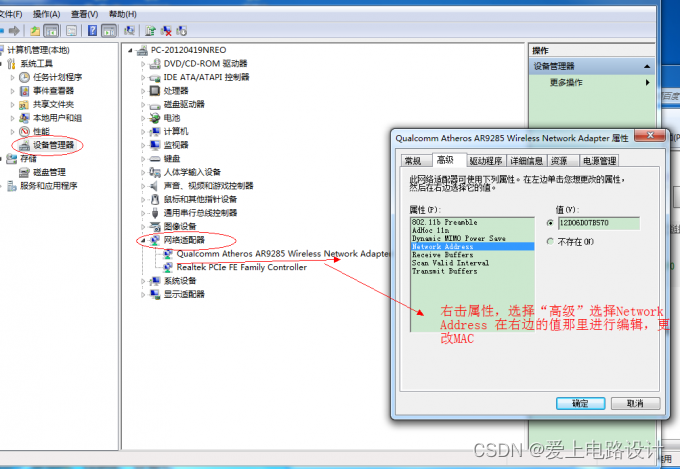
2. How to change the MAC address
Youth is a fleeting dream; when you wake up, it's already vanished without a trace. If you like this, give it a thumbs up!
————————————————
Copyright Notice: This article is an original work by CSDN blogger "Love Circuit Design" and is licensed under CC 4.0 BY-SA. Please include the original source link and this statement when reprinting.
Original Link: https://blog.csdn.net/liht_1634/article/details/124179889