



How to Build Performance-Oriented Ethernet Examples with WIZnet W5500 on Maker MCU Boards?
This maker-focused architecture explains how to use WIZnet W5500 as the wired Ethernet controller for MCU projects that need practical network examples, driver
How to Build Performance-Oriented Ethernet Examples with WIZnet W5500 on Maker MCU Boards?
Summary
This maker-focused architecture explains how to use WIZnet W5500 as the wired Ethernet controller for MCU projects that need practical network examples, driver configuration, and performance-aware bring-up. The GitCode project is a W5500 network-interface tutorial resource that covers hardware connection, driver configuration, example-based learning, and optimization notes for developers. W5500 provides the Ethernet MAC/PHY, hardwired TCP/IP stack, socket engine, and internal Tx/Rx buffering, while the maker MCU handles application logic, SPI control, packet formatting, diagnostics, and test workflows.
What the Project Does
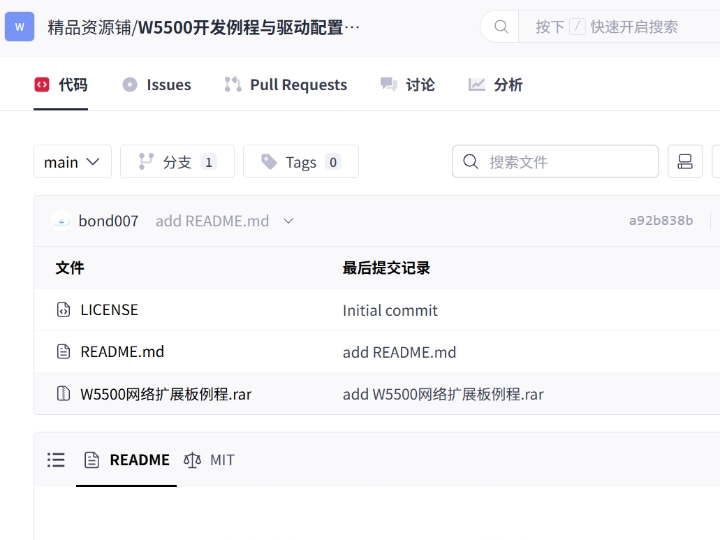
The source project is a W5500 development tutorial and example resource. Its stated purpose is to guide developers through W5500 network-interface development from hardware connection to driver configuration, with clear steps, practical examples, and notes for both beginners and experienced developers. The repository page lists the project as MIT licensed, but the visible GitCode page exposes README-level information rather than inspectable source files or example code.
For a maker project, this maps to a small Ethernet-capable MCU node. The board may read sensors, control relays, expose a local HTTP page, send UDP telemetry, connect to a TCP service, or provide a wired configuration interface. The data path is:
MCU application → W5500 driver/socket layer → SPI → W5500 → RJ45 Ethernet → router, PC, local server, gateway, or test laptop.
The performance angle is practical rather than abstract. The maker should verify SPI stability, socket allocation, Tx/Rx buffer use, link state, reconnect behavior, and application latency before adding heavier payloads such as JSON, file logging, dashboards, or cloud traffic.
Where WIZnet Fits
The exact WIZnet product is W5500. It sits between the maker MCU and the Ethernet connector. The MCU controls W5500 through SPI, chip select, reset, and optionally interrupt. W5500 handles Ethernet MAC/PHY operation, hardwired TCP/IP processing, socket state transitions, and packet buffering.
WIZnet documents W5500 as a hardwired TCP/IP Internet controller with SPI access up to 80 MHz, an embedded 10/100 Ethernet MAC and PHY, support for TCP, UDP, ICMP, IPv4, ARP, IGMP, and PPPoE, 8 independent sockets, and 32 KB internal Tx/Rx buffer memory.
This division is useful for maker boards because the MCU firmware does not need to host a full software TCP/IP stack. The application can focus on sensor readings, command handling, local configuration, telemetry format, and error recovery. W5500 owns the lower network transport boundary: link state, socket state, TX free space, RX received size, ARP/IP behavior, and TCP/UDP handling.
Implementation Notes
The GitCode project confirms a W5500 tutorial and example resource, but the visible repository page did not expose inspectable source files. Therefore, no project-specific code is quoted here.
A practical maker implementation can be organized into four parts.
The hardware bring-up layer verifies power, ground, SPI wiring, reset, and optional interrupt. On W5500-EVB-Pico, WIZnet documents a concrete maker-board mapping: RP2040 GPIO16 connects to W5500 MISO, GPIO17 to CSn, GPIO18 to SCLK, GPIO19 to MOSI, GPIO20 to RSTn, and GPIO21 to INTn. That mapping is useful as a reference because it shows the complete SPI/control-pin set needed for Ethernet operation.
The driver configuration layer selects W5500 as the Ethernet controller, configures the SPI access path, initializes socket memory, assigns MAC/IP information, and checks PHY status. WIZnet’s official ioLibrary configuration header defines W5500 as a supported chip and selects SPI as the W5500 interface mode when no other interface is specified. It also defines WIZnet chip control operations for reset, interrupt, PHY status, PHY link state, and network timeout configuration.
The socket test layer should start with small TCP or UDP examples before adding application load. WIZnet’s W5500 header exposes socket mode, socket command, socket status, socket Tx free-size, and socket Rx received-size access functions. Those registers are the main firmware-level indicators for whether a performance problem is caused by SPI transfer, socket state, peer behavior, or application code.
The performance observation layer records repeatable measurements: SPI clock rate, packet size, socket count, payload interval, reconnect count, link state, Tx free space, Rx received size, and end-to-end response time. For maker projects, this is usually more useful than a single peak-throughput number because Python, Arduino-style code, filesystem writes, serial logging, and JSON formatting can dominate observed latency.
Practical Tips / Pitfalls
- Validate power, reset, SPI read/write, and W5500 version before testing HTTP, MQTT, or cloud examples.
- Keep SCLK, MOSI, MISO, and chip select short on jumper-wire prototypes.
- Route reset to the MCU so firmware can recover W5500 without power-cycling the whole board.
- Use interrupt when receive, disconnect, timeout, or send-complete events should not depend on constant polling.
- Treat W5500’s 8 sockets as fixed resources; reserve sockets for telemetry, configuration, diagnostics, discovery, and future expansion.
- Measure application latency separately from Ethernet transport; logging and payload formatting can hide the real bottleneck.
- Log PHY status, socket status, Tx free size, Rx received size, IP address, reconnect count, and last error.
FAQ
Q: Why use WIZnet W5500 for a maker Ethernet example project?
A: W5500 gives a maker MCU wired Ethernet with hardwired TCP/IP, 8 sockets, and 32 KB internal Tx/Rx memory. That lets the project focus on practical examples, payload handling, diagnostics, and performance testing instead of implementing TCP/IP inside the MCU firmware.
Q: How does W5500 connect to the platform?
A: W5500 connects through SPI using SCLK, MOSI, MISO, chip select, reset, 3.3 V, and ground. Interrupt is optional for basic examples but useful for event-driven receive, disconnect, timeout, and send-complete handling. W5500-EVB-Pico shows the same practical signal set through its RP2040-to-W5500 pin mapping.
Q: What role does W5500 play in this project?
A: W5500 is the wired Ethernet transport engine. The maker MCU builds application payloads and calls the driver/socket layer; W5500 manages Ethernet MAC/PHY operation, hardwired TCP/IP processing, socket state, and internal packet buffers.
Q: Can beginners follow this project?
A: Yes, if the work is staged. The recommended order is wiring check, reset check, SPI communication, W5500 version read, PHY link check, static IP or DHCP setup, UDP test, TCP test, then the final maker application.
Q: How is this different from using Wi-Fi on a maker board?
A: Wi-Fi is better when the device must be cable-free. W5500 adds SPI wiring and Ethernet hardware, but it gives a repeatable wired path, visible PHY state, explicit reset control, bounded socket resources, and simpler bench diagnostics. That makes it useful for fixed maker installations, lab demos, local configuration tools, and performance experiments.
Source
Original source: GitCode repository “W5500开发例程与驱动配置教程: 基于 W5500 的网络接口开发教程项目.” The page describes a W5500 network-interface tutorial and example resource covering hardware connection, driver configuration, practical examples, optimization notes, and MIT licensing. The visible page did not expose inspectable source files during verification.
WIZnet product reference: W5500 documentation and feature list, including hardwired TCP/IP, SPI up to 80 MHz, 8 sockets, 32 KB buffer memory, and software/hardware resource links.
WIZnet board reference: W5500-EVB-Pico documentation, including RP2040-to-W5500 SPI, reset, and interrupt pin mapping.
WIZnet driver reference: official ioLibrary_Driver, including W5500 chip selection, SPI interface configuration, register access, PHY control, socket control, and buffer-state access.
Tags
#W5500 #WIZnet #Maker #Ethernet #SPI #Performance #NetworkStack #HardwareWiring #Firmware #Socket #Registers #EmbeddedNetworking
Maker MCU 보드에서 WIZnet W5500으로 성능 중심 Ethernet 예제를 구축하는 방법은?
요약
이 maker 중심 아키텍처는 실용적인 network example, driver configuration, performance-aware bring-up이 필요한 MCU 프로젝트에서 WIZnet W5500을 유선 Ethernet controller로 사용하는 방법을 설명합니다. GitCode 프로젝트는 hardware connection, driver configuration, example-based learning, optimization note를 다루는 W5500 network-interface tutorial resource입니다. W5500은 Ethernet MAC/PHY, hardwired TCP/IP stack, socket engine, internal Tx/Rx buffering을 제공하고, maker MCU는 application logic, SPI control, packet formatting, diagnostics, test workflow를 처리합니다.
프로젝트가 하는 일
소스 프로젝트는 W5500 development tutorial 및 example resource입니다. 목적은 개발자가 hardware connection부터 driver configuration까지 W5500 network-interface development를 따라갈 수 있도록 안내하는 것입니다. GitCode page는 beginner와 experienced developer 모두를 위한 clear step, practical example, optimization note를 제공한다고 설명합니다. Repository page는 MIT license를 표시하지만, visible GitCode page는 inspect 가능한 source file이나 example code보다는 README 수준의 정보를 노출합니다.
Maker 프로젝트에서는 이 구조가 작은 Ethernet-capable MCU node로 이어집니다. 보드는 sensor를 읽고, relay를 제어하고, local HTTP page를 노출하고, UDP telemetry를 보내고, TCP service에 연결하거나, 유선 configuration interface를 제공할 수 있습니다.
데이터 경로는 다음과 같습니다.
MCU application → W5500 driver/socket layer → SPI → W5500 → RJ45 Ethernet → router, PC, local server, gateway 또는 test laptop
Performance 관점은 추상적인 benchmark보다 실용적인 bring-up에 가깝습니다. Maker는 JSON, file logging, dashboard, cloud traffic 같은 무거운 payload를 추가하기 전에 SPI stability, socket allocation, Tx/Rx buffer use, link state, reconnect behavior, application latency를 먼저 확인해야 합니다.
WIZnet이 들어가는 위치
이 프로젝트에서 사용되는 정확한 WIZnet 제품은 W5500입니다. W5500은 maker MCU와 Ethernet connector 사이에 위치합니다. MCU는 SPI, chip select, reset, 선택적으로 interrupt를 통해 W5500을 제어합니다. W5500은 Ethernet MAC/PHY operation, hardwired TCP/IP processing, socket state transition, packet buffering을 처리합니다.
WIZnet 문서 기준으로 W5500은 최대 80 MHz SPI access, embedded 10/100 Ethernet MAC and PHY, TCP, UDP, ICMP, IPv4, ARP, IGMP, PPPoE 지원, 8개 independent socket, 32 KB internal Tx/Rx buffer memory를 제공하는 hardwired TCP/IP Internet controller입니다.
이 분업은 maker board에서 유용합니다. MCU firmware가 full software TCP/IP stack을 포함할 필요가 없기 때문입니다. Application은 sensor reading, command handling, local configuration, telemetry format, error recovery에 집중할 수 있습니다. W5500은 link state, socket state, TX free space, RX received size, ARP/IP behavior, TCP/UDP handling 같은 하위 network transport boundary를 담당합니다.
구현 참고 사항
GitCode 프로젝트는 W5500 tutorial 및 example resource임을 확인할 수 있지만, visible repository page는 inspect 가능한 source file을 노출하지 않았습니다. 따라서 여기서는 프로젝트별 코드를 인용하지 않습니다.
실용적인 maker 구현은 네 부분으로 구성할 수 있습니다.
Hardware bring-up layer는 power, ground, SPI wiring, reset, optional interrupt를 검증합니다. W5500-EVB-Pico에서 WIZnet은 구체적인 maker-board mapping을 문서화합니다. RP2040 GPIO16은 W5500 MISO, GPIO17은 CSn, GPIO18은 SCLK, GPIO19는 MOSI, GPIO20은 RSTn, GPIO21은 INTn에 연결됩니다. 이 mapping은 Ethernet 동작에 필요한 전체 SPI/control-pin set을 보여주므로 참고용으로 유용합니다.
Driver configuration layer는 W5500을 Ethernet controller로 선택하고, SPI access path를 설정하며, socket memory를 초기화하고, MAC/IP information을 할당하며, PHY status를 확인합니다. WIZnet 공식 ioLibrary configuration header는 W5500을 supported chip으로 정의하고, 다른 interface가 지정되지 않은 경우 W5500 interface mode를 SPI로 선택합니다. 또한 reset, interrupt, PHY status, PHY link state, network timeout configuration을 위한 WIZnet chip control operation을 정의합니다.
Socket test layer는 application load를 추가하기 전에 작은 TCP 또는 UDP 예제로 시작해야 합니다. WIZnet W5500 header는 socket mode, socket command, socket status, socket Tx free-size, socket Rx received-size access function을 제공합니다. 이 register들은 performance 문제가 SPI transfer, socket state, peer behavior, application code 중 어디에서 발생하는지 확인하는 주요 firmware-level indicator입니다.
Performance observation layer는 반복 가능한 측정값을 기록합니다. 여기에는 SPI clock rate, packet size, socket count, payload interval, reconnect count, link state, Tx free space, Rx received size, end-to-end response time이 포함됩니다. Maker 프로젝트에서는 단일 peak-throughput 숫자보다 이런 측정이 더 유용한 경우가 많습니다. Python, Arduino-style code, filesystem write, serial logging, JSON formatting이 실제 latency를 지배할 수 있기 때문입니다.
실무 팁 / 주의점
- HTTP, MQTT, cloud example을 테스트하기 전에 power, reset, SPI read/write, W5500 version을 먼저 검증해야 합니다.
- Jumper-wire prototype에서는 SCLK, MOSI, MISO, chip select를 짧게 유지해야 합니다.
- Reset을 MCU에 연결하면 전체 보드를 power-cycle하지 않고 W5500을 복구할 수 있습니다.
- Receive, disconnect, timeout, send-complete event가 constant polling에 의존하지 않아야 한다면 interrupt를 사용하는 것이 좋습니다.
- W5500의 8개 socket은 고정된 자원으로 다뤄야 합니다. Telemetry, configuration, diagnostics, discovery, future expansion용 socket을 예약해야 합니다.
- Application latency를 Ethernet transport와 분리해서 측정해야 합니다. Logging과 payload formatting이 실제 bottleneck을 가릴 수 있습니다.
- PHY status, socket status, Tx free size, Rx received size, IP address, reconnect count, last error를 기록해야 합니다.
FAQ
Q: Maker Ethernet example project에 왜 WIZnet W5500을 사용하나요?
A: W5500은 hardwired TCP/IP, 8개 socket, 32 KB internal Tx/Rx memory를 갖춘 유선 Ethernet을 maker MCU에 제공합니다. 따라서 프로젝트는 MCU firmware 내부에 TCP/IP를 구현하는 대신 practical example, payload handling, diagnostics, performance testing에 집중할 수 있습니다.
Q: W5500은 플랫폼에 어떻게 연결되나요?
A: W5500은 SCLK, MOSI, MISO, chip select, reset, 3.3 V, ground를 사용하는 SPI로 연결됩니다. Interrupt는 기본 예제에서는 선택 사항일 수 있지만, event-driven receive, disconnect, timeout, send-complete handling에는 유용합니다. W5500-EVB-Pico는 RP2040-to-W5500 pin mapping을 통해 같은 practical signal set을 보여줍니다.
Q: 이 프로젝트에서 W5500은 어떤 역할을 하나요?
A: W5500은 유선 Ethernet transport engine입니다. Maker MCU는 application payload를 만들고 driver/socket layer를 호출합니다. W5500은 Ethernet MAC/PHY operation, hardwired TCP/IP processing, socket state, internal packet buffer를 관리합니다.
Q: 초보자도 이 프로젝트를 따라갈 수 있나요?
A: 가능합니다. 다만 단계적으로 진행해야 합니다. 권장 순서는 wiring check, reset check, SPI communication, W5500 version read, PHY link check, static IP 또는 DHCP setup, UDP test, TCP test, 그다음 최종 maker application 구현입니다.
Q: Maker board에서 Wi-Fi를 사용하는 것과 무엇이 다른가요?
A: Wi-Fi는 device가 cable-free여야 할 때 더 적합합니다. W5500은 SPI wiring과 Ethernet hardware가 추가되지만, 반복 가능한 wired path, visible PHY state, explicit reset control, bounded socket resource, 더 단순한 bench diagnostics를 제공합니다. 따라서 fixed maker installation, lab demo, local configuration tool, performance experiment에 유용합니다.
출처
Original source: GitCode repository “W5500开发例程与驱动配置教程: 基于 W5500 的网络接口开发教程项目.” 해당 page는 hardware connection, driver configuration, practical example, optimization note, MIT licensing을 포함한 W5500 network-interface tutorial 및 example resource를 설명합니다. 검증 중 visible page는 inspect 가능한 source file을 노출하지 않았습니다.
https://gitcode.com/Premium-Resources/2aa83
WIZnet product reference: W5500 documentation and feature list, including hardwired TCP/IP, SPI up to 80 MHz, 8 sockets, 32 KB buffer memory, and software/hardware resource links.
https://docs.wiznet.io/Product/Chip/Ethernet/W5500
WIZnet board reference: W5500-EVB-Pico documentation, including RP2040-to-W5500 SPI, reset, and interrupt pin mapping.
https://docs.wiznet.io/Product/Chip/Ethernet/W5500/w5500-evb-pico
WIZnet driver reference: official ioLibrary_Driver, including W5500 chip selection, SPI interface configuration, register access, PHY control, socket control, and buffer-state access.
https://github.com/Wiznet/ioLibrary_Driver
태그
#W5500 #WIZnet #Maker #Ethernet #SPI #Performance #NetworkStack #HardwareWiring #Firmware #Socket #Registers #EmbeddedNetworking