



How to Build an Ethernet-Based Smart Home Device with W5500 and Arduino?
This project demonstrates a smart home device built with an Arduino board and the WIZnet W5500 Ethernet controller
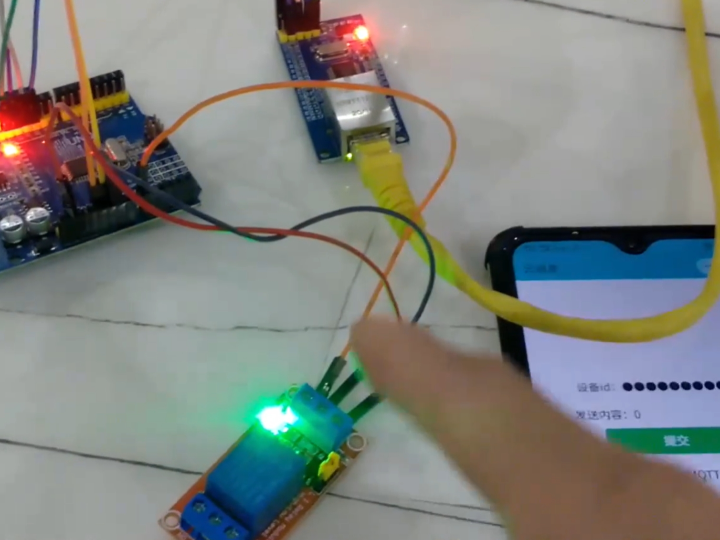
How to Build an Ethernet-Based Smart Home Device with W5500 and Arduino?
(W5500과 Arduino로 이더넷 기반 스마트 홈 장치를 만드는 방법)
Project Summary (53 words)
This project demonstrates a smart home device built with an Arduino board and the WIZnet W5500 Ethernet controller. By using hardware TCP/IP offloading instead of Wi-Fi, the system enables stable mobile application communication through HTTP, MQTT, or TCP, offering a reliable and educational approach to networked maker projects.
System Architecture Overview
Core Components
Arduino MCU
Handles application logic
Controls GPIO or sensors
Processes high-level commands
WIZnet W5500
Hardware TCP/IP stack
8 hardware sockets
SPI interface
32 KB internal network buffer
Mobile Application
Sends commands via local network or cloud
Communicates through HTTP/MQTT/TCP
Network Architecture & Protocol Flow
Conceptual Communication Flow
Protocol Handling
W5500
Manages TCP handshake
Handles retransmission
Calculates checksums
Maintains socket states
Arduino
Reads socket data
Parses application protocol
Executes control logic
This separation prevents network stack complexity from interfering with application behavior.
Ethernet vs Wi-Fi: Why It Matters
| Feature | W5500 Ethernet | Wi-Fi MCU |
|---|---|---|
| RF Interference | None | Possible |
| TCP/IP Stack | Hardware | Software |
| Firmware Complexity | Low | High |
| Stability | High | Variable |
Ethernet-based Arduino designs are closer to industrial device architecture than typical hobby Wi-Fi projects.
Overall System Design Perspective
The firmware structure typically includes:
Network initialization (SPI + W5500 setup)
Socket creation
Application command parsing
Device control loop
Because TCP/IP is handled in hardware, the MCU firmware remains clean and maintainable.
FAQ (WIZnet-Focused)
Q1: Why use W5500 instead of Wi-Fi on Arduino?
A: W5500 provides hardware TCP/IP offloading, eliminating Wi-Fi instability and reducing firmware complexity.
Q2: How does Arduino communicate with W5500?
A: Through SPI, using simple register and socket-level commands.
Q3: Can this support MQTT or HTTP?
A: Yes. MQTT and HTTP run at the application layer over W5500’s TCP/IP stack.
Q4: Is this suitable for Smart Home projects?
A: Yes. It provides reliable communication for local or cloud-based control.
Q5: Is this good for beginners?
A: Yes. It teaches proper network layering without overwhelming firmware complexity.
Tags
#W5500 #Arduino #Ethernet #SmartHome #MakerProject #EmbeddedNetworking
🇰🇷 KOREAN VERSION
W5500과 Arduino로 이더넷 기반 스마트 홈 장치를 만드는 방법은?
(How to Build an Ethernet-Based Smart Home Device with W5500 and Arduino?)
프로젝트 개요 (53단어)
이 프로젝트는 Arduino 보드와 WIZnet W5500 이더넷 컨트롤러를 사용하여 스마트 홈 장치를 구현합니다. Wi-Fi 대신 하드웨어 TCP/IP 오프로딩을 활용하여 HTTP, MQTT, TCP 기반 모바일 앱 통신을 안정적으로 지원하며, 메이커와 교육 목적에 적합한 구조를 제공합니다.
시스템 구성
Arduino MCU: 애플리케이션 로직 및 제어
W5500: 하드웨어 TCP/IP 처리
Mobile App: 로컬 또는 클라우드 기반 제어
네트워크 아키텍처 및 데이터 흐름
Mobile App → Router/Cloud → Ethernet → W5500 → Arduino → 장치 제어
TCP/IP 처리는 W5500이 담당하며, Arduino는 고수준 명령만 처리합니다.
Ethernet vs Wi-Fi 비교
이더넷은:
RF 간섭 없음
예측 가능한 지연시간
낮은 펌웨어 복잡도
Wi-Fi보다 안정적이며 산업용 구조와 유사합니다.
설계 관점의 의미
이 프로젝트는 단순한 메이커 실습을 넘어,
전문적인 네트워크 분리 설계 원칙을 학습할 수 있는 예제입니다.
FAQ
Q1: 왜 Wi-Fi 대신 W5500을 사용하나요?
A: 안정성과 예측성을 확보하기 위해서입니다.
Q2: Arduino와 어떻게 연결되나요?
A: SPI 인터페이스로 연결됩니다.
Q3: MQTT도 지원하나요?
A: 네, TCP 기반 애플리케이션 레벨에서 구현 가능합니다.
Q4: 스마트 홈에 적합한가요?
A: 네, 안정적인 통신이 필요한 환경에 적합합니다.
Q5: 초보자도 가능한가요?
A: 기본적인 Arduino 지식이 있다면 가능합니다.