



How Does a TCP Server Work on W5500-EVB-PICO?
This article explains how a TCP server is implemented on the W5500-EVB-PICO using the WIZnet W5500 Ethernet controller.
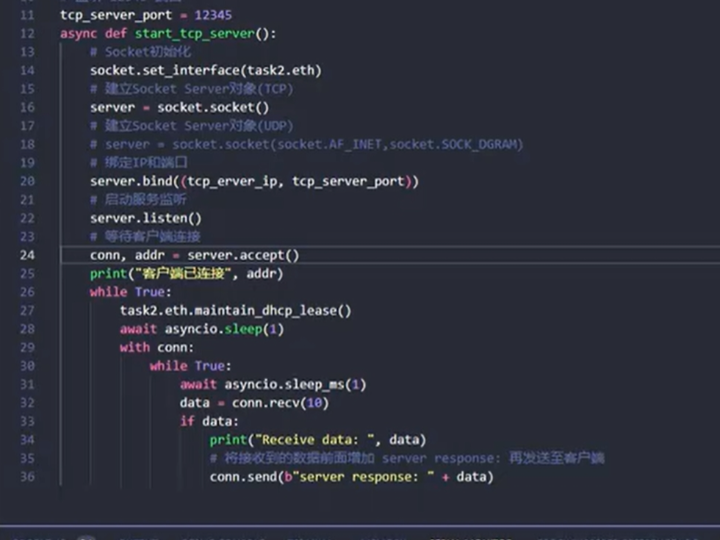
How Does a TCP Server Work on W5500-EVB-PICO?
An End-to-End TCP Protocol Workflow Using Hardware TCP/IP
(W5500-EVB-PICO에서 TCP 서버는 어떻게 동작하는가?)
Summary (40–60 words)
This article explains how a TCP server is implemented on the W5500-EVB-PICO using the WIZnet W5500 Ethernet controller. By walking through the complete TCP server workflow—from socket initialization to connection handling and data exchange—it shows how hardware TCP/IP offloading enables predictable, reliable server behavior on embedded systems.
1. Why a TCP Server Demo Matters for Embedded Engineers
TCP servers are often treated as “PC-side” concepts, but in embedded systems they are critical for:
Device control interfaces
Configuration tools
Diagnostics and testing
Industrial equipment communication
For engineers, the challenge is not the TCP protocol itself, but how TCP behaves when implemented on constrained hardware.
The W5500-EVB-PICO provides a clean environment to observe:
How a hardware TCP/IP engine behaves as a real TCP server.
2. What Is W5500-EVB-PICO?
The W5500-EVB-PICO combines:
RP2040 MCU (dual-core Cortex-M0+)
WIZnet W5500 Ethernet controller
SPI-based MCU ↔ Ethernet interface
Key design principle:
RP2040 handles application logic
W5500 handles TCP/IP entirely in hardware
This makes the board ideal for protocol workflow demonstrations.
3. System Architecture Overview
TCP Server Architecture
Important separation:
No software TCP/IP stack runs on RP2040
All TCP state transitions occur inside W5500
4. TCP Server Role on W5500
In a TCP server setup, the embedded device:
Listens on a fixed TCP port
Accepts incoming client connections
Exchanges data bidirectionally
Closes connections cleanly
On W5500, this behavior is driven by socket registers and commands, not software state machines.
5. End-to-End TCP Server Workflow
Step-by-Step Protocol Flow
Each step corresponds directly to a W5500 socket register state.
6. Socket Initialization and LISTEN State
To start a TCP server:
Select a hardware socket (0–7)
Set socket mode to TCP
Configure local port
Issue LISTEN command
At this point:
W5500 waits for incoming SYN packets
RP2040 simply polls socket status
No software TCP handshake is implemented.
7. Connection Establishment (Hardware-Driven)
When a client connects:
W5500 performs the TCP three-way handshake internally
Socket status changes to ESTABLISHED
An interrupt or status poll notifies the MCU
From the MCU’s perspective:
A TCP connection “just appears” as ESTABLISHED.
This is a major simplification compared to software stacks.
8. Data Transmission and Reception
RX Path
TX Path
Key insight:
Once pointers are correct, TCP reliability is guaranteed by hardware.
9. Connection Termination
When either side closes the connection:
W5500 transitions through FIN states
Socket eventually returns to CLOSED
Firmware can re-enter LISTEN
Correctly handling RX data before closing is critical to avoid CLOSE_WAIT issues.
10. Why This TCP Server Model Is Reliable
Compared to software TCP servers, this design offers:
Deterministic behavior
No retransmission logic in firmware
Minimal RAM usage
Easy debugging via registers
For engineers, TCP becomes observable and predictable.
11. Typical Use Cases
PC-based test tools connecting to embedded devices
Industrial control panels
Debug consoles over Ethernet
Simple device-to-device TCP protocols
The W5500 TCP server is especially well suited for long-running systems.
12. Key Takeaway
On W5500-EVB-PICO, a TCP server is implemented by controlling socket states and buffers—not by writing a TCP stack.
This allows engineers to:
Focus on application logic
Trust hardware for protocol correctness
Build reliable Ethernet servers with minimal code
FAQ (Engineer-Focused)
Q1. Does RP2040 implement TCP logic?
No. TCP is fully handled by the W5500.
Q2. How many TCP clients can connect?
Up to 8, limited by socket availability.
Q3. Is this suitable for industrial use?
Yes. Deterministic behavior makes it ideal.
Q4. What happens if the client disconnects unexpectedly?
W5500 handles TCP cleanup automatically.
Q5. Why use a TCP server instead of UDP?
TCP provides reliable, ordered delivery.
Source
Bilibili video: BV1wx4y1C7ty
WIZnet W5500 Datasheet
W5500-EVB-PICO documentation
Tags
W5500, WIZnet, TCP Server, W5500-EVB-PICO, Embedded Ethernet, Hardware TCP/IP, Industrial Networking
🇰🇷 한국어 번역 (1:1 Full Translation)
W5500-EVB-PICO에서 TCP 서버는 어떻게 동작하는가?
하드웨어 TCP/IP 기반 TCP 서버 프로토콜 워크플로우
요약
본 문서는 WIZnet W5500 이더넷 컨트롤러가 탑재된 W5500-EVB-PICO에서 TCP 서버를 구현하는 과정을 설명한다. 소켓 초기화부터 연결 수립, 데이터 송수신, 연결 종료까지의 전체 TCP 워크플로우를 통해, 하드웨어 TCP/IP 오프로딩이 임베디드 시스템에서 어떻게 안정적인 서버 동작을 제공하는지를 분석한다.
1. TCP 서버 데모의 의미
임베디드 시스템에서 TCP 서버는
제어, 설정, 테스트 인터페이스로 매우 중요하다.
2. W5500-EVB-PICO 개요
RP2040은 애플리케이션을 담당하고
TCP/IP는 W5500이 처리한다.
3. 시스템 아키텍처
4. TCP 서버 동작 흐름
LISTEN → ESTABLISHED → DATA → CLOSED
5. 데이터 송수신
버퍼 포인터만 정확하면
TCP 신뢰성은 자동으로 보장된다.
6. 산업용 관점
예측 가능한 네트워크
장시간 안정성
간단한 펌웨어
7. 핵심 메시지
W5500 기반 TCP 서버는 소프트웨어 TCP 구현이 아닌, 소켓 제어 문제다.
태그
W5500, TCP 서버, W5500-EVB-PICO, 임베디드 이더넷, 하드웨어 TCP/IP