[Follow me, Episode 4] Mounting an SD card and enabling file read/write access on the W5500-EVB-Pico
[Follow me, Episode 4] Mounting an SD card and enabling file read/write access on the W5500-EVB-Pico PIO
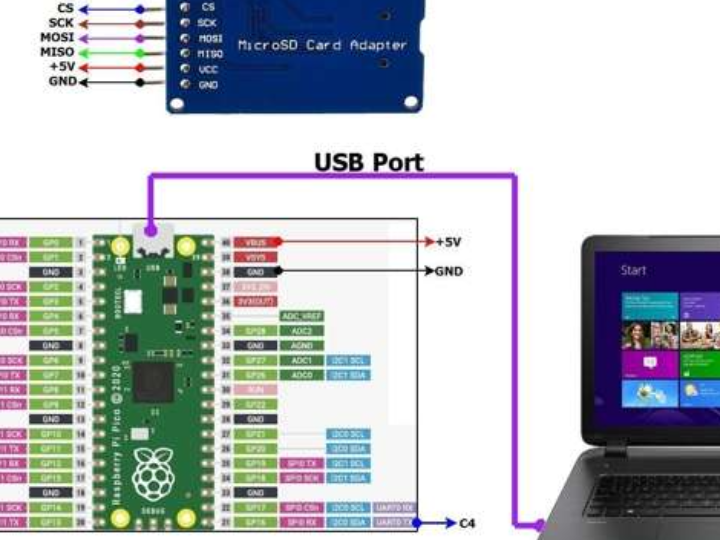
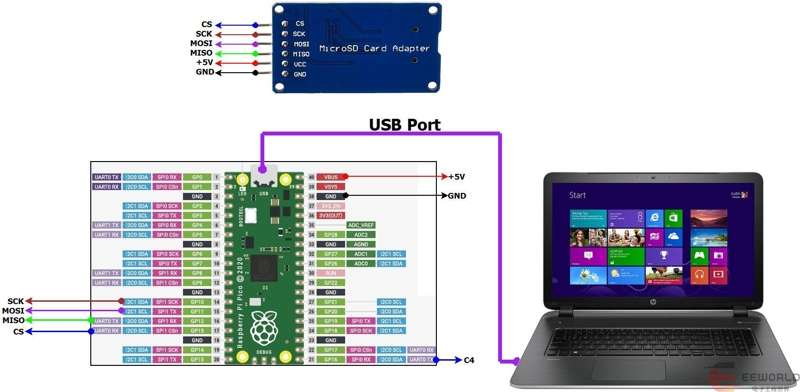
This section implements the following functions: Using a third-party SD library, it enables PICO access to an external SD card, including reading card information, displaying the SD card directory list, and file read/write access...
1. Prepare to download the SD card expansion library.
Address: https://github.com/khoih-prog/RP2040_SD
Overview: This library enables you to use SPI SD cards with RP2040-based boards such as Nano_RP2040_Connect, RASPBERRY_PI_PICO using either RP2040 Arduino-mbed or arduino-pico core. This SD-Fat v2 can support FAT16, FAT32, exFAT file systems. exFAT supports files larger than 4GB by using uint64_t as file offset.
This library is primarily designed for the RP2040 and supports FAT16, FAT32, and exFAT, as well as sizes larger than 4GB.
However, this library uses PICO's spi0 internally. Since the W5500 is connected to SPI0, some modifications are needed to connect the external SD card to SPI1.
2. Create a base project and copy the downloaded library to the project's lib folder.
/*
 SD card connection
 This example shows how to read an SD Card's CardInfo
              shows how to read and write data to and from an SD card file
 The circuit:
  SD card attached to SPI bus as follows:
  // Arduino-pico core
  ** MISO - pin 12
  ** MOSI - pin 11
  ** CS   - pin 13
  ** SCK  - pin 10
*/
#include <Arduino.h>
#include <SPI.h>
#include <RP2040_SD.h>
#define _RP2040_SD_LOGLEVEL_   1
#define PIN_SD_SS    PIN_SPI1_SS
// set up variables using the SD utility library functions:
Sd2Card card;
SdVolume volume;
File root;
#define fileName  "example.txt"
File myFile;
uint32_t writeData  = 0xDEADBEEF;
uint32_t readData   = 0;
void printDirectory(File dir, int numTabs)
{
 while (true)
 {
   File entry =  dir.openNextFile();
   if (! entry)
   {
     // no more files
     break;
   }
   for (uint8_t i = 0; i < numTabs; i++)
   {
     Serial.print('\t');
   }
   Serial.print(entry.name());
   if (entry.isDirectory())
   {
     Serial.println("/");
     printDirectory(entry, numTabs + 1);
   }
   else
   {
     // files have sizes, directories do not
     Serial.print("\t\t");
     Serial.println(entry.size(), DEC);
   }
   entry.close();
 }
}
bool checkFileExist(const char * fileNameInput)
{
 // Check to see if the file exists now
 if (SD.exists(fileNameInput) )
 {
   Serial.print(fileNameInput);
   Serial.println(" exists.");
   return true;
 }
 else
 {
   Serial.print(fileNameInput);
   Serial.println(" doesn't exist.");
   return false;
 }
}
void setup()
{
 // Open serial communications and wait for port to open:
 Serial.begin(115200);
 while (!Serial);
 delay(1000);
#if defined(ARDUINO_ARCH_MBED)
 Serial.print("Starting SD Card CardInfo on MBED ");
#else
 Serial.print("Starting SD Card CardInfo on ");
#endif
 Serial.println(BOARD_NAME);
 Serial.println(RP2040_SD_VERSION);
 Serial.print("Initializing SD card with SS = ");
 Serial.println(PIN_SPI1_SS);
 Serial.print("SCK = ");
 Serial.println(SPI1_SCK);
 Serial.print("MOSI = ");
 Serial.println(SPI1_MOSI);
 Serial.print("MISO = ");
 Serial.println(SPI1_MISO);
 // we'll use the initialization code from the utility libraries
 // since we're just testing if the card is working!
 if (!card.init(SPI_HALF_SPEED, PIN_SPI1_SS))
 {
   Serial.println("initialization failed. Things to check:");
   Serial.println("* is a card inserted?");
   Serial.println("* is your wiring correct?");
   Serial.println("* did you change the chipSelect pin to match your shield or module?");
   while (1);
 }
 else
 {
   Serial.println("Wiring is correct and a card is present.");
 }
 // print the type of card
 Serial.println();
 Serial.print("Card type:         ");
 switch (card.type())
 {
   case SD_CARD_TYPE_SD1:
     Serial.println("SD1");
     break;
   case SD_CARD_TYPE_SD2:
     Serial.println("SD2");
     break;
   case SD_CARD_TYPE_SDHC:
     Serial.println("SDHC");
     break;
   default:
     Serial.println("Unknown");
 }
 // Now we will try to open the 'volume'/'partition' - it should be FAT16 or FAT32
 if (!volume.init(card))
 {
   Serial.println("Could not find FAT16/FAT32 partition.\nMake sure you've formatted the card");
   while (1);
 }
 Serial.print("Clusters:          ");
 Serial.println(volume.clusterCount());
 Serial.print("Blocks x Cluster:  ");
 Serial.println(volume.blocksPerCluster());
 Serial.print("Total Blocks:      ");
 Serial.println(volume.blocksPerCluster() * volume.clusterCount());
 Serial.println();
 // print the type and size of the first FAT-type volume
 uint32_t volumesize;
 Serial.print("Volume type is:    FAT");
 Serial.println(volume.fatType(), DEC);
 volumesize = volume.blocksPerCluster();    // clusters are collections of blocks
 volumesize *= volume.clusterCount();       // we'll have a lot of clusters
 volumesize /= 2;                           // SD card blocks are always 512 bytes (2 blocks are 1KB)
 Serial.print("Volume size (Kb):  ");
 Serial.println(volumesize);
 Serial.print("Volume size (Mb):  ");
 volumesize /= 1024;
 Serial.println(volumesize);
 Serial.print("Volume size (Gb):  ");
 Serial.println((float)volumesize / 1024.0);
 if (!SD.begin(PIN_SD_SS))
 {
   Serial.println("Initialization failed!");
   return;
 }
 Serial.println("Initialization done.");
 root = SD.open("/");
 printDirectory(root, 0);
 Serial.println("read cardinfo done.");
 checkFileExist(fileName);

 // open a new file and immediately close it:
 Serial.print("Creating ");
 Serial.println(fileName);
 myFile = SD.open(fileName, FILE_WRITE);
 if (myFile)
 {
   myFile.write((uint8_t *) &writeData, sizeof(writeData));
   Serial.print("writeData = 0x");
   Serial.println(writeData, HEX);
   myFile.close();
 }
 else
 {
   Serial.print("Error open for writing ");
   Serial.println(fileName);
 }
 myFile = SD.open(fileName, FILE_READ);
 if (myFile)
 {
   myFile.read((uint8_t *) &readData, sizeof(readData));
   Serial.print("readData = 0x");
   Serial.println(readData, HEX);
   myFile.close();
 }
 else
 {
   Serial.print("Error open for reading ");
   Serial.println(fileName);
 }
 checkFileExist(fileName);
 // delete the file:
 Serial.println("Removing example.txt...");
 SD.remove(fileName);
 checkFileExist(fileName);
}
void loop()
{
 // nothing happens after setup finishes.
}
Step 1: Define the global object
Sd2Card card;
SdVolume volume;
File root;
Step 2: Initialize the SD card using card.init(), which internally uses SPI1.
Step 3: Output the SD card type based on card.type().
Step 4: volume.init(card) Initializes the SD card volume and prints and displays the SD card volume information.
Step 5: Initialize the SD card again with SD.begin(), and open the root directory of the SD card with SD.open("/").
Step 6: printDirectory(root, 0); traverse the SD card directory and print it via serial port.
Step 7: checkFileExist() checks if the file exists on the SD card, and uses functions such as SD.open, File.write, File.close, File.read, and SD.remove to open, add, delete, modify, and query the file.
3. Areas requiring modification
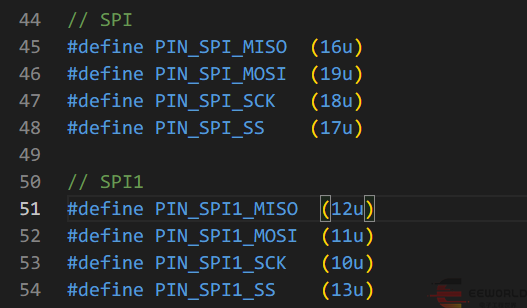
3.1. \.platformio\packages\framework-arduino-mbed\variants\RASPBERRY_PI_PICO\pins_arduino.h
Increase:
// SPI1
#define PIN_SPI1_MISO  (12u)
#define PIN_SPI1_MOSI  (11u)
#define PIN_SPI1_SCK   (10u)
#define PIN_SPI1_SS    (13u)

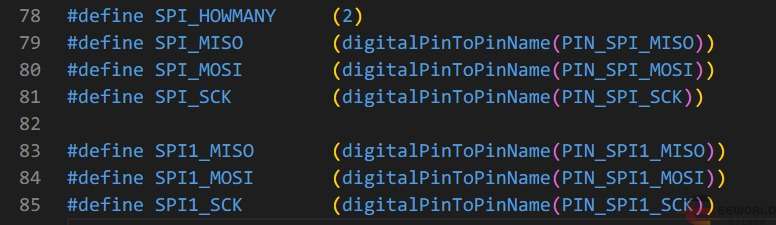
Modification: #define SPI_HOWMANY (1) (MBED's library only sets the macro definitions related to the SPI0 pin by default)
for:
#define SPI_HOWMANY (2)
Increase:
#define SPI1_MISO        (digitalPinToPinName(PIN_SPI1_MISO))
#define SPI1_MOSI        (digitalPinToPinName(PIN_SPI1_MOSI))
#define SPI1_SCK        (digitalPinToPinName(PIN_SPI1_SCK))

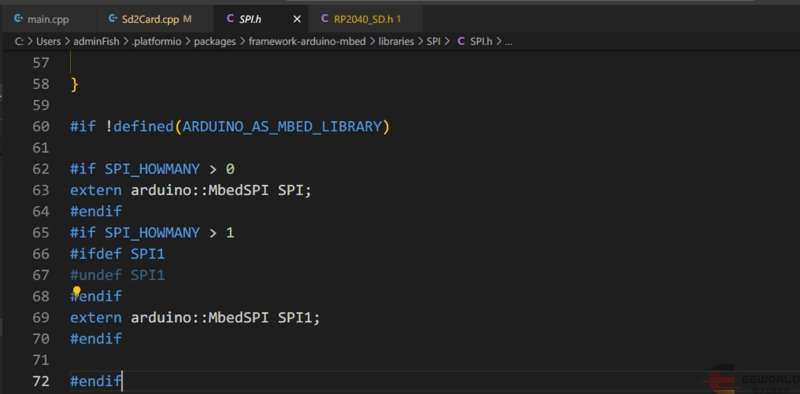
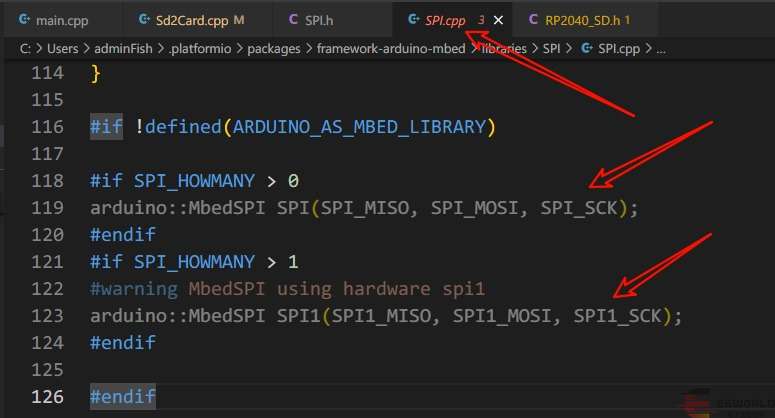
The relevant contents of the spi.h and spi.c files are as follows:
spi1 has already been bound to the corresponding pins during its definition.

3.2 RP2040_SD\src\utility\Sd2Card.cpp under RP2040_SD library
Modify SDCARD_SPI to:
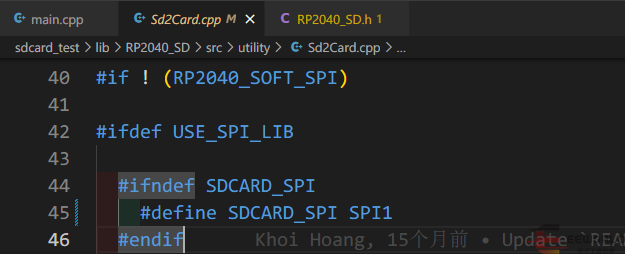
#define SDCARD_SPI SPI1