



louder-esphome-sendspin
louder-esphome-sendspin
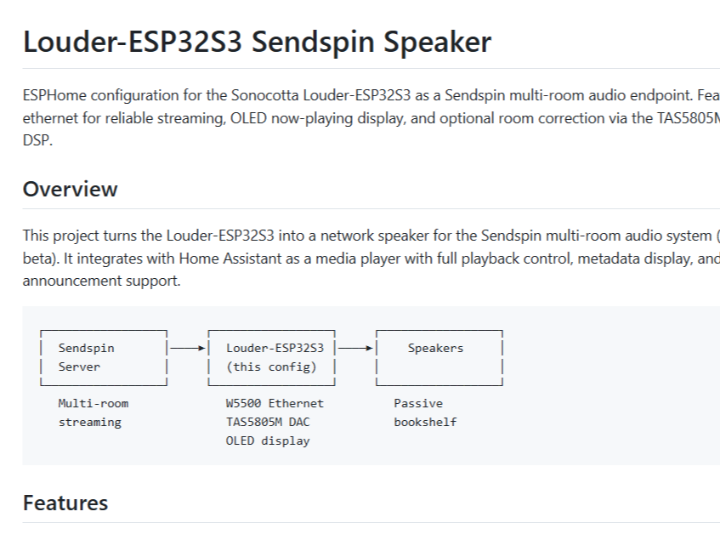
ESPHome configuration for the Sonocotta Louder-ESP32S3 as a Sendspin multi-room audio endpoint. Features W5500 ethernet for reliable streaming, OLED now-playing display, and optional room correction via the TAS5805M's built-in DSP.
This project turns the Louder-ESP32S3 into a network speaker for the Sendspin multi-room audio system (ESPHome beta). It integrates with Home Assistant as a media player with full playback control, metadata display, and announcement support.
┌─────────────────┐     ┌─────────────────┐     ┌─────────────────┐
│  Sendspin       │────►│  Louder-ESP32S3 │────►│    Speakers     │
│  Server         │     │  (this config)  │     │                 │
└─────────────────┘     └─────────────────┘     └─────────────────┘
   Multi-room              W5500 Ethernet          Passive
   streaming               TAS5805M DAC            bookshelf
                           OLED display
- Sendspin streaming - Synchronized multi-room audio playback
- Home Assistant integration - Media player entity with full control
- Announcement support - TTS/announcements with automatic ducking
- Now playing display - OLED shows track, artist, album
- Ethernet connectivity - W5500 for reliable, low-latency streaming
- 15-band graphic EQ - Adjustable via Home Assistant
- Room correction - Optional parametric EQ via TAS5805M biquads
- Sonocotta Louder-ESP32S3 board
- W5500 SPI Ethernet module (recommended)
- 128x64 SSD1306/SH1106 OLED (SPI)
- Passive speakers (bookshelf, etc.)
- 65W USB-C PD power supply
git clone https://github.com/yourusername/louder-esphome-sendspin.git
cd louder-esphome-sendspin

# Copy and edit secrets
cp secrets.yaml.example secrets.yaml
# Edit secrets.yaml with your API key and OTA passwordEdit louder-s3-sendspin-ethernet-oled.yaml:
substitutions:
  name: "louder-s3-kitchen"      # Change per zone
friendly_name: "Kitchen Speaker" # Change per zoneesphome run louder-s3-sendspin-ethernet-oled.yamlThe device will be auto-discovered. Add it via the ESPHome integration.
├── louder-s3-sendspin-ethernet-oled.yaml  # Main ESPHome config
├── room_correction_services.yaml          # Room correction HA services
├── tas5805m_biquad_i2c.h                  # Biquad I2C implementation
├── tas5805m_profile_manager.h             # EQ profile storage
├── calibrate.html                         # Phone calibration UI
├── index.html                             # Room correction UI
├── secrets.yaml.example                   # Example secrets
└── docs/
    ├── GETTING_STARTED.md                 # Detailed setup guide
    ├── PROFILE_USAGE.md                   # Profile management
    └── TESTING_CHECKLIST.md               # Testing procedures
| Function | GPIO |
|---|---|
| I2S LRCLK | 15 |
| I2S BCLK | 14 |
| I2S DOUT | 16 |
| TAS5805M Enable | 17 |
| I2C SDA | 8 |
| I2C SCL | 9 |
| Ethernet CS | 10 |
| Ethernet INT | 6 |
| Ethernet RST | 5 |
| OLED CS | 47 |
| OLED DC | 38 |
| OLED RST | 48 |
The configuration includes optional room correction via the TAS5805M's 30 programmable biquad filters (15 per channel). This is included as a package and can be removed if not needed.
When room correction is enabled, these services are available:
| Service | Description |
|---|---|
set_parametric_eq | Parametric EQ (frequency, gain, Q) |
set_low_shelf / set_high_shelf | Shelf filters |
set_highpass / set_lowpass | HP/LP filters |
set_notch | Notch filter |
reset_all_biquads | Reset to flat response |
save_profile / load_profile | Manage EQ profiles |
service: esphome.louder_s3_kitchen_set_parametric_eq
data:
  channel: 2      # 0=left, 1=right, 2=both
  index: 0        # Biquad slot 0-14
  frequency: 80   # Hz
  gain_db: -6     # dB (negative = cut)
q: 2 # Q factorFor automated measurement and correction:
- Open
http://louder-s3-kitchen.local/calibrateon your phone - Position phone at listening position
- Allow microphone access
- Follow measurement wizard
- Review and apply calculated filters
To use as a simple Sendspin speaker without room correction, remove this from the main config:
packages:
room_correction: !include room_correction_services.yaml- Check ethernet connection (link LED on W5500)
- Verify Sendspin server is running
- Check ESPHome logs for errors
- Use ethernet instead of WiFi for reliability
- Check network congestion
- Verify PSRAM is detected in logs
- Check SPI wiring (CS=47, DC=38, RST=48)
- Try changing model from
SSD1306toSH1106
- Check I2C bus logs for errors
- Verify TAS5805M address (0x2C)
- Ensure DAC is enabled
- mrtoy-me - ESPHome TAS5805M component
- Sonocotta - Louder-ESP32S3 hardware
- ESPHome Sendspin team - Multi-room audio streaming
MIT License