



Just for Fun !!!!! Why not ? Ethernet shield for NearQaxe using W5500 Ethernet module
Adding Ethernet to the Bitaxe Miner with WIZnet W5500: A "Just for Fun" Project
Introduction
The Bitaxe is a fantastic open-source ASIC Bitcoin miner based on the ESP32-S3. While it is compact and efficient, it natively relies on Wi-Fi for connectivity. In the world of mining, network stability is just as critical as hashrate; Wi-Fi interference, latency spikes, or dropouts directly result in reduced efficiency and rejected shares.
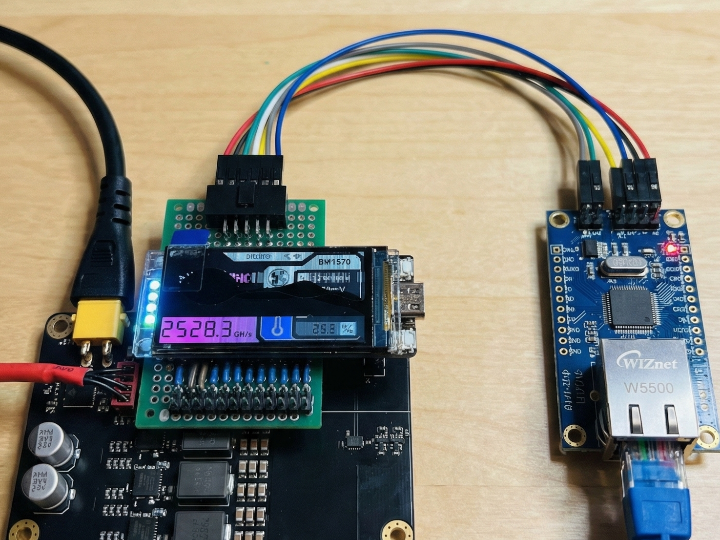
Recently, a maker in the Bitaxe Reddit community shared a success story of connecting an Ethernet shield to a NearQaxe miner "Just for fun." This project demonstrates how to leverage the ESP32-S3's powerful SPI interface to add a WIZnet W5500 Ethernet module, providing the miner with a robust, hardwired network connection.
This post outlines how to upgrade your Bitaxe with a wired connection using the WIZnet W5500 module, inspired by that community project.
What is NearQaxe?
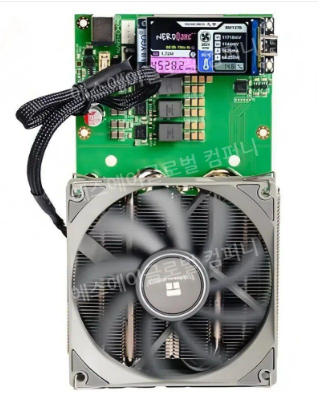
The NearQaxe is a specialized iteration within the open-source Bitaxe ecosystem. Designed by community makers, it aims to push the boundaries of home mining efficiency and customizability.
Like the standard Bitaxe Ultra, the NearQaxe is powered by the ESP32-S3 microcontroller and utilizes the Bitmain BM1366 ASIC chip for hashing. However, the NearQaxe is often distinguished by its optimized PCB layout and specific design choices favoring power stability.
Crucially for this project, the NearQaxe design retains accessible GPIO headers on the board. Unlike some commercialized compact miners that remove these pins to save space or cost, the NearQaxe embraces the "maker" spirit. These exposed headers allow users to tap into the ESP32's SPI bus, making it the perfect candidate for hardware expansions like the WIZnet W5500 Ethernet shield.
Features
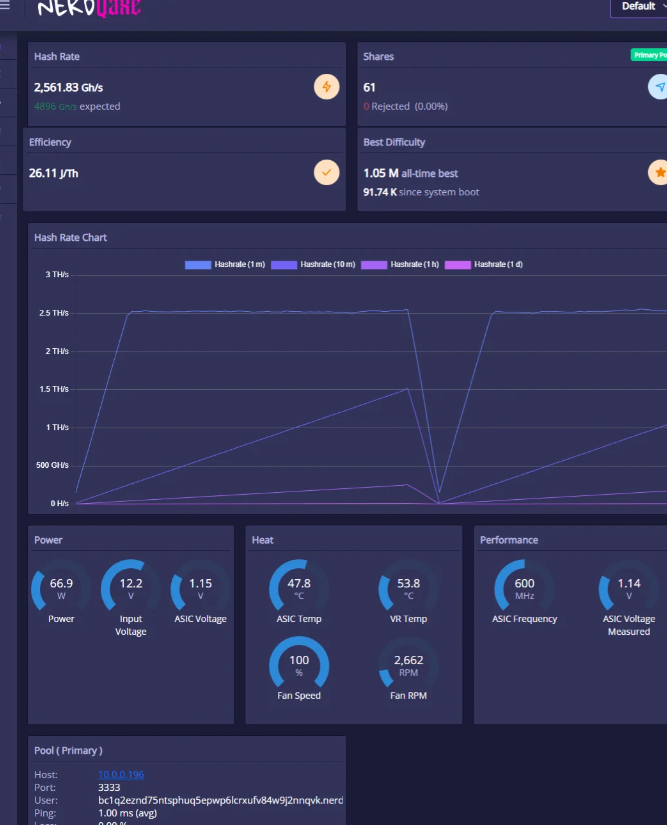
Stable Network: Eliminates Wi-Fi instability and ensures a continuous, reliable connection to the mining pool.
Standard SPI Interface: Utilizes the spare GPIO pins on the ESP32-S3 (accessible on the NearQaxe board) for standard SPI communication.
Cost-Effective: A low-cost upgrade using the readily available WIZnet W5500 module.
ESP-IDF Compatibility: Uses the native Ethernet drivers officially supported by the ESP32-S3 development framework (ESP-IDF).
How to Use
This project consists of two main parts: Hardware Wiring and Firmware Configuration.
Step 1: Requirements
Bitaxe Board: Specifically the NearQaxe or any Bitaxe variant with accessible GPIO headers.
Ethernet Module: WIZnet W5500 (SPI Interface).
Tools: Jumper wires and soldering equipment.
Step 2: Wiring
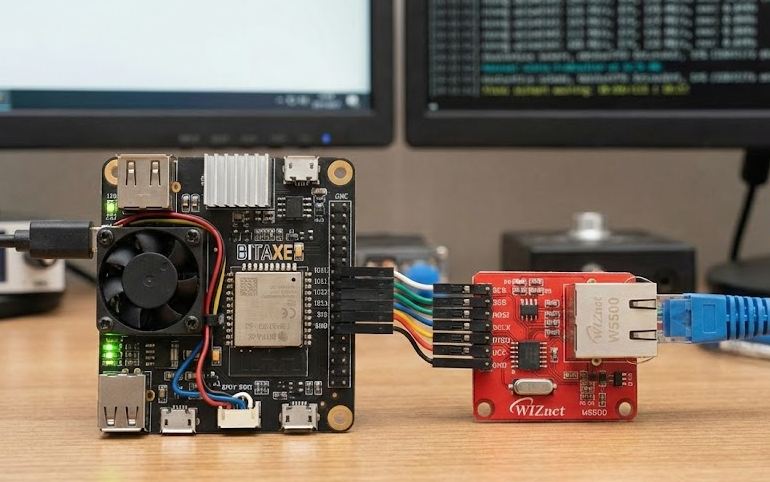
You need to connect the W5500 module to the ESP32-S3 GPIO pins on the NearQaxe via SPI.
Crucial: The available GPIO pin map may vary depending on your specific board revision, so always check your board's schematic.
Here is a general connection example (you must define these specific pins in the firmware later):
| ESP32-S3 (NearQaxe GPIO) | W5500 Module | Description |
|---|---|---|
| 3.3V | VCC / 3V3 | Power |
| GND | GND | Ground |
| GPIO XX (e.g., IO10) | SCS (CS) | Chip Select |
| GPIO XX (e.g., IO12) | SCLK (SCK) | SPI Clock |
| GPIO XX (e.g., IO13) | MISO | Master In Slave Out |
| GPIO XX (e.g., IO11) | MOSI | Master Out Slave In |
| GPIO XX (Optional) | INT | Interrupt (Not mandatory) |
| GPIO XX (Optional) | RST | Reset (Not mandatory) |
Note: The pin numbers above are examples. You must find unused GPIO pins on your actual NearQaxe board to make these connections.
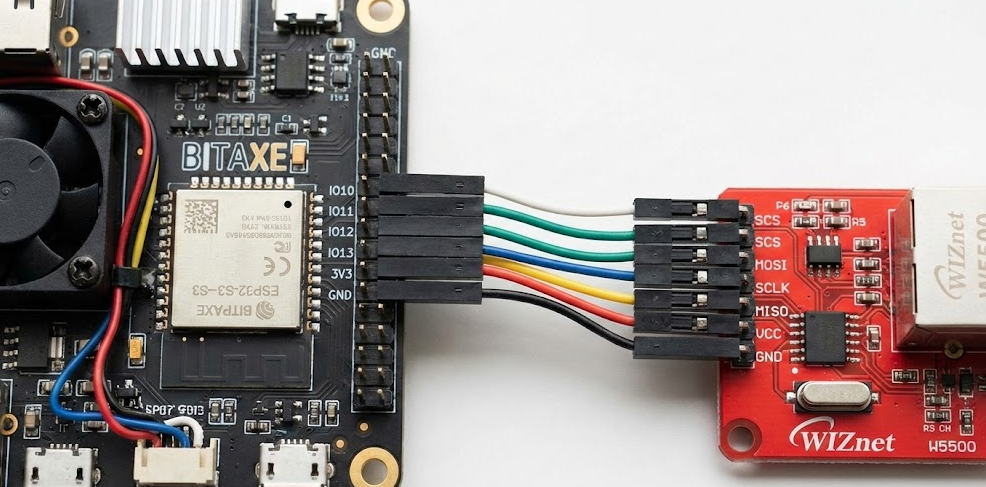
[Image 1: Hardware connection between NearQaxe and W5500]
Step 3: Firmware Configuration
The Bitaxe firmware (mostly based on ESP-Miner) is built on the ESP-IDF framework. To enable Ethernet, you must recompile the firmware with the correct drivers enabled.
Prepare the Bitaxe source code and set up the ESP-IDF environment.
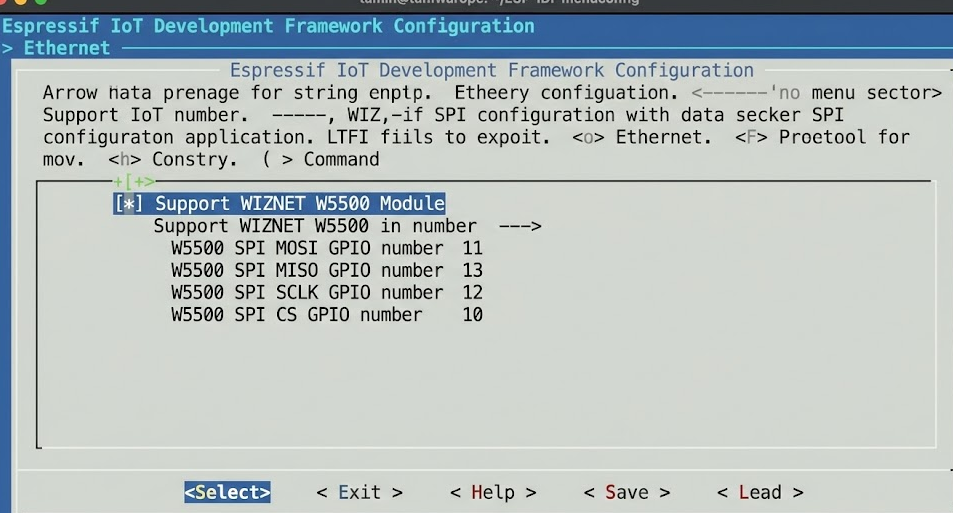
Run the command idf.py menuconfig.
Navigate to Component config -> Ethernet.
Enable the Support WIZNET W5500 Module option.
Enter the exact GPIO pin numbers you used in the wiring step (MISO, MOSI, SCLK, CS, etc.).
Save the configuration, build the firmware (idf.py build), and flash it (idf.py flash).
[Image 2: ESP-IDF menuconfig Ethernet settings]
Result
Once the configuration is complete and the firmware is uploaded, the NearQaxe will attempt to connect via Ethernet upon boot (either replacing or prioritizing over Wi-Fi). It will obtain an IP address via DHCP from your router and establish a stable connection to the mining pool to begin hashing.
[Image 3: NearQaxe running on Ethernet]
Code & Resources
This project relies on changing the ESP-IDF configuration of the existing Bitaxe firmware rather than writing a standalone application. For reference on how the W5500 is initialized in ESP32-S3, you can check the official Espressif examples.
ESP-IDF Ethernet Example: https://github.com/espressif/esp-idf/tree/master/examples/ethernet/
FAQ (WIZnet-Focused)
Q1. Why use W5500 instead of Wi-Fi for NearQaxe projects?
W5500 removes the need for software TCP/IP stacks and wireless configuration, allowing NearQaxe projects to focus on application logic. Its deterministic timing and hardware offload make system behavior easier to understand, debug, and teach—especially in educational or experimental settings.
Q2. How does W5500 connect to NearQaxe hardware?
W5500 connects via SPI, typically using MOSI, MISO, SCLK, and CS lines. All Ethernet processing happens inside the chip, while the MCU only exchanges socket data and configuration registers, keeping firmware simple and predictable.
Q3. What role does W5500 play in this project specifically?
In this project, W5500 replaces Wi-Fi as the primary network interface, acting as a stable and always-on communication layer. It demonstrates that Ethernet is not overkill for maker projects but often a better engineering choice.
Q4. Is this approach suitable for beginners?
Yes. Beginners often struggle more with Wi-Fi configuration than with SPI peripherals. W5500 offers a clearer learning curve, especially when paired with Arduino-compatible libraries or WIZnet’s ioLibrary, making it beginner-friendly despite being “industrial-grade.”
Q5. How does W5500 compare to ENC28J60 for similar projects?
ENC28J60 requires a full software TCP/IP stack, increasing firmware size and complexity. W5500’s hardware TCP/IP drastically reduces development effort, memory usage, and debugging time—making it far more suitable for NearQaxe and educational projects.