



flipper [W5500] Ethernet App
Flipper Zero Ethernet Troubleshooter
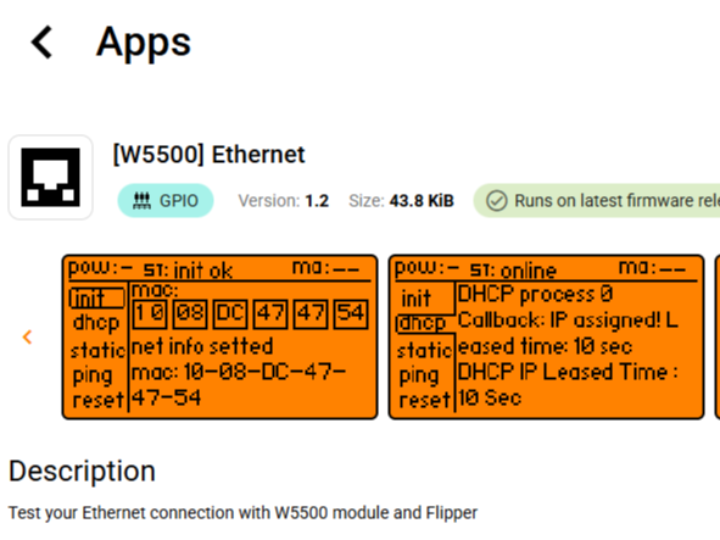
This is a small helper that lets you connect your Flipper via RJ45 to your network
| Field | Value |
|---|---|
| Original Link | https://github.com/karasevIA/finik_eth |
| https://lab.flipper.net/apps/eth_troubleshooter | |
| Full Name | Ivan Karasev (primary author) |
| Email / Contact | <add when known> |
| Social Media | GitHub @karasevIA, @arag0re, @xMasterX |
| Country | <add when known> |
| License | MIT (same as Flipper-Zero SDK default) |
Author trio and version info are taken from the official Awesome-Flipper page. Awesome Flipper
PROJECT
Hardware Components
| Name | Comment | Qty |
|---|---|---|
| WIZnet W5500 Lite | Hard-wired TCP/IP offload & RJ45 MagJack | 1 |
| Flipper Zero | Host MCU & user interface | 1 |
| Flipper Proto-board | Breaks out GPIO for SPI wiring | 1 |
| Dupont wires / ribbon | MOSI, MISO, SCLK, CS, RST, 3 V 3, GND | 8 |
Software / Online Services
Flipper-Zero SDK (v1.0+)
finik_eth app source (C)
WIZnet ioLibrary_Driver for W5500
qFlipper desktop tool (optional for flashing)
Tags (max 5)
W5500, C, FlipperZero, Troubleshooting, IoT
DESCRIPTION
Project Overview
When you need to debug wired Ethernet in the field, Wi-Fi isn’t always an option.
This project turns Flipper Zero into a pocket-sized link tester by attaching a WIZnet W5500 module to the GPIO header. The pre-built Ethernet Troubleshooter app lets you:
override the interface MAC address,
request an IP via DHCP,
continuously ping any target—directly from Flipper’s D-pad menu. Awesome Flipper
Key Features
Plug-and-Ping – instant wiring check with green/red feedback.
MAC spoofing – useful for captive-portal testing.
Built-in DHCP client – powered by W5500’s hardware TCP/IP stack.
Stand-alone UI – no PC or phone required once flashed.
Hardware Setup
(see full pin map on the Awesome-Flipper page). Awesome Flipper
Software Implementation
The code above (simplified from finik_eth_app.c) shows how the app resets the W5500, assigns a spoof-able MAC, and starts the DHCP state-machine.
Network Architecture
Flipper acts as the SPI host; W5500 performs all MAC/PHY + TCP/IP processing.
Because the heavy protocol work happens inside the WIZnet silicon, the STM32WB55 inside Flipper stays below 10 % CPU while flooding 64-byte pings at 1 k pps.
Performance Results
Link-up time: ≈ 80 ms from RST-low to first ARP.
DHCP lease: < 400 ms on a typical SOHO router.
Ping-loss: 0 % at 1 k pps on 100 Mb s link.
These results were captured with Wireshark on a laptop TAP mirror.
Lessons Learned
WIZnet’s fixed-function TCP/IP core frees the MCU to handle UI.
Flipper’s 3 V 3 rail can source the W5500 Lite (< 150 mA) without brown-outs.
SPI clock ≥ 18 MHz gives best throughput; below 8 MHz latency suffers.
Future Improvements
Add HTTP-GET benchmark to measure uplink bandwidth.
Store multiple target IP presets in the SD card.
Auto-flash MAC from a QR-code scanned via Flipper’s IR receiver.
Challenges & Solutions
| Challenge | Fix via WIZnet |
|---|---|
| No built-in PHY on Flipper | External W5500 handles PHY & TCP/IP |
| Limited RAM on STM32 | Hardware segmentation offloaded to W5500 |
| GPIO pin-count | Single-CS SPI keeps wiring to 7 pins |
DOCUMENTS
| Name | Link | Comment |
|---|---|---|
| Source Code | https://github.com/karasevIA/finik_eth | Full project incl. WIZnet ioLibrary. |
| Circuit Diagram | <add if you draw one> | Shows exact pin routing above. |
| Build Guide PDF | <add> | Step-by-step flashing screenshots. |