Smart Watch
Smart Watch
0
Components
Hardware componentsSSD1306
x 1
WIZnet WIZwiki-W7500
x 1
easy module shield
x 1
jumper cable
x 1
mbed IDE
x 1
Project description
Story
A smart watch becomes the most significant item in a wearable device category.
I did use the mbed web complier. I wish you use the mbed web complier.

Step 1: Parts

-?WIZwiki-W7500?at WIZnet :?WIZwiki-W7500
-?OLED 128x64(SSD1306/i2c)?at Adafruit :http://www.adafruit.com/products/326
-?Easy module Shield?at YWRobot(only china site) :?YWRobot
-?Jumper cable?: connect OLED and easy module Shield
Libraries
- SSD1306 Driver
- Ethernet library (made in WIZnet)
Apps
- mbed web complier :?LINK
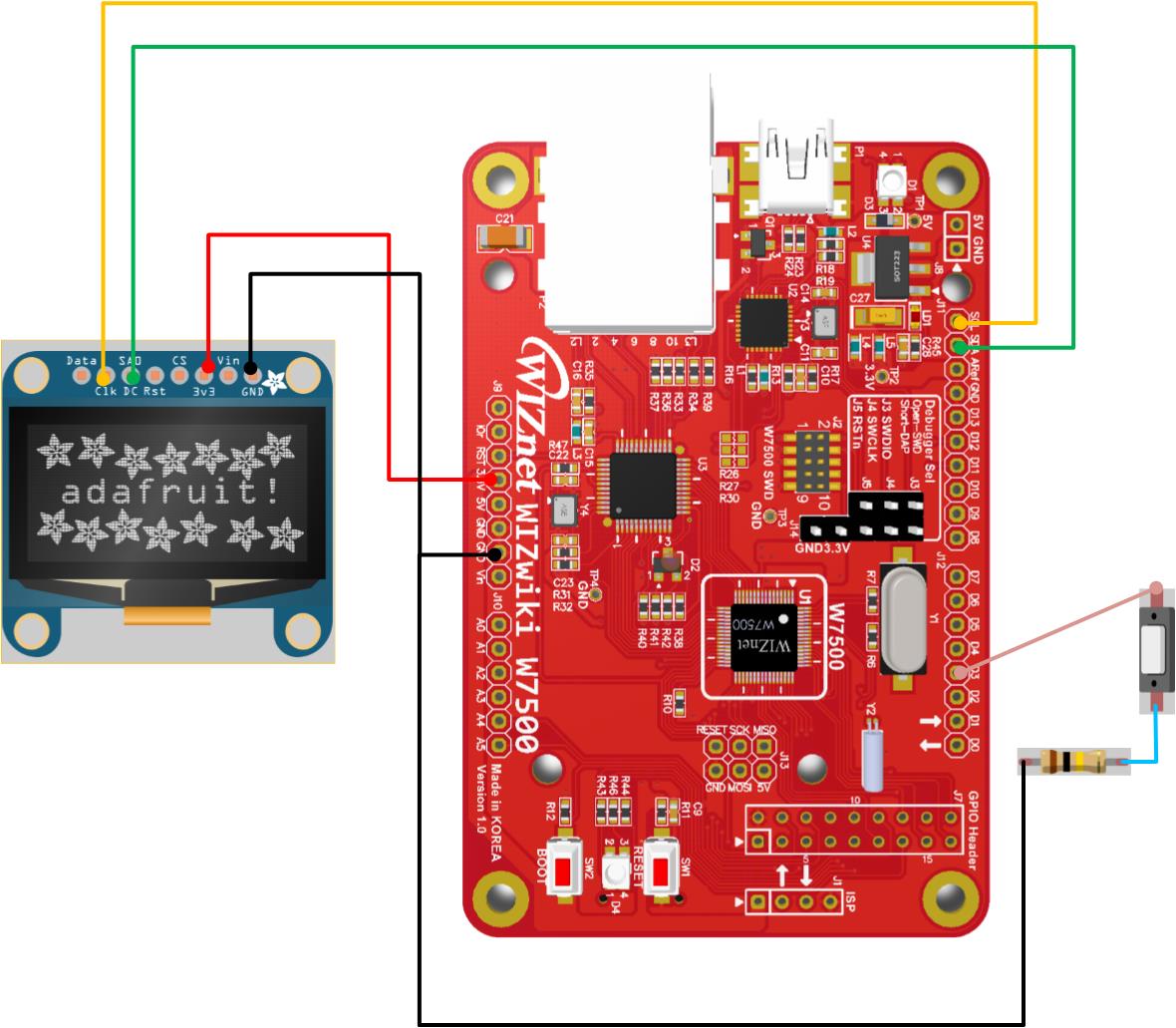
Step 2: Hardware

? ? ? ? ? ?WIZwiki-W7500 ? ? OLED
?SCL ? ? ? ? PA_9 ? ? ? ? ? ? ? ? ? SCL
?SDA ? ? ? ?PA_10 ? ? ? ? ? ? ? ? ?SDA
?GND ? ? ? GND ? ? ? ? ? ? ? ? ? ? GND
?VCC ? ? ? ?VCC ? ? ? ? ? ? ? ? ? ? VCC
? ? ? ? ? ? WIZwiki-W7500
Button? ? ? ? ? ?PC_0
Step 3: Realize the smart clock

1. The Network time obtain from NTP Server using SNTP Protocol
2. The initial value of RTC write the bring data.
3. The Clock count using setting value.
Step 4: Mbed web complier and CMSIS-DAP

You can download the firmware using the mbed web complie.
1. When you connect the USB cable to the WIZwiki-W7500, PC recognized as a removable disk. Removable disk name is MBED.2. You “drag and drop” or copy the firmware to the removable disk, the firmware writing progress has completed.
3. After completing the firmware writing, open to check the removable disk.
4. If “fail.txt” file is exists in the removable disk, it means writing the firmware has failed.
5. After pressing the Reset button (SW1) of WIZwiki- W7500, please repeat the steps from 2.
Step 5: Design the case of clock

3D print :?LINK
Step 6: Confirm the operation

Step 7: Source code and reference site
- smart watch source code :?LINK
- ethernet source code :?LINK
- 3D print :?LINK