


UV-SM-
Arduino uniform vending machine using WIZnet W5x00 Ethernet. Supports QR authentication, inventory management, and automated dispensing.
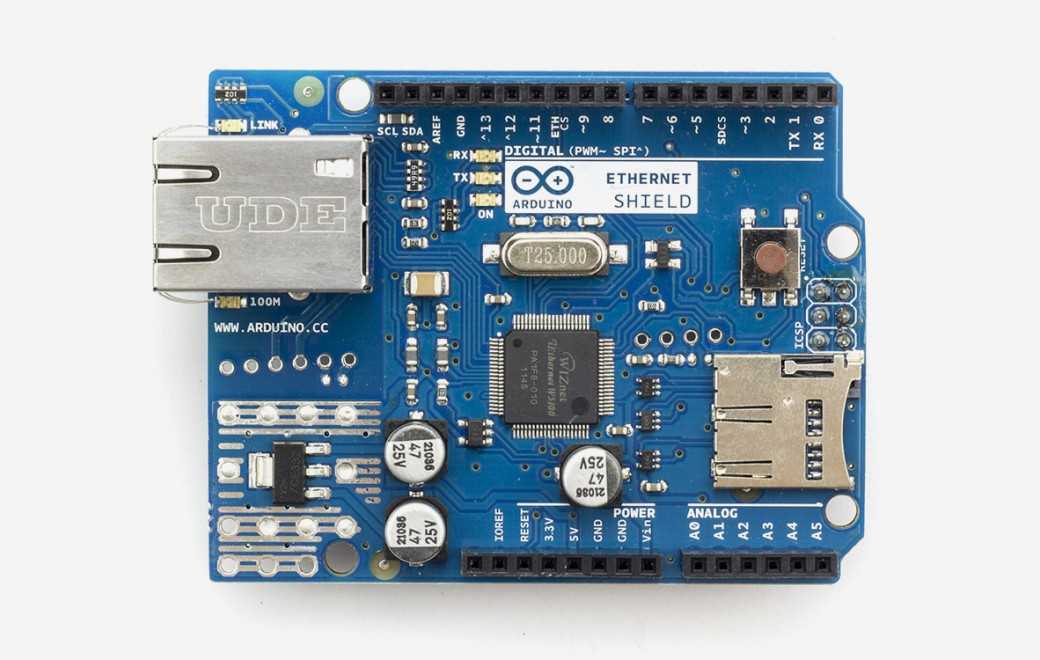
Arduino - Arduino Ethernet Shield
x 1

What the Project Does
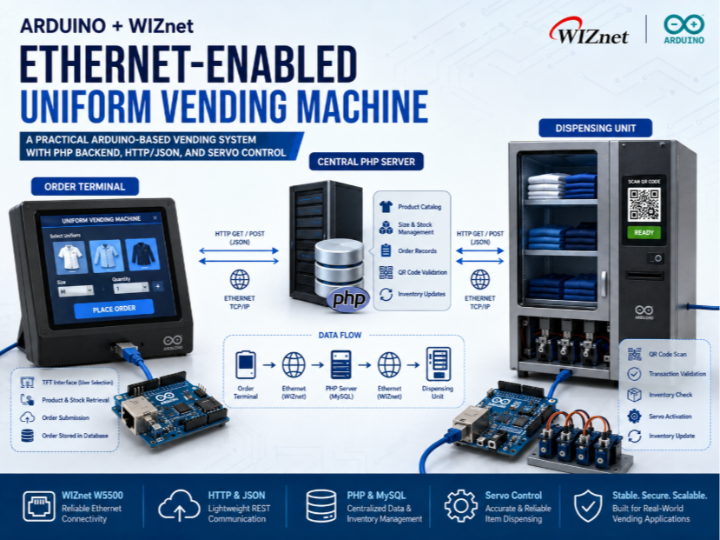
The system is divided into two major devices: an Order Terminal and a Dispensing Unit.
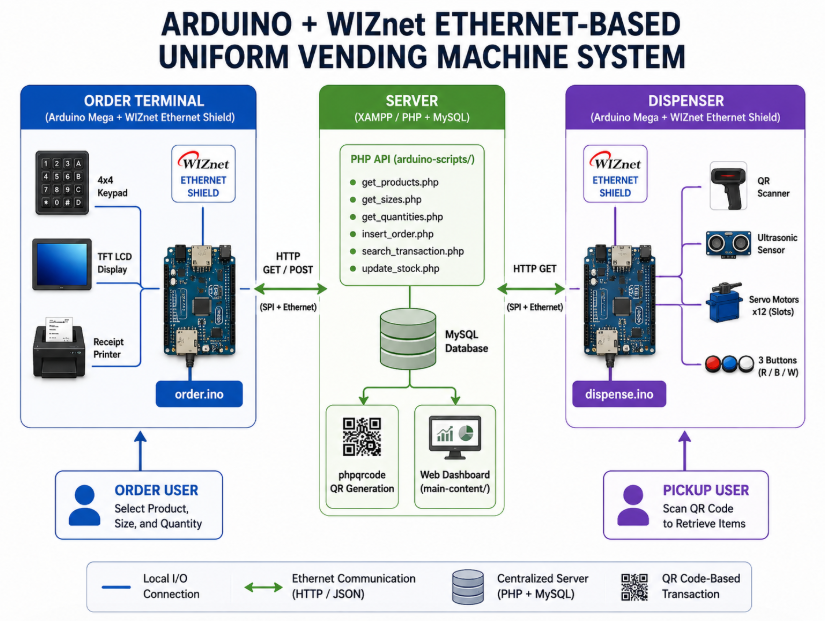
Generated By GPT
The Order Terminal allows users to select uniform types, sizes, and quantities through a TFT interface. Product information is retrieved from a PHP server, and completed orders are stored in a backend database.
The Dispensing Unit receives QR codes from customers, validates the transaction through the server, verifies inventory availability, and activates servo motors to release the requested items. Inventory information is updated immediately after successful dispensing.
Data flows through a centralized PHP server that manages:
- Product catalog information
- Size and stock availability
- Order records
- QR code validation
- Inventory updates
This architecture demonstrates a practical Ethernet-enabled vending system where multiple Arduino nodes interact with centralized backend services using HTTP and JSON.
Where WIZnet Fits
The project uses the Arduino Ethernet library together with the SPI interface, indicating a WIZnet W5x00-series Ethernet controller deployment.
In this architecture, the WIZnet device acts as the network transport layer between the Arduino application and the backend server.
Key responsibilities include:
- Establishing Ethernet connectivity
- Managing TCP socket communication
- Sending HTTP requests
- Receiving JSON responses
- Supporting real-time inventory synchronization
This is particularly useful because vending systems require predictable and stable network behavior. Unlike Wi-Fi-based deployments that may experience signal fluctuations or roaming issues, wired Ethernet provides deterministic communication for transaction processing.
For Arduino-class MCUs with limited memory resources, WIZnet's hardware TCP/IP offload architecture reduces software networking complexity while allowing the application to focus on UI handling, QR processing, and actuator control.
Implementation Notes
Ethernet Initialization
The order terminal initializes the Ethernet interface and prepares a client connection to the backend server.
File: arduino/order.ino
#include <SPI.h>
#include <Ethernet.h>

byte mac[] = { 0xDE, 0xAD, 0xBE, 0xEF, 0xFE, 0xED };
IPAddress server(192, 168, 1, 4);
EthernetClient client;

void setup(void) {
    Ethernet.begin(mac);
}
Why it matters:
- Initializes the WIZnet-based Ethernet interface
- Obtains network parameters
- Creates the transport layer used by the application
HTTP Communication with PHP APIs
The Arduino communicates with backend APIs through standard HTTP GET requests.
File: arduino/order.ino
client.print("GET ");
client.print(endpoint);
client.println(" HTTP/1.1");
client.print("Host: ");
client.println(server);
client.println("Connection: close");
Why it matters:
- Demonstrates a lightweight REST-style architecture
- Allows Arduino devices to integrate with standard web technologies
- Simplifies backend development using PHP and MySQL
JSON-Based Product Synchronization
Server responses are parsed and cached locally.
File: arduino/order.ino
DeserializationError error = deserializeJson(doc, jsonResponse);

if (!error) {
    JsonArray productsArray = doc.as<JsonArray>();

    for (JsonObject product : productsArray) {
        products[productCount].product_name =
            String(product["product_name"].as<const char*>());

        productCount++;
    }
}
Why it matters:
- Enables dynamic inventory retrieval
- Avoids hardcoded product definitions
- Allows centralized inventory management
QR-Based Order Verification
The dispensing unit validates QR codes through a backend lookup request.
File: arduino/dispense.ino
String encodedQrCode = urlEncode(qrCode);

client.print(
"/uvm/arduino/arduino-scripts/search_transaction.php?qrcode=");
client.print(encodedQrCode);
client.println(" HTTP/1.1");
Why it matters:
- Prevents unauthorized dispensing
- Enables transaction-based inventory control
- Supports centralized order validation
Practical Tips and Pitfalls
- Use static IP addressing for vending deployments when backend servers reside on local networks.
- Verify Ethernet link status before processing orders to avoid transaction failures.
- Reserve sufficient memory for ArduinoJson documents when handling large product catalogs.
- Add request timeout handling to prevent the UI from freezing during network interruptions.
- Consider watchdog recovery for unattended installations.
- Separate servo power supplies from Arduino logic power to avoid network instability during motor activation.
- Validate inventory updates on the server side to prevent duplicate dispensing events.
FAQ
Why use a WIZnet Ethernet controller for this project?
A vending machine processes real transactions and inventory updates. Wired Ethernet provides stable and predictable connectivity, while WIZnet devices offload TCP/IP processing from the MCU and simplify implementation on resource-constrained Arduino boards.
How is the WIZnet device connected to Arduino?
The Ethernet controller communicates through the SPI interface. Typical connections include MOSI, MISO, SCK, CS, and RESET, while the Ethernet library handles most low-level communication details.
What role does the WIZnet device play in this vending machine?
It provides all network connectivity between the Arduino devices and the PHP backend. Product retrieval, order submission, QR validation, and inventory synchronization all depend on Ethernet communication.
Can beginners build a simplified version of this project?
Yes. Basic knowledge of Arduino programming, Ethernet networking, HTTP communication, and servo control is sufficient. Beginners can start by implementing only the product query and order submission stages before adding dispensing hardware.
How does this compare with a Wi-Fi-based solution?
Wi-Fi reduces cabling requirements but introduces signal-quality dependencies and potential connection instability. Ethernet provides more deterministic communication, which is often preferable for transaction-oriented systems such as vending machines and inventory kiosks.
Source
Original Project: Arduino-Based Uniform Vending Machine
Referenced Files:
arduino/order.inoarduino/dispense.inoarduino/arduino-scripts/*
License: Verify the original repository license before redistribution.
Tags
#W5500
#WIZnet
#Arduino
#EthernetShield
#UniformVendingMachine
#IndustrialIoT
#HTTP
#JSON
#ServoControl
#QRCode
#InventoryManagement
#EmbeddedSystems