


TeslaCloud
TeslaCloud
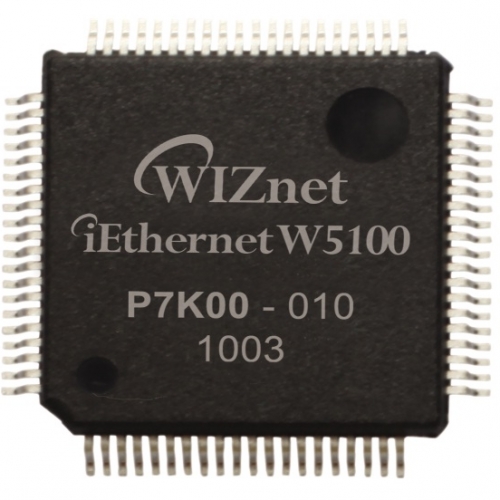
WIZnet - W5100
x 1


WIZnet - W5500
x 1
What the Project Does
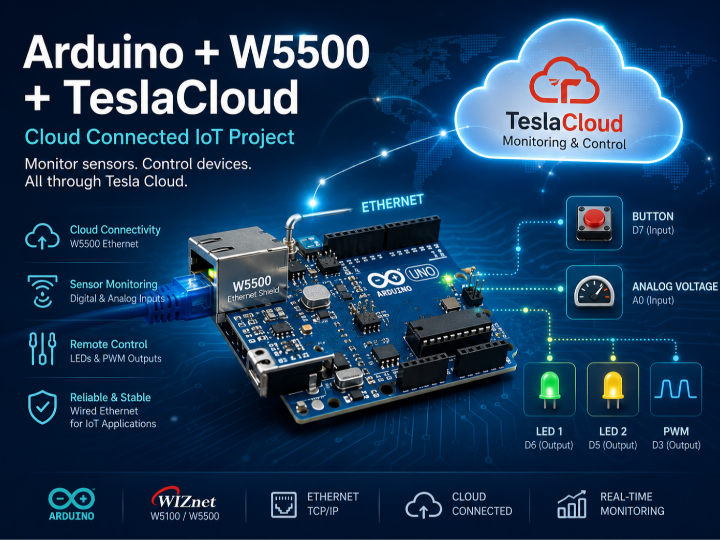
The project creates a cloud-connected Arduino node that can both publish sensor data and receive remote control commands through Tesla Cloud.
The architecture consists of:
- Arduino UNO or compatible board
- WIZnet W5100/W5500 Ethernet Shield
- Tesla Cloud platform
- Digital and analog field devices
The workflow is straightforward:
- Arduino initializes the Ethernet connection.
- The TeslaCloud client connects to the cloud server.
- Sensor inputs are mapped to cloud tags.
- Input changes are transmitted to Tesla Cloud.
- Remote commands received from Tesla Cloud update Arduino outputs.
The provided example demonstrates:
| Tag | Pin | Direction | Function |
|---|---|---|---|
| BUT | D7 | Input | Push button monitoring |
| vol | A0 | Input | Analog voltage monitoring |
| L1 | D6 | Output | Remote LED control |
| L2 | D5 | Output | Remote LED control |
| L3 | D3 | Output | PWM output control |
This creates a complete end-to-end IoT workflow covering data acquisition, cloud transmission, visualization, and remote actuation.
Where WIZnet Fits
This project uses the WIZnet W5100 or W5500 Ethernet Shield as the physical network interface between Arduino and Tesla Cloud.
In the system architecture, the W5500 provides:
- Wired Ethernet connectivity
- TCP/IP communication support through the Arduino Ethernet library
- Stable cloud connectivity for continuous operation
- Isolation from Wi-Fi congestion and interference
For Arduino-class microcontrollers, wired Ethernet remains attractive because memory and processing resources are limited. The W5500 integrates a hardware TCP/IP offload engine with internal network buffering, allowing the MCU to focus on application logic instead of maintaining a complete software networking stack.
System Architecture
+----------------------+
|      Tesla Cloud     |
| Monitoring & Control |
+----------+-----------+
           |
      Ethernet LAN
           |
+----------+-----------+
| W5100 / W5500 Shield |
| Ethernet Interface   |
+----------+-----------+
           |
+----------+-----------+
|      Arduino UNO     |
| TeslaCloud Client    |
+----+---------+-------+
     |         |
 Sensors    Outputs
(Button,    LEDs,
Analog)     PWM)
Implementation Notes
The Arduino example initializes the Tesla Cloud client and establishes Ethernet connectivity using a fixed IP address and MAC address.
File: examples/arduinouno/arduinouno.ino
byte mac[] = {0xDE, 0xAD, 0xBE, 0xEF, 0xFE, 0xED};
IPAddress ip(192, 168, 1, 55);

TeslaCloud cloudclient("username", "password", 5);

void setup() {
    cloudclient.connect(ip, mac);
}
Why it matters:
- The MAC address uniquely identifies the Ethernet device.
- The static IP provides deterministic network access.
cloudclient.connect()establishes communication through the Ethernet Shield to Tesla Cloud.
The project then maps Arduino pins to cloud-managed tags.
File: examples/arduinouno/arduinouno.ino
Tag tag("BUT", 7, INPUT_PULLUP);
cloudclient.addTag(tag);

Tag tag2("vol", A0, INPUT, ANALOG_PIN);
tag2.setScale(0, 1023, 0, 5);
tag2.setDeadband(0.2);
cloudclient.addTag(tag2);
Why it matters:
- Digital and analog signals become cloud-visible objects.
- Scaling converts raw ADC values into engineering units.
- Deadband filtering reduces unnecessary network traffic by suppressing minor fluctuations.
The continuous cloud synchronization loop is handled through:
void loop() {
    if (cloudclient.run()) {
    }
}
This function continuously processes inbound and outbound cloud communications, ensuring that sensor updates and remote commands remain synchronized.
Practical Tips / Pitfalls
- Ensure the MAC address is unique on the local network.
- Avoid assigning a static IP inside the router's DHCP allocation range.
- Verify SPI pin usage when combining Ethernet Shields with other SPI peripherals.
- On many W5100 shields, the SD card slot shares resources and may require attention to CS pin configuration.
- Check Ethernet link status before troubleshooting cloud connectivity.
- For larger deployments, consider migrating from W5100 to W5500 for improved performance and compatibility.
- Arduino UNO memory is limited; excessive tag counts or large JSON payloads may cause instability.
FAQ
Why use the W5500 for this project?
The W5500 provides reliable wired Ethernet connectivity and hardware TCP/IP offloading. Compared with Wi-Fi-based designs, it offers more predictable network behavior in classrooms, laboratories, and industrial environments where stability is often more important than mobility.
How does the W5500 connect to Arduino?
The shield communicates through the SPI interface.
For Arduino UNO:
- MOSI → D11
- MISO → D12
- SCK → D13
- CS → D10
These connections are handled automatically when using a compatible Ethernet Shield.
What role does the W5500 play in this project?
The W5500 acts as the network transport layer between Arduino and Tesla Cloud. All sensor data uploads and remote control commands pass through the Ethernet interface provided by the shield.
Can beginners build this project?
Yes. Developers familiar with Arduino IDE, basic networking concepts, and simple sensor wiring can reproduce the project. The example sketch already demonstrates tag creation, cloud registration, and network initialization.
Why use Ethernet instead of Wi-Fi?
Ethernet provides deterministic connectivity without RF interference, access-point roaming issues, or wireless congestion. In educational labs, industrial proof-of-concepts, and remote monitoring demonstrations, this typically results in easier troubleshooting and more repeatable results.
Source
Original Project: TeslaCloud
Platform: WIZnet Makers
Original Content: TeslaCloud Arduino Cloud/IoT example using W5100/W5500 Ethernet Shield
Related References:
- TeslaCloud Arduino Library
- Arduino Ethernet Library
- WIZnet W5100 Ethernet Shield
- WIZnet W5500 Ethernet Shield
Tags
#W5500 #W5100 #Arduino #TeslaCloud #Ethernet #IndustrialIoT #CloudMonitoring #RemoteControl #ArduinoUNO #WIZnet