


T-embedCC1101----BruceUSB-Firmware
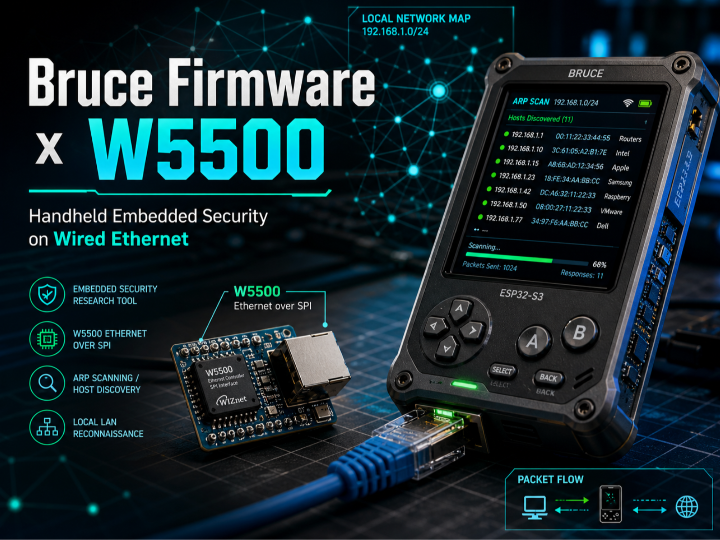
Bruce Firmware uses ESP32-S3 and WIZnet W5500 for wired Ethernet security tests, including DHCP, ARP scanning, SSH, and port scanning on wired LANs.

WIZnet - W5500
x 1

What the Project Does
Bruce Firmware turns an ESP32-S3 handheld board into a multi-interface embedded security tool. It combines Wi-Fi, BLE, Sub-GHz RF, NFC/RFID, IR, USB HID, storage, scripting, and Ethernet functions in one firmware image. On the Lilygo T-Embed CC1101 target, the device integrates an ESP32-S3 MCU, CC1101 Sub-GHz transceiver, nRF24L01+ radio, PN532 NFC module, display, SD card, and WIZnet W5500 Ethernet controller.
The Ethernet path is not just for general internet connectivity. In the documented Bruce Firmware architecture, W5500 enables DHCP-based IP assignment, ARP host discovery, ARP spoofing or poisoning workflows, SSH access, and port scanning through a wired interface. This makes the Ethernet menu useful for controlled lab networks where a researcher needs predictable physical access to the target LAN.
The data flow is straightforward. The user enters the Ethernet menu, the firmware initializes the W5500 over SPI, DHCP assigns an IP address, and the Ethernet modules use the resulting network interface for host discovery or follow-up actions. ARP scanning sends ARP requests across the local subnet, reads the ARP table, and presents discovered hosts on the device display.
Where WIZnet Fits
The WIZnet product used here is the W5500. On the Lilygo T-Embed CC1101 configuration, it is connected to the ESP32-S3 through SPI: MOSI on GPIO9, MISO on GPIO10, SCK on GPIO11, CS on GPIO44, and INT on GPIO43. The documented SPI configuration uses Mode 0, with W5500 framing based on a 16-bit address phase and 8-bit control phase.
In this firmware, W5500 provides the wired Ethernet transport path. The ESP32-S3 still runs the application logic, menu system, display handling, and security-test modules, while the W5500 provides the Ethernet MAC/PHY path and RJ45 network attachment. The software stack places W5500 under the ESP-IDF / Arduino networking layer, using esp_netif, esp_eth, lwIP, and SPI master support.
This design is practical because a handheld security tool has limited MCU resources and many shared peripherals. W5500 gives the firmware a wired link without relying on Wi-Fi signal quality, AP association state, or wireless channel conditions. For ARP scanning and wired LAN testing, a cable-connected interface also makes failures easier to reason about: link state, DHCP state, gateway reachability, and SPI configuration can be checked separately.
Implementation Notes
The provided source brief confirms that W5500 support is present in the project. The Ethernet initialization path is centered on src/modules/ethernet/EthernetHelper.cpp, while menu entry is handled through EthernetMenu.cpp, and host discovery is handled through ARPScanner.cpp.
W5500 SPI and Driver Initialization
File path: src/modules/ethernet/EthernetHelper.cpp
Purpose: configure the SPI bus, create the W5500 MAC/PHY driver, attach it to the ESP network stack, and start DHCP/Ethernet operation.
spi_bus_config_t buscfg = {
    .mosi_io_num = bruceConfigPins.W5500_bus.mosi,
    .miso_io_num = bruceConfigPins.W5500_bus.miso,
    .sclk_io_num = bruceConfigPins.W5500_bus.sck,
    .quadwp_io_num = -1,
    .quadhd_io_num = -1,
};

spi_bus_initialize(SPI2_HOST, &buscfg, SPI_DMA_CH_AUTO);

spi_device_interface_config_t devcfg = {
    .command_bits = 16,
    .address_bits = 8,
    .mode = 0,
    .clock_speed_hz = ETH_SPI_CLOCK_MHZ * 1000 * 1000,
    .queue_size = 20
};

eth_w5500_config_t w5500_config = ETH_W5500_DEFAULT_CONFIG(spi_handle);
w5500_config.int_gpio_num = bruceConfigPins.W5500_bus.io0;

mac_spi = esp_eth_mac_new_w5500(&w5500_config, &mac_config_spi);
phy_spi = esp_eth_phy_new_w5500(&phy_config_spi);
This code matters because it binds the configured board pins to the W5500 SPI device and then creates the ESP-IDF W5500 MAC and PHY objects. Bruce Firmware can therefore expose Ethernet as a normal network interface while keeping the board-specific pin mapping in configuration.
ARP-Based Host Discovery
File path: src/modules/ethernet/ARPScanner.cpp
Purpose: obtain the active Ethernet IP configuration, calculate the subnet range, send ARP requests, and collect discovered hosts from the ARP table.
void ARPScanner::setup() {
    esp_netif_get_ip_info(esp_net_interface, &ip_info);

    const uint32_t networkAddress = ntohl(gateway) & ip_info.netmask.addr;
    const uint32_t broadcast = networkAddress | ~ip_info.netmask.addr;

    for (uint32_t ip_le = networkAddress + 1; ip_le < broadcast; ip_le++) {
        ip4_addr_t ip_be{htonl(ip_le)};

        err_t res = etharp_request(net_iface, &ip_be);

        vTaskDelay(arpRequestDelay);

        if (tableReadCounter == ARP_TABLE_SIZE) {
            readArpTableETH(net_iface);
        }
    }
}
This code exists because ARP discovery is local-link behavior. It does not require a remote server or internet access. Once W5500 brings up the wired Ethernet interface and DHCP provides local IP information, the scanner can enumerate reachable hosts on the same subnet by issuing ARP requests through the Ethernet interface.
Practical Tips / Pitfalls
- Check SPI pin sharing before enabling multiple radios. On the documented T-Embed CC1101 mapping, W5500 uses CS GPIO44 and INT GPIO43, while nRF24 also uses GPIO44 and GPIO43 for CS/CE. They should not be used at the same time without careful firmware-level arbitration.
- Wait for DHCP before starting Ethernet tests. Bruce marks the Ethernet connection as ready only after the IP event handler receives IP information. Starting ARP discovery too early will produce misleading failures.
- Keep ARP scans inside authorized lab networks. ARP spoofing and poisoning features are security-test functions and should only be used on networks where testing is explicitly permitted.
- Validate link state separately from IP state. A cable can be connected while DHCP still fails, or DHCP can succeed while gateway reachability is still wrong.
- Use static IP only when DHCP is unavailable or intentionally disabled. DHCP is simpler for portable tools, but static addressing is useful for isolated switch-only test setups.
- Watch SPI clock and signal integrity. The documented configuration uses 36 MHz for ESP32-S3 and 12 MHz for ESP32, so wiring length, grounding, and module quality matter in unstable setups.
FAQ
Q: Why use W5500 in this project?
A: W5500 gives Bruce Firmware a dedicated wired Ethernet path over SPI. For ARP scanning, SSH access, and port scanning, a cable-connected LAN interface is easier to control than Wi-Fi because it avoids wireless signal strength, AP roaming, and channel congestion variables.
Q: How does W5500 connect to the ESP32-S3 platform?
A: It connects through SPI. On the documented Lilygo T-Embed CC1101 setup, MOSI is GPIO9, MISO is GPIO10, SCK is GPIO11, CS is GPIO44, and INT is GPIO43. Power and ground are connected to 3.3 V and GND.
Q: What role does W5500 play in Bruce Firmware?
A: W5500 is the wired Ethernet interface used by the Ethernet menu. It enables DHCP IP assignment, ARP host discovery, ARP spoofing or poisoning workflows, SSH connection, and port scanning through a physical RJ45 link.
Q: Can beginners follow this project?
A: Basic flashing and menu operation are approachable, but debugging W5500 requires understanding SPI wiring, chip-select conflicts, DHCP, ARP, and ESP network interfaces. Beginners should first verify link-up and DHCP behavior before testing ARP-related functions.
Q: How does W5500 compare with Wi-Fi for this project?
A: Wi-Fi is useful when mobility and wireless testing are the target, but it adds RF conditions and AP behavior to the test environment. W5500 is better when the goal is controlled wired LAN access, especially for ARP-based discovery and gateway-level experiments where physical link stability matters.
Source
Original Project: Bruce Firmware / BruceUSB
Original Link: https://github.com/pr3y/Bruce
Web Flasher: https://bruce.computer/flasher
License: AGPL-3.0
Provided Technical Brief: Bruce Firmware system explanation for WIZnet UCC curation.
Tags
#W5500 #WIZnet #ESP32S3 #BruceFirmware #Ethernet #SPI #ARP #SecurityResearch #Lilygo #TEmbed #EmbeddedSecurity #RedTeam