


RemoteXY-Guide
Build smartphone-controlled IoT devices with RemoteXY and W5500 Ethernet, enabling reliable wired monitoring and control without app development.
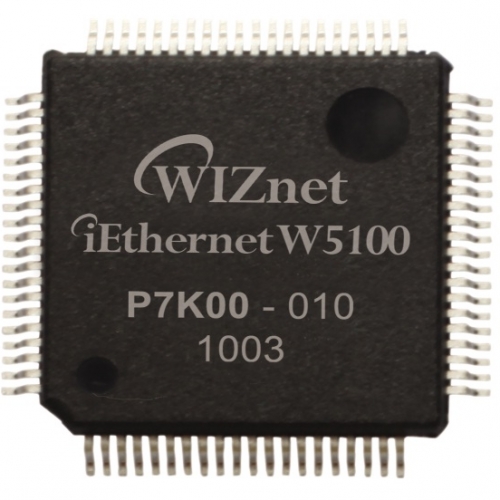
WIZnet - W5100
x 1


WIZnet - W5500
x 1
What the Project Does
RemoteXY is a platform that automatically generates graphical user interfaces for microcontroller-based devices. Instead of creating a mobile application from scratch, developers design a control panel in the RemoteXY Editor and generate firmware code that communicates directly with the RemoteXY mobile application.
The typical workflow is:
- Design a GUI in the RemoteXY Editor.
- Select the target hardware and communication method.
- Generate source code automatically.
- Upload the code to a microcontroller.
- Connect through the RemoteXY mobile application.
- Exchange data between the GUI and the device.
The generated GUI can include:
- Buttons
- Switches
- Sliders
- Sensor indicators
- Status displays
- Multi-page interfaces
Unlike traditional mobile control systems, the GUI definition is stored directly inside the microcontroller firmware rather than on an external server. When the RemoteXY application connects, it reads the GUI configuration and builds the interface automatically.
Where WIZnet Fits
This repository is a RemoteXY guide rather than a WIZnet-specific project. However, the documentation explicitly identifies W5100 and W5500 Ethernet modules as supported communication options for Ethernet-based deployments.
In a WIZnet-based implementation, the W5500 serves as:
- Ethernet communication interface
- TCP/IP transport layer
- LAN-accessible control endpoint
- Gateway between the smartphone application and the embedded device
A practical architecture would look like this:
+----------------------+
| RemoteXY Mobile App  |
+----------+-----------+
           |
           | Ethernet LAN
           |
+----------+-----------+
| W5500 Ethernet Module|
+----------+-----------+
           |
+----------+-----------+
| Arduino UNO / Mega   |
| RemoteXY Firmware    |
+----+-----------+-----+
     |           |
   LEDs      Sensors
For educational laboratories, industrial demonstrations, and local IoT deployments, Ethernet offers predictable connectivity and avoids many of the configuration challenges associated with Wi-Fi-based systems.
Implementation Notes
Because the repository does not contain a WIZnet-specific example, no verified WIZnet code can be cited from the source material. The following is a conceptual integration example based on RemoteXY Ethernet support and a W5500 Ethernet module.
Conceptual Integration Example Based on WIZnet Ethernet Support
#include <SPI.h>
#include <Ethernet.h>
#include <RemoteXY.h>

// Network configuration
byte mac[] = {0xDE,0xAD,0xBE,0xEF,0xFE,0xED};
IPAddress ip(192,168,1,50);

void setup() {
    Ethernet.begin(mac, ip);
    RemoteXY_Init();
}

void loop() {
    RemoteXY_Handler();

    digitalWrite(LED_BUILTIN, RemoteXY.switch_01);
}
Why it matters:
- The W5500 provides Ethernet connectivity.
- RemoteXY manages GUI synchronization.
- Smartphone controls are mapped directly to firmware variables.
- No custom Android or iOS application development is required.
RemoteXY Runtime Requirements
The documentation identifies two functions that must remain central to every generated project:
RemoteXY_Init();
RemoteXY_Handler();
These functions initialize the GUI communication layer and maintain continuous synchronization between the application and the embedded device.
Practical Tips / Pitfalls
- Do not manually modify the generated
RemoteXY_CONFarray. - Keep
RemoteXY_Handler()running frequently to maintain communication. - Verify SPI wiring when connecting a W5500 module.
- Avoid long blocking delays that interrupt RemoteXY communication.
- Use static IP addresses during development for easier discovery.
- Consider RemoteXY Cloud or Own Cloud when remote Internet access is required.
- Check board-specific SPI pin assignments before deployment.
FAQ
Why use the W5500 with RemoteXY?
The W5500 provides reliable wired Ethernet connectivity and hardware TCP/IP processing. This makes it suitable for educational environments, industrial demonstrations, and IoT installations where stable network communication is preferred over wireless connectivity.
How does the W5500 connect to Arduino?
The W5500 communicates through SPI using MOSI, MISO, SCK, and CS signals. Most Ethernet shields integrate these connections automatically, while standalone modules require manual wiring.
What role does the W5500 play in this project?
The W5500 acts as the network transport layer. It enables the RemoteXY application to exchange commands and status information with the microcontroller over a standard Ethernet network.
Can beginners build this project?
Yes. RemoteXY is specifically designed to reduce development complexity. Users can create graphical control interfaces through the editor and generate firmware templates without writing a mobile application.
How does Ethernet compare with Wi-Fi for RemoteXY?
Wi-Fi offers mobility and easier deployment, but Ethernet typically provides more predictable latency, simpler troubleshooting, and greater stability in environments with wireless interference.
Source
Original Project: RemoteXY Guide
Project Type: Documentation and Learning Resource
Primary Topics: RemoteXY Editor, GUI Generation, Remote Control Interfaces, Ethernet Connectivity
Tags
#W5500 #W5100 #RemoteXY #Arduino #Ethernet #IoT #MobileControl #IndustrialIoT #RemoteMonitoring #WIZnet