



Parking_Lot_System
Arduino parking gate example combining local sensor-based control with WIZnet Ethernet HTTP monitoring, emphasizing reliable separation of control and network.
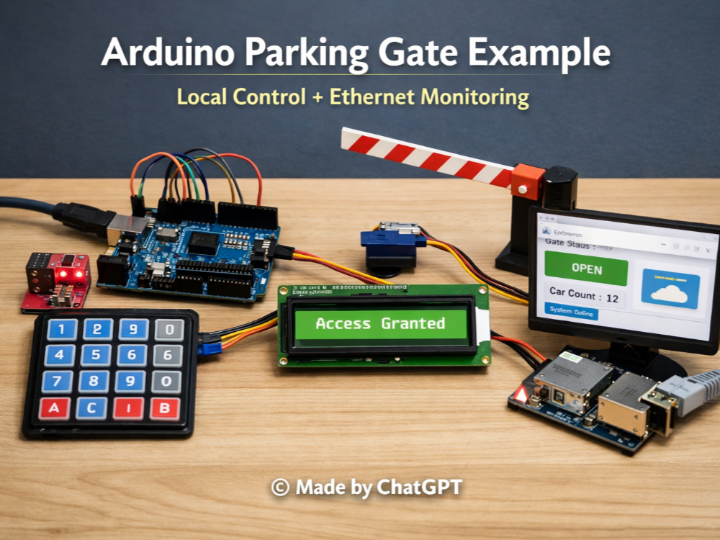
How to Build an Ethernet-Based Parking Gate Control System with Arduino?
(Arduino로 이더넷 기반 주차장 출입 제어 시스템을 만드는 방법)
Summary
This project demonstrates an Arduino-based parking gate control system designed as an educational and practical example. It combines local gate control using sensors, keypad, and LCD with WIZnet-based Ethernet monitoring via an embedded HTTP server. The architecture emphasizes reliability by separating real-time control from network-dependent monitoring.
(52 words)
Technical Overview: What Does This System Do?
This Arduino sketch implements a complete parking gate control workflow, not just a single feature demo.
It integrates sensing, actuation, user interaction, and networking into one coherent system.
Core functions implemented locally on the MCU:
Vehicle detection using opto-isolated sensors
Gate motor direction control (open / close)
Parking capacity management (count vs capacity)
Password-based access using keypad
Real-time feedback through 16×2 LCD
Status indication via LEDs
Networking function:
An Ethernet-based HTTP server that exposes:
Remaining free parking slots
Gate open/close status
Temperature sensor value
The most important architectural decision is that network connectivity is never required for gate operation.
Ethernet is used purely for visibility, not control.
System Architecture: Local Control First, Network Second
1. Deterministic Local Control Loop
All safety-critical logic runs independently of the network:
Gate opening/closing is triggered only by:
Opto sensor states
Capacity logic
Keypad authentication
Motor direction pins are driven directly by GPIO
Network latency or disconnection cannot block execution
This reflects a fundamental principle of field systems:
If the network fails, the gate must still work.
From an educational perspective, this clearly demonstrates how real-time control loops should never depend on Ethernet or Wi-Fi availability.
2. Ethernet as a Monitoring Interface
The Ethernet stack is initialized as a simple HTTP server:
When a client connects, the system responds with a basic HTML page displaying:
Free parking slots
Gate state (Open / Close)
Temperature reading
Importantly:
No gate commands are accepted via Ethernet
No remote control logic exists
Ethernet traffic is read-only
This design choice prevents accidental or malicious remote control and keeps the system predictable and safe.
Why Use Wired Ethernet Instead of Wi-Fi Here?
This project intentionally uses wired Ethernet for monitoring, and that choice is technically meaningful.
Deterministic Link State
Using WIZnet-based Ethernet shields, the code can directly query:
This allows the system to:
Detect missing Ethernet hardware
Detect unplugged network cables
Avoid ambiguous “connected but not working” states common in Wi-Fi
Educational Value
For students and beginners, Ethernet offers:
Clear SPI-based hardware structure
Stable IP addressing
No reconnection logic, scanning delays, or RF interference
The lesson is simple and powerful:
Ethernet reports facts. Wi-Fi often reports attempts.
WIZnet Ethernet’s Role (Highlighted, Not Overstated)
In this project, WIZnet Ethernet chips (W5100 / W5200 / W5500) act as infrastructure components, not the main feature.
Their contribution is:
Hardware-level TCP/IP handling
Clear link and hardware status reporting
Low CPU overhead on the Arduino
This makes them ideal for educational field-system examples, where understanding system behavior is more important than maximizing throughput.
Educational Use Cases
This example is particularly well suited for:
🎓 Embedded Systems Classes
GPIO input/output handling
State machines (gate open / closed)
Sensor debouncing and flag logic
🎓 HMI Integration Practice
Keypad input parsing
Masked password entry
LCD-based user feedback
🎓 Networking Fundamentals
Embedded HTTP server concepts
Client–server interaction
Separating control logic from monitoring
🎓 Field System Design Thinking
Designing for partial failure
Network as an optional component
Safety through isolation
Deployment Scenarios (Predicted)
Although presented as an educational example, this design maps naturally to real systems:
🚗 Small parking facilities
🏫 Campus or office demo installations
🏭 Factory entry gates (non-critical)
🧪 Prototyping platforms for access control systems
Its strength lies in its clarity, not complexity.
FAQ
Q1: Why is Ethernet used only for monitoring and not control?
Because gate control must remain deterministic and safe. By keeping all control logic local, the system avoids failures caused by network latency, disconnections, or malformed remote commands.
Q2: Why choose wired Ethernet instead of Wi-Fi for this system?
Wired Ethernet provides a stable physical link with explicit link-state reporting. This makes system behavior easier to understand, debug, and teach, especially in educational environments.
Q3: What role does WIZnet Ethernet play in this project?
WIZnet Ethernet hardware provides reliable TCP/IP communication with minimal MCU overhead, allowing the Arduino to focus on real-time gate control and user interaction.
Q4: Is this project suitable for beginners?
Yes. It is especially valuable for beginners who want to understand how real-world embedded systems combine sensors, actuators, user interfaces, and networking without overcomplicating any single part.
Q5: How could this system be extended?
Possible extensions include data logging, centralized monitoring dashboards, or migrating the design to integrated solutions like W55RP20 for reduced component count.
Arduino로 이더넷 기반 주차장 출입 제어 시스템을 만드는 방법
요약
이 프로젝트는 교육용 및 실용적 예제로 설계된 Arduino 기반 주차장 게이트 제어 시스템입니다. 센서, 키패드, LCD를 사용한 로컬 게이트 제어와 WIZnet 기반 이더넷 모니터링을 내장 HTTP 서버를 통해 결합했습니다. 이 아키텍처는 실시간 제어와 네트워크 의존적 모니터링을 분리하여 신뢰성을 강조합니다.
기술 개요: 이 시스템은 무엇을 하는가?
이 Arduino 스케치는 단일 기능 데모가 아닌, 완전한 주차장 게이트 제어 워크플로우를 구현합니다. 센싱, 구동, 사용자 상호작용, 네트워킹을 하나의 통합된 시스템으로 결합했습니다.
MCU에서 로컬로 구현된 핵심 기능:
- 광절연 센서를 사용한 차량 감지
- 게이트 모터 방향 제어 (개방/폐쇄)
- 주차 용량 관리 (현재 차량 수 vs 최대 용량)
- 키패드 기반 비밀번호 인증
- 16×2 LCD를 통한 실시간 피드백
- LED를 통한 상태 표시
네트워킹 기능:
이더넷 기반 HTTP 서버가 다음을 제공:
- 남은 주차 공간
- 게이트 개방/폐쇄 상태
- 온도 센서 값
가장 중요한 아키텍처 결정은 게이트 작동에 네트워크 연결이 절대 필요하지 않다는 것입니다. 이더넷은 순수하게 가시성을 위해 사용되며, 제어용이 아닙니다.
시스템 아키텍처: 로컬 제어 우선, 네트워크는 부차적
1. 결정론적 로컬 제어 루프
모든 안전-중요 로직은 네트워크와 독립적으로 실행됩니다:
게이트 개폐는 오직 다음에 의해서만 트리거됩니다:
- 광센서 상태
- 용량 로직
- 키패드 인증
모터 방향 핀은 GPIO로 직접 구동됩니다
네트워크 지연이나 연결 끊김이 실행을 차단할 수 없습니다
이는 현장 시스템의 기본 원칙을 반영합니다:
네트워크가 실패해도 게이트는 여전히 작동해야 합니다.
교육적 관점에서, 이는 실시간 제어 루프가 절대 이더넷이나 Wi-Fi 가용성에 의존해서는 안 된다는 것을 명확히 보여줍니다.
2. 모니터링 인터페이스로서의 이더넷
이더넷 스택은 간단한 HTTP 서버로 초기화됩니다:
EthernetServer server(80);
EthernetClient client = server.available();클라이언트가 연결되면, 시스템은 다음을 표시하는 기본 HTML 페이지로 응답합니다:
- 남은 주차 공간
- 게이트 상태 (Open / Close)
- 온도 측정값
중요한 점:
- 이더넷을 통한 게이트 명령은 수락되지 않음
- 원격 제어 로직이 존재하지 않음
- 이더넷 트래픽은 읽기 전용
이 설계 선택은 우발적이거나 악의적인 원격 제어를 방지하고 시스템을 예측 가능하고 안전하게 유지합니다.
왜 여기서 Wi-Fi 대신 유선 이더넷을 사용하는가?
이 프로젝트는 의도적으로 모니터링에 유선 이더넷을 사용하며, 이 선택은 기술적으로 의미가 있습니다.
결정론적 링크 상태
WIZnet 기반 이더넷 실드를 사용하면, 코드가 직접 쿼리할 수 있습니다:
Ethernet.hardwareStatus();
Ethernet.linkStatus();이를 통해 시스템은:
- 누락된 이더넷 하드웨어 감지
- 연결 해제된 네트워크 케이블 감지
- Wi-Fi에서 흔한 "연결됐지만 작동하지 않는" 모호한 상태 회피
교육적 가치
학생과 초보자에게 이더넷은 다음을 제공합니다:
- 명확한 SPI 기반 하드웨어 구조
- 안정적인 IP 주소 지정
- 재연결 로직, 스캔 지연, RF 간섭 없음
교훈은 간단하고 강력합니다:
이더넷은 사실을 보고합니다. Wi-Fi는 종종 시도를 보고합니다.
WIZnet 이더넷의 역할 (강조되지만 과장되지 않음)
이 프로젝트에서 WIZnet 이더넷 칩(W5100 / W5200 / W5500)은 주요 기능이 아닌 인프라 구성 요소로 작동합니다.
이들의 기여는:
- 하드웨어 수준 TCP/IP 처리
- 명확한 링크 및 하드웨어 상태 보고
- Arduino의 낮은 CPU 오버헤드
이는 시스템 동작을 이해하는 것이 처리량 최대화보다 중요한 교육용 현장 시스템 예제에 이상적입니다.
교육적 활용 사례
이 예제는 특히 다음에 적합합니다:
🎓 임베디드 시스템 수업
- GPIO 입출력 처리
- 상태 머신 (게이트 개방/폐쇄)
- 센서 디바운싱 및 플래그 로직
🎓 HMI 통합 실습
- 키패드 입력 파싱
- 마스킹된 비밀번호 입력
- LCD 기반 사용자 피드백
🎓 네트워킹 기초
- 임베디드 HTTP 서버 개념
- 클라이언트-서버 상호작용
- 제어 로직과 모니터링 분리
🎓 현장 시스템 설계 사고
- 부분 장애를 위한 설계
- 선택적 구성 요소로서의 네트워크
- 격리를 통한 안전성
배포 시나리오 (예상)
교육용 예제로 제시되었지만, 이 설계는 실제 시스템에 자연스럽게 매핑됩니다:
- 🚗 소규모 주차 시설
- 🏫 캠퍼스 또는 사무실 데모 설치
- 🏭 공장 출입 게이트 (비중요)
- 🧪 출입 제어 시스템용 프로토타이핑 플랫폼
이 시스템의 강점은 복잡성이 아닌 명확성에 있습니다.
FAQ
Q1: 왜 이더넷이 제어가 아닌 모니터링에만 사용되나요?
게이트 제어는 결정론적이고 안전해야 하기 때문입니다. 모든 제어 로직을 로컬로 유지함으로써, 시스템은 네트워크 지연, 연결 끊김 또는 잘못된 원격 명령으로 인한 장애를 피합니다.
Q2: 왜 이 시스템에서 Wi-Fi 대신 유선 이더넷을 선택했나요?
유선 이더넷은 명시적인 링크 상태 보고와 함께 안정적인 물리적 링크를 제공합니다. 이는 특히 교육 환경에서 시스템 동작을 더 쉽게 이해하고, 디버그하고, 가르칠 수 있게 만듭니다.
Q3: 이 프로젝트에서 WIZnet 이더넷은 어떤 역할을 하나요?
WIZnet 이더넷 하드웨어는 최소한의 MCU 오버헤드로 신뢰할 수 있는 TCP/IP 통신을 제공하여, Arduino가 실시간 게이트 제어 및 사용자 상호작용에 집중할 수 있게 합니다.
Q4: 이 프로젝트는 초보자에게 적합한가요?
네. 특히 실제 임베디드 시스템이 센서, 액추에이터, 사용자 인터페이스, 네트워킹을 어떻게 결합하는지 어느 한 부분도 지나치게 복잡하지 않게 이해하고 싶은 초보자에게 매우 유용합니다.
Q5: 이 시스템을 어떻게 확장할 수 있나요?
가능한 확장으로는 데이터 로깅, 중앙 집중식 모니터링 대시보드, 또는 부품 수를 줄이기 위해 W55RP20과 같은 통합 솔루션으로 설계 마이그레이션이 있습니다.